Note
Access to this page requires authorization. You can try signing in or changing directories.
Access to this page requires authorization. You can try changing directories.
Note
Please note that passkey isn't supported in Microsoft Azure operated by 21Vianet.
You can nudge users to set up a passkey or Microsoft Authenticator during sign-in. Users go through their regular sign-in, perform multifactor authentication (MFA) as usual, and are then prompted to set up the targeted authentication method. You can include or exclude users or groups to control who gets nudged and create targeted campaigns to move users from less secure authentication methods to passkeys or Authenticator.
Registration campaigns support two authentication methods:
- Passkey (FIDO2): Nudges users to register a passkey, which includes both synced passkeys and device-bound passkeys.
- Authenticator: Nudges users to download and set up Authenticator for push notifications.
A registration campaign can target only one authentication method at a time. You can't run campaigns for both Authenticator and passkeys simultaneously in the same tenant.
You can also define how many days a user can postpone, or "snooze," the nudge. If a user taps Skip for now to postpone setup, they get nudged again on the next MFA attempt after the snooze duration elapses. You can decide whether the user can snooze indefinitely or up to three times (after which registration is required).
As users go through their regular sign-in, Microsoft Entra Conditional Access policies that govern security information registration apply before the user is nudged to set up an authentication method. For example, if a Conditional Access policy requires that security information updates can occur only on an internal network. Users aren't prompted unless they're on the internal network.
Prerequisites
- Optionally, you can determine the number of users who registered each authentication method before you configure the registration campaign.
- You must enable multifactor authentication, but there are no license requirements.
- You can choose from two authentication campaigns:
- Authenticator campaigns: Users can't already have Authenticator set up for push notifications on their account. Enable users for Authenticator in the authentication methods policy. Authentication mode must be set to Any or Push. If the mode is set to Passwordless, users aren't eligible for the nudge.
- Passkey campaigns: The passkey (FIDO2) authentication method must be enabled in the authentication methods policy. In addition, the Allow self-service setup toggle must be enabled in the passkey (FIDO2) method configuration.
User experience
Authenticator campaign
When you're targeted for an Authenticator registration campaign, you experience the following flow:
You need to complete MFA.
If you're enabled for Authenticator push notifications and it isn't set up, you're prompted to set up Authenticator to improve your sign-in experience.
Other security features, such as passwordless passkey, self-service password reset, or security defaults, might also prompt you for setup.
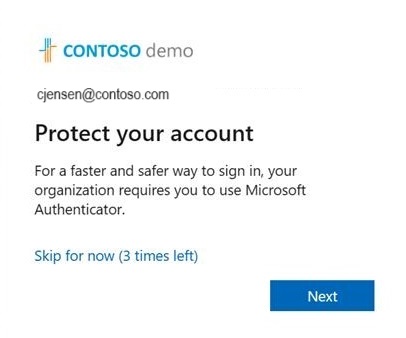
Select Next and step through Authenticator setup.
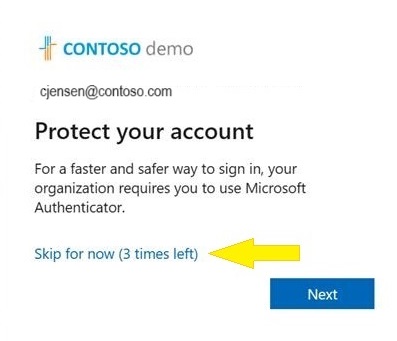
If you don't want to set up Authenticator, you can select Skip for now to snooze the prompt for up to 14 days, which can be set by an admin. Users with free and trial subscriptions can snooze the prompt up to three times.
Passkey campaign
When you're targeted for a passkey registration campaign, you experience the following flow:
You need to complete MFA.
If passkey registration is enabled for your account and a passkey isn't registered, you're prompted to set up a passkey.
Note
The passkey nudge evaluation determines whether you have a local passkey for your current device and browser combination. If you already have a local passkey for that experience, you aren't nudged. The nudge evaluation is based on each device-and-browser combination that you use, rather than for your user account.
If you don't want to set up a passkey, select Skip for now to snooze the prompt.
If you encounter an error during passkey registration, you see an error screen with a skip option. Skips from the error screen don't count toward your limited skip count, so registration errors don't block your sign-in.
Enable the registration campaign policy by using the Microsoft Entra admin center
To enable a registration campaign in the Microsoft Entra admin center, follow these steps:
Sign in to the Microsoft Entra admin center as at least an Authentication Policy Administrator.
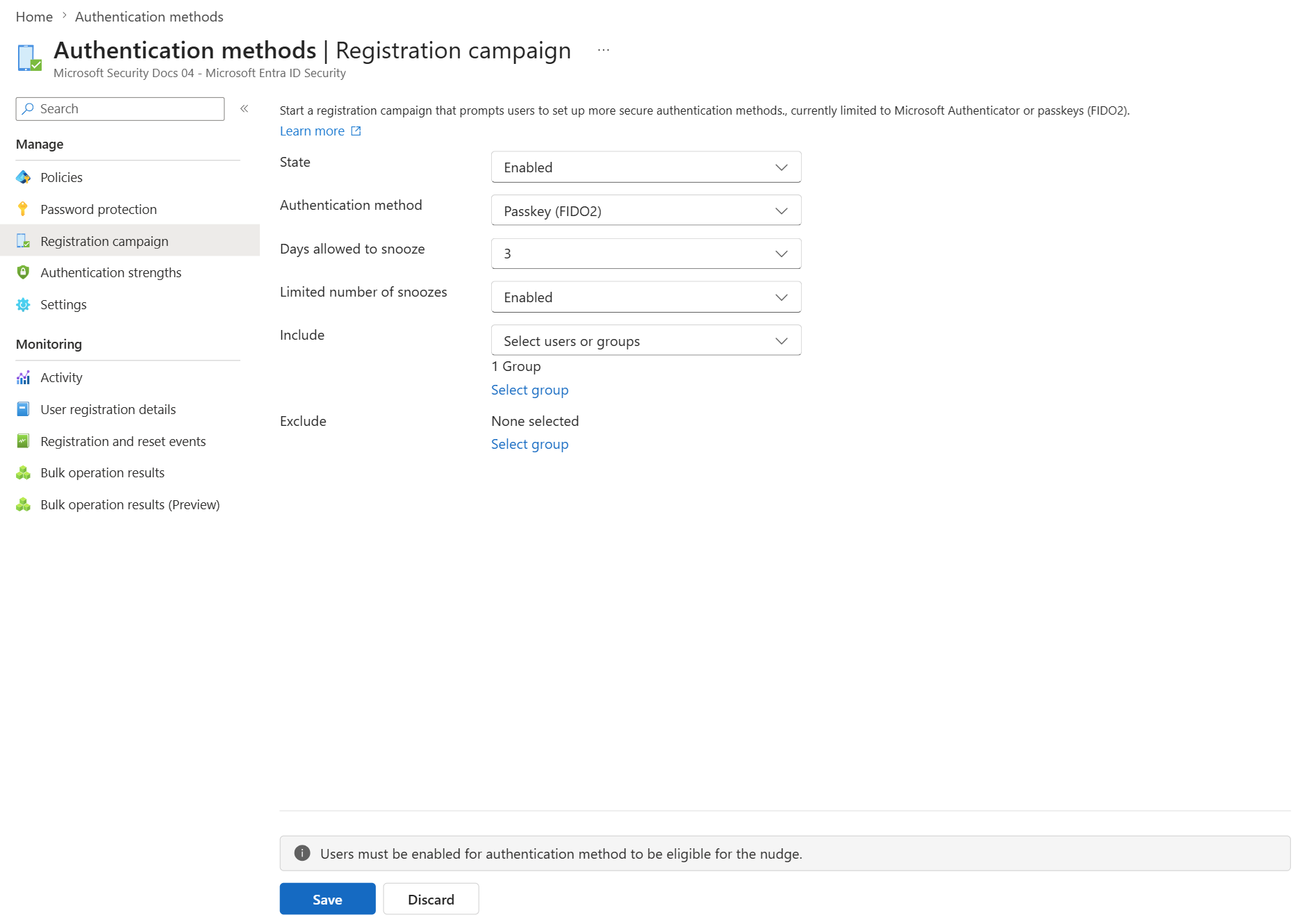
Browse to Entra ID > Authentication methods > Registration campaign, and select Edit.
For State:
- Select Enabled to enable the registration campaign for all users. When the state is set to Enabled, you can configure the target authentication method, snooze duration, limited number of snoozes, and include/exclude targets.
- Select Microsoft managed to enable the registration campaign with Microsoft-recommended defaults. When Microsoft managed is selected, the target authentication method, snooze duration, and limited number of snoozes are set automatically and can't be configured. You can still configure include/exclude targets. For more information, see Protecting authentication methods in Microsoft Entra ID.
Note
When the state is set to Microsoft managed, Microsoft determines the optimal campaign settings based on best practices for your tenant. The following changes are incrementally rolled out to tenants:
- Targeted authentication method changes from Authenticator to passkeys (FIDO2).
- Days allowed to snooze changes to one day. This setting is no longer configurable.
- Limited number of snoozes changes to Disabled (unlimited snoozes). This setting is no longer configurable.
- User targeting changes from voice call or text message users to all MFA capable users.
If your tenant targets specific AAGUIDs in the passkey (FIDO2) policy, the targeted authentication method doesn't update to passkeys under Microsoft managed mode. You can still switch to Enabled and configure passkey targeting manually. After the changes take effect, targeted users receive passkey registration nudges during sign-in after they finish MFA.
If you want passkeys enabled but don't want the registration campaign to target passkeys, you can switch the state to Enabled and target Authenticator. You can also set the state to Disabled. For more information about how Microsoft managed values are set, see Microsoft managed values.
If the registration campaign state is set to Enabled, you can configure the experience for users by using Limited number of snoozes:
- If Limited number of snoozes is set to Enabled, users can skip the interrupt prompt three times, after which they're forced to register the targeted authentication method.
- If Limited number of snoozes is set to Disabled, users can snooze an unlimited number of times and avoid registration.
Note
When Limited number of snoozes is set to Enabled, the snooze count is tracked per user and persists across campaign restarts or configuration changes (including targeted method updates). This setting ensures a consistent and predictable registration experience.
Days allowed to snooze sets the period between two successive interrupt prompts. For example, if the period is set to three days, users who skipped registration don't get prompted again until after three days.
For Authentication method, select the method to target:
- Microsoft Authenticator: Nudges users to set up Authenticator.
- Passkey: Nudges users to register a passkey (includes both synced passkeys and device-bound passkeys).
Select any users or groups to exclude from the registration campaign, and then select Save.
Limitations
The passkey nudge is evaluated on a per-user basis under Microsoft managed mode. When a user signs in and is scoped into the registration campaign, their passkey profile is checked for restrictions. Users don't see a nudge when MFA is finished if their passkey profile has any of the following restrictions:
- Synced only
- Device-bound only
- Attestation enforced
- AAGUID restrictions
Frequently asked questions
Can users be nudged within an application?
Yes. Registration campaigns support embedded browser views in certain applications. The campaign doesn't nudge users in out-of-the-box experiences or in browser views embedded in Windows settings.
Can users be nudged within an SSO session?
The nudge doesn't trigger if the user is already signed in with SSO.
Can users be nudged on a mobile device?
It depends on the registration campaign:
Microsoft Authenticator registration campaigns aren't supported on mobile devices.
Passkey registration campaigns are supported on mobile devices, including:
- Browser-based experiences on mobile devices.
- Native iOS mobile apps. Native Android mobile app support isn't currently available.
How long does the campaign run?
You can enable the campaign for as long as you want. Whenever you want to be finished running the campaign, use the admin center or APIs to disable the campaign.
Can each group of users have a different snooze duration?
No. The snooze duration for the prompt is a tenant-wide setting and applies to all groups in scope.
Can users be nudged to set up passwordless phone sign-in?
The registration campaign feature supports nudging users to set up MFA by using Authenticator or to register a passkey. Passwordless phone sign-in isn't a targeted method for registration campaigns.
Does a user who signs in with a non-Microsoft authenticator app see the nudge?
Yes. If a user is enabled for the registration campaign and the targeted authentication method isn't set up (Authenticator for push notifications or a passkey), the user is nudged.
Does a user who has Authenticator set up only for time-based one-time password codes see the nudge?
Yes. If a user is enabled for an Authenticator registration campaign and Authenticator isn't set up for push notifications, the user is nudged to set up push notification with Authenticator.
Does a user who already has a passkey see the nudge?
The passkey nudge evaluates whether a user has a local passkey for their current device and browser combination. If the user already has a local passkey for that experience, they aren't nudged. For this reason, a user might be nudged on one device but not another.
Can I run registration campaigns for both Authenticator and passkeys at the same time?
No. A registration campaign can target only one authentication method at a time. You can target either Authenticator or passkeys, but not both simultaneously in the same tenant.
If a user just went through MFA registration, are they nudged in the same sign-in session?
No. To provide a good user experience, users aren't nudged to set up Authenticator in the same session in which they registered other authentication methods.
Can I nudge my users to register another authentication method?
Yes. Registration campaigns support nudging users to set up Authenticator or to register a passkey (FIDO2). Select the targeted authentication method when you configure the campaign.
Is there a way for me to hide the snooze option and force my users to set up Authenticator?
Set Limited number of snoozes to Enabled so that users can postpone the app setup for up to three times, after which setup is required.
Can I nudge my users if I'm not using Microsoft Entra MFA?
No. The nudge works only for users who are doing MFA by using Microsoft Entra MFA.
Are Guest/B2B users in my tenant nudged?
They're nudged if they're included in a registration campaign for Authenticator. They're not nudged if they're included in a registration campaign for passkeys because passkey support for guest users isn't currently available.
What if the user closes the browser?
Closing the browser is the same as snoozing. If setup is required for a user after they snoozed three times, the user is nudged when they next sign in.
Why don't some users see a nudge when there's a Conditional Access policy for "Register security information"?
A nudge doesn't appear if a user is in scope for a Conditional Access policy that blocks access to the Register security information page.
Do users see a nudge when a terms-of-use screen appears during sign-in?
A nudge doesn't appear if a terms of use screen appears during sign-in.
Do users see a nudge when Conditional Access custom controls are applicable to the sign-in?
A nudge doesn't appear if a user is redirected during sign-in because of Conditional Access custom controls settings.