Note
Access to this page requires authorization. You can try signing in or changing directories.
Access to this page requires authorization. You can try changing directories.
Azure Advisor provides recommendations to help you optimize your Azure deployments. Within Advisor, you have access to a few features that help you narrow down your recommendations to only the ones that matter to you.
Configure subscriptions and resource groups
Advisor gives you the ability to select subscriptions and resource groups that matter to you and your organization. You only see recommendations for the subscriptions and resource groups that you select. By default, all are selected. Configuration settings apply to the subscription or resource group, so the same settings apply to everyone that has access to that subscription or resource group. Configuration settings can be changed in the Azure portal or programmatically.
To make changes in the Azure portal:
Open Azure Advisor in the Azure portal.
Select Configuration from the menu.
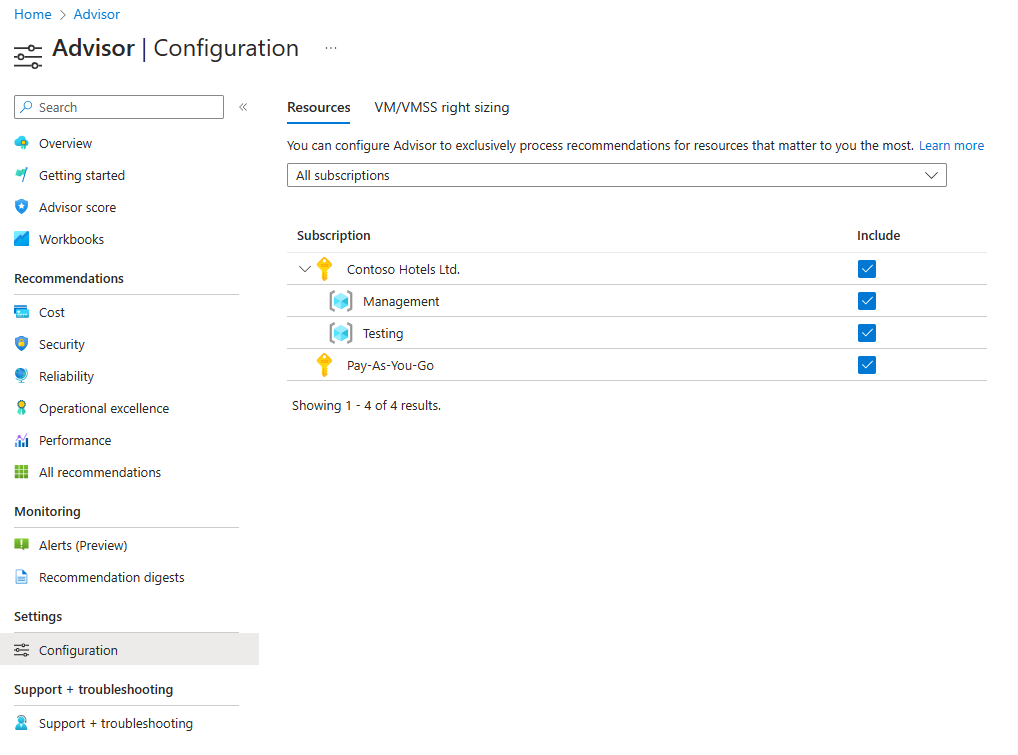
Select the checkbox in the Include column for any subscriptions or resource groups to receive Advisor recommendations. If the box is disabled, you might not have permission to make a configuration change on that subscription or resource group. Learn more about permissions in Azure Advisor.
Select Apply at the bottom after you make a change.