Note
Access to this page requires authorization. You can try signing in or changing directories.
Access to this page requires authorization. You can try changing directories.
Azure Kubernetes Service (AKS) manages multiple components that follow different versioning and patching strategies. Understanding how these components are versioned helps you plan upgrades, track security patches, and manage your cluster lifecycle effectively.
This article explains the versioning approach for different categories of AKS components and how they're maintained over time.
AKS components overview
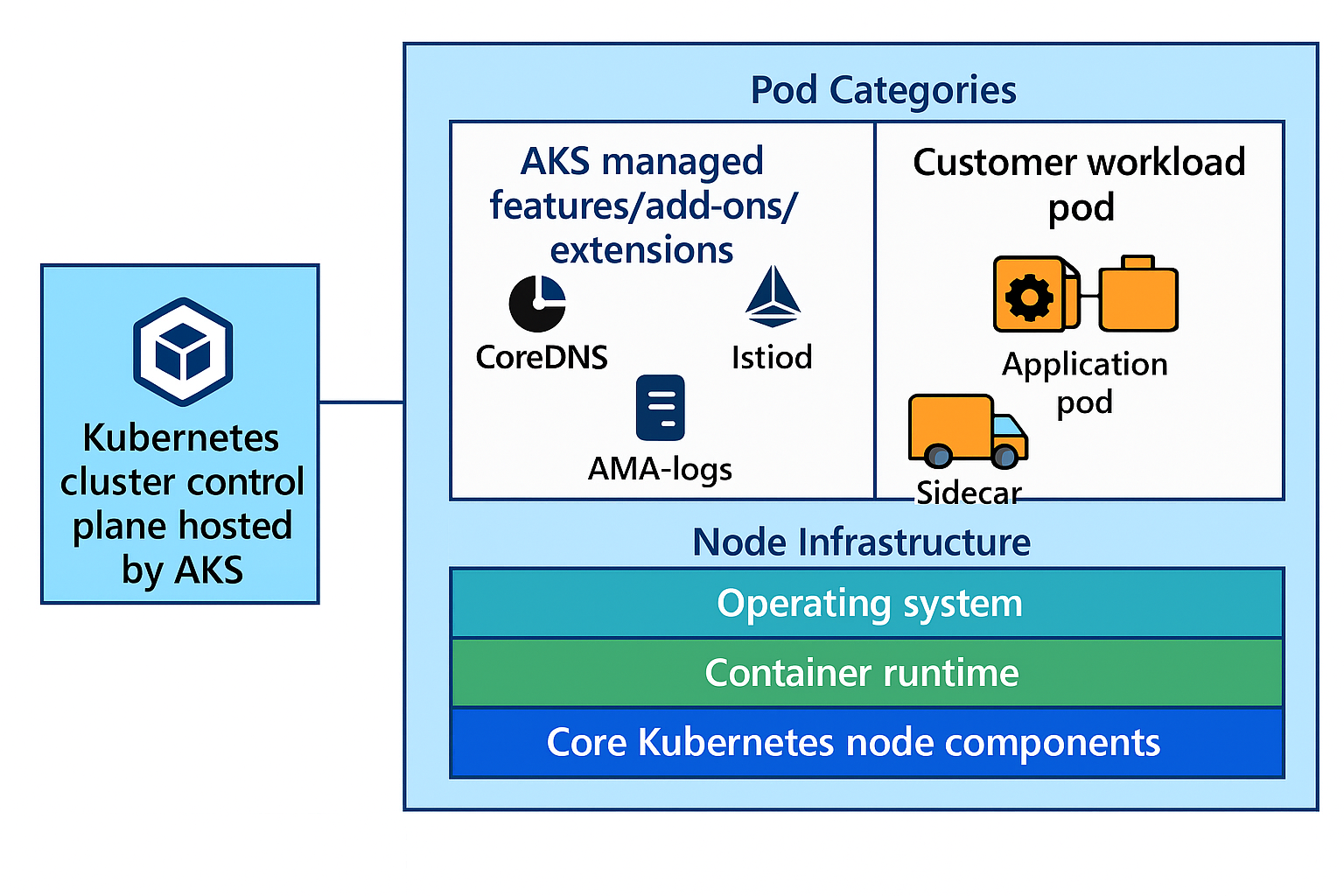
AKS consists of multiple components, each with distinct versioning patterns:
Kubernetes cluster control plane hosted by AKS: Managed Kubernetes API server, etcd, and other cluster control plane components.
Node images: Operating system, container runtime, and core Kubernetes node components. Details about what components are packaged in the node images can be found under the Virtual Hard Disk (VHD) notes folder under AKS GitHub repository.
Workloads: AKS managed features/add-ons/extensions could have components in one of these two buckets:
- Standalone add-on/features/extension pods: AKS feature/add-ons/extensions that are running standalone pods (from Deployments or DaemonSets) on customer hosted nodes (left side). Examples include
istiod,azure-cns, andcoredns. - AKS components inside customer workload pods: Some AKS feature/add-ons/extensions might have sidecars running inside user's pods (right side). For example, Istio injects sidecar proxies to customer workload pods.
The following table summarizes how versioning and updates are managed for each AKS component category:
- Standalone add-on/features/extension pods: AKS feature/add-ons/extensions that are running standalone pods (from Deployments or DaemonSets) on customer hosted nodes (left side). Examples include
| Control plane | Node images | Standalone add-on/features/extension pods | AKS components inside customer workload pods | |
|---|---|---|---|---|
| What is versioned? | Kubernetes API server, etcd, controllers | Operating system, container runtime, and core Kubernetes node components | AKS feature/add-ons/extensions that are running standalone pods (for example - istiod) | Sidecars or supporting containers injected by add-ons/extensions |
| Versioning model | Follows upstream Kubernetes semantic versioning (MAJOR.MINOR.PATCH). AKS offers community and Long Term Support (LTS) models. More information can be found in AKS version support policy documentation | Node image versions along with VHD notes published with AKS releases. | Add-on/feature/extension minor version tied 1-1 to AKS minor version | Sidecar version must be compatible with add-on control plane |
| Update method | Customer has control over which MAJOR.MINOR.PATCH version to upgrade to. Manual (az aks upgrade) or automatic using autoupgrade channels |
Customer can upgrade to latest supported node image version. Manual (az aks nodepool upgrade) or automatic using autoupgrade channels |
- Minor version upgraded when control plane minor version is upgraded (except Istio; see Istio upgrade documentation) - Patch version upgraded by AKS releases automatically |
Customer needs to manually update (restart workloads having sidecars) to compatible sidecar versions as documented by the add-on/feature/extension. |
Version management best practices
Security consideration: Enable automatic patch updates to ensure security fixes are applied as soon as possible. Choose the autoupgrade channel that best fits your cluster's requirements and risk tolerance. Manual or automatic: Choose the update strategy that best fits your operational requirements. Automatic updates provide timely security patches and reduce operational overhead, while manual updates offer precise control over timing and change management. Use planned maintenance windows to control when automatic upgrades are applied, ensuring updates occur during approved timeframes for your cluster. Monitor and prepare for changes: Stay informed about upcoming updates and availability of new versions using AKS release notes and the AKS release tracker. Validate upgrades in nonproduction environments before upgrading production environments.
- For production clusters:
- Consider automatic patch updates for timely security fixes
- Choose between automatic or manual minor version upgrades based on your operational needs
- Test all changes in staging environments first
- For development clusters:
- Enable automatic updates for both control plane and node pools to stay current with latest features
- Choose appropriate channels based on your development and testing needs (see automatic cluster upgrades and node image autoupgrade for channel options)
- Use as a testing ground for production update strategies
- Breaking changes: Monitor the AKS release tracker and review Kubernetes deprecation policies to stay informed about API deprecations and breaking changes in both AKS and upstream Kubernetes.
- Pre-upgrade validation: Before upgrading your production clusters, test your applications, custom resources, and third-party integrations on preproduction clusters to ensure compatibility with the new Kubernetes version and updated AKS components.
View AKS component versions using AKS Component Insights (Preview)
AKS Component Insights (Preview) provides detailed visibility into the exact versions of all components running in your Azure Kubernetes Service cluster. This feature helps you understand your cluster's current state, plan upgrades, and identify potential compatibility issues.
Important
AKS preview features are available on a self-service, opt-in basis. Previews are provided "as is" and "as available," and they're excluded from the service-level agreements and limited warranty. AKS previews are partially covered by customer support on a best-effort basis. As such, these features aren't meant for production use. For more information, see the following support articles:
Prerequisites
- An Azure account with an active subscription. If you don't have one, you can create an account.
- An AKS cluster set up in your Azure environment
| Prerequisite | Notes |
|---|---|
| Azure CLI | 2.74.0 or later installed. To find the version, run az --version. If you need to install or upgrade, see Install Azure CLI. |
Azure CLI aks-preview extension |
18.0.0b19 or later. To find the version, run az --version. If you need to install or upgrade, see Manage Azure CLI extensions. |
You can install or update to the latest available aks-preview Azure CLI extension using the following commands:
# Install the aks-preview extension
az extension add --name aks-preview

# Update to the latest version if already installed
az extension update --name aks-preview
View component versions using Azure CLI
Use the az aks get-upgrades command to view component versions:
az aks get-upgrades --resource-group myResourceGroup --name myAKSCluster
The component information is returned in the componentsByReleases section. Expected output would be similar to the following (only portion of componentByReleases is shown here for brevity):
{
  "componentsByReleases": [
      {
        "components": [
          {
            "hasBreakingChanges": false,
            "name": "cloud-provider-node-manager-linux",
            "version": "v1.32.5"
          },
          {
            "hasBreakingChanges": false,
            "name": "cloud-provider-node-manager-windows",
            "version": "v1.32.5"
          },
          {
            "hasBreakingChanges": false,
            "name": "health-probe-proxy",
            "version": "v1.29.1"
          },
          {
            "hasBreakingChanges": false,
            "name": "kubelet-serving-csr-approver",
            "version": "v0.0.7"
          },
          {
            "hasBreakingChanges": false,
            "name": "coredns",
            "version": "v1.11.3-8"
          },
          {
            "hasBreakingChanges": false,
            "name": "metrics-server",
            "version": "v0.7.2-7"
          }
        ],
        "kubernetesVersion": "1.32"
      }
  ]
}
The actual components shown can vary based on your cluster configuration, enabled add-ons, and Kubernetes version. Use the az aks get-upgrades command to see the complete list of components for your specific cluster.
Each component entry includes:
- name: The component identifier
- version: The exact version of the component installed on the cluster
- hasBreakingChanges: Whether this component version introduces breaking changes
Tip
In addition to using the Azure CLI to query component version information, you can also use the GET upgradeProfiles API with preview AKS APIs (2025-05-04-preview or later) to retrieve detailed component version data programmatically.
Next steps
- Plan upgrades: Configure automatic cluster upgrades or plan manual upgrades
- Stay informed: Monitor AKS releases for updates and breaking changes
- Understand support: Review Kubernetes version support policy