Note
Access to this page requires authorization. You can try signing in or changing directories.
Access to this page requires authorization. You can try changing directories.
In this article, you configure and deploy a Ray cluster on Azure Kubernetes Service (AKS) using KubeRay, with BlobFuse providing scalable storage. You'll learn how to set up the cluster, integrate BlobFuse for high-throughput data access, and use Ray to run distributed tuning or training jobs. The guide also covers monitoring results on the Ray Dashboard and managing resources efficiently.
Overview
Ray is an open-source framework for distributed computing and machine learning workloads. When deployed on Azure Kubernetes Service (AKS), Ray enables scalable hyperparameter tuning, training, and inference across multiple nodes. Integrating BlobFuse as a persistent storage backend allows Ray jobs to efficiently read and write large datasets, which is especially critical for tuning workloads that require rapid access to training data, intermediate results, and model checkpoints.
High throughput from BlobFuse is essential for tuning jobs because these workloads often involve many parallel tasks, each reading and writing data simultaneously. BlobFuse provides POSIX-compliant, high-performance access to Azure Blob Storage, minimizing I/O bottlenecks and ensuring that distributed Ray tasks can complete faster. This results in more efficient resource utilization and accelerates the overall tuning process.
This solution leverages KubeRay to orchestrate Ray clusters on AKS, with BlobFuse providing scalable and performant storage. The architecture supports robust data management, fast I/O, and seamless scaling, enabling data scientists and engineers to optimize model development and tuning workflows in the cloud.
Deployment architecture
The following diagram shows a Ray cluster deployed on AKS, with persistent volumes provisioned using BlobFuse. BlobFuse connects Azure Blob Storage to the cluster, enabling fast, POSIX-compliant access to large datasets. This architecture ensures high throughput for distributed tuning jobs, allowing multiple Ray workers to efficiently read and write data in parallel, which accelerates model training and hyperparameter optimization.
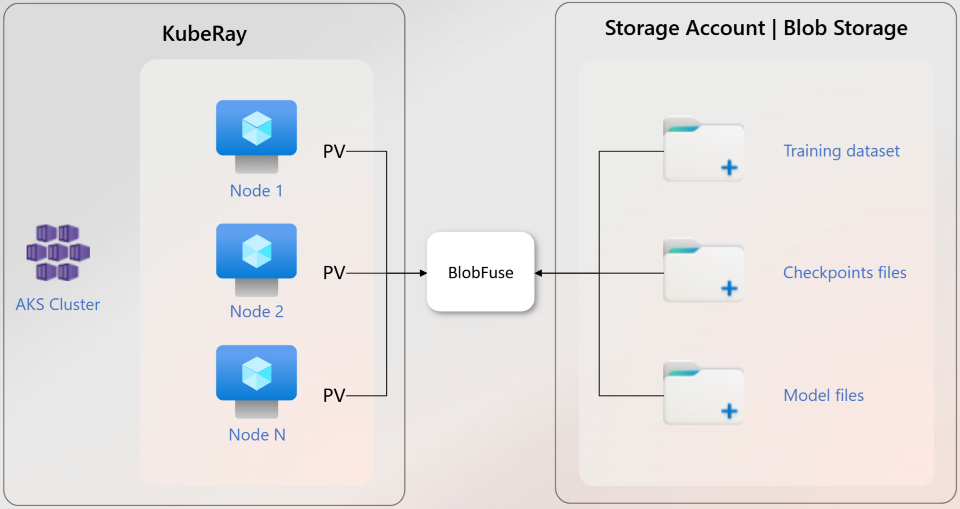
Figure 1: Ray cluster deployed on AKS with BlobFuse providing scalable, high-throughput storage for distributed tuning jobs.
Storage considerations
When deploying Ray clusters for distributed tuning on AKS, choosing the right storage backend is critical for performance and scalability. The main options are Azure Disks, Azure Files, and BlobFuse (Azure Blob Storage):
| Storage Option | Scalability | Performance (Throughput) | Access Mode | Cost Efficiency | Suitability for Distributed Tuning Jobs |
|---|---|---|---|---|---|
| Azure Disks | Limited (per node) | High (single node) | Single/Shared node | Higher for large data | Not ideal (limited concurrent access) |
| Azure Files | Moderate | Moderate | Multi-node (shared) | Moderate | Usable, but might bottleneck at scale |
| BlobFuse/Blobs | High (cloud scale) | High (parallel access) | Multi-node (shared) | Cost-effective | Best (scalable, high throughput, parallel access) |
Recommendation:
BlobFuse (Azure Blob Storage) is the preferred option for Ray clusters running distributed tuning jobs on AKS. It offers cloud-scale concurrency, high throughput for parallel reads/writes, and cost-effective storage, making it ideal for data-intensive machine learning workloads.
Deploy Ray clusters for tuning with BlobFuse
Prerequisites
- Review the Ray cluster on AKS overview to understand the components and deployment process.
- An Azure subscription. If you don't have an Azure subscription, you can create a Trial here.
- The Azure CLI installed on your local machine. You can install it using the instructions in How to install the Azure CLI.
- The Azure Kubernetes Service Preview extension installed.
- Helm installed.
- Terraform client tools or OpenTofu installed. This article uses Terraform, but the modules used should be compatible with OpenTofu.
Deploy the Ray sample automatically
If you want to deploy the complete Ray sample non-interactively, you can use the deploy.sh script in the GitHub repository (https://github.com/Azure-Samples/aks-ray-sample). This script completes the steps outlined in the Ray deployment process section.
Clone the GitHub repo locally and change to the root of the repo using the following commands:
git clone https://github.com/Azure-Samples/aks-ray-sample
cd aks-ray-sample/sample-tuning-setup/terraform
Deploy the complete sample using the following commands:
chmod +x deploy.sh
./deploy.sh
Once the deployment completes, review the output of the logs and the resource group in the Azure portal to see the infrastructure that was created.
Clean up resources
To clean up the resources created in this guide, you can delete the Azure resource group that contains the AKS cluster.
Next steps
To learn more about AI and machine learning workloads on AKS, see the following articles: