Note
Access to this page requires authorization. You can try signing in or changing directories.
Access to this page requires authorization. You can try changing directories.
Using the same Valkey cluster on Azure Kubernetes Service (AKS) that you deployed with Locust, you can validate the resiliency of the Valkey cluster during an AKS node pool upgrade. This process helps validate that Valkey maintains resiliency during AKS node pool upgrades. Monitoring with Locust ensures visibility into request handling and shard availability, allowing you to confidently manage upgrades with minimal service disruption.
Upgrade the AKS cluster
List the available versions for the AKS cluster and identify the target version you're upgrading to using the
az aks get-upgradescommand.az aks get-upgrades --resource-group $MY_RESOURCE_GROUP_NAME --name $MY_CLUSTER_NAME --output tableUpgrade the AKS control plane using the
az aks upgradecommand. In this example, the target version is 1.33.0.az aks upgrade --resource-group $MY_RESOURCE_GROUP_NAME --name $MY_CLUSTER_NAME --control-plane-only --kubernetes-version 1.33.0
Verify Locust client status
- Verify the Locust client started in the previous article is still running. The Locust dashboard will show the impact of the AKS node pool upgrade on the Valkey cluster.
Upgrade the Valkey node pool
Upgrade the Valkey node pool using the
az aks nodepool upgradecommand.az aks nodepool upgrade \ --resource-group $MY_RESOURCE_GROUP_NAME \ --cluster-name $MY_CLUSTER_NAME \ --kubernetes-version 1.33.0 \ --name valkeyWhile the upgrade process is running, you can monitor the Locust dashboard to see the status of the client requests. The dashboard should look similar to the following screenshot:
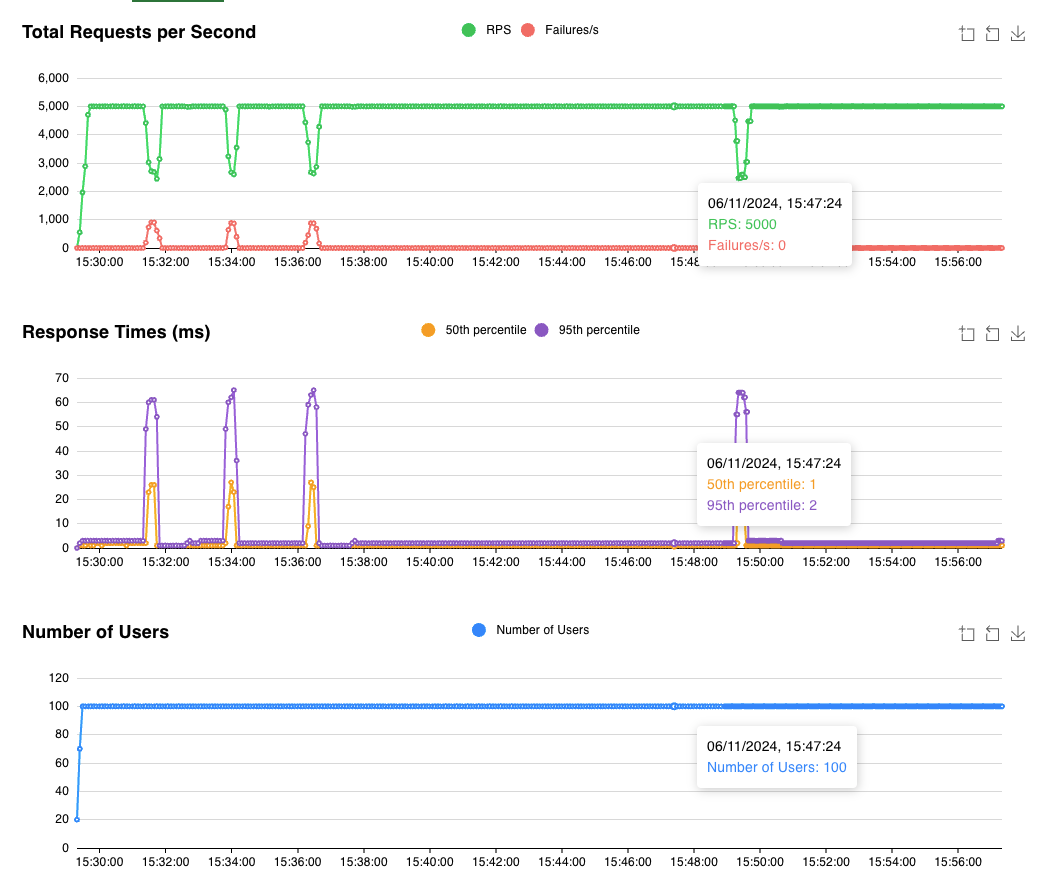
The dashboard shows that Locust is running with 100 users making 50 requests per second. During the upgrade process, a primary pod is evicted four times. You can see the shard isn't available for a few seconds, but the Valkey cluster can still respond to requests for the other shards.
Related content
To learn more about stateful workloads on AKS, see Design and deploy stateful workloads on Azure Kubernetes Service (AKS).