Note
Access to this page requires authorization. You can try signing in or changing directories.
Access to this page requires authorization. You can try changing directories.
In this quickstart, you deploy an existing .NET Durable Task SDK sample to Azure Kubernetes Service (AKS), with Durable Task Scheduler as the orchestration backend. Deployment uses Azure Developer CLI (azd) and the document processing sample.
You learn how to:
- Set up and run the Durable Task Scheduler emulator locally.
- Run the .NET client and worker projects in the AKS scenario sample.
- Deploy the sample infrastructure and apps to AKS with
azd up. - Verify orchestration execution in AKS by reviewing pod logs.
Prerequisites
Before you begin:
Install:
Clone the Durable Task Scheduler sample repository.
Sign in to Azure and the Azure Developer CLI:
az login
azd auth login
Prepare and run the sample locally
From the repository root, go to the AKS scenario sample:
cd samples/scenarios/DocumentProcessingOnAKSStart the Durable Task Scheduler emulator:
docker run --name dts-emulator -d -p 8080:8080 -p 8082:8082 mcr.microsoft.com/dts/dts-emulator:latestThe emulator exposes:
8080for gRPC app connectivity.8082for the scheduler dashboard.
Build the solution:
dotnet build DurableTaskOnAKS.slnIn one terminal, run the worker:
cd Worker
dotnet run
In a second terminal, run the client:
cd Client
dotnet run
Confirm output similar to the following in the client terminal:
Endpoint: http://localhost:8080 | TaskHub: default
Submitting 3 documents...

  Scheduled [...] 'Cloud Migration Strategy'
  -> Processed 'Cloud Migration Strategy': Sentiment=Positive, Topic=Technology, Priority=Normal

  Scheduled [...] 'Quarterly Incident Report'
  -> Processed 'Quarterly Incident Report': Sentiment=Positive, Topic=Technology, Priority=Normal

  Scheduled [...] 'ML Model Evaluation'
  -> Processed 'ML Model Evaluation': Sentiment=Positive, Topic=Technology, Priority=Normal

Done.
Deploy to AKS with Azure Developer CLI
From
samples/scenarios/DocumentProcessingOnAKS, run:azd upWhen prompted, provide:
Parameter Description Environment Name Prefix used for your deployment resources. Azure Subscription Azure subscription for deployment. Azure Location Azure region for the resources.
azd up provisions and deploys the full solution, including:
- AKS cluster for the client and worker workloads.
- Azure Container Registry (ACR) for container images.
- Durable Task Scheduler for orchestration state and execution.
- User-assigned managed identity and federated credentials for AKS workload identity authentication.
Verify the AKS deployment
Get AKS credentials:
az aks get-credentials --resource-group <resource-group-name> --name <aks-cluster-name>You can get these values from
azd env get-values.Confirm pods are running:
kubectl get podsCheck client logs:
kubectl logs -l app=client --tail=30Check worker logs:
kubectl logs -l app=worker --tail=30
When deployment is working, the client logs show scheduled orchestrations and completed document-processing results.
Verify using the Durable Task Scheduler dashboard
You can also verify your task hub and orchestration status using the Durable Task Scheduler dashboard.
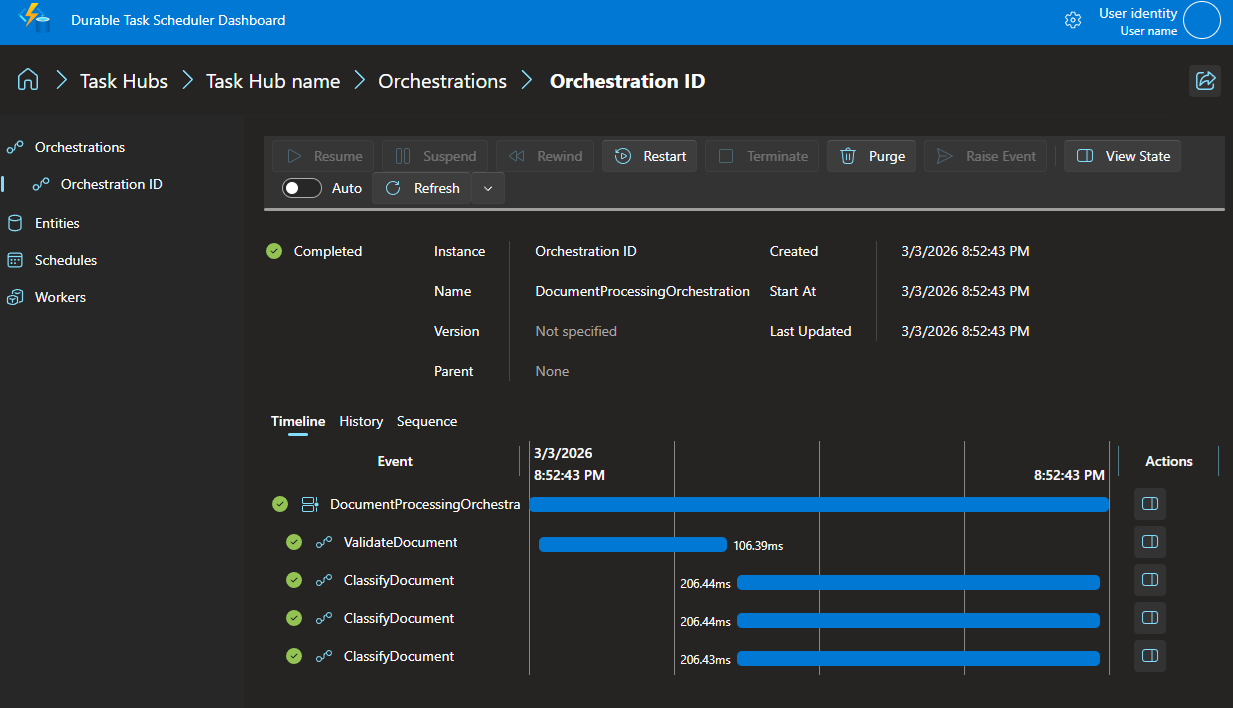
You can view the orchestration status and history via the Durable Task Scheduler dashboard. By default, the dashboard runs on port 8082.
Navigate to http://localhost:8082 in your web browser.
Click the default task hub. The orchestration instance you created is in the list.
Click the orchestration instance ID to view the execution details.
Understand the code
Client app
The client creates a Durable Task client, schedules orchestrations, and waits for completion:
foreach (var doc in docs)
{
    string id = await client.ScheduleNewOrchestrationInstanceAsync(
        "DocumentProcessingOrchestration", doc);

    var meta = await client.WaitForInstanceCompletionAsync(id, getInputsAndOutputs: true);
    if (meta.RuntimeStatus == OrchestrationRuntimeStatus.Completed)
        Console.WriteLine($"  -> {meta.ReadOutputAs<string>()}\n");
}
The sample builds the connection string from environment variables (ENDPOINT, TASKHUB, AZURE_CLIENT_ID), using local emulator defaults when those variables aren't set.
Worker app
The worker registers the orchestration and activities, then connects to Durable Task Scheduler:
builder.Services.AddDurableTaskWorker()
    .AddTasks(r =>
    {
        r.AddOrchestrator<DocumentProcessingOrchestration>();
        r.AddActivity<ValidateDocument>();
        r.AddActivity<ClassifyDocument>();
    })
    .UseDurableTaskScheduler(connectionString);
Orchestration flow
The DocumentProcessingOrchestration demonstrates activity chaining and fan-out/fan-in:
bool isValid = await context.CallActivityAsync<bool>(nameof(ValidateDocument), doc);

var tasks = new[]
{
    context.CallActivityAsync<ClassificationResult>(nameof(ClassifyDocument), new ClassifyRequest(doc.Id, doc.Content, "Sentiment")),
    context.CallActivityAsync<ClassificationResult>(nameof(ClassifyDocument), new ClassifyRequest(doc.Id, doc.Content, "Topic")),
    context.CallActivityAsync<ClassificationResult>(nameof(ClassifyDocument), new ClassifyRequest(doc.Id, doc.Content, "Priority")),
};

ClassificationResult[] results = await Task.WhenAll(tasks);
Clean up resources
To avoid charges, delete deployed Azure resources:
azd down
To stop and remove the local emulator:
docker stop dts-emulator
docker rm dts-emulator
Next step
- Learn more in Durable Task SDK overview.