Note
Access to this page requires authorization. You can try signing in or changing directories.
Access to this page requires authorization. You can try changing directories.
Applies to: Azure Stack HCI, version 22H2
Azure Stack HCI is a hyperconverged infrastructure (HCI) solution that hosts Windows and Linux VM or containerized workloads and their storage. It's a hybrid product that connects the on-premises system to Azure for cloud-based services, monitoring, and management.
Important
Microsoft Azure operated by 21Vianet does not support Azure Local version 2311.2 and later.
Microsoft does not support operating Azure Local in China connected to Azure Cloud regions. Instead, it is recommended to use Azure Local disconnected operations as it is designed to even run fully air gapped. For more information, see Disconnected operations for Azure Local (preview).
Overview
An Azure Stack HCI system consists of a server or a cluster of servers running the Azure Stack HCI operating system and connected to Azure. You can use the Azure portal to monitor and manage individual Azure Stack HCI systems as well as view all of your Azure Stack HCI deployments. You can also manage with your existing tools, including Windows Admin Center and PowerShell.
Azure Stack HCI is available for download from the Azure portal with a free 60-day trial.
To acquire the servers to run Azure Stack HCI, you can purchase Azure Stack HCI integrated systems from a Microsoft hardware partner with the operating system pre-installed, or buy validated nodes and install the operating system yourself. See the Azure Stack HCI Catalog for hardware options and use the Azure Stack HCI sizing tool to estimate hardware requirements.
Azure Stack HCI features and architecture
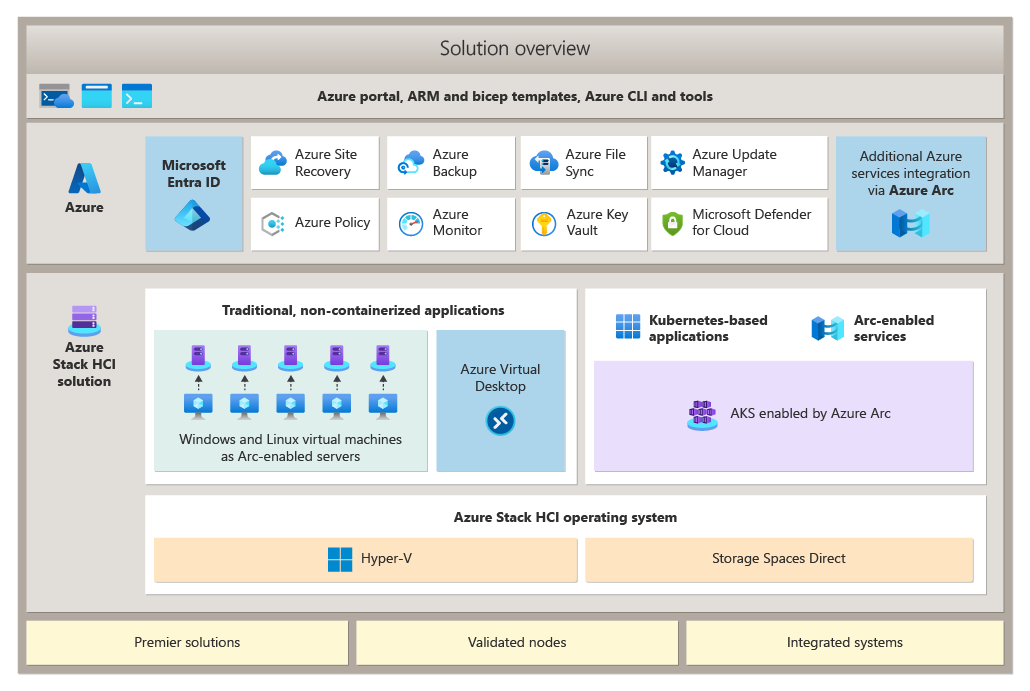
Azure Stack HCI is built on proven technologies including Hyper-V, Storage Spaces Direct, and core Azure management service.
Each Azure Stack HCI system consists of between 1 and 16 physical servers. All servers share common configurations and resources by leveraging the Windows Server Failover Clustering feature.
Azure Stack HCI combines the following:
- Validated hardware from a hardware partner.
- Azure Stack HCI operating system.
- Hyper-V-based compute resources.
- Storage Spaces Direct-based virtualized storage.
- Windows and Linux virtual machines as Arc-enabled servers.
- Azure Virtual Desktop.
- Azure services including monitoring, backup, site recovery, and more.
- Azure portal, Azure Resource Manager and Bicep templates, Azure CLI and tools.
Why Azure Stack HCI?
There are many reasons customers choose Azure Stack HCI, including:
- It provides industry-leading virtualization performance and value.
- You pay for the software monthly via an Azure subscription instead of when buying the hardware.
- It's familiar to Hyper-V and server admins, allowing them to leverage existing virtualization and storage concepts and skills.
- It can be monitored and managed from the Azure portal or using on-premises tools such as Microsoft System Center, Active Directory, Group Policy, and PowerShell scripting.
- It works with popular third-party backup, security, and monitoring tools.
- Flexible hardware choices allow customers to choose the vendor with the best service and support in their geography.
- Joint support between Microsoft and the hardware vendor improves the customer experience.
- Solution updates make it easy to keep the entire solution up-to-date.
Common use cases for Azure Stack HCI
Customers often choose Azure Stack HCI in the following scenarios.
| Use case | Description |
|---|---|
| Azure Virtual Desktop (AVD) | Azure Virtual Desktop for Azure Stack HCI lets you deploy Azure Virtual Desktop session hosts on your on-premises Azure Stack HCI infrastructure. You manage your session hosts from the Azure portal. To learn more, see Azure Virtual Desktop for Azure Stack HCI. |
| Run Azure Arc services on-premises | Azure Arc allows you to run Azure services anywhere. This allows you to build consistent hybrid and multicloud application architectures by using Azure services that can run in Azure, on-premises, at the edge, or at other cloud providers. Azure Arc enabled services allow you to run Arc VMs, Azure data services and Azure application services such as Azure App Service, Functions, Logic Apps, Event Grid, and API Management anywhere to support hybrid workloads. To learn more, see Azure Arc overview. |
| Highly performant SQL Server | Azure Stack HCI provides an additional layer of resiliency to highly available, mission-critical Always On availability groups-based deployments of SQL Server. This approach also offers extra benefits associated with the single-vendor approach, including simplified support and performance optimizations built into the underlying platform. To learn more, see Deploy SQL Server on Azure Stack HCI. |
| Trusted enterprise virtualization | Azure Stack HCI satisfies the trusted enterprise virtualization requirements through its built-in support for Virtualization-based Security (VBS). VBS relies on Hyper-V to implement the mechanism referred to as virtual secure mode, which forms a dedicated, isolated memory region within its guest VMs. By using programming techniques, it's possible to perform designated, security-sensitive operations in this dedicated memory region while blocking access to it from the host OS. This considerably limits potential vulnerability to kernel-based exploits. To learn more, see Deploy Trusted Enterprise Virtualization on Azure Stack HCI. |
| Scale-out storage | Storage Spaces Direct is a core technology of Azure Stack HCI that uses industry-standard servers with locally attached drives to offer high availability, performance, and scalability. Using Storage Spaces Direct results in significant cost reductions compared with competing offers based on storage area network (SAN) or network-attached storage (NAS) technologies. These benefits result from an innovative design and a wide range of enhancements, such as persistent read/write cache drives, mirror-accelerated parity, nested resiliency, and deduplication. |
| Data center consolidation and modernization | Refreshing and consolidating aging virtualization hosts with Azure Stack HCI can improve scalability and make your environment easier to manage and secure. It's also an opportunity to retire legacy SAN storage to reduce footprint and total cost of ownership. Operations and systems administration are simplified with unified tools and interfaces and a single point of support. |
Azure integration benefits
Azure Stack HCI allows you to take advantage of cloud and on-premises resources working together and natively monitor, secure, and back up to the cloud.
You can use the Azure portal for an increasing number of tasks including:
- Monitoring: View all of your Azure Stack HCI systems in a single, global view where you can group them by resource group and tag them.
- Billing: Pay for Azure Stack HCI through your Azure subscription.
You can also subscribe to additional Azure hybrid services.
For more details on the cloud service components of Azure Stack HCI, see Azure Stack HCI hybrid capabilities with Azure services.
What you need for Azure Stack HCI
To get started, you'll need:
- One or more servers from the Azure Stack HCI Catalog, purchased from your preferred Microsoft hardware partner.
- An Azure subscription.
- Operating system licenses for your workload VMs – for example, Windows Server.
- An internet connection for each server in the cluster that can connect via HTTPS outbound traffic to well-known Azure endpoints at least every 30 days.
- For clusters stretched across sites (functionality only available in Azure Stack HCI, version 22H2):
- At least four severs (two in each site)
- At least one 1 Gb connection between sites (a 25 Gb RDMA connection is preferred)
- An average latency of 5 ms round trip between sites if you want to do synchronous replication where writes occur simultaneously in both sites.
- If you plan to use SDN, you'll need a virtual hard disk (VHD) for the Azure Stack HCI OS to create Network Controller VMs (see Plan to deploy Network Controller).
Make sure your hardware meets the System requirements and that your network meets the physical network and host network requirements for Azure Stack HCI.
Azure Stack HCI is priced on a per core basis on your on-premises servers. For current pricing, see Azure Stack HCI pricing.
Hardware and software partners
We recommend purchasing Integrated Systems built by our hardware partners and validated by Microsoft to provide the best experience running Azure Stack HCI. You can also run Azure Stack HCI on Validated Nodes, which offer a basic building block for HCI systems to give customers more hardware choices. Microsoft partners also offer a single point of contact for implementation and support services.
Browse the Azure Stack HCI Catalog to view Azure Stack HCI solutions from Microsoft partners such as ASUS, Blue Chip, DataON, Dell EMC, Fujitsu, HPE, Hitachi, Lenovo, NEC, primeLine Solutions, QCT, and Supermicro.
Some Microsoft partners are developing software that extends the capabilities of Azure Stack HCI while allowing IT admins to use familiar tools. To learn more, see Utility applications for Azure Stack HCI.