Note
Access to this page requires authorization. You can try signing in or changing directories.
Access to this page requires authorization. You can try changing directories.
Basic and Auxiliary table plans reduce the cost of ingesting high-volume, verbose logs. Queries that include these tables support full Kusto Query Language (KQL), including queries across multiple tables and Log Analytics workspaces. This article explains the query window, scope, performance, and billing considerations.
For more information about Basic and Auxiliary table plans, see Azure Monitor Logs Overview: Table plans.
Note
Other tools that use the Azure API for querying - for example, Power BI - cannot access data in Basic and Auxiliary tables.
Permissions required
You must have Microsoft.OperationalInsights/workspaces/query/*/read permissions to the Log Analytics workspaces you query, as provided by the Log Analytics Reader built-in role, for example.
Considerations
Queries that include data in Basic or Auxiliary tables have the following considerations.
Query capabilities
Queries that include Basic or Auxiliary tables support full KQL across multiple tables. Use the workspace() expression to query these tables across Log Analytics workspaces.
The externaldata operator, cross-service queries, cross-resource queries that use the resource() expression, and resource-context queries aren't supported when the query includes a Basic or Auxiliary table.
Time range
Specify the start and end date and time by using the time range picker in Log Analytics or the timespan parameter in an API call. A time filter in the KQL query doesn't replace this explicit time range.
The maximum query time range depends on the table plans included in the query:
- A query that includes Analytics and Basic tables, but no Auxiliary table, can cover the past 30 days.
- A query that includes an Auxiliary table can cover the total retention period of the queried tables, up to 12 years.
A query that includes Analytics and Basic tables, but no Auxiliary table, can cover the past 30 days. If you need data older than 30 days, run a search job.
Query scope
Set a Log Analytics workspace as the query scope. To query multiple workspaces, explicitly reference each additional workspace by using the workspace() expression. Resource scope isn't supported when the query includes a Basic or Auxiliary table. For more information, see Log query scope and time range in Azure Monitor Log Analytics.
Concurrent queries
Each user can run two concurrent queries. For more information, see Log Analytics query limits.
Auxiliary log query performance
Queries of data in Auxiliary tables are unoptimized and might take longer to return results than queries you run on Analytics and Basic tables.
Purge
You can't purge personal data from Basic and Auxiliary tables.
Visualizations
Basic and Auxiliary table plans currently support Workbooks and Grafana, while Azure Monitor Dashboards are not supported.
Run a query that includes Basic or Auxiliary tables
Running a query on Basic or Auxiliary tables follows the same steps as querying any other table in Log Analytics. For more information, see Log Analytics tutorial.
In the Azure portal, select Monitor > Logs > Tables.
In the list of tables, identify Basic and Auxiliary tables by their unique icon:
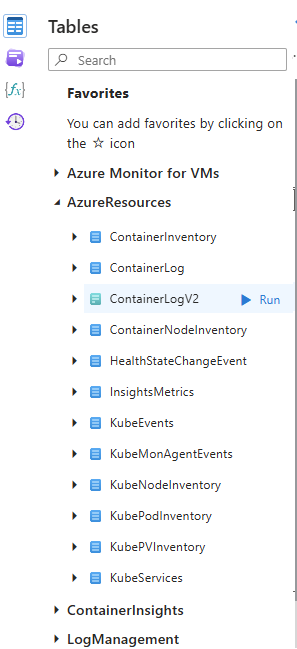
Hover over a table name to open the table information view, which identifies the Basic or Auxiliary table plan:
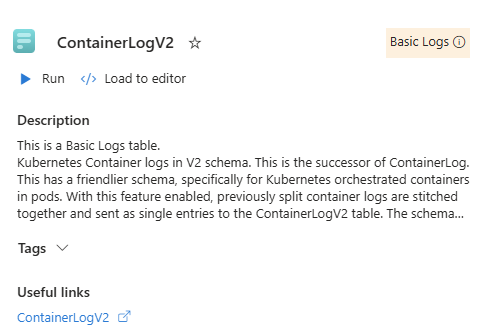
Pricing model
When a query includes a Basic or Auxiliary table, the charge is based on the total data scanned across all queried tables. Data ingestion charges from Analytics tables within their retention period isn't included in the billable scanned data.
The data scanned depends on the amount of data ingested into each queried table during the specified time range. For example, a query that scans three days of data in a table that ingests 100 GB each day is charged for 300 GB. If the query includes multiple tables, the scanned data is the sum of the data scanned from each table.
| Table ingestion rate | Table plan | Charge based on data scanned |
|---|---|---|
| Table ingests 100 GB per day | Basic | Query charge based on 300 GB |
| Table ingests 400 GB per day | Auxiliary | Query charge based on 1200 GB |
| Table ingests 500 GB per day | Analytics | no query charge |
In the example table, the query charge is based on 1500 GB (300 + 1200) of data scanned.
For more information, see Azure Monitor pricing.