Note
Access to this page requires authorization. You can try signing in or changing directories.
Access to this page requires authorization. You can try changing directories.
Azure portal administrators (users with the Global Administrator role) can set policies that affect all users in the tenant. This article provides details on some of those options.
Set feedback policies
Azure portal administrators can enable or disable feedback policy controls for their tenant. These policies can affect whether or not surveys can be shown to users, whether or not Azure is able to contact users about their feedback, and other feedback options. By default, all of the feedback options are enabled for users in your tenant.
In order to change feedback policies, you must elevate your access to ensure that you can access all subscriptions and management groups in your tenant.
Once your access is elevated, open Feedback Policy Controls in the Azure portal.
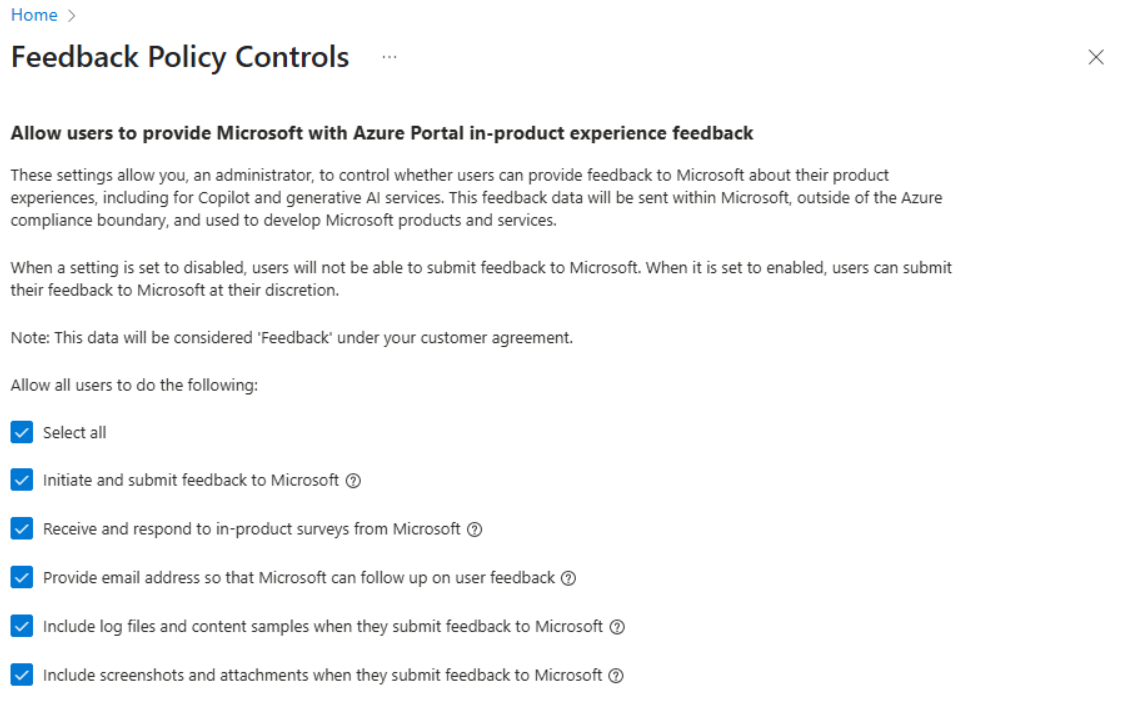
You can Select all to allow all feedback options, or check individual boxes to allow any of the following options:
- Initiate and submit feedback to Microsoft: Allows users to send feedback to Azure in the Azure portal, such as by using the feedback option in the page header.
- Receive and respond to in-product surveys from Microsoft: Allows users to receive surveys from Azure while using the Azure portal and provide responses to survey questions.
- Provide email address so that Azure can follow up on user feedback: Allows users to provide their own email address when submitting feedback, so that Azure can contact them directly.
- Include log files and content samples when they submit feedback to Microsoft: Allows users to add Microsoft-generated files, such as log files and content samples, when they provide feedback.
- Include screenshots and attachments when they submit feedback to Microsoft: Allows users to add screenshots and other attachments when they provide feedback.
Set a directory timeout period
Azure portal administrators can change the directory timeout setting for their tenant. This setting controls how long a user can be inactive in the portal before they are signed out.
For more information, see Change the directory timeout setting.