Note
Access to this page requires authorization. You can try signing in or changing directories.
Access to this page requires authorization. You can try changing directories.
As an Azure Stack Hub cloud operator, you might need to troubleshoot or raise support issues with Azure during installation of Azure Container Registry, or due to issues encountered by users of Azure Container Registry on Azure Stack Hub. This article provides guidance on how to collect specific logs for Azure Container Registry, and collect other details required when raising support requests.
Find the Resource ID for a registry
Users of Azure Container Registry on Azure Stack Hub have troubleshooting guidance available for self-help. If you can't resolve an issue with your container registry, you might need the operator's help in creating a support request. When creating a support request for a user registry issue, the Resource ID is required during case creation. You have guidance to find this, but operators can also find this using the following steps:
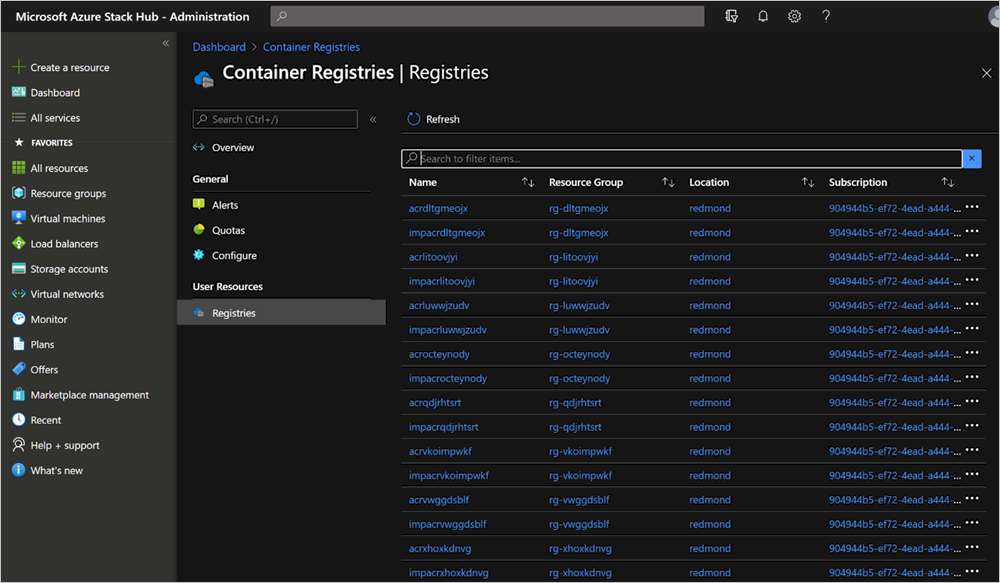
- Open the Azure Stack Hub administrator portal, and then open Container Registries.
- Select Registries under User Resources.
- Search for the name of the registry in the list view:
- Select the registry to view the detail:
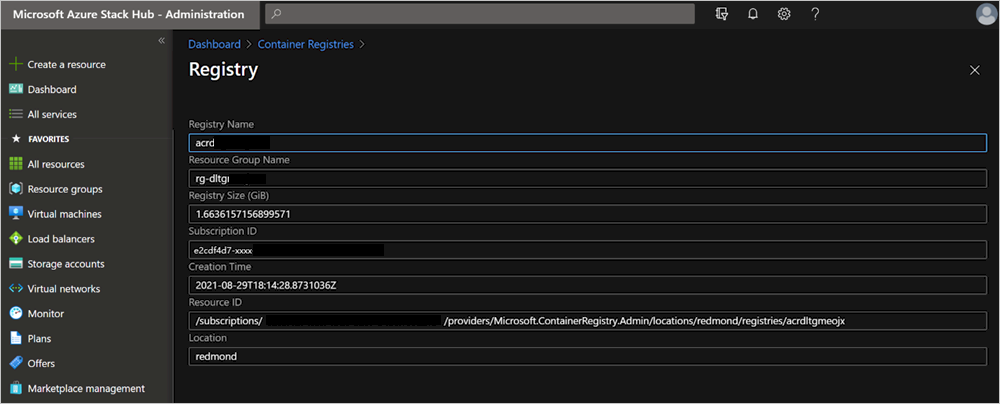
- Copy the Resource ID field.
Collect logs for support
Azure Container Registry logs are collected when collecting logs from the Azure Stack Hub administrator portal or during a full run of Send-AzureStackDiagnosticLog. There might be circumstances in which you just want to collect logs specific to Azure Container Registry; for example, if you collect for more than a four-hour period.
Collecting logs for Azure Container Registry install issues
To collect logs for Azure Container Registry issues including installation issues, run Send-AzureStackDiagnosticLog with the following parameters:
Send-AzureStackDiagnosticLog -FilterByResourceProvider ACR -FilterByRole FabricRingServices,ECE,CLM
Collecting logs for all other Azure Container Registry issues
To collect logs for Azure Container Registry issues, excluding installation issues, run Send-AzureStackDiagnosticLog with the following parameters:
Send-AzureStackDiagnosticLog -FilterByResourceProvider ACR -FilterByRole FabricRingServices