Note
Access to this page requires authorization. You can try signing in or changing directories.
Access to this page requires authorization. You can try changing directories.
Troubleshooting Azure Kubernetes Service (AKS) clusters isn't much different from troubleshooting most Kubernetes clusters. For more information, see the Kubernetes site, Troubleshooting. Another useful resource in Azure Stack Hub is Diagnostic settings available in the Azure Stack Hub user portal AKS cluster blade.
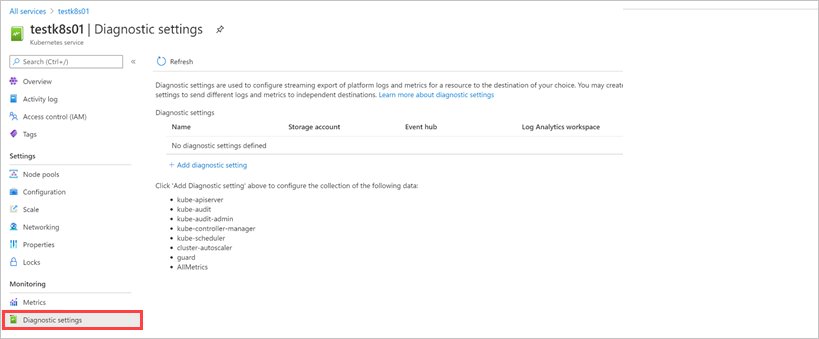
From this page, you can collect information on:
- kube-apiserver
- kube-audit
- kube-audit-admin
- kube-controller-manager
- kube-scheduler
- AllMetrics
Collect logs from cluster nodes
To troubleshoot some AKS cluster problems, you might need to collect logs directly from the cluster nodes. Use the script in the GitHub repository msazurestackworkloads/azurestack-gallery to collect logs from cluster nodes. Without these scripts, you'd need to connect to each node in the cluster, locate, and download the logs manually.
The scripts simplify the collection of relevant logs from your Kubernetes cluster. The script automatically creates a snapshot of the cluster, and connects to each node to collect logs. In addition, the script can, optionally, upload the collected logs to a storage account.
This tool is designed for the Microsoft support team to collect comprehensive cluster logs.
Script requirements
- Make sure the Network Security Group (NSG) for control plane nodes exposes SSH port 22.
- A machine that has access to your Kubernetes cluster, or the same machine you used to deploy your cluster. For Windows machine, install Git Bash to run bash scripts.
- Azure CLI installed on the machine where you run the script. Make sure that you can log in to your Azure Stack environment by using
Azure CLIfrom the machine. For instructions, see Install Azure CLI on Azure Stack Hub. - Switch to the subscription where you deployed the Kubernetes cluster by using
az account set --subscription <Subscription ID>. - Download the latest release of the script to your machine and extract the scripts.
Logs
The script automates gathering the following logs:
- Log files in the
/var/log/azure/directory. - Log files in the
/var/log/kubeauditdirectory (kube audit logs). - Log file
/var/log/waagent.log(waagent). - Log file
/var/log/azure/deploy-script-dvm.log(if deployed by using Azure Stack's Kubernetes Cluster marketplace item). - Static manifests in the
/etc/kubernetes/manifestsdirectory. - Static addons in the
/etc/kubernetes/addonsdirectory. - Waagent logs.
- kube-system containers metadata and logs.
- kubelet status and journal.
- etcd status and journal.
- docker status and journal.
- containerd status and journal.
- kube-system snapshot.
- Azure CNI config files.
- kubelet config files.
The script retrieves some more logs for Windows nodes:
- Log file
c:\Azure\CustomDataSetupScript.log. - kube-proxy status and journal.
- containerd status and journal.
- azure-vnet log and azure-vnet-telemetry log.
- ETW events for docker.
- ETW events for Hyper-V.
- Azure CNI config files.
Parameters
| Parameter | Description | Required | Example |
|---|---|---|---|
| -h, --help | Print command usage. | no | |
| -u,--user | The administrator username for the cluster VMs. | yes | azureuser (default value) |
| -i, --identity-file | SA private key tied to the public key used to create the Kubernetes cluster (sometimes named 'id_rsa'). | yes | /rsa.pem (Putty) ~/.ssh/id_rsa (SSH) |
| -g, --resource-group | Kubernetes cluster resource group. For the clusters created by AKS Service, the managed resource group name follows pattern 'MC_RESOURCEGROUP_CLUSTERNAME_LOCTION'. | yes | k8sresourcegroup MC_AKSRP_k8scluster1_redmond |
| -n, --user-namespace | Collect logs from containers in the specified namespaces. If not specified, logs from ALL namespaces are collected. | no | monitoring |
| --upload-logs | Persists retrieved logs in an Azure Stack Hub storage account. Logs can be found in KubernetesLogs resource group. | no | |
| --api-model | Persists apimodel.json file in an Azure Stack Hub Storage account. Upload apimodel.json file to storage account happens when --upload-logs parameter is also provided. | no | ./apimodel.json |
| --disable-host-key-checking | Sets SSH's StrictHostKeyChecking option to "no" while the script executes. Only use in a safe environment. | no |
Examples
# switch to the subscription where the Kubernetes cluster is deployed.
az account set --subscription <Subscription ID>

# download the scripts.
mkdir -p $HOME/kuberneteslogs
cd $HOME/kuberneteslogs
curl -L https://github.com/msazurestackworkloads/azurestack-gallery/releases/download/diagnosis-v1.1.0/diagnosis-v1.1.0.tar.gz -o diagnosis.tar.gz
tar xvf diagnosis.tar.gz

# use the script to collect logs
./getkuberneteslogs.sh -u azureuser -i private.key.1.pem -g k8s-rg
./getkuberneteslogs.sh -u azureuser -i ~/.ssh/id_rsa -g k8s-rg --disable-host-key-checking
./getkuberneteslogs.sh -u azureuser -i ~/.ssh/id_rsa -g k8s-rg -n default -n monitoring
./getkuberneteslogs.sh -u azureuser -i ~/.ssh/id_rsa -g k8s-rg --upload-logs --api-model clusterDefinition.json
./getkuberneteslogs.sh -u azureuser -i ~/.ssh/id_rsa -g k8s-rg --upload-logs