Note
Access to this page requires authorization. You can try signing in or changing directories.
Access to this page requires authorization. You can try changing directories.
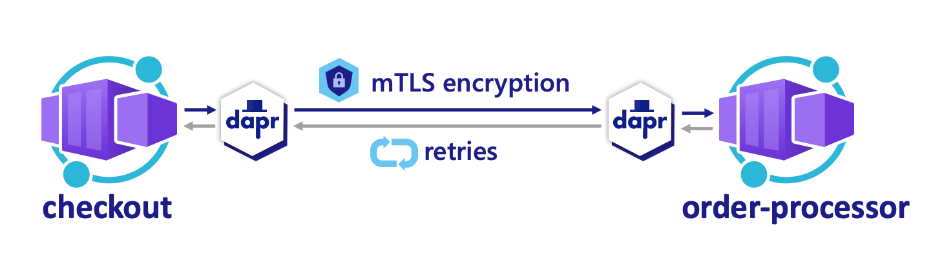
In a microservice-based application, you can use Distributed Application Runtime (Dapr) for improved security and reliability in communication between microservices. To encrypt data in transit, the Dapr Service Invocation API uses automatic mutual Transport Layer Security (mTLS). For reliability, this API offers a resiliency feature that performs automatic retries after call failures and transient errors.
This tutorial uses a sample service invocation project that includes the following components:
- A
checkoutcaller service that uses HTTP proxying on a loop to invoke a request on anorder-processorservice via the Dapr Service Invocation API - An
order-processorcallee service that receives the request from thecheckoutservice via the Dapr Service Invocation API
In this tutorial, you:
- Create two microservices that use the Dapr Service Invocation API to communicate.
- Run the application locally.
- Deploy the application to Azure Container Apps by using the Azure Developer CLI and Bicep files provided in the sample project.
Prerequisites
- The Azure Developer CLI
- The Dapr CLI, installed and initialized
- Docker Desktop
- Git
Run the Node.js application locally
Before you deploy the application to Container Apps, take the steps in the following sections to run the order-processor and checkout services locally with Dapr.
Prepare the project
Clone the sample application to your local machine.
git clone https://github.com/Azure-Samples/svc-invoke-dapr-nodejs.gitGo to the sample root directory.
cd svc-invoke-dapr-nodejs
Run the application by using the Dapr CLI
Run the order-processor service and the checkout service by taking the following steps.
From the sample root directory, go to the order-processor directory.
cd order-processorInstall the dependencies.
npm installRun the
order-processorservice.dapr run --app-port 5001 --app-id order-processor --app-protocol http --dapr-http-port 3501 -- npm startIn a new terminal window, go to the sample root directory, and then go to the checkout directory.
cd checkoutInstall the dependencies.
npm installRun the
checkoutservice.dapr run --app-id checkout --app-protocol http --dapr-http-port 3500 -- npm start
Expected output
In the checkout terminal, the checkout service sends information about 20 orders to the order-processor service and then temporarily pauses.
== APP == Order passed: {"orderId":1}
== APP == Order passed: {"orderId":2}
== APP == Order passed: {"orderId":3}
== APP == Order passed: {"orderId":4}
== APP == Order passed: {"orderId":5}
== APP == Order passed: {"orderId":6}
== APP == Order passed: {"orderId":7}
== APP == Order passed: {"orderId":8}
== APP == Order passed: {"orderId":9}
== APP == Order passed: {"orderId":10}
== APP == Order passed: {"orderId":11}
== APP == Order passed: {"orderId":12}
== APP == Order passed: {"orderId":13}
== APP == Order passed: {"orderId":14}
== APP == Order passed: {"orderId":15}
== APP == Order passed: {"orderId":16}
== APP == Order passed: {"orderId":17}
== APP == Order passed: {"orderId":18}
== APP == Order passed: {"orderId":19}
== APP == Order passed: {"orderId":20}
In the order-processor terminal, the order-processor service receives information about 20 orders and then temporarily pauses.
== APP == Order received: { orderId: 1 }
== APP == Order received: { orderId: 2 }
== APP == Order received: { orderId: 3 }
== APP == Order received: { orderId: 4 }
== APP == Order received: { orderId: 5 }
== APP == Order received: { orderId: 6 }
== APP == Order received: { orderId: 7 }
== APP == Order received: { orderId: 8 }
== APP == Order received: { orderId: 9 }
== APP == Order received: { orderId: 10 }
== APP == Order received: { orderId: 11 }
== APP == Order received: { orderId: 12 }
== APP == Order received: { orderId: 13 }
== APP == Order received: { orderId: 14 }
== APP == Order received: { orderId: 15 }
== APP == Order received: { orderId: 16 }
== APP == Order received: { orderId: 17 }
== APP == Order received: { orderId: 18 }
== APP == Order received: { orderId: 19 }
== APP == Order received: { orderId: 20 }
Stop the application
Select Cmd/Ctrl+C in both terminals to stop the service-to-service invocation.
Deploy the application template by using the Azure Developer CLI
To deploy the application to Container Apps by using azd commands, take the steps in the following sections.
Prepare the project
In a new terminal window, go to the sample root directory.
cd svc-invoke-dapr-nodejs
Create and deploy by using the Azure Developer CLI
Run
azd initto initialize the project.azd initWhen prompted in the terminal, enter a unique environment name. The command uses this name as a prefix for the resource group that it creates to hold all Azure resources.
Run
azd upto prepare the infrastructure and deploy the application to Container Apps in a single command.azd upWhen prompted in the terminal, provide the following parameters.
Parameter Description Azure location The Azure location for your resources Azure subscription The Azure subscription for your resources This process can take some time to run. While the
azd upcommand runs, the output displays two Azure portal links that you can use to monitor the deployment progress. The output also demonstrates howazd up:- Creates and configures all necessary Azure resources via the Bicep files in the ./infra directory by using
azd provision. After the Azure Developer CLI deploys these resources, you can use the Azure portal to access them. The files that are used to configure the Azure resources include:- main.parameters.json.
- main.bicep.
- An app resources directory organized by functionality.
- A core reference library that contains the Bicep modules used by the
azdtemplate.
- Deploys the code using
azd deploy.
If this step causes error BCP420, go to your cloned repo, open the svc-invoke-dapr-nodejs/infra/core/host/container-apps.bicep file, and replace line 28 with the following line:
scope: resourceGroup(!empty(containerRegistryResourceGroupName) ? containerRegistryResourceGroupName : resourceGroup().name)- Creates and configures all necessary Azure resources via the Bicep files in the ./infra directory by using
Expected output
The azd init command displays output that's similar to the following lines:
Initializing an app to run on Azure (azd init)

? Enter a unique environment name: [? for help] <environment-name>

? Enter a unique environment name: <environment-name>

SUCCESS: Initialized environment <environment-name>.
The azd up command displays output that's similar to the following lines:
? Select an Azure Subscription to use:  3. <subscription-name> (aaaa0a0a-bb1b-cc2c-dd3d-eeeeee4e4e4e)
? Enter a value for the 'location' infrastructure parameter: 51. (US) China East 2  (chinaeast2)

Packaging services (azd package)

  (✓) Done: Packaging service api
  - Container: service-invoke-dapr-node-aca/api-<environment-name>:azd-deploy-1765226976

  (✓) Done: Packaging service worker
  - Container: service-invoke-dapr-node-aca/worker-<environment-name>:azd-deploy-1765226992

Provisioning Azure resources (azd provision)
Provisioning Azure resources can take some time.

Subscription: <subscription-name> (aaaa0a0a-bb1b-cc2c-dd3d-eeeeee4e4e4e)
Location: China East 2

  You can view detailed progress in the Azure portal:
  https://portal.azure.cn/#view/HubsExtension/DeploymentDetailsBlade/~/overview/id/%2Fsubscriptions%2Faaaa0a0a-bb1b-cc2c-dd3d-eeeeee4e4e4e%2Fproviders%2FMicrosoft.Resources%2Fdeployments%2F<environment-name>-1765226998

  (✓) Done: Resource group: rg-<environment-name> (2.341s)
  (✓) Done: Log Analytics workspace: log-a1bc2de3fh4ij (25.882s)
  (✓) Done: Application Insights: appi-a1bc2de3fh4ij (1.314s)
  (✓) Done: Portal dashboard: dash-a1bc2de3fh4ij (1.833s)
  (✓) Done: Container Registry: cra1bc2de3fh4ij (17.672s)
  (✓) Done: Container Apps Environment: cae-a1bc2de3fh4ij (1m53.997s)
  (✓) Done: Container App: ca-checkout-a1bc2de3fh4ij (27.995s)
  (✓) Done: Container App: ca-order-processor-a1bc2de3fh4ij (22.651s)

Deploying services (azd deploy)

  (✓) Done: Deploying service api
  - Endpoint: https://ca-order-processor-a1bc2de3fh4ij.wittymeadow-c2de3fh4.chinaeast2.azurecontainerapps.io/

  (✓) Done: Deploying service worker
  - Endpoint: https://ca-checkout-a1bc2de3fh4ij.wittymeadow-c2de3fh4.chinaeast2.azurecontainerapps.io/

SUCCESS: Your up workflow to provision and deploy to Azure completed in 5 minutes 31 seconds.
Confirm successful deployment
To verify that the checkout service is passing orders to the order-processor service, take the following steps.
In the terminal output, copy the
checkoutcontainer app name.Sign in to the Azure portal, and then search for the container app resource by name.
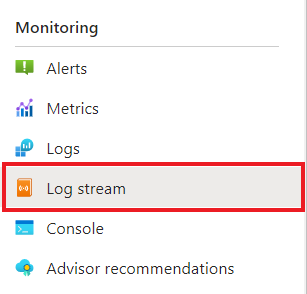
On the container app Overview page, select Monitoring > Log stream.
On the Log stream page, next to Container, select checkout.
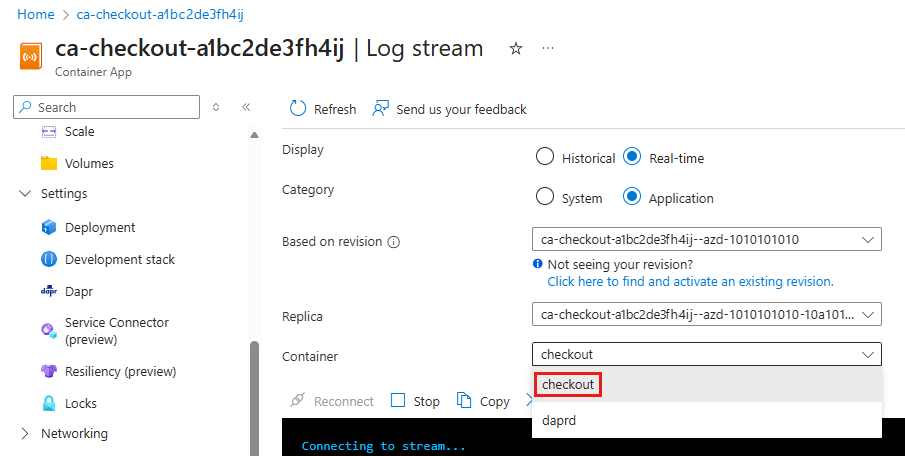
Confirm the
checkoutcontainer is logging the same output as in the terminal earlier.Connecting to stream... 2025-12-09T14:04:33.45953 Connecting to the container 'checkout'... 2025-12-09T14:04:33.53740 Successfully Connected to container: 'checkout' [Revision: 'ca-checkout-a1bc2de3fh4ij--azd-1010101010', Replica: 'ca-checkout-a1bc2de3fh4ij--azd-1010101010-e3fh4ij5kl-6mn7o'] 2025-12-09T14:04:24.125429697Z Order passed: {"orderId":1} 2025-12-09T14:04:25.132356280Z Order passed: {"orderId":2} 2025-12-09T14:04:26.138280828Z Order passed: {"orderId":3} 2025-12-09T14:04:27.143795525Z Order passed: {"orderId":4} 2025-12-09T14:04:28.149049451Z Order passed: {"orderId":5} 2025-12-09T14:04:29.155266540Z Order passed: {"orderId":6} 2025-12-09T14:04:30.160579732Z Order passed: {"orderId":7} 2025-12-09T14:04:31.165857030Z Order passed: {"orderId":8} 2025-12-09T14:04:32.171575903Z Order passed: {"orderId":9} 2025-12-09T14:04:33.176673433Z Order passed: {"orderId":10} 2025-12-09T14:04:34.183728937Z Order passed: {"orderId":11} 2025-12-09T14:04:35.191018777Z Order passed: {"orderId":12} 2025-12-09T14:04:36.196886189Z Order passed: {"orderId":13} 2025-12-09T14:04:37.203280592Z Order passed: {"orderId":14} 2025-12-09T14:04:38.209860731Z Order passed: {"orderId":15} 2025-12-09T14:04:39.230493897Z Order passed: {"orderId":16} 2025-12-09T14:04:40.236164211Z Order passed: {"orderId":17} 2025-12-09T14:04:41.242369482Z Order passed: {"orderId":18} 2025-12-09T14:04:42.249403792Z Order passed: {"orderId":19} 2025-12-09T14:04:43.255729366Z Order passed: {"orderId":20}Take similar steps for the
order-processorservice.Connecting to stream... 2025-12-09T14:04:40.56424 Connecting to the container 'order-processor'... 2025-12-09T14:04:40.58332 Successfully Connected to container: 'order-processor' [Revision: 'ca-order-processor-a1bc2de3fh4ij--azd-1010101010', Replica: 'ca-order-processor-a1bc2de3fh4ij--azd-1010101010-8qr9st0uv1wx2y'] 2025-12-09T14:04:24.116375837Z Order received: { orderId: 1 } 2025-12-09T14:04:25.128718200Z Order received: { orderId: 2 } 2025-12-09T14:04:26.134766577Z Order received: { orderId: 3 } 2025-12-09T14:04:27.140414040Z Order received: { orderId: 4 } 2025-12-09T14:04:28.145763273Z Order received: { orderId: 5 } 2025-12-09T14:04:29.152026156Z Order received: { orderId: 6 } 2025-12-09T14:04:30.157316984Z Order received: { orderId: 7 } 2025-12-09T14:04:31.162593847Z Order received: { orderId: 8 } 2025-12-09T14:04:32.168252075Z Order received: { orderId: 9 } 2025-12-09T14:04:33.173389844Z Order received: { orderId: 10 } 2025-12-09T14:04:34.178499336Z Order received: { orderId: 11 } 2025-12-09T14:04:35.186679161Z Order received: { orderId: 12 } 2025-12-09T14:04:36.193541819Z Order received: { orderId: 13 } 2025-12-09T14:04:37.200040677Z Order received: { orderId: 14 } 2025-12-09T14:04:38.206379653Z Order received: { orderId: 15 } 2025-12-09T14:04:39.227185042Z Order received: { orderId: 16 } 2025-12-09T14:04:40.232518266Z Order received: { orderId: 17 } 2025-12-09T14:04:41.239199248Z Order received: { orderId: 18 } 2025-12-09T14:04:42.245578021Z Order received: { orderId: 19 } 2025-12-09T14:04:43.252568045Z Order received: { orderId: 20 }
Understand azd up
When the azd up command runs successfully:
- The Azure Developer CLI creates the Azure resources referenced in the sample project ./infra directory in the Azure subscription you specify. You can find those Azure resources in the Azure portal.
- The app is deployed to Container Apps. In the Azure portal, you can access the fully functional app.
Run the Python application locally
Before you deploy the application to Container Apps, take the steps in the following sections to run the order-processor and checkout services locally with Dapr.
Prepare the project
Clone the sample application to your local machine.
git clone https://github.com/Azure-Samples/svc-invoke-dapr-python.gitGo to the sample root directory.
cd svc-invoke-dapr-python
Run the application by using the Dapr CLI
Run the order-processor service and the checkout service by taking the following steps.
From the sample root directory, go to the order-processor directory.
cd order-processorInstall the dependencies.
pip3 install -r requirements.txtRun the
order-processorservice.
In a new terminal window, go to the sample root directory, and then go to the checkout directory.
cd checkoutInstall the dependencies.
pip3 install -r requirements.txtRun the
checkoutservice.
Expected output
In the checkout terminal, the checkout service sends information about 19 orders to the order-processor service and then temporarily pauses.
== APP == Order passed: {"orderId": 1}
== APP == Order passed: {"orderId": 2}
== APP == Order passed: {"orderId": 3}
== APP == Order passed: {"orderId": 4}
== APP == Order passed: {"orderId": 5}
== APP == Order passed: {"orderId": 6}
== APP == Order passed: {"orderId": 7}
== APP == Order passed: {"orderId": 8}
== APP == Order passed: {"orderId": 9}
== APP == Order passed: {"orderId": 10}
== APP == Order passed: {"orderId": 11}
== APP == Order passed: {"orderId": 12}
== APP == Order passed: {"orderId": 13}
== APP == Order passed: {"orderId": 14}
== APP == Order passed: {"orderId": 15}
== APP == Order passed: {"orderId": 16}
== APP == Order passed: {"orderId": 17}
== APP == Order passed: {"orderId": 18}
== APP == Order passed: {"orderId": 19}
In the order-processor terminal, the order-processor service receives information about 19 orders and then temporarily pauses.
== APP == Order received : {"orderId": 1}
== APP == 127.0.0.1 - - [08/Dec/2025 16:42:08] "POST /orders HTTP/1.1" 200 -
== APP == Order received : {"orderId": 2}
== APP == 127.0.0.1 - - [08/Dec/2025 16:42:09] "POST /orders HTTP/1.1" 200 -
== APP == Order received : {"orderId": 3}
== APP == 127.0.0.1 - - [08/Dec/2025 16:42:10] "POST /orders HTTP/1.1" 200 -
== APP == Order received : {"orderId": 4}
== APP == 127.0.0.1 - - [08/Dec/2025 16:42:11] "POST /orders HTTP/1.1" 200 -
== APP == Order received : {"orderId": 5}
== APP == 127.0.0.1 - - [08/Dec/2025 16:42:12] "POST /orders HTTP/1.1" 200 -
== APP == Order received : {"orderId": 6}
== APP == 127.0.0.1 - - [08/Dec/2025 16:42:13] "POST /orders HTTP/1.1" 200 -
== APP == Order received : {"orderId": 7}
== APP == 127.0.0.1 - - [08/Dec/2025 16:42:14] "POST /orders HTTP/1.1" 200 -
== APP == Order received : {"orderId": 8}
== APP == 127.0.0.1 - - [08/Dec/2025 16:42:15] "POST /orders HTTP/1.1" 200 -
== APP == Order received : {"orderId": 9}
== APP == 127.0.0.1 - - [08/Dec/2025 16:42:16] "POST /orders HTTP/1.1" 200 -
== APP == Order received : {"orderId": 10}
== APP == 127.0.0.1 - - [08/Dec/2025 16:42:17] "POST /orders HTTP/1.1" 200 -
== APP == Order received : {"orderId": 11}
== APP == 127.0.0.1 - - [08/Dec/2025 16:42:18] "POST /orders HTTP/1.1" 200 -
== APP == Order received : {"orderId": 12}
== APP == 127.0.0.1 - - [08/Dec/2025 16:42:19] "POST /orders HTTP/1.1" 200 -
== APP == Order received : {"orderId": 13}
== APP == 127.0.0.1 - - [08/Dec/2025 16:42:20] "POST /orders HTTP/1.1" 200 -
== APP == Order received : {"orderId": 14}
== APP == 127.0.0.1 - - [08/Dec/2025 16:42:21] "POST /orders HTTP/1.1" 200 -
== APP == Order received : {"orderId": 15}
== APP == 127.0.0.1 - - [08/Dec/2025 16:42:22] "POST /orders HTTP/1.1" 200 -
== APP == Order received : {"orderId": 16}
== APP == 127.0.0.1 - - [08/Dec/2025 16:42:23] "POST /orders HTTP/1.1" 200 -
== APP == Order received : {"orderId": 17}
== APP == 127.0.0.1 - - [08/Dec/2025 16:42:24] "POST /orders HTTP/1.1" 200 -
== APP == Order received : {"orderId": 18}
== APP == 127.0.0.1 - - [08/Dec/2025 16:42:25] "POST /orders HTTP/1.1" 200 -
== APP == Order received : {"orderId": 19}
== APP == 127.0.0.1 - - [08/Dec/2025 16:42:26] "POST /orders HTTP/1.1" 200 -
Stop the application
Select Cmd/Ctrl+C in both terminals to stop the service-to-service invocation.
Deploy the application template by using the Azure Developer CLI
To deploy the application to Container Apps by using azd commands, take the steps in the following sections.
Prepare the project
In a new terminal window, go to the sample root directory.
cd svc-invoke-dapr-python
Create and deploy by using the Azure Developer CLI
Run
azd initto initialize the project.azd initWhen prompted in the terminal, enter a unique environment name. The command uses this name as a prefix for the resource group that it creates to hold all Azure resources.
Run
azd upto prepare the infrastructure and deploy the application to Container Apps in a single command.azd upWhen prompted in the terminal, provide the following parameters.
Parameter Description Azure location The Azure location for your resources Azure subscription The Azure subscription for your resources This process can take some time to run. While the
azd upcommand runs, the output displays two Azure portal links that you can use to monitor the deployment progress. The output also demonstrates howazd up:- Creates and configures all necessary Azure resources via the Bicep files in the ./infra directory by using
azd provision. After the Azure Developer CLI deploys these resources, you can use the Azure portal to access them. The files that are used to configure the Azure resources include:- main.parameters.json.
- main.bicep.
- An app resources directory organized by functionality.
- A core reference library that contains the Bicep modules used by the
azdtemplate.
- Deploys the code using
azd deploy.
- Creates and configures all necessary Azure resources via the Bicep files in the ./infra directory by using
Expected output
The azd init command displays output that's similar to the following lines:
Initializing an app to run on Azure (azd init)

? Enter a unique environment name: [? for help] <environment-name>

? Enter a unique environment name: <environment-name>

SUCCESS: Initialized environment <environment-name>.
The azd up command displays output that's similar to the following lines:
? Select an Azure Subscription to use:  3. <subscription-name> (aaaa0a0a-bb1b-cc2c-dd3d-eeeeee4e4e4e)
? Enter a value for the 'location' infrastructure parameter: 51. (US) China East 2  (chinaeast2)

Packaging services (azd package)

  (✓) Done: Packaging service api
  - Container: service-invoke-dapr-node-aca/api-<environment-name>:azd-deploy-1765230378

  (✓) Done: Packaging service worker
  - Container: service-invoke-dapr-node-aca/worker-<environment-name>:azd-deploy-1765230379

Provisioning Azure resources (azd provision)
Provisioning Azure resources can take some time.

Subscription: <subscription-name> (aaaa0a0a-bb1b-cc2c-dd3d-eeeeee4e4e4e)
Location: China East 2

  You can view detailed progress in the Azure portal:
  https://portal.azure.cn/#view/HubsExtension/DeploymentDetailsBlade/~/overview/id/%2Fsubscriptions%2Faaaa0a0a-bb1b-cc2c-dd3d-eeeeee4e4e4e%2Fproviders%2FMicrosoft.Resources%2Fdeployments%2F<environment-name>-1765230385

  (✓) Done: Resource group: rg-<environment-name> (1.633s)
  (✓) Done: Log Analytics workspace: log-a1bc2de3fh4ij (21.209s)
  (✓) Done: Application Insights: appi-a1bc2de3fh4ij (1.32s)
  (✓) Done: Portal dashboard: dash-a1bc2de3fh4ij (430ms)
  (✓) Done: Container Registry: cra1bc2de3fh4ij (20.632s)
  (✓) Done: Container Apps Environment: cae-a1bc2de3fh4ij (1m53.401s)
  (✓) Done: Container App: ca-order-processor-a1bc2de3fh4ij (49.189s)
  (✓) Done: Container App: ca-checkout-a1bc2de3fh4ij (47.751s)

Deploying services (azd deploy)

  (✓) Done: Deploying service api
  - Endpoint: https://ca-order-processor-a1bc2de3fh4ij.livelyriver-c2de3fh4.chinaeast2.azurecontainerapps.io/

  (✓) Done: Deploying service worker

SUCCESS: Your up workflow to provision and deploy to Azure completed in 5 minutes 22 seconds.
Confirm successful deployment
To verify that the checkout service is passing orders to the order-processor service, take the following steps.
In the terminal output, copy the
checkoutcontainer app name.Sign in to the Azure portal, and then search for the container app resource by name.
On the container app Overview page, select Monitoring > Log stream.
On the Log stream page, next to Container, select checkout.
Confirm the
checkoutcontainer is logging the same output as in the terminal earlier.Connecting to stream... 2025-12-08T21:52:13.30188 Connecting to the container 'checkout'... 2025-12-08T21:52:13.32059 Successfully Connected to container: 'checkout' [Revision: 'ca-checkout-a1bc2de3fh4ij--azd-1010101010', Replica: 'ca-checkout-a1bc2de3fh4ij--azd-1010101010-e3fh4ij5kl-6mn7o'] 2025-12-08T21:51:50.336588427Z Order passed: {"orderId": 1} 2025-12-08T21:51:51.344226554Z Order passed: {"orderId": 2} 2025-12-08T21:51:52.352458279Z Order passed: {"orderId": 3} 2025-12-08T21:51:53.359545509Z Order passed: {"orderId": 4} 2025-12-08T21:51:54.367664737Z Order passed: {"orderId": 5} 2025-12-08T21:51:55.375686968Z Order passed: {"orderId": 6} 2025-12-08T21:51:56.384068096Z Order passed: {"orderId": 7} 2025-12-08T21:51:57.392023627Z Order passed: {"orderId": 8} 2025-12-08T21:51:58.400084856Z Order passed: {"orderId": 9} 2025-12-08T21:51:59.407839688Z Order passed: {"orderId": 10} 2025-12-08T21:52:00.415796718Z Order passed: {"orderId": 11} 2025-12-08T21:52:01.423684349Z Order passed: {"orderId": 12} 2025-12-08T21:52:02.431038891Z Order passed: {"orderId": 13} 2025-12-08T21:52:03.438415598Z Order passed: {"orderId": 14} 2025-12-08T21:52:04.445862305Z Order passed: {"orderId": 15} 2025-12-08T21:52:05.454030709Z Order passed: {"orderId": 16} 2025-12-08T21:52:06.462323213Z Order passed: {"orderId": 17} 2025-12-08T21:52:07.469778904Z Order passed: {"orderId": 18} 2025-12-08T21:52:08.478176259Z Order passed: {"orderId": 19}Take similar steps for the
order-processorservice.Connecting to stream... 2025-12-08T21:52:21.69283 Connecting to the container 'order-processor'... 2025-12-08T21:52:21.71200 Successfully Connected to container: 'order-processor' [Revision: 'ca-order-processor-a1bc2de3fh4ij--azd-1010101010', Replica: 'ca-order-processor-a1bc2de3fh4ij--azd-1010101010-8qr9st0uv1wx2y'] 2025-12-08T21:52:08.466641579Z 127.0.0.1 - - [08/Dec/2025 21:52:08] "POST /orders HTTP/1.1" 200 - 2025-12-08T21:52:19.484297503Z Order received : {"orderId": 1} 2025-12-08T21:52:19.484712607Z 127.0.0.1 - - [08/Dec/2025 21:52:19] "POST /orders HTTP/1.1" 200 - 2025-12-08T21:52:20.492919969Z Order received : {"orderId": 2} 2025-12-08T21:52:20.493318072Z 127.0.0.1 - - [08/Dec/2025 21:52:20] "POST /orders HTTP/1.1" 200 - 2025-12-08T21:52:21.501517134Z Order received : {"orderId": 3} 2025-12-08T21:52:21.501881937Z 127.0.0.1 - - [08/Dec/2025 21:52:21] "POST /orders HTTP/1.1" 200 - 2025-12-08T21:52:22.509507378Z Order received : {"orderId": 4} 2025-12-08T21:52:22.510107685Z 127.0.0.1 - - [08/Dec/2025 21:52:22] "POST /orders HTTP/1.1" 200 - 2025-12-08T21:52:23.518153270Z Order received : {"orderId": 5} 2025-12-08T21:52:23.519026380Z 127.0.0.1 - - [08/Dec/2025 21:52:23] "POST /orders HTTP/1.1" 200 - 2025-12-08T21:52:24.526933360Z Order received : {"orderId": 6} 2025-12-08T21:52:24.528534270Z 127.0.0.1 - - [08/Dec/2025 21:52:24] "POST /orders HTTP/1.1" 200 - 2025-12-08T21:52:25.536263633Z Order received : {"orderId": 7} 2025-12-08T21:52:25.536895737Z 127.0.0.1 - - [08/Dec/2025 21:52:25] "POST /orders HTTP/1.1" 200 - 2025-12-08T21:52:26.544453199Z Order received : {"orderId": 8} 2025-12-08T21:52:26.545099303Z 127.0.0.1 - - [08/Dec/2025 21:52:26] "POST /orders HTTP/1.1" 200 - 2025-12-08T21:52:27.552418814Z Order received : {"orderId": 9} 2025-12-08T21:52:27.552886419Z 127.0.0.1 - - [08/Dec/2025 21:52:27] "POST /orders HTTP/1.1" 200 - 2025-12-08T21:52:28.560536453Z Order received : {"orderId": 10} 2025-12-08T21:52:28.560978457Z 127.0.0.1 - - [08/Dec/2025 21:52:28] "POST /orders HTTP/1.1" 200 - 2025-12-08T21:52:29.569267098Z Order received : {"orderId": 11} 2025-12-08T21:52:29.569883405Z 127.0.0.1 - - [08/Dec/2025 21:52:29] "POST /orders HTTP/1.1" 200 - 2025-12-08T21:52:30.577652340Z Order received : {"orderId": 12} 2025-12-08T21:52:30.578145945Z 127.0.0.1 - - [08/Dec/2025 21:52:30] "POST /orders HTTP/1.1" 200 - 2025-12-08T21:52:31.585742379Z Order received : {"orderId": 13} 2025-12-08T21:52:31.586148183Z 127.0.0.1 - - [08/Dec/2025 21:52:31] "POST /orders HTTP/1.1" 200 - 2025-12-08T21:52:32.593496421Z Order received : {"orderId": 14} 2025-12-08T21:52:32.594131028Z 127.0.0.1 - - [08/Dec/2025 21:52:32] "POST /orders HTTP/1.1" 200 - 2025-12-08T21:52:33.602273111Z Order received : {"orderId": 15} 2025-12-08T21:52:33.604202631Z 127.0.0.1 - - [08/Dec/2025 21:52:33] "POST /orders HTTP/1.1" 200 - 2025-12-08T21:52:34.610559896Z Order received : {"orderId": 16} 2025-12-08T21:52:34.610927600Z 127.0.0.1 - - [08/Dec/2025 21:52:34] "POST /orders HTTP/1.1" 200 - 2025-12-08T21:52:35.618588379Z Order received : {"orderId": 17} 2025-12-08T21:52:35.619991693Z 127.0.0.1 - - [08/Dec/2025 21:52:35] "POST /orders HTTP/1.1" 200 - 2025-12-08T21:52:36.628053075Z Order received : {"orderId": 18} 2025-12-08T21:52:36.628608981Z 127.0.0.1 - - [08/Dec/2025 21:52:36] "POST /orders HTTP/1.1" 200 - 2025-12-08T21:52:37.638211579Z Order received : {"orderId": 19} 2025-12-08T21:52:37.638144079Z 127.0.0.1 - - [08/Dec/2025 21:52:37] "POST /orders HTTP/1.1" 200 -
Understand azd up
When the azd up command runs successfully:
- The Azure Developer CLI creates the Azure resources referenced in the sample project ./infra directory in the Azure subscription you specify. You can find those Azure resources in the Azure portal.
- The app is deployed to Container Apps. In the Azure portal, you can access the fully functional app.
Run the .NET application locally
Before you deploy the application to Container Apps, take the steps in the following sections to run the order-processor and checkout services locally with Dapr.
Prepare the project
Clone the sample application to your local machine.
git clone https://github.com/Azure-Samples/svc-invoke-dapr-csharp.gitGo to the sample root directory.
cd svc-invoke-dapr-csharp
Run the application by using the Dapr CLI
Run the order-processor service and the checkout service by taking the following steps.
From the sample root directory, go to the order-processor directory.
cd order-processorInstall the dependencies.
dotnet buildRun the
order-processorservice.dapr run --app-port 7001 --app-id order-processor --app-protocol http --dapr-http-port 3501 -- dotnet runIn a new terminal window, go to the sample root directory, and then go to the checkout directory.
cd checkoutInstall the dependencies.
dotnet buildRun the
checkoutservice.dapr run --app-id checkout --app-protocol http --dapr-http-port 3500 -- dotnet run
Expected output
In the checkout terminal, the checkout service sends information about 20 orders to the order-processor service and then temporarily pauses.
== APP == Order passed: Order { OrderId = 1 }
== APP == Order passed: Order { OrderId = 2 }
== APP == Order passed: Order { OrderId = 3 }
== APP == Order passed: Order { OrderId = 4 }
== APP == Order passed: Order { OrderId = 5 }
== APP == Order passed: Order { OrderId = 6 }
== APP == Order passed: Order { OrderId = 7 }
== APP == Order passed: Order { OrderId = 8 }
== APP == Order passed: Order { OrderId = 9 }
== APP == Order passed: Order { OrderId = 10 }
== APP == Order passed: Order { OrderId = 11 }
== APP == Order passed: Order { OrderId = 12 }
== APP == Order passed: Order { OrderId = 13 }
== APP == Order passed: Order { OrderId = 14 }
== APP == Order passed: Order { OrderId = 15 }
== APP == Order passed: Order { OrderId = 16 }
== APP == Order passed: Order { OrderId = 17 }
== APP == Order passed: Order { OrderId = 18 }
== APP == Order passed: Order { OrderId = 19 }
== APP == Order passed: Order { OrderId = 20 }
In the order-processor terminal, the order-processor service receives information about 20 orders and then temporarily pauses.
== APP == Order received : Order { orderId = 1 }
== APP == Order received : Order { orderId = 2 }
== APP == Order received : Order { orderId = 3 }
== APP == Order received : Order { orderId = 4 }
== APP == Order received : Order { orderId = 5 }
== APP == Order received : Order { orderId = 6 }
== APP == Order received : Order { orderId = 7 }
== APP == Order received : Order { orderId = 8 }
== APP == Order received : Order { orderId = 9 }
== APP == Order received : Order { orderId = 10 }
== APP == Order received : Order { orderId = 11 }
== APP == Order received : Order { orderId = 12 }
== APP == Order received : Order { orderId = 13 }
== APP == Order received : Order { orderId = 14 }
== APP == Order received : Order { orderId = 15 }
== APP == Order received : Order { orderId = 16 }
== APP == Order received : Order { orderId = 17 }
== APP == Order received : Order { orderId = 18 }
== APP == Order received : Order { orderId = 19 }
== APP == Order received : Order { orderId = 20 }
Stop the application
Select Cmd/Ctrl+C in both terminals to stop the service-to-service invocation.
Deploy the application template by using the Azure Developer CLI
Deploy the application to Azure Container Apps using azd.
Prepare the project
In a new terminal window, go to the sample root directory.
cd svc-invoke-dapr-csharp
Create and deploy by using the Azure Developer CLI
Run
azd initto initialize the project.azd initWhen prompted in the terminal, enter a unique environment name. The command uses this name as a prefix for the resource group that it creates to hold all Azure resources.
Run
azd upto prepare the infrastructure and deploy the application to Container Apps in a single command.azd upWhen prompted in the terminal, provide the following parameters.
Parameter Description Azure location The Azure location for your resources Azure subscription The Azure subscription for your resources This process can take some time to run. While the
azd upcommand runs, the output displays two Azure portal links that you can use to monitor the deployment progress. The output also demonstrates howazd up:- Creates and configures all necessary Azure resources via the Bicep files in the ./infra directory by using
azd provision. After the Azure Developer CLI deploys these resources, you can use the Azure portal to access them. The files that are used to configure the Azure resources include:- main.parameters.json.
- main.bicep.
- An app resources directory organized by functionality.
- A core reference library that contains the Bicep modules used by the
azdtemplate.
- Deploys the code using
azd deploy.
If this step causes error BCP420, go to your cloned repo, open the svc-invoke-dapr-csharp/infra/core/host/container-apps.bicep file, and replace line 28 with the following line:
scope: resourceGroup(!empty(containerRegistryResourceGroupName) ? containerRegistryResourceGroupName : resourceGroup().name)- Creates and configures all necessary Azure resources via the Bicep files in the ./infra directory by using
Expected output
The azd init command displays output that's similar to the following lines:
Initializing an app to run on Azure (azd init)

? Enter a unique environment name: [? for help] <environment-name>

? Enter a unique environment name: <environment-name>

SUCCESS: Initialized environment <environment-name>.
The azd up command displays output that's similar to the following lines:
? Select an Azure Subscription to use:  3. <subscription-name> (aaaa0a0a-bb1b-cc2c-dd3d-eeeeee4e4e4e)
? Enter a value for the 'location' infrastructure parameter: 51. (US) China East 2  (chinaeast2)

Packaging services (azd package)

  (✓) Done: Packaging service api
  - Container: service-invoke-dapr-dotnet-aca/api-<environment-name>:azd-deploy-1765290820

  (✓) Done: Packaging service worker
  - Container: service-invoke-dapr-dotnet-aca/worker-<environment-name>:azd-deploy-1765290828

Provisioning Azure resources (azd provision)
Provisioning Azure resources can take some time.

Subscription: <subscription-name> (aaaa0a0a-bb1b-cc2c-dd3d-eeeeee4e4e4e)
Location: China East 2

  You can view detailed progress in the Azure portal:
  https://portal.azure.cn/#view/HubsExtension/DeploymentDetailsBlade/~/overview/id/%2Fsubscriptions%2Faaaa0a0a-bb1b-cc2c-dd3d-eeeeee4e4e4e%2Fproviders%2FMicrosoft.Resources%2Fdeployments%2F<environment-name>-1765290834

  (✓) Done: Resource group: rg-<environment-name> (1.95s)
  (✓) Done: Log Analytics workspace: log-a1bc2de3fh4ij (21.073s)
  (✓) Done: Application Insights: appi-a1bc2de3fh4ij (3.339s)
  (✓) Done: Portal dashboard: dash-a1bc2de3fh4ij (1.791s)
  (✓) Done: Container Registry: cra1bc2de3fh4ij (18.521s)
  (✓) Done: Container Apps Environment: cae-a1bc2de3fh4ij (1m54.347s)
  (✓) Done: Container App: ca-order-processor-a1bc2de3fh4ij (20.447s)
  (✓) Done: Container App: ca-checkout-a1bc2de3fh4ij (19.159s)

Deploying services (azd deploy)

  (✓) Done: Deploying service api
  - Endpoint: https://ca-order-processor-a1bc2de3fh4ij.blackmoss-c2de3fh4.chinaeast2.azurecontainerapps.io/

  (✓) Done: Deploying service worker

SUCCESS: Your up workflow to provision and deploy to Azure completed in 5 minutes 14 seconds.
Confirm successful deployment
To verify that the checkout service is passing orders to the order-processor service, take the following steps.
In the terminal output, copy the
checkoutcontainer app name.Sign in to the Azure portal, and then search for the container app resource by name.
On the container app Overview page, select Monitoring > Log stream.
On the Log stream page, next to Container, select checkout.
Confirm the
checkoutcontainer is logging the same output as in the terminal earlier.Connecting to stream... 2025-12-09T15:10:41.47802 Connecting to the container 'checkout'... 2025-12-09T15:10:41.51661 Successfully Connected to container: 'checkout' [Revision: 'ca-checkout-a1bc2de3fh4ij--azd-1010101010', Replica: 'ca-checkout-a1bc2de3fh4ij--azd-1010101010-e3fh4ij5kl-6mn7o'] 2025-12-09T15:10:35.970525383Z Order passed: Order { OrderId = 1 } 2025-12-09T15:10:36.974299140Z Order passed: Order { OrderId = 2 } 2025-12-09T15:10:37.977372717Z Order passed: Order { OrderId = 3 } 2025-12-09T15:10:38.980052480Z Order passed: Order { OrderId = 4 } 2025-12-09T15:10:39.983760836Z Order passed: Order { OrderId = 5 } 2025-12-09T15:10:40.987032666Z Order passed: Order { OrderId = 6 } 2025-12-09T15:10:41.990514871Z Order passed: Order { OrderId = 7 } 2025-12-09T15:10:42.993271242Z Order passed: Order { OrderId = 8 } 2025-12-09T15:10:43.996447160Z Order passed: Order { OrderId = 9 } 2025-12-09T15:10:44.999515468Z Order passed: Order { OrderId = 10 } 2025-12-09T15:10:46.003606414Z Order passed: Order { OrderId = 11 } 2025-12-09T15:10:47.006857265Z Order passed: Order { OrderId = 12 } 2025-12-09T15:10:48.012116293Z Order passed: Order { OrderId = 13 } 2025-12-09T15:10:49.015322253Z Order passed: Order { OrderId = 14 } 2025-12-09T15:10:50.018667962Z Order passed: Order { OrderId = 15 } 2025-12-09T15:10:51.019739902Z Order passed: Order { OrderId = 16 } 2025-12-09T15:10:52.021675650Z Order passed: Order { OrderId = 17 } 2025-12-09T15:10:53.024514318Z Order passed: Order { OrderId = 18 } 2025-12-09T15:10:54.028031299Z Order passed: Order { OrderId = 19 } 2025-12-09T15:10:55.031371921Z Order passed: Order { OrderId = 20 }Take similar steps for the
order-processorservice.Connecting to stream... 2025-12-09T15:01:47.03912 Connecting to the container 'order-processor'... 2025-12-09T15:01:47.07513 Successfully Connected to container: 'order-processor' [Revision: 'ca-order-processor-a1bc2de3fh4ij--azd-1010101010', Replica: 'ca-order-processor-a1bc2de3fh4ij--azd-1010101010-e3fh4ij5kl6mn7'] 2025-12-09T15:10:35.961828162Z Order received : Order { orderId = 1 } 2025-12-09T15:10:36.971520049Z Order received : Order { orderId = 2 } 2025-12-09T15:10:37.974663292Z Order received : Order { orderId = 3 } 2025-12-09T15:10:38.977375837Z Order received : Order { orderId = 4 } 2025-12-09T15:10:39.980547949Z Order received : Order { orderId = 5 } 2025-12-09T15:10:40.984127518Z Order received : Order { orderId = 6 } 2025-12-09T15:10:41.987422901Z Order received : Order { orderId = 7 } 2025-12-09T15:10:42.990385188Z Order received : Order { orderId = 8 } 2025-12-09T15:10:43.993530965Z Order received : Order { orderId = 9 } 2025-12-09T15:10:44.996506444Z Order received : Order { orderId = 10 } 2025-12-09T15:10:46.000838163Z Order received : Order { orderId = 11 } 2025-12-09T15:10:47.004060023Z Order received : Order { orderId = 12 } 2025-12-09T15:10:48.007760527Z Order received : Order { orderId = 13 } 2025-12-09T15:10:49.012628202Z Order received : Order { orderId = 14 } 2025-12-09T15:10:50.016058393Z Order received : Order { orderId = 15 } 2025-12-09T15:10:51.016443730Z Order received : Order { orderId = 16 } 2025-12-09T15:10:52.018312472Z Order received : Order { orderId = 17 } 2025-12-09T15:10:53.021307966Z Order received : Order { orderId = 18 } 2025-12-09T15:10:54.025018485Z Order received : Order { orderId = 19 } 2025-12-09T15:10:55.028189928Z Order received : Order { orderId = 20 }
Understand azd up
When the azd up command runs successfully:
- The Azure Developer CLI creates the Azure resources referenced in the sample project ./infra directory in the Azure subscription you specify. You can find those Azure resources in the Azure portal.
- The app is deployed to Container Apps. In the Azure portal, you can access the fully functional app.
Clean up resources
If you're not going to continue to use this application, run the following command to delete the Azure resources you created:
azd down
Related content
- For more information about deploying Dapr applications to Container Apps, see Quickstart: Deploy a Dapr application to Azure Container Apps using the Azure CLI.
- For information about using a token to check that requests to your app come from Dapr, see Enable token authentication for Dapr requests.
- For information about making your applications compatible with
azd, see Create Azure Developer CLI templates overview.