Note
Access to this page requires authorization. You can try signing in or changing directories.
Access to this page requires authorization. You can try changing directories.
Overview
The License Usage page in the Microsoft Entra admin center helps you optimize your Microsoft Entra licenses by providing visibility into feature usage across your tenant. The page shows how many Microsoft Entra ID P1, P2, and Suite licenses you own, along with usage of key features mapped to each license type.
This view gives you a clearer understanding of your license count, the value you're getting from your Microsoft Entra license, and potential over-usage within your tenant.
Prerequisites
- The tenant must have a paid Microsoft Entra license (for example, Microsoft Entra ID P1, P2, or Microsoft Entra Suite).
- This feature is only available in public clouds.
- The least privileged role is Reports Reader.
- The following roles can also access this page: Application Administrator, Cloud Application Administrator, Global Reader, Security Administrator, Security Reader, and Security Operator.
Access the license usage insights page
- Sign in to the Microsoft Entra admin center.
- Browse to Billing > Licenses.
You can also navigate directly to the License usage page.
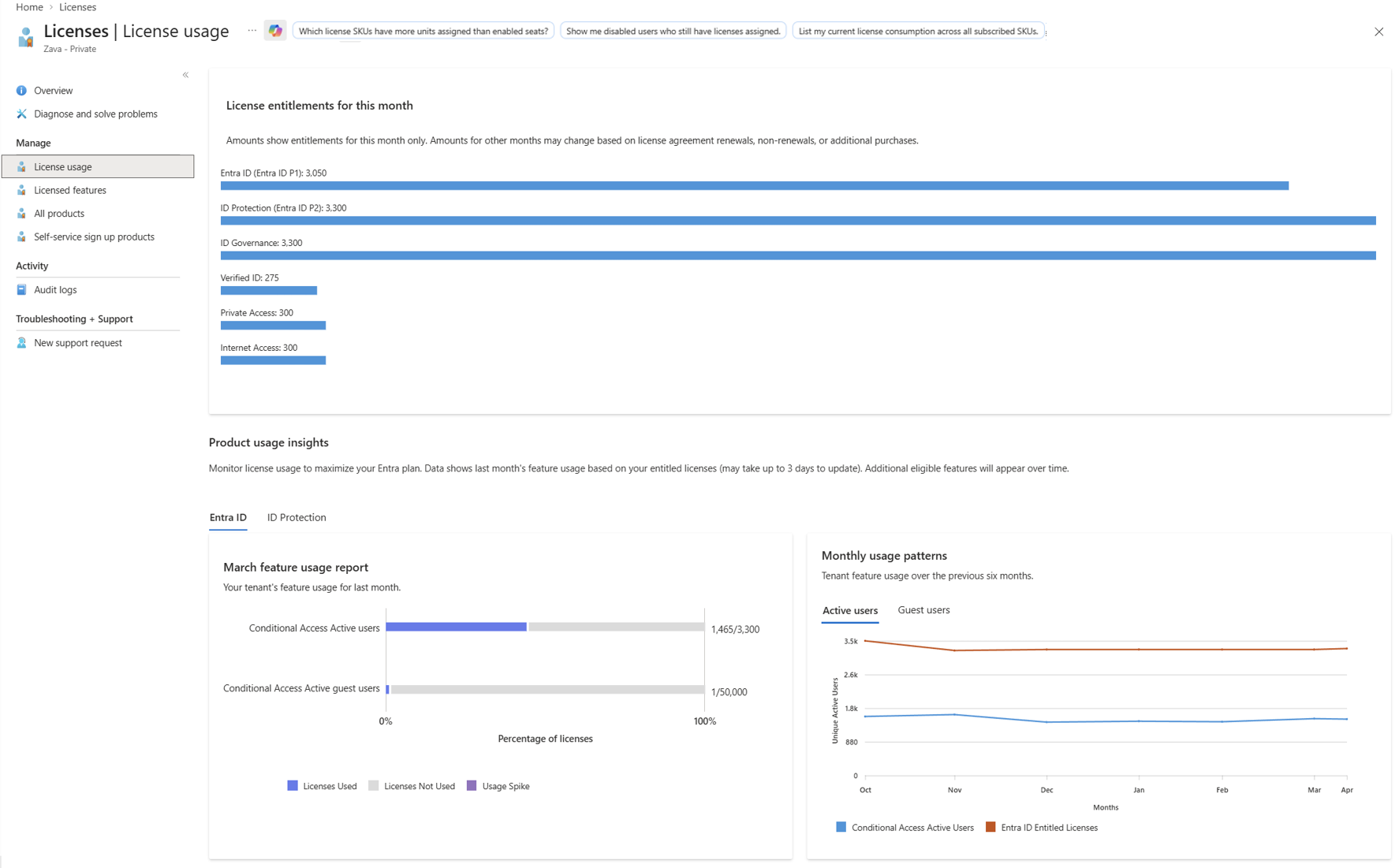
License entitlements
The license entitlements section shows how many licenses you've purchased for the current month. Amounts for other months might change based on license agreement renewals, non-renewals, or additional purchases. Entitlements are calculated by looking at all Microsoft Entra products you've purchased, including:
- Microsoft Entra ID P1
- Microsoft Entra ID P2
- Microsoft Entra Suite
- Microsoft Entra ID Governance
- Microsoft Entra Private Access
- Microsoft Entra Internet Access
The entitlement count reflects the total number of licenses across all products that include each tier of Microsoft Entra ID functionality.
Product usage insights
The Product usage insights section helps you monitor license usage to maximize your Microsoft Entra plan. Data shows last month's feature usage based on your entitled licenses and might take up to three days to update.
The license usage insights page uses a single representative metric (hero metric) for each license tier to measure usage. This approach simplifies the view by focusing on the most meaningful indicator of paid feature adoption.
The section is organized into two tabs:
- Entra ID — Displays usage metrics for Microsoft Entra ID P1 features.
- ID Protection — Displays usage metrics for Microsoft Entra ID P2 features.
Microsoft Entra ID P1 usage
In the Entra ID tab, the key metric is Conditional Access users — the number of unique users with at least one Conditional Access policy evaluated during the measurement period.
Microsoft Entra ID P2 usage
In the ID Protection tab, the key metric is Risk-based Conditional Access users — the number of unique users with at least one risk-based Conditional Access policy evaluated during the measurement period.
Feature usage report
Each tab includes a feature usage report that shows your tenant's feature usage for the previous month. The report displays a bar chart that compares your usage against your entitlements for each metric, expressed as a percentage of total licenses.
The chart uses the following indicators:
- Licenses Used — The portion of entitlements consumed by active usage.
- Licenses Not Used — The remaining entitlements not consumed.
- Usage Spike — Usage that exceeds your entitled license count.
Monthly usage patterns
The Monthly usage patterns panel shows tenant feature usage over the previous six months. You can switch between Active users and Guest users views to see trends for each user type. The chart compares feature usage against your entitled license count over time, helping you identify usage trends and plan for future license needs.
Active and guest user differentiation
The usage metrics differentiate between active users and guest users. This distinction helps you understand which portion of your license consumption comes from internal users versus external collaborators.