Note
Access to this page requires authorization. You can try signing in or changing directories.
Access to this page requires authorization. You can try changing directories.
From March 2026, Microsoft Entra ID will no longer support app authentication without a service principal. In this article, you'll learn how to prepare for the retirement. As a tenant administrator, you'll identify affected apps, create a service principal, and verify the changes you made.
Prerequisites
- An account with the Application administrator or Cloud application administrator role assigned.
Blocking app authentication without a service principal
Microsoft Entra ID will block authentication for all non-Microsoft multitenant applications that don't have a service principal in the tenant where they're authenticating. This scenario is also known as service principal-less authentication. This behavior has already been disabled for most non-Microsoft applications. This change addresses a few remaining exceptions and is a preventive security measure.
App authentication without a service principal allows a multitenant client application to obtain an app-only token from a tenant without an object identifier (object ID) claim. In most cases, the absence of a service principal means the app hasn't been granted authorization to access any data, and this is harmless. However, in rare cases where the target API has implemented improper authorization checks, this capability could lead to unauthorized access. Microsoft has already verified that Microsoft-published APIs aren't vulnerable to this type of abuse. Disabling this behavior entirely also protects non-Microsoft APIs with insufficient authorization checks.
Additionally, by enforcing the requirement that all applications must have a service principal in every tenant where they authenticate, we facilitate the tenant administrator's governance of all access, including the ability to target these apps individually with Conditional Access policies.
If applications you rely on are authenticating without a service principal in your tenant, you must act before March 31, 2026 to avoid disruption.
For the most up-to-date information on the retirement, see Service principal required for Microsoft Entra ID | Microsoft Community Hub.
Use sign-in logs to find applications authenticating without a service principal
Note
Action is only required for apps authenticating without a service principal found in the "Service principal sign-ins" (app-only) sign-in logs. User sign-in logs will include Microsoft applications and services that are authenticating without a service principal. Sign-ins and authentication without a service principal by Microsoft apps is expected, and no action is required by customers.
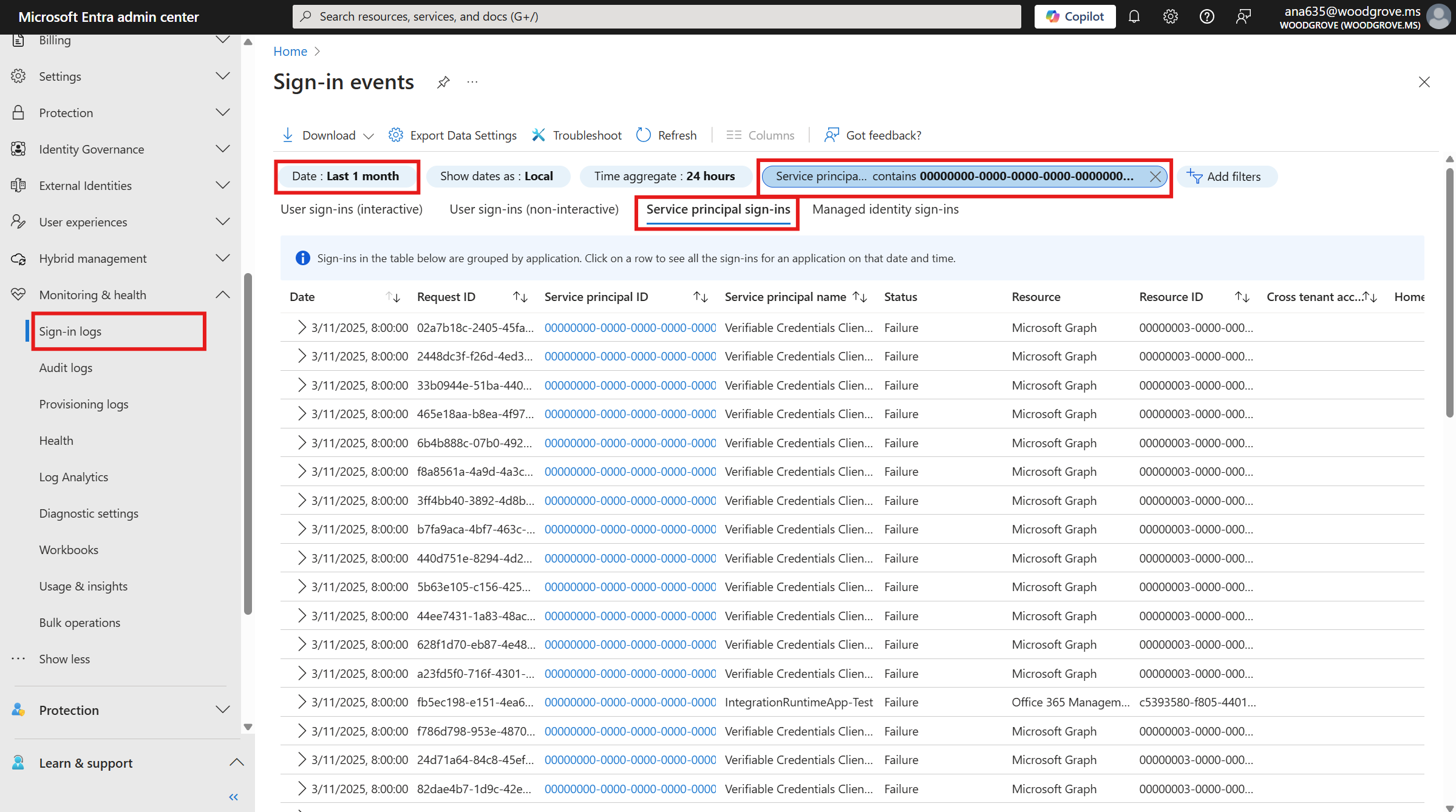
First, you'll need to verify that access by the named applications to the resources listed is necessary. The application’s sign-in activity can be reviewed by the resource tenant’s administrator via sign-in logs. The service principal ID of an application making a service principal-less authentication is shown as 00000000-0000-0000-0000-000000000000 in the sign-in logs of the resource tenant.
- Navigate to the Microsoft Entra admin center.
- On the left navigation panel, go to Entra ID > Monitoring & health > Sign-in logs.
- Go to the Service principal sign-ins tab.
- Filter by Service principal ID, and enter
00000000-0000-0000-0000-000000000000in the input field. - Set the date range to Last 1 month.
- Click on a log entry to view the details, and identify the app's Application ID. You'll need this in the next step.
Create a service principal
Once you've identified an application authenticating without a service principal, use the details in the sign-in logs to decide whether it's expected and should continue to authenticate in your tenant.
If you don't recognize the app and wish to block it, create a service principal for the app, and then disable the service principal. Disabling the app's service principal will block all future sign-in and authentication attempts by that app in your tenant.
Verify the changes you made
Once you've taken action for an application, the sign-in logs will include the app's new service principal ID, now with a unique alphanumeric GUID in the format aaaaaaaa-bbbb-cccc-1111-222222222222. This confirms that the app has a service principal in your tenant and won't be further affected by the upcoming change.