Note
Access to this page requires authorization. You can try signing in or changing directories.
Access to this page requires authorization. You can try changing directories.
Microsoft Entra ID can automatically provision users and groups to any application or system fronted by a web service with the interface defined in the System for Cross-Domain Identity Management (SCIM) 2.0 protocol specification.
Microsoft Entra support for the SCIM 2.0 protocol is described in Using System for Cross-Domain Identity Management (SCIM) to automatically provision users and groups from Microsoft Entra ID to applications, which lists the specific parts of the protocol that it implements in order to automatically provision users and groups from Microsoft Entra ID to applications that support SCIM 2.0.
This article describes current and past issues with the Microsoft Entra user provisioning service's adherence to the SCIM 2.0 protocol, and how to work around these issues.
Understanding the provisioning job
The provisioning service uses the concept of a job to operate against an application. The jobID can be found in the progress bar. All new provisioning applications are created with a jobID starting with scim. The scim job represents the current state of the service. Older jobs have the ID customappsso. This job represents the state of the service in 2018.
If you're using an application in the gallery, the job generally contains the name of the app (such as zoom snowFlake or dataBricks). You can skip this documentation when using a gallery application. This primarily applies for non-gallery applications with jobID SCIM or customAppSSO.
SCIM 2.0 compliance issues and status
In the, any item marked as fixed means that the proper behavior can be found on the SCIM job. We have worked to ensure backwards compatibility for the changes we have made. We recommend using the new behavior for any new implementations and updating existing implementations. The customappSSO behavior that was the default prior to December 2018 isn't supported anymore.
Note
For the changes made in 2018, it's possible to revert back to the customappsso behavior. For the changes made since 2018, you can use the URLs to revert back to the older behavior. We have worked to ensure backwards compatibility for the changes we have made by allowing you to revert back to the old jobID or by using a flag. However, as previously mentioned, we don't recommend implementing old behavior as it isn't supported anymore. We recommend using the new behavior for any new implementations and updating existing implementations.
| SCIM 2.0 compliance issue | Fixed? | Fix date | Backwards compatibility |
|---|---|---|---|
| Microsoft Entra ID requires "/scim" to be in the root of the application's SCIM endpoint URL | Yes | December 18, 2018 | downgrade to customappSSO |
Extension attributes use dot . notation before attribute names instead of colon ":" notation |
Yes | December 18, 2018 | downgrade to customappSSO |
| Patch requests for multi-value attributes contain invalid path filter syntax | Yes | December 18, 2018 | downgrade to customappSSO |
| Group creation requests contain an invalid schema URI | Yes | December 18, 2018 | downgrade to customappSSO |
| Update PATCH behavior to ensure compliance (such as active as boolean and proper group membership removals) | No | TBD | use feature flag |
Flags to alter the SCIM behavior
Use the flags in the tenant URL of your application in order to change the default SCIM client behavior.
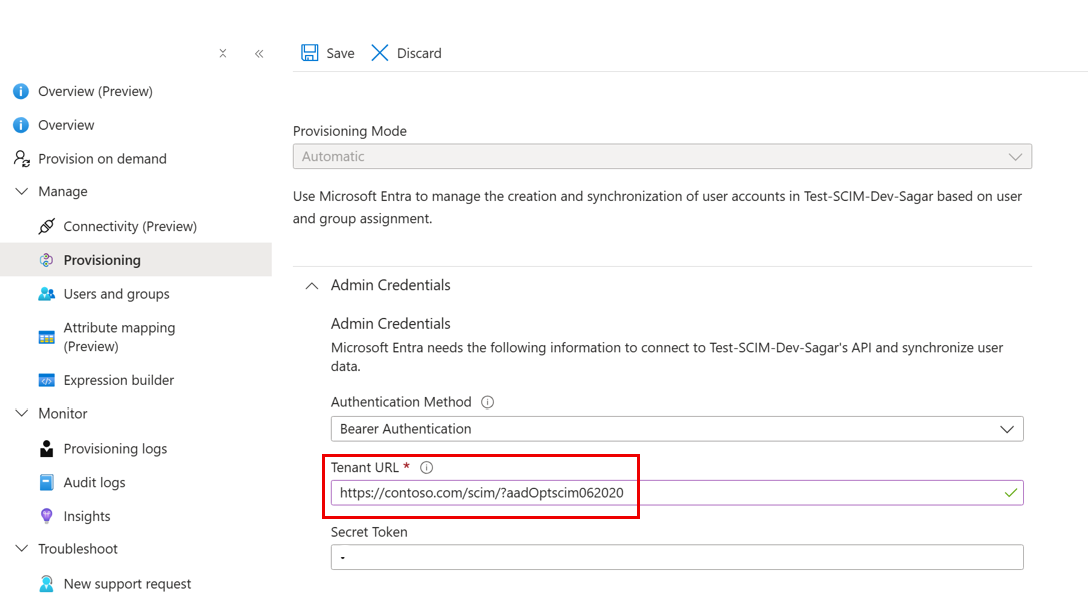
Use the following URL to update PATCH behavior and ensure SCIM compliance. The flag alters the following behaviors:
- Requests made to disable users
- Requests to add a single-value string attribute
- Requests to replace multiple attributes
- Requests to remove a group member
This behavior is currently only available when using the flag, but will become the default behavior over the next few months. Note this feature flag currently doesn't work with on-demand provisioning.
- URL (SCIM Compliant): aadOptscim062020
- SCIM RFC references:
Sample requests to help outline what the sync engine currently sends versus the requests that are sent once the feature flag is enabled.
Requests made to disable users:
Without feature flag
{
  "schemas": [
      "urn:ietf:params:scim:api:messages:2.0:PatchOp"
  ],
  "Operations": [
      {
          "op": "Replace",
          "path": "active",
          "value": "False"
      }
  ]
}
With feature flag
{
  "schemas": [
      "urn:ietf:params:scim:api:messages:2.0:PatchOp"
  ],
  "Operations": [
      {
          "op": "replace",
          "path": "active",
          "value": false
      }
  ]
}
Requests made to add a single-value string attribute:
Without feature flag
{
  "schemas": [
      "urn:ietf:params:scim:api:messages:2.0:PatchOp"
  ],
  "Operations": [
    {
      "op": "Add",
      "path": "nickName",
      "value": "Babs"
    }
  ]
}
With feature flag
{
  "schemas": ["urn:ietf:params:scim:api:messages:2.0:PatchOp"],
  "Operations": [
    {
      "op": "add",
      "path": "nickName",
      "value": "Babs"
    }
  ]
}
Requests to replace multiple attributes:
Without feature flag
{
  "schemas": [
      "urn:ietf:params:scim:api:messages:2.0:PatchOp"
  ],
  "Operations": [
      {
          "op": "Replace",
          "path": "displayName",
          "value": "Pvlo"
      },
      {
          "op": "Replace",
          "path": "emails[type eq \"work\"].value",
          "value": "TestBcwqnm@test.microsoft.com"
      },
      {
          "op": "Replace",
          "path": "name.givenName",
          "value": "Gtfd"
      },
      {
          "op": "Replace",
          "path": "name.familyName",
          "value": "Pkqf"
      },
      {
          "op": "Replace",
          "path": "externalId",
          "value": "Eqpj"
      },
      {
          "op": "Replace",
          "path": "urn:ietf:params:scim:schemas:extension:enterprise:2.0:User:employeeNumber",
          "value": "Eqpj"
      }
  ]
}
With feature flag
{
  "schemas": [
      "urn:ietf:params:scim:api:messages:2.0:PatchOp"
  ],
  "Operations": [
      {
          "op": "replace",
          "path": "emails[type eq \"work\"].value",
          "value": "TestMhvaes@test.microsoft.com"
      },
      {
          "op": "replace",
          "value": {
              "displayName": "Bjfe",
              "name.givenName": "Kkom",
              "name.familyName": "Unua",
              "urn:ietf:params:scim:schemas:extension:enterprise:2.0:User:employeeNumber": "Aklq"
          }
      }
  ]
}
Requests made to remove a group member:
Without feature flag
{
  "schemas": [
      "urn:ietf:params:scim:api:messages:2.0:PatchOp"
  ],
  "Operations": [
      {
          "op": "Remove",
          "path": "members",
          "value": [
              {
                  "value": "u1091"
              }
          ]
      }
  ]
}
With feature flag
{
  "schemas": [
      "urn:ietf:params:scim:api:messages:2.0:PatchOp"
  ],
  "Operations": [
      {
          "op": "remove",
          "path": "members[value eq \"7f4bc1a3-285e-48ae-8202-5accb43efb0e\"]"
      }
  ]
}
- Downgrade URL: Once the new SCIM compliant behavior becomes the default on the non-gallery application, you can use the following URL to roll back to the old, non SCIM compliant behavior: AzureAdScimPatch2017
Next steps
Learn more about provisioning and deprovisioning to SaaS applications