Note
Access to this page requires authorization. You can try signing in or changing directories.
Access to this page requires authorization. You can try changing directories.
Overview
This article explains how to configure Microsoft Entra application proxy and Azure Traffic Manager.
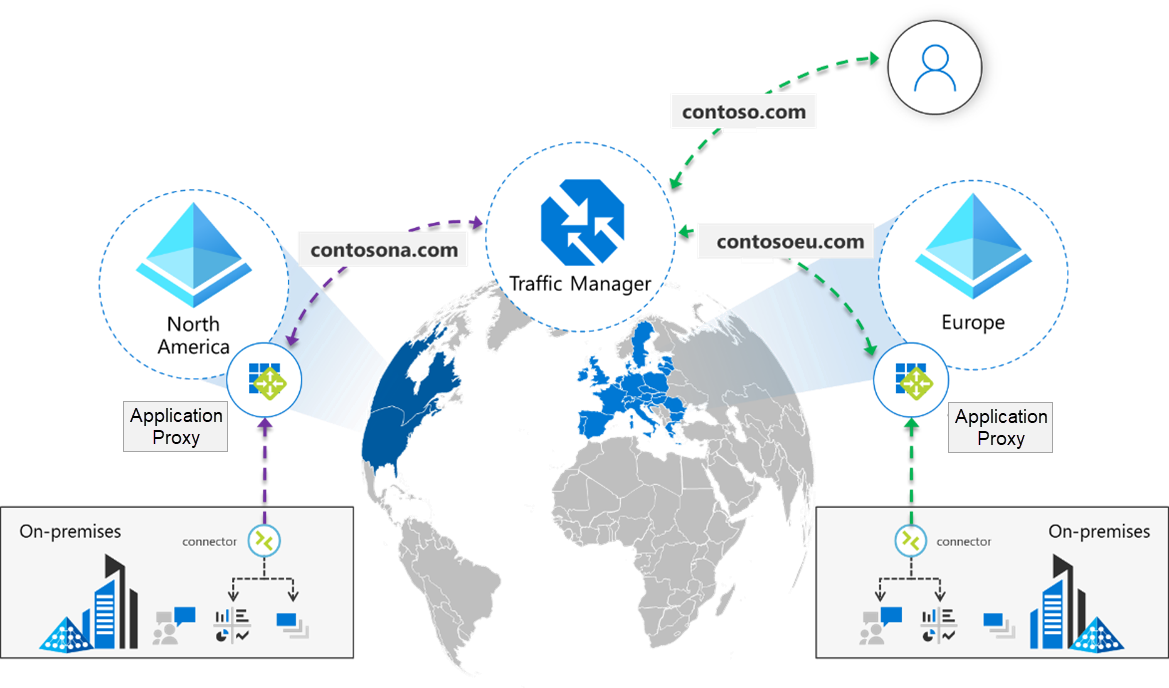
With the application proxy geo-routing feature, you can optimize which region of application proxy your connector groups use. You can combine this functionality with a Traffic Manager solution of your choice. This combination enables a fully dynamic geo-aware solution based on your user location. It unlocks the rich rule set of your preferred Traffic Manager solution to prioritize how traffic is routed to the apps that you help protect by using application proxy. With this combination, users can use a single URL to access the instance of the app that's closest to them.
Prerequisites
- A Traffic Manager solution.
- Apps that exist in different regions. Geo-routing is enabled per connector group colocated with the app.
- A custom domain to use for each app.
Configure application proxy
To use Traffic Manager, you must configure application proxy. The configuration steps that follow refer to these URL definitions:
- Regional URL: The application proxy endpoints for each app. For example,
nam.contoso.comandindia.contoso.com. - Alternate URL: The URL configured for the Traffic Manager solution. For example,
contoso.com.
To configure application proxy for Traffic Manager:
Install connectors for each location that contains your app instances. For each connector group, use the geo-routing feature to assign the connectors to their respective regions.
Set up your app instances with application proxy:
- For each app, upload a custom domain. Include the alternate URL to use for the apps as a subject alternative name (SAN) URL to the uploaded certificate.
- Assign each app to its respective connector group.
- If you prefer the alternate URL to be maintained throughout the user session, register each app and add the URL as a reply URL. This step is optional.
In the Traffic Manager solution, add the regional URLs for application proxy that you created for each app as endpoints.
Configure the Traffic Manager solution's load-balancing rules with a standard license.
To give your Traffic Manager solution a user-friendly URL, create a
CNAMErecord that points the alternate URL to the Traffic Manager solution's endpoint.Configure the alternate URL on the app by using the Microsoft Graph API to update the
alternateUrlproperty on theonPremisesPublishingresource type. ThealternateUrlproperty isn't available in the Microsoft Entra admin center. You must configure it by using the Graph API. For more information, see Update application.The following example shows the request body for setting
alternateUrl:PATCH https://microsoftgraph.chinacloudapi.cn/beta/applications/{id} Content-Type: application/json { "onPremisesPublishing": { "alternateUrl": "https://www.contoso.com" } }Note
The
onPremisesPublishingproperty can't be updated in the same request as other application properties.If you want the alternate URL to be maintained throughout the user session, set the
useAlternateUrlForTranslationAndRedirectflag totruein the sameonPremisesPublishingobject:PATCH https://microsoftgraph.chinacloudapi.cn/beta/applications/{id} Content-Type: application/json { "onPremisesPublishing": { "alternateUrl": "https://www.contoso.com", "useAlternateUrlForTranslationAndRedirect": true } }
Sample application proxy configuration
The following table shows a sample application proxy configuration. This configuration uses the sample app domain www.contoso.com as the alternate URL.
| North America-based app | India-based app | Additional information | |
|---|---|---|---|
| Internal URL | contoso.com |
contoso.com |
If the apps are hosted in different regions, you can use the same internal URL for each app. |
| External URL | nam.contoso.com |
india.contoso.com |
Configure a custom domain for each app. |
| Custom domain certificate | Domain Name System (DNS): nam.contoso.comSAN: www.contoso.com |
DNS: india.contoso.comSAN: www.contoso.com |
In the certificate that you upload for each app, set the SAN value to the alternate URL. The alternate URL is the URL that all users use to reach the app. |
| Connector group | North America Geo Group | India Geo Group | Ensure that you assign each app to the correct connector group by using the geo-routing functionality. |
| Redirects | (Optional) To maintain redirects for the alternate URL, add the application registration for the app. | (Optional) To maintain redirects for the alternate URL, add the application registration for the app. | This step is required if the alternate URL www.contoso.com will be maintained for all redirections. |
| Reply URL | www.contoso.com |
www.contoso.com |
Configure Traffic Manager
Follow these steps to configure Traffic Manager:
Create a Traffic Manager profile with your preferred routing rules.
In Traffic Manager, add the North America endpoint:
nam.contoso.com.Add the India endpoint:
india.contoso.com.Add the app proxy endpoints.
Add a
CNAMErecord to pointwww.contoso.comto the Traffic Manager solution's URL. For example, usecontoso.trafficmanager.cn. The alternate URL now points to the Traffic Manager solution.