Note
Access to this page requires authorization. You can try signing in or changing directories.
Access to this page requires authorization. You can try changing directories.
Update your Android Device policy resource to support automatically enabling browser access during device registration.
As announced in September 2024 and November 2025 in the What’s New in Microsoft Entra blog, we're automatically enabling browser access by default for Android users. This change is part of hardening all Microsoft products as part of the Secure Future Initiative. As part of this initiative, we're eliminating the mechanism to export device registration keys from device storage after registration completes.
This change means that users of Android devices will no longer be able to modify their browser access settings in Authenticator app or Company Portal after their device has been registered in Microsoft Entra ID. Instead, Android users have browser access enabled by default.
If you're an MDM provider
We request that you modify your Android Device policy resource to support enabling browser access during device registration. The policy resource is used to create and save groups of device and app management settings for your customers to apply to devices.
To enable browser access on behalf of your customers, you need to either create or modify an existing policy to provide a delegated certificate to the Authenticator app and Company Portal.
The following is an example of a policy:
Policy example for setting delegated scope CERT_INSTALL for authenticator
"applications": [{
    "packageName": "com.azure.authenticator"
    "installType": "REQUIRED_FOR_SETUP"
    "delegatedScopes": [
        "CERT_INSTALL"
      ]
}],
CERT_INSTALL - Grants access to certificate installation and management. - https://developer.android.com/reference/android/app/admin/DevicePolicyManager#DELEGATION_CERT_INSTALL
More information can be found here: Android MDM create and apply policy.
If you fail to make the requested change, your end users encounter the following behavior:
- If the device is registered in Microsoft Entra with Browser Access enabled
- No effect
- If the device is registered in Microsoft Entra but Browser Access isn't enabled:
- Access to CA-protected resources on a non Microsoft Edge browser will be blocked.
- If the user requires access to CA-protected resources on a web browser, they'll have to use Microsoft Edge.
- If the device is undergoing registration for the first time:
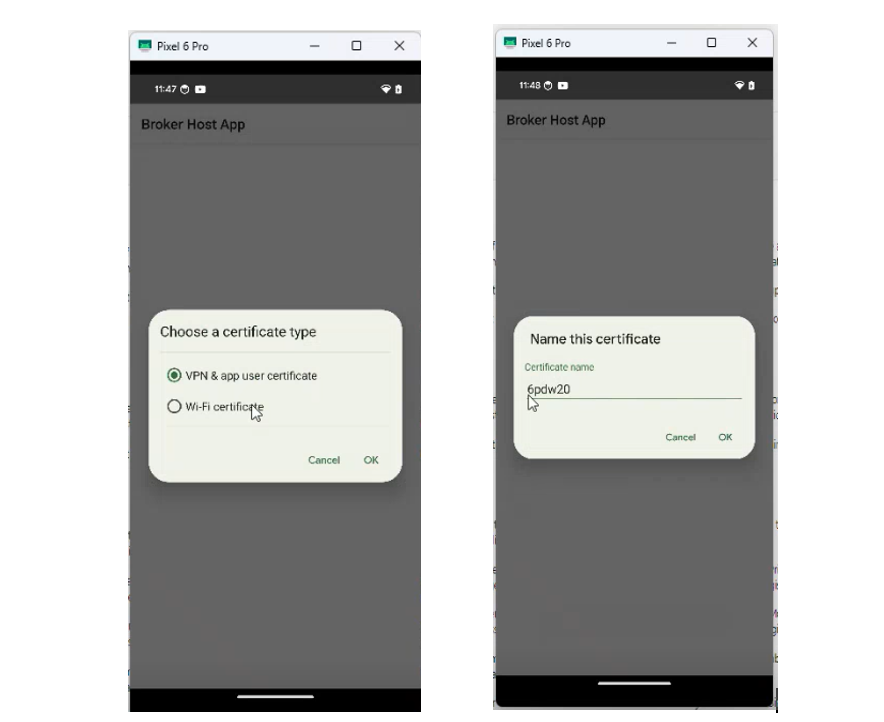
- The user is prompted to choose a certificate type and name their certificate as part of the registration flow.
- This certificate is used to enable browser access.
- Once this certificate is on the device, browser access is enabled, and the user can access CA-protected resources on any browser of their choice.