This article explains the steps needed to subscribe to events published by Azure Resource Notifications - AKS Resources. For detailed information about these events, see Azure Resource Notifications - AKS Resources events.
Create AKS Resources system topic
Set the account to the Azure subscription where you wish to create the system topic.
az account set -s AZURESUBSCRIPTIONID
Create a system topic of type microsoft.resourcenotifications.AKSResources using the az eventgrid system-topic create command.
az eventgrid system-topic create \
    --name SYSTEMTOPICNAME \
    --resource-group RESOURCEGROUPNAME \
    --source /subscriptions/AZURESUBSCRIPTIONID \
    --topic-type microsoft.resourcenotifications.AKSResources\
    --location Global
Set the account to the Azure subscription where you wish to create the system topic.
Set-AzContext -Subscription AZURESUBSCRIPTIONID
Create a system topic of type microsoft.resourcenotifications.AKSResources using the New-AzEventGridSystemTopic command.
New-AzEventGridSystemTopic`
  -name SYSTEMTOPICNAME`
  -resourcegroup RESOURCEGROUPNAME`
  -source /subscriptions/AZURESUBSCRIPTIONID -topictype microsoft.resourcenotifications.AKSResources`
  -location global
Sign into the Azure portal.
In the search bar, type Event Grid System Topics, and select it from the drop-down list.
On the Event Grid system topics page, select + Create on the toolbar.
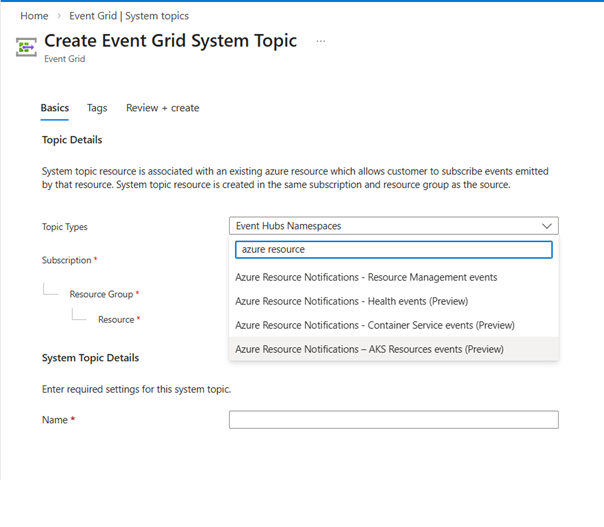
On the Create Event Grid System Topic page, select Azure Resource Notifications - AKS Resources events for Topic type.
Select the resource group in which you want to create the system topic.
Enter a name for the system topic.
Select Review + create
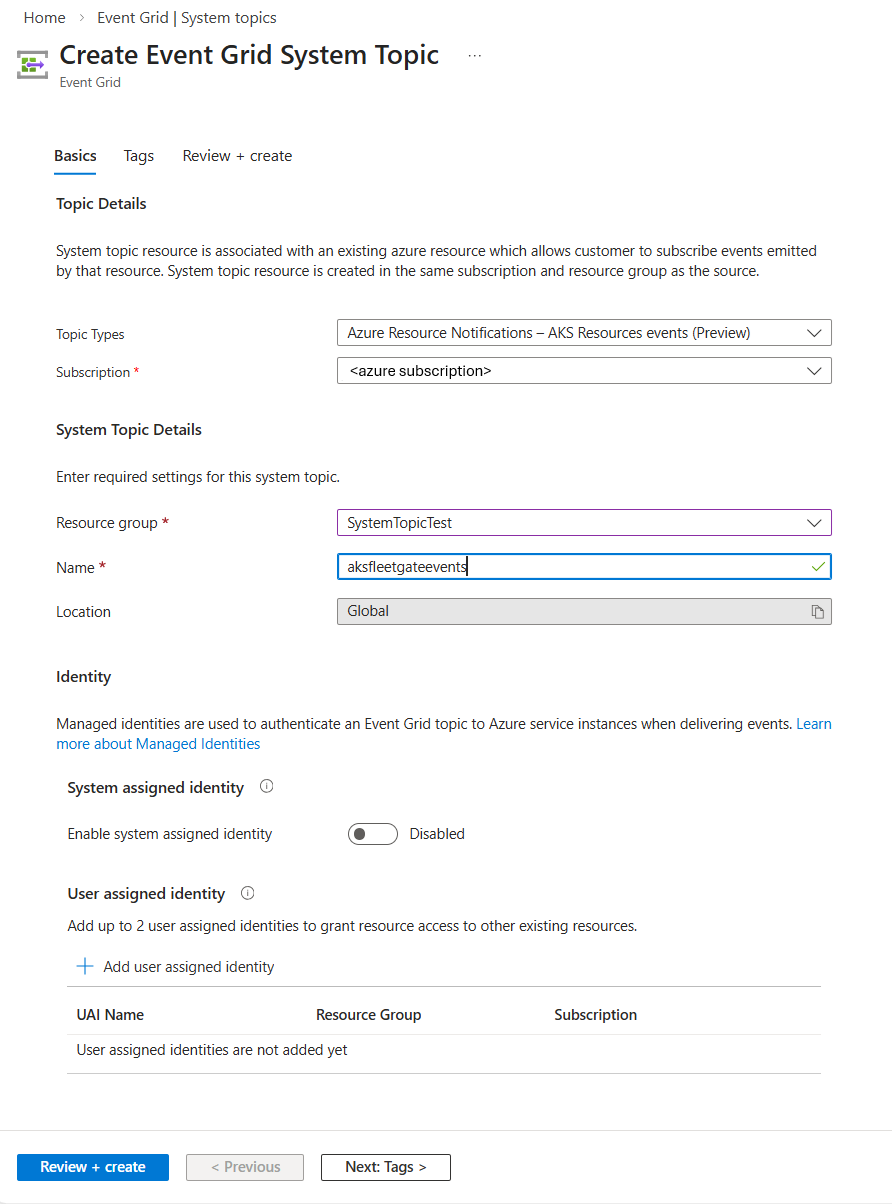
On the Review + create page, select Create.
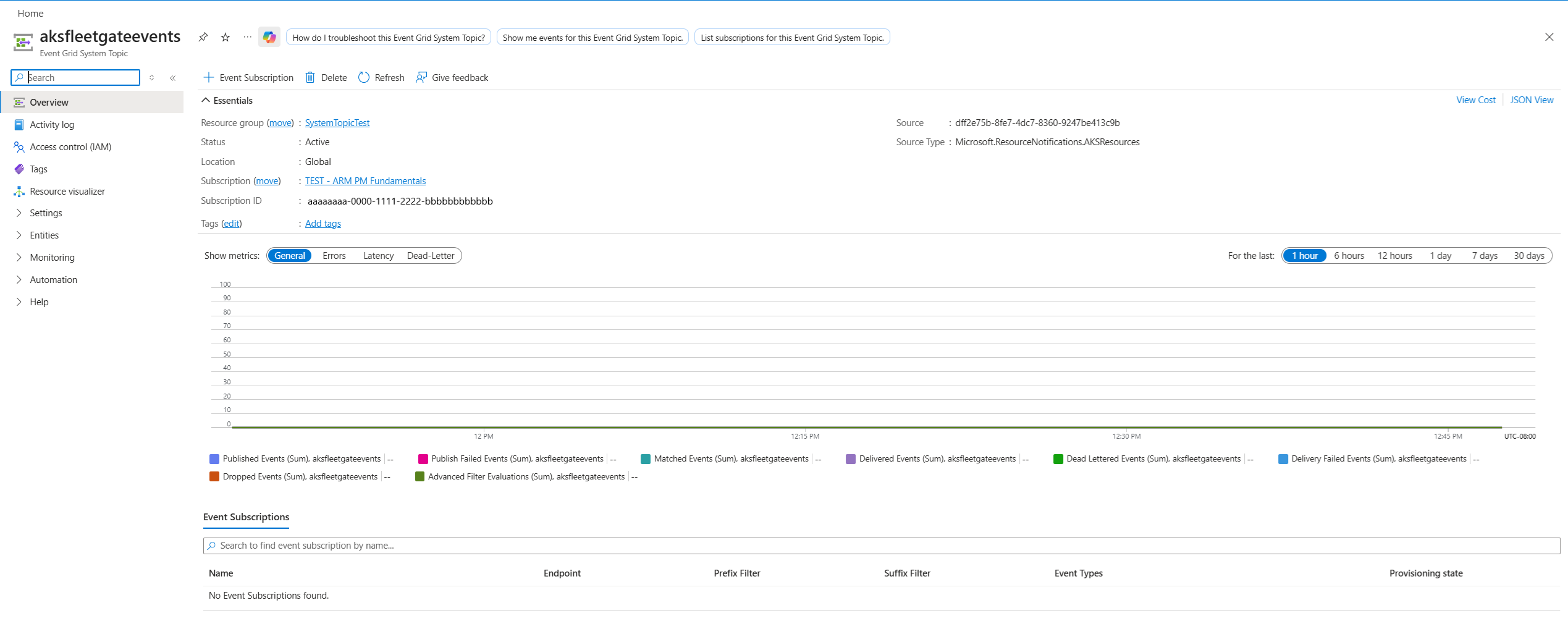
On the successful deployment page, select Go to resource to navigate to the page for your system topic. You see the details about your system topic on this page.
Subscribe to events
Create an event subscription for the above topic using the az eventgrid system-topic event-subscription create command.
The following sample command creates an event subscription for the FleetGateCreated event.
az eventgrid system-topic event-subscription create \
  --name stes-fleet-gates-sales-before-dev \
  --resource-group $GROUP \
  --system-topic-name stpc-aks-resource-notifications \
  --included-event-types Microsoft.ResourceNotifications.AKSResources.FleetGateCreated \
  --advanced-filter data.resourceInfo.properties.target.id StringContains "fleets/flt-mgr-approvals-01" \
  --advanced-filter data.resourceInfo.properties.gateType StringIn Approval \
  --advanced-filter data.resourceInfo.properties.state StringIn Pending \
  --advanced-filter data.resourceInfo.properties.displayName StringContains "Check with sales teams" \
  --advanced-filter data.resourceInfo.properties.target.updateRunProperties.timing StringIn Before \
  --advanced-filter data.resourceInfo.properties.target.updateRunProperties.stage StringIn Dev \
  --endpoint-type azurefunction \
  --endpoint /subscriptions/$SUBSCRIPTION_ID/resourceGroups/$GROUP/providers/Microsoft.Web/sites/fap-process-fleet-events/functions/fa-handle-pre-dev-events \
  --max-delivery-attempts 10 \
  --event-ttl 120
If you don't specify included-event-types, all the event types are included by default.
To filter events from a specific resource, use the --subject-begins-with parameter. The example shows how to subscribe to FleetGateUpdated events for resources in a specified resource group.
az eventgrid system-topic event-subscription create \
  --name EVENTSUBSCRIPTIONNAME \
  --resource-group RESOURCEGROUPNAME \
  --system-topic-name SYSTEMTOPICNAME \
  --included-event-types Microsoft.ResourceNotifications.AKSResources.FleetGateUpdated \
  --advanced-filter data.resourceInfo.properties.target.id StringContains "fleets/flt-mgr-approvals-01" \
  --endpoint /subscriptions/$SUBSCRIPTION_ID/resourceGroups/$GROUP/providers/Microsoft.Web/sites/fap-process-fleet-events/functions/fa-handle-pre-dev-events \
  --endpoint-type azurefunction \
  --subject-begins-with /subscriptions/AZURESUBSCRIPTIONID/resourceGroups/RESOURCEGROUPNAME/
Create an event subscription for the above topic using the New-AzEventGridSystemTopicEventSubscription command.
The following sample command creates an event subscription for the FleetGateCreated event.
New-AzEventGridSubscription `
  -EventSubscriptionName "stes-fleet-gates-sales-before-dev" `
  -Scope "/subscriptions/$SUBSCRIPTION_ID/resourceGroups/$GROUP/providers/Microsoft.EventGrid/systemTopics/stpc-aks-resource-notifications" `
  -IncludedEventType @("Microsoft.ResourceNotifications.AKSResources.FleetGateCreated") `
  -AdvancedFilter @(
    (New-AzEventGridAdvancedFilterObject -StringContainsAdvancedFilter -Key "data.resourceInfo.properties.target.id" -Value @("fleets/flt-mgr-approvals-01")),
    (New-AzEventGridAdvancedFilterObject -StringInAdvancedFilter -Key "data.resourceInfo.properties.gateType" -Value @("Approval")),
    (New-AzEventGridAdvancedFilterObject -StringInAdvancedFilter -Key "data.resourceInfo.properties.state" -Value @("Pending")),
    (New-AzEventGridAdvancedFilterObject -StringContainsAdvancedFilter -Key "data.resourceInfo.properties.displayName" -Value @("Check with sales teams")),
    (New-AzEventGridAdvancedFilterObject -StringInAdvancedFilter -Key "data.resourceInfo.properties.target.updateRunProperties.timing" -Value @("Before")),
    (New-AzEventGridAdvancedFilterObject -StringInAdvancedFilter -Key "data.resourceInfo.properties.target.updateRunProperties.stage" -Value @("Dev"))
  ) `
  -EndpointType AzureFunction `
  -Endpoint "/subscriptions/$SUBSCRIPTION_ID/resourceGroups/$GROUP/providers/Microsoft.Web/sites/fap-process-fleet-events/functions/fa-handle-pre-dev-events" `
  -MaxDeliveryAttempt 10
If you don’t specify -IncludedEventType, all event types are included by default
To filter events from a specific resource, use the -SubjectBeginsWith parameter. The example shows how to subscribe to FleetGateUpdated events for resources in a specified resource group.
New-AzEventGridSubscription `
  -EventSubscriptionName "EVENTSUBSCRIPTIONNAME" `
  -Scope "/subscriptions/AZURESUBSCRIPTIONID/resourceGroups/RESOURCEGROUPNAME/providers/Microsoft.EventGrid/systemTopics/SYSTEMTOPICNAME" `
  -IncludedEventType @("Microsoft.ResourceNotifications.AKSResources.FleetGateUpdated") `
  -AdvancedFilter @(
    (New-AzEventGridAdvancedFilterObject -StringContainsAdvancedFilter -Key "data.resourceInfo.properties.target.id" -Value @("fleets/flt-mgr-approvals-01"))
  ) `
  -EndpointType AzureFunction `
  -Endpoint "/subscriptions/$SUBSCRIPTION_ID/resourceGroups/$GROUP/providers/Microsoft.Web/sites/fap-process-fleet-events/functions/fa-handle-pre-dev-events" `
  -SubjectBeginsWith "/subscriptions/AZURESUBSCRIPTIONID/resourceGroups/RESOURCEGROUPNAME/"
On the Event Grid System Topic page, select + Event Subscription on the toolbar.
Confirm that the Topic Type, Source Resource, and Topic Name are automatically populated.
Enter a name for the event subscription.
For Filter to event types, select the event, for example, FleetGateCreated.
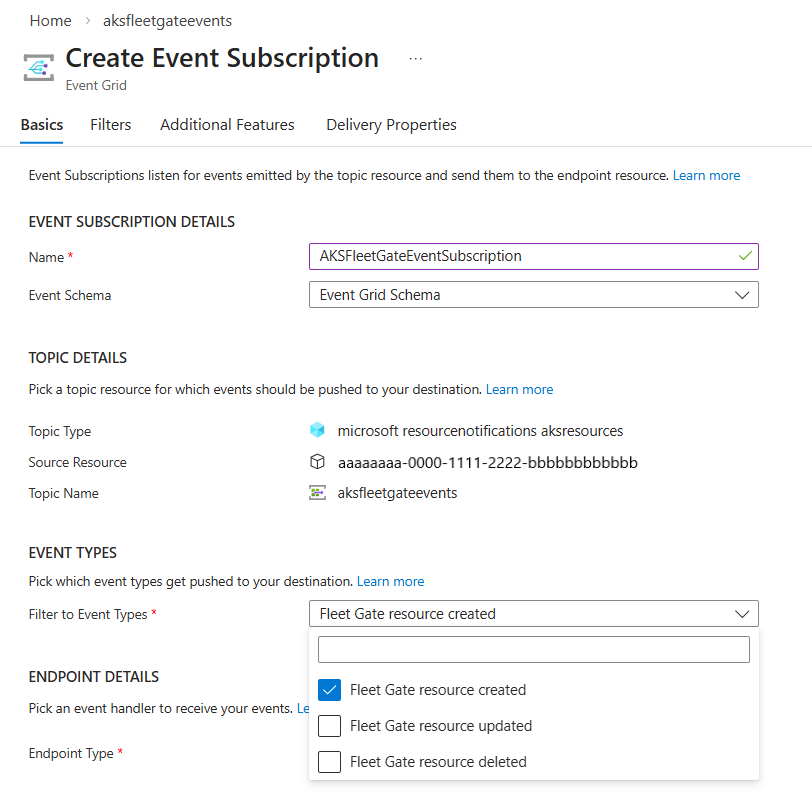
Select endpoint type.
Configure event handler based on the endpoint type you selected. In the following example, an Azure event hub is selected.
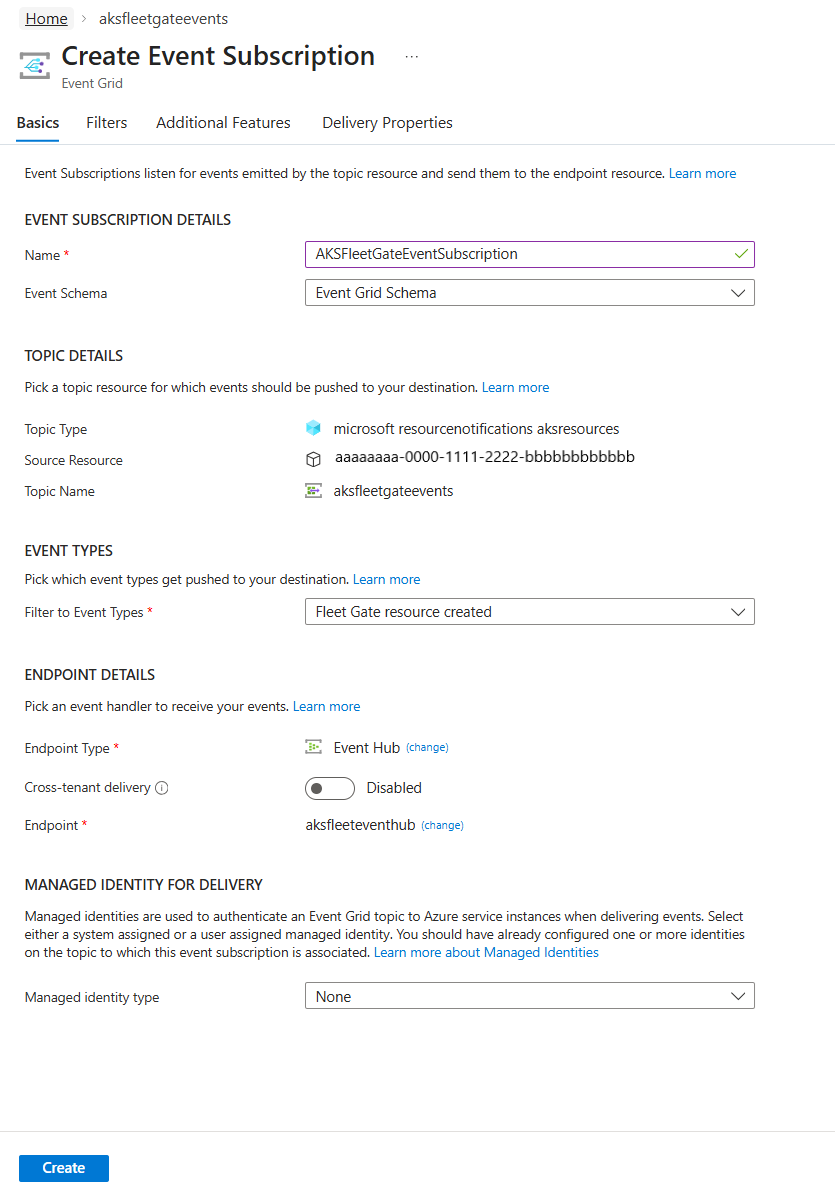
Select the Filters tab to provide subject filtering and advanced filtering. For example, to filter for events from resources in a specific resource group, follow these steps:
Select Enable subject filtering.
In the Subject Filters section, for Subject begins with, provide the value of the resource group in this format: /subscriptions/{subscription-id}/resourceGroups/{resourceGroup-id}.
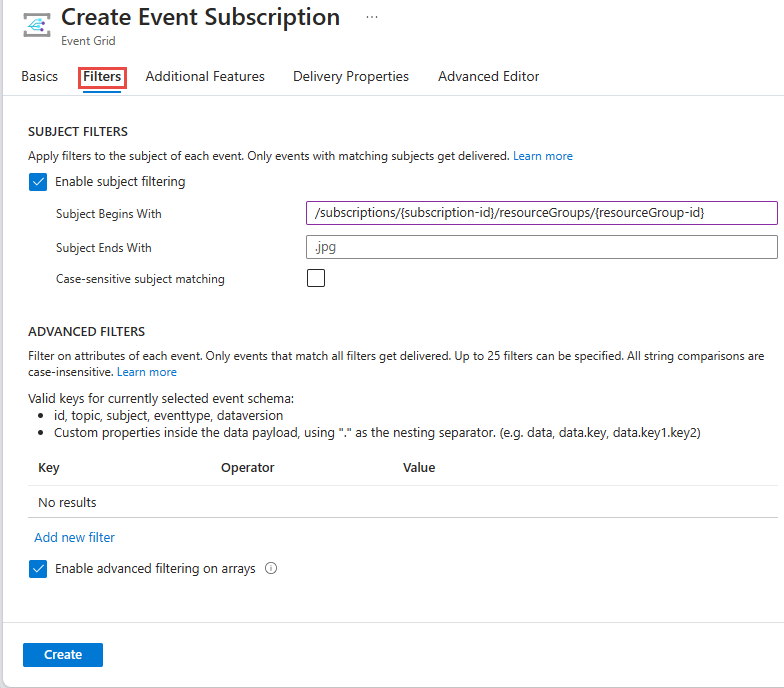
Then, select Create to create the event subscription.
Delete event subscription and system topic
To delete the event subscription, use the az eventgrid system-topic event-subscription delete command. Here's an example:
az eventgrid system-topic event-subscription delete \
   --name EVENTSUBSCRIPTIONNAME \
   --resourcegroup RESOURCEGROUPNAME \
  --system-topic-name SYSTEMTOPICNAME
To delete the system topic, use the az eventgrid system-topic delete command. Here's an example:
az eventgrid system-topic delete \
  --name SYSTEMTOPICNAME \
  --resource-group RESOURCEGROUPNAME
To delete an event subscription, use the Remove-AzEventGridSystemTopicEventSubscription command. Here's an example:
Remove-AzEventGridSystemTopicEventSubscription`
       -EventSubscriptionName EVENTSUBSCRIPTIONNAME`
       -ResourceGroupName RESOURCEGROUPNAME`
       -SystemTopicName SYSTEMTOPICNAME
To delete the system topic, use the Remove-AzEventGridSystemTopic command. Here's an example:
Remove-AzEventGridSystemTopic -ResourceGroupName RESOURCEGROUPNAME -Name SYSTEMTOPICNAME
- Sign in to the Azure portal.
- In the search bar, type Event Grid System Topics, and press ENTER.
- Select the system topic.
- On the Event Grid System Topic page, select Delete on the toolbar.
Filtering examples
Subscribe to Gate creation events to be notified of pending approvals.
You might want to route approvals to different people or teams. To achieve that, you can set up multiple subscriptions to the Event Grid System Topic, with different filters for each one. For example, if you have a team's clusters in a single update run group, you can filter on that group and set the endpoint to their Azure function which runs a post-update health check:
az eventgrid system-topic event-subscription create \
  --name fleet-approvals-group-subscription \
  --resource-group <resource-group> \
  --system-topic-name system-topic-aksresources \
  --included-event-types Microsoft.ResourceNotifications.AKSResources.FleetGateCreated \
  --advanced-filter data.resourceInfo.properties.gateType StringIn Approval \
  --advanced-filter data.resourceInfo.properties.state StringIn Pending \
  --advanced-filter data.resourceInfo.properties.target.updateRunProperties.timing StringIn After \
  --advanced-filter data.resourceInfo.properties.target.updateRunProperties.group StringIn teamName-group \
  --endpoint-type azurefunction \
  --endpoint /subscriptions/$SUBSCRIPTION_ID/resourceGroups/$RESOURCEGROUP/providers/Microsoft.Web/sites/teamname/functions/health-check
You can also use the gate displayName as a filter for events:
az eventgrid system-topic event-subscription create \
  --name fleet-approvals-group-subscription \
  --resource-group <resource-group> \
  --system-topic-name system-topic-aksresources \
  --included-event-types Microsoft.ResourceNotifications.AKSResources.FleetGateCreated \
  --advanced-filter data.resourceInfo.properties.gateType StringIn Approval \
  --advanced-filter data.resourceInfo.properties.state StringIn Pending \
  --advanced-filter data.resourceInfo.properties.displayName StringContains "Check with sales teams" \
  --endpoint-type eventhub \
  --endpoint /subscriptions/$SUBSCRIPTION_ID/resourceGroups/$RESOURCEGROUP/providers/Microsoft.EventHub/namespaces/EVENTHUBNAMESPACE/eventhubs/EVENTHUBNAME
New-AzEventGridSubscription `
  -EventSubscriptionName "fleet-approvals-group-subscription" `
  -Scope "/subscriptions/<subscription-id>/resourceGroups/<resource-group>/providers/Microsoft.EventGrid/systemTopics/system-topic-aksresources" `
  -IncludedEventType @("Microsoft.ResourceNotifications.AKSResources.FleetGateCreated") `
  -AdvancedFilter @(
    (New-AzEventGridAdvancedFilterObject -StringInAdvancedFilter `
        -Key   "data.resourceInfo.properties.gateType" `
        -Value @("Approval")
    ),
    (New-AzEventGridAdvancedFilterObject -StringInAdvancedFilter `
        -Key   "data.resourceInfo.properties.state" `
        -Value @("Pending")
    ),
    (New-AzEventGridAdvancedFilterObject -StringInAdvancedFilter `
        -Key   "data.resourceInfo.properties.target.updateRunProperties.timing" `
        -Value @("After")
    ),
    (New-AzEventGridAdvancedFilterObject -StringInAdvancedFilter `
        -Key   "data.resourceInfo.properties.target.updateRunProperties.group" `
        -Value @("teamName-group")
    )
  ) `
  -EndpointType AzureFunction `
  -Endpoint "/subscriptions/<subscription-id>/resourceGroups/<resource-group>/providers/Microsoft.Web/sites/teamname/functions/health-check"
You can also use the gate displayName as a filter for events:
New-AzEventGridSubscription `
  -EventSubscriptionName "fleet-approvals-group-subscription" `
  -Scope "/subscriptions/<subscription-id>/resourceGroups/<resource-group>/providers/Microsoft.EventGrid/systemTopics/system-topic-aksresources" `
  -IncludedEventType @("Microsoft.ResourceNotifications.AKSResources.FleetGateCreated") `
  -AdvancedFilter @(
    (New-AzEventGridAdvancedFilterObject -StringInAdvancedFilter `
        -Key   "data.resourceInfo.properties.gateType" `
        -Value @("Approval")
    ),
    (New-AzEventGridAdvancedFilterObject -StringInAdvancedFilter `
        -Key   "data.resourceInfo.properties.state" `
        -Value @("Pending")
    ),
    (New-AzEventGridAdvancedFilterObject -StringContainsAdvancedFilter `
        -Key   "data.resourceInfo.properties.displayName" `
        -Value @("Check with sales teams")
    )
  ) `
  -EndpointType EventHub `
Choose FleetGateCreated as the event type.
In the Filters tab of the event subscription, choose the following advanced filters.
Key = data.resourceInfo.properties.gateType
Operator = String contains
Value = Approval

        AND

Key = data.resourceInfo.properties.state
Operator = String contains
Value = Pending

        AND

Key = data.resourceInfo.properties.displayName
Operator = String contains
Value = Check with sales teams
If you have any questions or feedback on this feature, don't hesitate to reach us at this stackoverflow link
To better assist you with specific feedback about a certain event, provide the following information:
For missing events:
- System topic type name
- Approximate timestamp in UTC when the operation was executed
- Base resource ID for which the notification was generated
- Navigate to your resource in Azure portal and select JSON view at the far right corner. Resource ID is the first field on the JSON view page.
- Expected event type
- Operation executed (for example, VM started or stopped, Storage account created etc.)
- Description of issue encountered (for example, VM started and no Microsoft.ResourceNotifications.HealthResources.AvailabilityStatusChanged event generated)
- If possible, provide the correlation ID of operation executed
For event that was delayed or has unexpected content
- System topic type name
- Entire contents of the notification excluding data.resourceInfo.properties
- Description of issue encountered and impacted field values
Ensure that you aren't providing any end user identifiable information while you're sharing this data.
Next steps
For detailed information about these events, see Azure Resource Notifications - AKS Resources events.
