Note
Access to this page requires authorization. You can try signing in or changing directories.
Access to this page requires authorization. You can try changing directories.
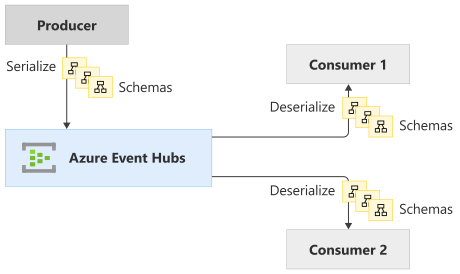
Event streaming and messaging scenarios often deal with structured data in the event or message payload. However, the structured data is of little value to the event broker, which only deals with bytes. Schema-driven formats such as Apache Avro, JSONSchema, or Protobuf are often used to serialize or deserialize such structured data to/from binary.
An event producer uses a schema definition to serialize the event payload and publish it to an event broker such as Event Hubs. Event consumers read the event payload from the broker and deserialize it by using the same schema definition.
Both producers and consumers can validate the integrity of the data by using the same schema.
What is Azure Schema Registry?
Azure Schema Registry is a feature of Event Hubs that provides a central repository for schemas for event-driven and messaging-centric applications. It provides the flexibility for your producer and consumer applications to exchange data without having to manage and share the schema. It also provides a simple governance framework for reusable schemas and defines relationship between schemas through a logical grouping construct (schema groups).
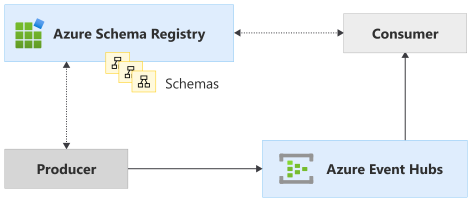
With schema-driven serialization frameworks like Apache Avro, JSONSchema, and Protobuf, moving serialization metadata into shared schemas can also help reduce the per-message overhead. Each message doesn't need to include the metadata (type information and field names) as it does with tagged formats such as JSON.
Note
The feature is available in the Standard, Premium tier.
Storing schemas alongside the events and inside the eventing infrastructure ensures that the metadata required for serialization or deserialization is always available and schemas can't be misplaced.
Related content
- To learn more about Azure Schema registry, see Azure Schema Registry Concepts.
- To learn how to create a schema registry using the Azure portal, see Create an Event Hubs schema registry using the Azure portal.
- See the following Schema Registry Avro client library samples.