Note
Access to this page requires authorization. You can try signing in or changing directories.
Access to this page requires authorization. You can try changing directories.
Applies to: ✔️ Front Door Standard ✔️ Front Door Premium
This quickstart shows you how to use an Azure Resource Manager (ARM) template to create an Azure Front Door with an Azure Web App as the origin.
An Azure Resource Manager template is a JavaScript Object Notation (JSON) file that defines the infrastructure and configuration for your project. The template uses declarative syntax. You describe your intended deployment without writing the sequence of programming commands to create the deployment.
If you meet the prerequisites and are familiar with Azure Resource Manager templates, select the Deploy to Azure button to open the template in the Azure portal.

Prerequisites
- An Azure subscription. Create a Trial if you don't have one.
- The IP address or fully qualified domain name (FQDN) of a website or web application.
Review the template
This quickstart uses a template from Azure Quickstart Templates.
In this quickstart, you create an Azure Front Door Standard/Premium, an App Service, and configure the App Service to validate that traffic comes through the Azure Front Door origin.
{
  "$schema": "https://schema.management.azure.com/schemas/2019-04-01/deploymentTemplate.json#",
  "contentVersion": "1.0.0.0",
  "metadata": {
    "_generator": {
      "name": "bicep",
      "version": "0.5.6.12127",
      "templateHash": "1359495056007144414"
    }
  },
  "parameters": {
    "location": {
      "type": "string",
      "defaultValue": "[resourceGroup().location]",
      "metadata": {
        "description": "The location into which regionally scoped resources should be deployed. Note that Front Door is a global resource."
      }
    },
    "appName": {
      "type": "string",
      "defaultValue": "[format('myapp-{0}', uniqueString(resourceGroup().id))]",
      "metadata": {
        "description": "The name of the App Service application to create. This must be globally unique."
      }
    },
    "appServicePlanSkuName": {
      "type": "string",
      "defaultValue": "S1",
      "metadata": {
        "description": "The name of the SKU to use when creating the App Service plan."
      }
    },
    "appServicePlanCapacity": {
      "type": "int",
      "defaultValue": 1,
      "metadata": {
        "description": "The number of worker instances of your App Service plan that should be provisioned."
      }
    },
    "frontDoorEndpointName": {
      "type": "string",
      "defaultValue": "[format('afd-{0}', uniqueString(resourceGroup().id))]",
      "metadata": {
        "description": "The name of the Front Door endpoint to create. This must be globally unique."
      }
    },
    "frontDoorSkuName": {
      "type": "string",
      "defaultValue": "Standard_AzureFrontDoor",
      "allowedValues": [
        "Standard_AzureFrontDoor",
        "Premium_AzureFrontDoor"
      ],
      "metadata": {
        "description": "The name of the SKU to use when creating the Front Door profile."
      }
    }
  },
  "variables": {
    "appServicePlanName": "AppServicePlan",
    "frontDoorProfileName": "MyFrontDoor",
    "frontDoorOriginGroupName": "MyOriginGroup",
    "frontDoorOriginName": "MyAppServiceOrigin",
    "frontDoorRouteName": "MyRoute"
  },
  "resources": [
    {
      "type": "Microsoft.Cdn/profiles",
      "apiVersion": "2021-06-01",
      "name": "[variables('frontDoorProfileName')]",
      "location": "global",
      "sku": {
        "name": "[parameters('frontDoorSkuName')]"
      }
    },
    {
      "type": "Microsoft.Web/serverfarms",
      "apiVersion": "2020-06-01",
      "name": "[variables('appServicePlanName')]",
      "location": "[parameters('location')]",
      "sku": {
        "name": "[parameters('appServicePlanSkuName')]",
        "capacity": "[parameters('appServicePlanCapacity')]"
      },
      "kind": "app"
    },
    {
      "type": "Microsoft.Web/sites",
      "apiVersion": "2020-06-01",
      "name": "[parameters('appName')]",
      "location": "[parameters('location')]",
      "kind": "app",
      "identity": {
        "type": "SystemAssigned"
      },
      "properties": {
        "serverFarmId": "[resourceId('Microsoft.Web/serverfarms', variables('appServicePlanName'))]",
        "httpsOnly": true,
        "siteConfig": {
          "detailedErrorLoggingEnabled": true,
          "httpLoggingEnabled": true,
          "requestTracingEnabled": true,
          "ftpsState": "Disabled",
          "minTlsVersion": "1.2",
          "ipSecurityRestrictions": [
            {
              "tag": "ServiceTag",
              "ipAddress": "AzureFrontDoor.Backend",
              "action": "Allow",
              "priority": 100,
              "headers": {
                "x-azure-fdid": [
                  "[reference(resourceId('Microsoft.Cdn/profiles', variables('frontDoorProfileName'))).frontDoorId]"
                ]
              },
              "name": "Allow traffic from Front Door"
            }
          ]
        }
      },
      "dependsOn": [
        "[resourceId('Microsoft.Web/serverfarms', variables('appServicePlanName'))]",
        "[resourceId('Microsoft.Cdn/profiles', variables('frontDoorProfileName'))]"
      ]
    },
    {
      "type": "Microsoft.Cdn/profiles/afdEndpoints",
      "apiVersion": "2021-06-01",
      "name": "[format('{0}/{1}', variables('frontDoorProfileName'), parameters('frontDoorEndpointName'))]",
      "location": "global",
      "properties": {
        "enabledState": "Enabled"
      },
      "dependsOn": [
        "[resourceId('Microsoft.Cdn/profiles', variables('frontDoorProfileName'))]"
      ]
    },
    {
      "type": "Microsoft.Cdn/profiles/originGroups",
      "apiVersion": "2021-06-01",
      "name": "[format('{0}/{1}', variables('frontDoorProfileName'), variables('frontDoorOriginGroupName'))]",
      "properties": {
        "loadBalancingSettings": {
          "sampleSize": 4,
          "successfulSamplesRequired": 3
        },
        "healthProbeSettings": {
          "probePath": "/",
          "probeRequestType": "HEAD",
          "probeProtocol": "Http",
          "probeIntervalInSeconds": 100
        }
      },
      "dependsOn": [
        "[resourceId('Microsoft.Cdn/profiles', variables('frontDoorProfileName'))]"
      ]
    },
    {
      "type": "Microsoft.Cdn/profiles/originGroups/origins",
      "apiVersion": "2021-06-01",
      "name": "[format('{0}/{1}/{2}', variables('frontDoorProfileName'), variables('frontDoorOriginGroupName'), variables('frontDoorOriginName'))]",
      "properties": {
        "hostName": "[reference(resourceId('Microsoft.Web/sites', parameters('appName'))).defaultHostName]",
        "httpPort": 80,
        "httpsPort": 443,
        "originHostHeader": "[reference(resourceId('Microsoft.Web/sites', parameters('appName'))).defaultHostName]",
        "priority": 1,
        "weight": 1000
      },
      "dependsOn": [
        "[resourceId('Microsoft.Web/sites', parameters('appName'))]",
        "[resourceId('Microsoft.Cdn/profiles/originGroups', variables('frontDoorProfileName'), variables('frontDoorOriginGroupName'))]"
      ]
    },
    {
      "type": "Microsoft.Cdn/profiles/afdEndpoints/routes",
      "apiVersion": "2021-06-01",
      "name": "[format('{0}/{1}/{2}', variables('frontDoorProfileName'), parameters('frontDoorEndpointName'), variables('frontDoorRouteName'))]",
      "properties": {
        "originGroup": {
          "id": "[resourceId('Microsoft.Cdn/profiles/originGroups', variables('frontDoorProfileName'), variables('frontDoorOriginGroupName'))]"
        },
        "supportedProtocols": [
          "Http",
          "Https"
        ],
        "patternsToMatch": [
          "/*"
        ],
        "forwardingProtocol": "HttpsOnly",
        "linkToDefaultDomain": "Enabled",
        "httpsRedirect": "Enabled"
      },
      "dependsOn": [
        "[resourceId('Microsoft.Cdn/profiles/afdEndpoints', variables('frontDoorProfileName'), parameters('frontDoorEndpointName'))]",
        "[resourceId('Microsoft.Cdn/profiles/originGroups/origins', variables('frontDoorProfileName'), variables('frontDoorOriginGroupName'), variables('frontDoorOriginName'))]",
        "[resourceId('Microsoft.Cdn/profiles/originGroups', variables('frontDoorProfileName'), variables('frontDoorOriginGroupName'))]"
      ]
    }
  ],
  "outputs": {
    "appServiceHostName": {
      "type": "string",
      "value": "[reference(resourceId('Microsoft.Web/sites', parameters('appName'))).defaultHostName]"
    },
    "frontDoorEndpointHostName": {
      "type": "string",
      "value": "[reference(resourceId('Microsoft.Cdn/profiles/afdEndpoints', variables('frontDoorProfileName'), parameters('frontDoorEndpointName'))).hostName]"
    }
  }
}
The template defines multiple Azure resources:
- Microsoft.Web/serverfarms (App service plan to host web apps)
- Microsoft.Web/sites (Web app origin servicing request for Azure Front Door)
Deploy the template
Open Azure Cli.
Note
To deploy Azure Front Door Premium instead of Standard, substitute the value of the
skuparameter withPremium_AzureFrontDoor. For a detailed comparison, see Azure Front Door tier comparison.$projectName = Read-Host -Prompt "Enter a project name that is used for generating resource names" $location = Read-Host -Prompt "Enter the location (i.e. chinanorth3)" $templateUri = "https://raw.githubusercontent.com/Azure/azure-quickstart-templates/master/quickstarts/microsoft.cdn/front-door-standard-premium-app-service-public/azuredeploy.json" $resourceGroupName = "${projectName}rg" New-AzResourceGroup -Name $resourceGroupName -Location "$location" New-AzResourceGroupDeployment -ResourceGroupName $resourceGroupName -TemplateUri $templateUri -frontDoorSkuName Standard_AzureFrontDoor Read-Host -Prompt "Press [ENTER] to continue ..."Wait until you see the prompt from the console.
Select Copy in the previous code block to copy the PowerShell script.
Right-click the shell console pane and then select Paste.
Enter the values.
The template deployment creates an Azure Front Door with a web app as origin.
The resource group name is the project name with rg appended.
Note
frontDoorName needs to be a globally unique name for the template to deploy successfully. If deployment fails, start over with Step 1.
It takes a few minutes to deploy the template. When completed, the output is similar to:
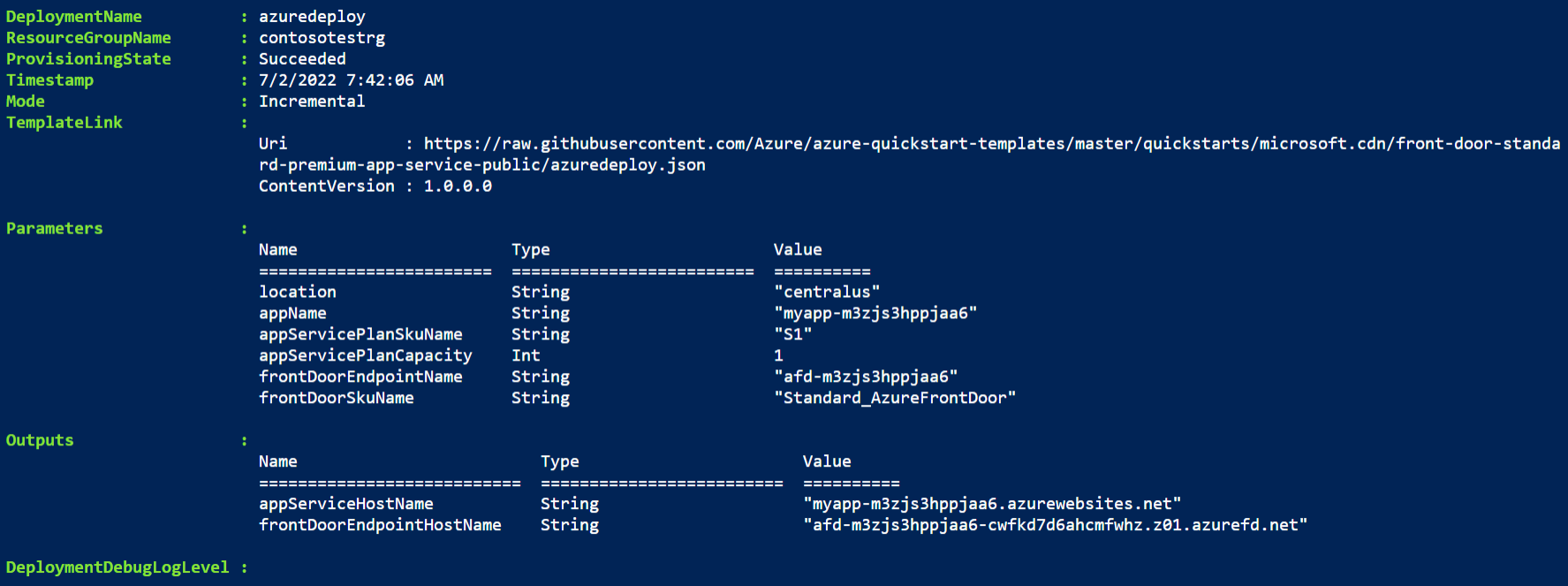
Azure PowerShell is used to deploy the template. In addition to Azure PowerShell, you can also use the Azure portal, Azure CLI, and REST API. To learn about other deployment methods, see Deploy templates.
Validate the deployment
Sign in to the Azure portal.
Select Resource groups from the left pane.
Select the resource group that you created in the previous section. The default resource group name is the project name with rg appended.
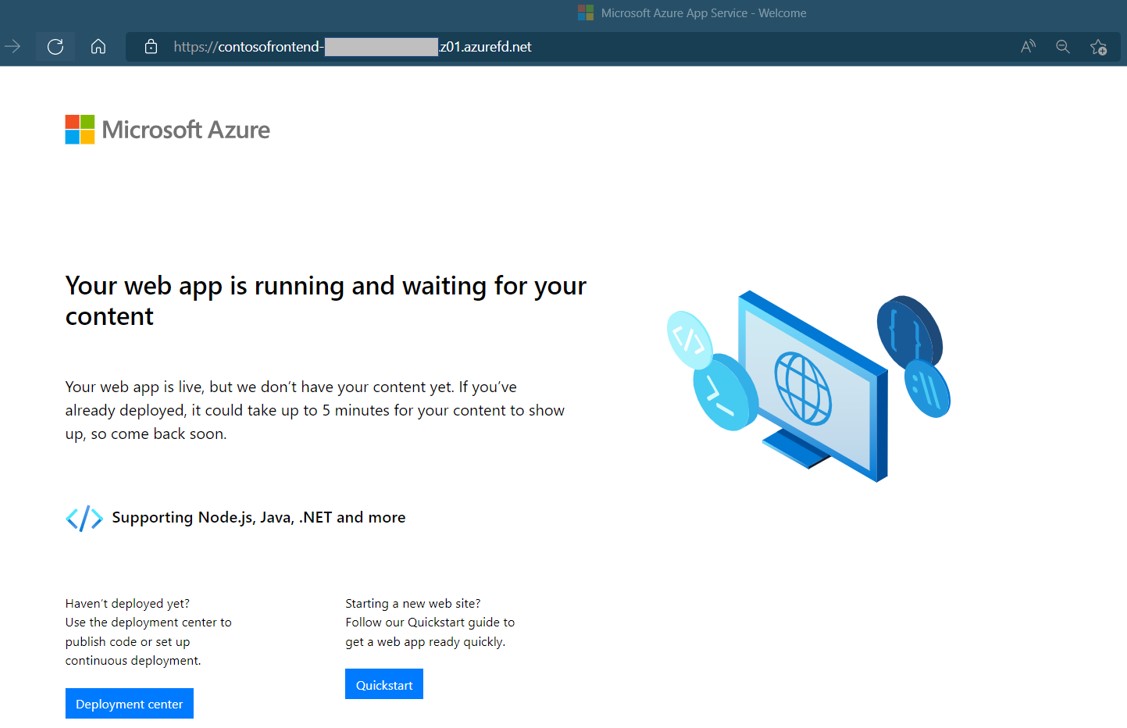
Select the Azure Front Door you created previously to see the endpoint hostname. Copy the hostname and paste it into the address bar of a browser. Press enter and your request automatically routes to the web app.
Clean up resources
When you no longer need the Azure Front Door service, delete the resource group. This action removes the Azure Front Door and all related resources.
To delete the resource group, call the Remove-AzResourceGroup cmdlet:
Remove-AzResourceGroup -Name <your resource group name>