Note
Access to this page requires authorization. You can try signing in or changing directories.
Access to this page requires authorization. You can try changing directories.
Applies to:  IoT Edge 1.6
Important
IoT Edge 1.6 LTS is the supported release. IoT Edge 1.5 LTS support ends on November 10, 2026; IoT Edge 1.4 LTS reached end of life on November 12, 2024. If you're using an earlier release, see Update IoT Edge.
In Industrial IoT (IIoT) scenarios, you might want to use IoT Edge and completely isolate your network from internet traffic. You achieve this by using different Azure services. The following diagram shows a reference architecture for a factory network scenario.
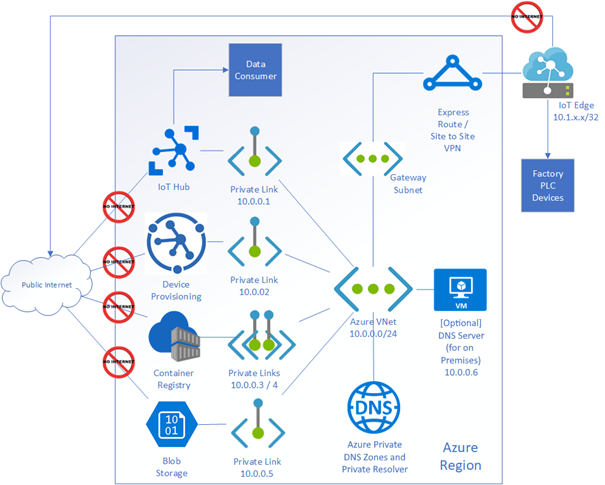
In the preceding diagram, the network for the IoT Edge device and the PaaS services is isolated from internet traffic. ExpressRoute or a Site-to-Site VPN creates an encrypted tunnel for traffic between on-premises and Azure by using Azure Private Link service. Azure IoT services like IoT Hub, Device Provisioning Service (DPS), Container Registry, and Blob Storage all support Private Link.
ExpressRoute
ExpressRoute lets you extend your on-premises networks into the Microsoft cloud over a private connection with a connectivity provider. In IIoT, connection reliability for devices at the edge to the cloud can be important, and ExpressRoute meets this need with a connection uptime SLA (service level agreement). To learn more about how Azure ExpressRoute provides secure connectivity for edge devices in a private network, see What is Azure ExpressRoute?
Azure Private Link
Azure Private Link lets you use Azure PaaS services and Azure-hosted customer-owned or partner services over a private endpoint in your virtual network. You can use your services running in Azure over ExpressRoute private peering, Site-to-Site (S2S) VPN, and peered virtual networks. In IIoT, private links give you flexibility to connect devices in different regions. With a private endpoint, you can disable access to the external PaaS resource and configure to send your traffic through the firewall. To learn more about Azure Private Link, see What is Azure Private Link?
Azure DNS Private Resolver
Azure DNS Private Resolver lets you query Azure DNS private zones from an on-premises environment and the other way around without deploying VM-based DNS servers. Azure DNS Private Resolver makes it easier to manage both private and public IPs. The DNS forwarding ruleset feature in Azure DNS Private Resolver helps an IoT admin easily configure rules and manage which address an endpoint should resolve. To learn more about Azure DNS Private Resolver, see What is Azure DNS Private Resolver?
Configure IoT Edge endpoints when using Private Link
When Private Link is enabled, you must configure IoT Edge to use the private endpoint FQDNs, not the public service hostnames. If public hostnames are used, IoT Edge modules fail to connect after public network access is disabled.
Which hostname should be used?
| Azure service | Public FQDN | Private Link FQDN | What IoT Edge should use |
|---|---|---|---|
| IoT Hub | <hubname>.azure-devices.net |
<hubname>.privatelink.azure-devices.net |
Use Private Link FQDN |
| DPS | global.azure-devices-provisioning.net |
global.privatelink.azure-devices-provisioning.net |
Use Private Link FQDN |
| Azure Container Registry (ACR) | <registry>.azurecr.io |
<registry>.privatelink.azurecr.io |
Use Private Link FQDN |
| Storage (Blob) | <account>.blob.core.chinacloudapi.cn |
<account>.privatelink.blob.core.chinacloudapi.cn |
Use Private Link FQDN |
Example IoT Edge config.toml (DPS provisioning)
# DPS provisioning with symmetric key
[provisioning]
source = "dps"
global_endpoint = "https://global.privatelink.azure-devices-provisioning.net"
id_scope = "<scope-id>"

[provisioning.attestation]
method = "symmetric_key"
registration_id = "<registration-id>"
symmetric_key = { value = "<symmetric-key>" }
Example IoT Edge config.toml (manual provisioning)
[provisioning]
source = "manual"
iothub_hostname = "<hubname>.privatelink.azure-devices.net"
device_id = "<device-id>"

[provisioning.authentication]
method = "sas"
device_id_pk = { value = "<shared-access-key>" }
DNS requirement
Your environment must correctly resolve private endpoint hostnames. Ensure:
- Private DNS zones for IoT Hub, DPS, ACR, and Storage are configured.
- Private DNS zones are linked to your VNET.
- On-premises systems forward DNS queries via Azure DNS Private Resolver (if applicable).
If DNS isn't configured, IoT Edge won't be able to resolve the private endpoint FQDNs.
For a walkthrough example scenario, see Using Azure Private Link and Private Endpoints to secure Azure IoT traffic. This example shows a possible configuration for a factory network and isn't intended as a production-ready reference.