Note
Access to this page requires authorization. You can try signing in or changing directories.
Access to this page requires authorization. You can try changing directories.
Applies to: Azure Logic Apps (Standard)
Important
This capability is in preview and is subject to the Supplemental Terms of Use for Azure Previews.
To build automated integrations for healthcare systems or migrate from BizTalk Server to Azure Logic Apps, use the HL7 built-in connector operations in Standard logic app workflows. This connector lets your healthcare organization continue to use their existing healthcare solutions and create new healthcare integrations in Azure Logic Apps.
This guide shows how to use the HL7 connector operations in Standard workflows. In this guide, the examples use the Azure portal, but you can create Standard workflows with these operations in Visual Studio Code.
Healthcare integrations with Azure Logic Apps
Healthcare organizations are complex businesses with different departments that work together. For example, hospitals have areas like admissions, doctors, nursing stations, laboratories, and billing. Each area produces and uses various kinds of data. For example, this information includes patients, medical procedures, medications, and billing charges, which multiple departments must often share. Healthcare systems face major challenges in providing efficient ways for departments to exchange this data with each other.
The Health Level 7 (HL7) protocol v2.x family defines widely adopted messaging standards across clinical systems such as EHR, LIS, RIS, and HIS. The protocol facilitates communication by providing data exchange standards across healthcare apps. These standards eliminate or reduce custom interface programming and program maintenance.
Despite modern standards such as Fast Healthcare Interoperability Resources (FHIR), HL7 v2.x continues to dominate in real-time clinical workflows, such as admission, discharge, and transfer (ADT), lab results handling, and billing processing, for the following key reasons:
| Reason | Description |
|---|---|
| Interoperability backbone | HL7 v2.x is deeply embedded in existing clinical systems. |
| Acknowledgment support | ACK/NACK patterns help ensure delivery confirmation critical for patient safety and auditability. |
| Low complexity | Text-based, predictable segments simplify development and maintenance versus more complex service-based protocols. |
Common HL7 message types include:
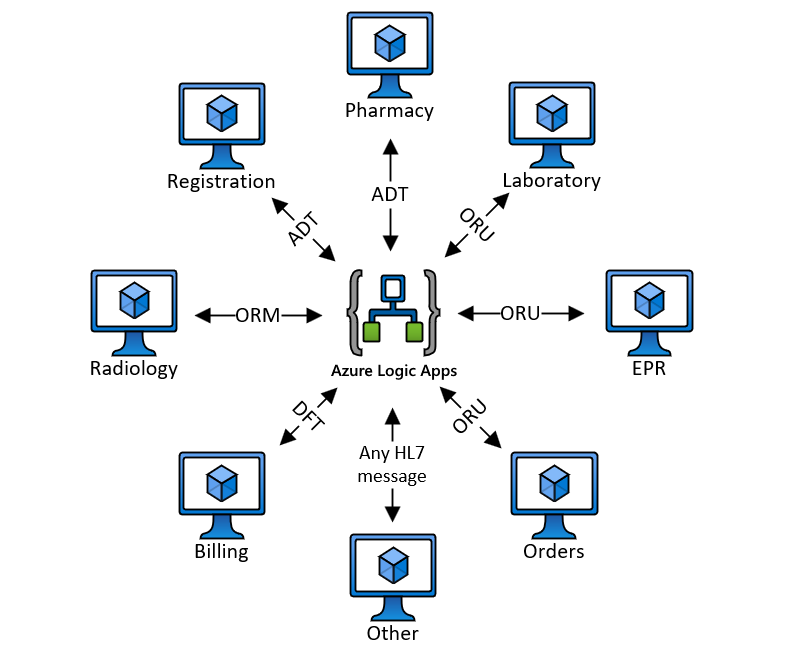
- ADT: Admission, discharge, and transfer
- EPR: Electronic patient record
- ORM: General order message
- ORU: Unsolicited observation results
- DFT: Detailed financial transaction
Connector technical reference
The HL7 connector operations are available in all Standard workflows.
Operations
| Operation | Type | Description | Parameters |
|---|---|---|---|
| Encode HL7 | Action | Convert XML to a flat file. | - Message to encode: The HL7 message to encode. Required, String - Header to encode: The HL7 header to encode. Required, String |
| Decode HL7 | Action | Convert a flat file to XML. | Message to decode: The HL7 message to decode. Required, String |
Supported and unsupported behaviors
| Support level | Behavior |
|---|---|
| Supported | - v2.X message handling with validation up to v2.6 and BizTalk schema releases up to v2.6. - Individual message processing. - Acknowledgment parsing for versions 2.4, 2.5, and 2.6. - Only need to upload message schema. - Z segments support requires updating schema with Z segments node. |
| Unsupported | - Batch messages processing. - ACK generation and ACK support for versions lower than 2.4. - MSH overrides and partner specific configuration. - Z segments support without schema updates. Dynamic discovery isn't supported. |
Prerequisites
An Azure account and subscription. Get a Azure account.
Access to the healthcare system that you want to integrate.
An integration account resource to define and store artifacts for use with enterprise integrations and B2B workflows.
Both your integration account and logic app resource must exist in the same Azure subscription and Azure region.
Before you start working with HL7 or MLLP operations, you must link your Standard logic app to your integration account.
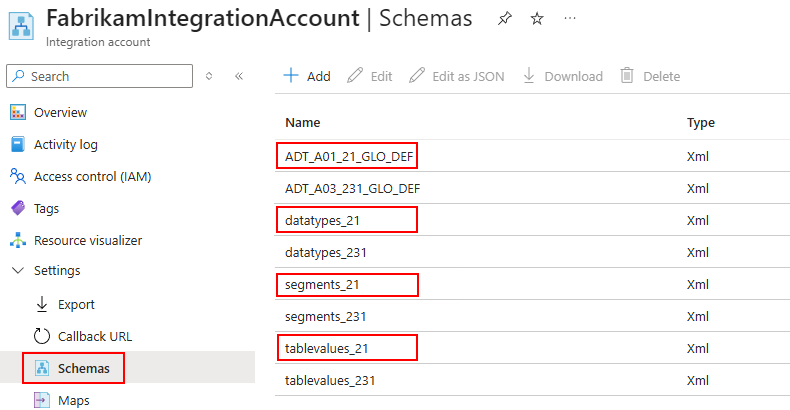
HL7 flat file schema and all the BizTalk schemas referenced by your HL7 schema.
You must upload all these schemas to your integration account. However, unlike BizTalk Server, you don't need to upload the following common schemas:
- Message headers: MSH_25_GLO_DEF.xsd
- Acknowledgments: ACK_24_GLO_DEF.xsd and ACK_25_GLO_DEF.xsd
The following example shows the ADT_A01_231_GLO_DEF.xsd schema and the following dependencies:
- datatypes_21.xsd
- segments_21.xsd
- tablevalues_21.xsd
A Standard logic app resource and workflow to use for your healthcare integration. See Create Standard logic app workflows in Azure Logic Apps.
The HL7 connector doesn't have triggers, so you can use any trigger that works for your scenario.
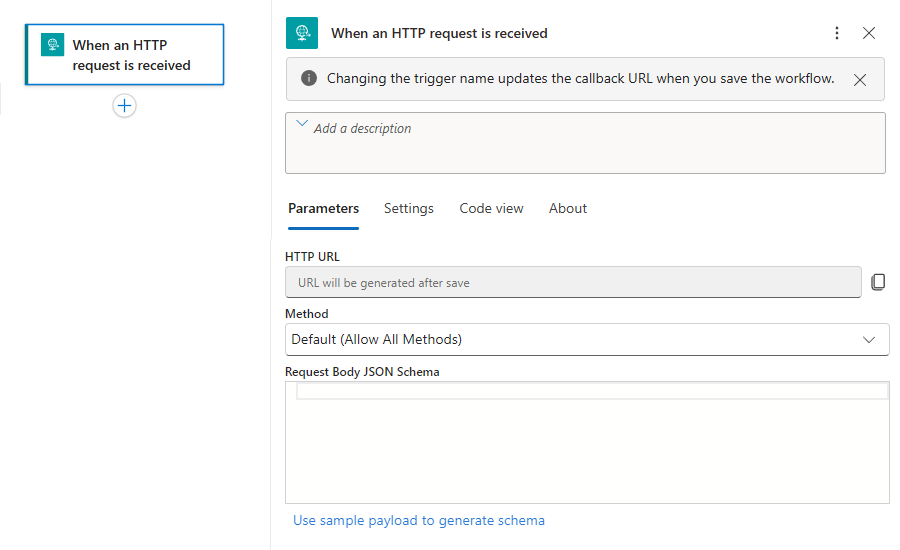
This guide uses the Request trigger named When an HTTP request is received. You can then add HL7 connector actions.
Limitations
In this release, the following limitations apply:
The HL7 connector requires that you upload your schemas to an integration account.
This implementation supports only single message processing.
Add an Encode HL7 action
Follow these steps to add the Encode HL7 action and set up the necessary parameters:
In the Azure portal, open your Standard logic app resource. Open your workflow in the designer.
If your workflow doesn't have a trigger, follow the general steps to add the trigger that best suits your scenario.
This example continues with the Request trigger named When an HTTP request is received, for example:
Follow the general steps to add the HL7 built-in connector action named Encode HL7.
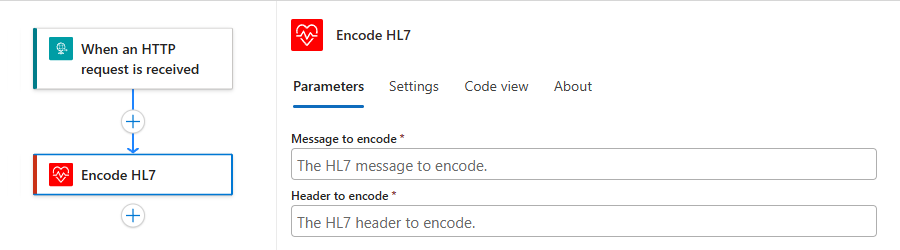
On the designer, select the added action, if not selected. In the action pane, provide the following information:
Parameter Required Value Description Message to encode Yes <message-to-encode> The HL7 message content to encode. Header to encode Yes <header-to-encode> The HL7 message header to encode. For example:
Save your workflow. On the designer toolbar, select Save.
Add a Decode HL7 action
Follow these steps to add the Decode HL7 action and set up the necessary parameters:
In the Azure portal, open your Standard logic app resource. Open your workflow in the designer.
If your workflow doesn't have a trigger, follow the general steps to add the trigger that best suits your scenario.
This example continues with the Request trigger named When an HTTP request is received, for example:
Follow the general steps to add the HL7 built-in connector action named Decode HL7.
On the designer, select the added action, if not selected. In the action pane, provide the following information:
Parameter Required Value Description Message to decode Yes <message-to-decode> The HL7 message content to decode. For example:
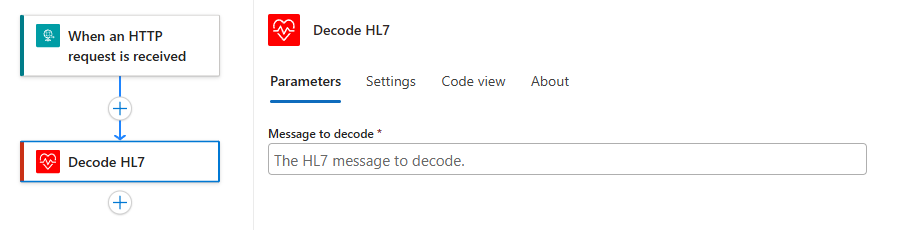
Save your workflow. On the designer toolbar, select Save.
BizTalk migration notes
Since the first BizTalk Server release, Microsoft provides support for healthcare scenarios. BizTalk Server helps organizations develop business processes across healthcare computer systems by using Microsoft BizTalk Accelerator for HL7 (BTAHL7), the HL7 standard, and the Minimal Lower Layer Protocol (MLLP) for messaging.
BizTalk Server uses a disassembler pipeline to split HL7 messages into header, body, and custom segments. Azure Logic Apps exposes these messages as fixed outputs. This behavior simplifies HL7 message handling by avoiding multipart message complexity unless the number of parts varies.
The following table compares BizTalk Server with Standard logic app workflows in single-tenant Azure Logic Apps:
| Aspect | BizTalk Server | Standard workflows |
|---|---|---|
| Pipeline disassembly | Separates header, body, and custom segments. | Action outputs directly provide structured values. |
| Schemas | HL7 schemas + global header or ACK schemas uploaded. | Upload HL7 message schemas and dependencies. Doesn't require header or ACK common schemas. |
| ACK handling | Generation and parsing through pipeline components. | Parsing for HL7 ACK/NACK (2.4–2.6). Generation isn't supported. |
| Z segments | Supported through schema customization. | Supported when Z segments exist in uploaded schema, but without dynamic discovery. |