Note
Access to this page requires authorization. You can try signing in or changing directories.
Access to this page requires authorization. You can try changing directories.
Learn how Azure Advisor works with an Azure Database for PostgreSQL flexible server and get answers to common questions.
What is Azure Advisor for PostgreSQL?
The Azure Advisor system uses telemetry to provide performance and reliability recommendations for your Azure Database for PostgreSQL database.
Some recommendations apply to multiple product offerings, while others are based on product-specific optimizations.
Where can I view my recommendations?
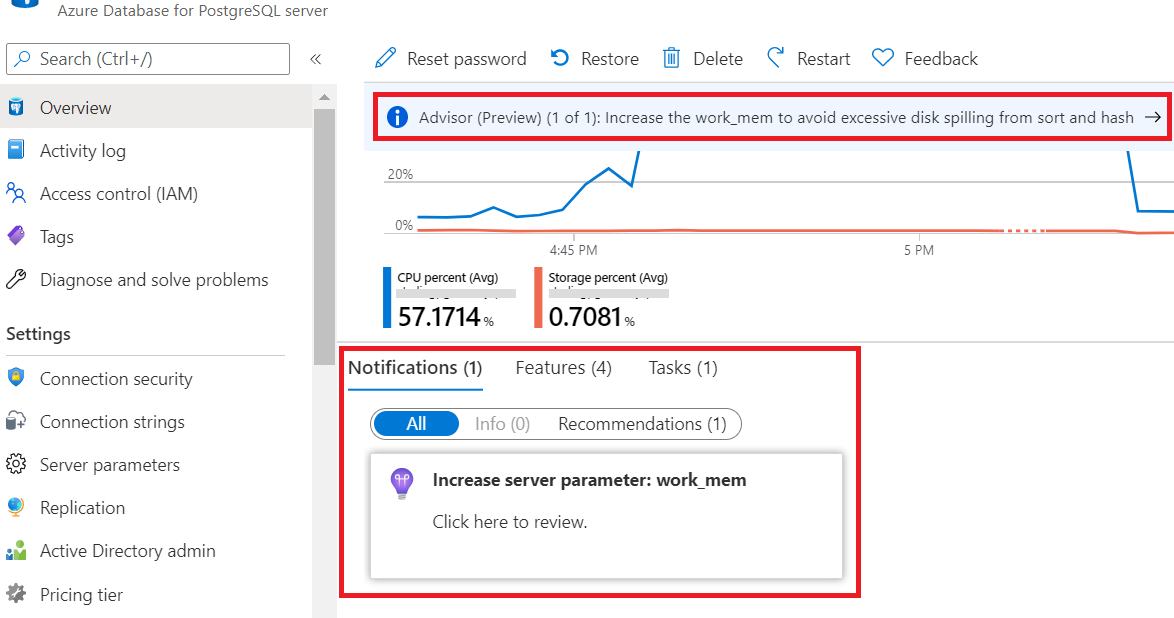
You can view recommendations from the Overview navigation sidebar in the Azure portal. A preview appears as a banner notification, and you can view details in the Notifications section located just below the resource usage graphs.
Recommendation types
Azure Database for PostgreSQL prioritizes the following type of recommendation:
- Performance: To enhance the performance of your Azure Database for PostgreSQL flexible server, the recommendations proactively identify servers experiencing scenarios that can affect performance. These scenarios include high CPU utilization, frequent checkpoint initiations, performance-impacting log parameter settings, inactive logical replication slots, long-running transactions, orphaned prepared transactions, a high bloat ratio, and transaction wraparound risks. For more information, see Advisor Performance recommendations.
Understanding your recommendations
Daily schedule: For Azure Database for PostgreSQL databases, the system reviews server telemetry and issues recommendations daily. If you make changes to your server configuration, the existing recommendations remain visible until the system reevaluates the recommendation the following day, approximately 24 hours later.
Performance history: Some recommendations are based on performance history. These recommendations only appear after a server operates with the same configuration for seven days. This period allows the system to detect patterns of heavy usage, such as high CPU activity or high connection volume, over a sustained period. If you provision a new server or change to a new vCore configuration, these recommendations are temporarily paused. This pause prevents legacy telemetry from triggering recommendations on a newly reconfigured server. However, this pause also means that performance history-based recommendations might not be identified immediately.