Note
Access to this page requires authorization. You can try signing in or changing directories.
Access to this page requires authorization. You can try changing directories.
Azure Site Recovery is a managed replication and failover service for virtual machines (VMs) that keeps workloads available during outages. It continuously replicates workloads from primary sites to secondary locations and limits data loss and downtime. During planned maintenance or unexpected disruptions, it orchestrates failover and failback. This service supports disaster recovery (DR) for on-premises environments and Azure VMs, which helps organizations maintain business continuity.
When you use Azure, reliability is a shared responsibility. Azure provides a range of capabilities to support resiliency and recovery. You're responsible for understanding how those capabilities work within all of the services you use, and selecting the capabilities you need to meet your business objectives and uptime goals.
This article describes how to make Site Recovery resilient to various potential outages and problems, including transient faults, availability zone outages, and region outages. It also highlights key information about the Site Recovery service-level agreement (SLA).
Note
This article describes how the Site Recovery service is resilient, or how you can make it resilient, to various problems. It doesn't explain how to use Site Recovery to protect your VMs or other assets. For more information, see About Site Recovery.
Production deployment recommendations for reliability
When you use Site Recovery with production workloads, we recommend that you take these actions:
Deploy your Recovery Services vault in your target region for replication.
For Azure-to-Azure DR, use the Site Recovery high churn feature for VMs that have a high rate of data change. High churn support improves your recovery point objective (RPO) and enables replication for many high-scale database workloads.
For Azure-to-Azure DR, configure the cache storage account to use zone-redundant storage (ZRS).
Perform test failovers on a regular basis as part of DR drills. Run DR drills every quarter or biannually to verify that your replication and failover processes are healthy.
Use on-demand capacity reservations to ensure that compute resources are available in your target region for failover.
Enable automatic updates for mobility agents.
Monitor the health of your replication, and configure alerts so that you're notified if a problem occurs.
Reliability architecture overview
When you use Site Recovery, you define a source and target, which represent the replicated VMs:
The source can be an Azure VM or a VM or server from another supported source, including on-premises physical servers, VMware VMs, and Hyper-V VMs.
The target is always an Azure VM. For Azure-to-Azure VM replication, the target can be a different region or availability zone from the source VM.
You're responsible for deploying and configuring resources and related settings, including:
Recovery Services vault, which Site Recovery uses to store your replication configuration settings. The vault doesn't store your replicated data. The redundancy configuration of the vault isn't important for Site Recovery, but it's important if you use the same vault for Azure Backup.
A vault can include extra configuration, such as:
A replication policy, which configures the snapshot frequency and retention length.
A recovery plan, which coordinates the order in which machines fail over and can include scripts and manual actions. Recovery plans are especially useful for workloads that have multiple tiers, such as application and database tiers, that need to fail over in a specific order.
For Azure-to-Azure replication, a cache storage account that stores a copy of the source data in its region before it's replicated to the target. The redundancy configuration of your cache storage account can affect your reliability during an availability zone outage.
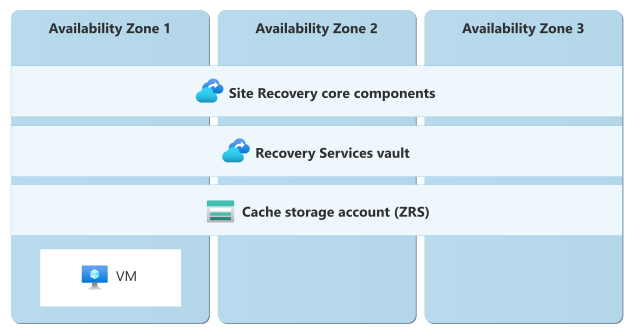
The diagram shows three availability zones. Zone 1 includes a VM. The following sections span all three zones: Site Recovery core components, the Recovery Services vault, and the cache storage account for ZRS.
Note
This guide focuses on the reliability of the Azure-based components of Site Recovery and the replication relationship. If you replicate data or VMs from an on-premises environment or another cloud provider, consider the reliability of the components outside of Azure.
For more information about the components that you deploy, see the following articles:
- Azure-to-Azure DR architecture
- Hyper-V-to-Azure DR architecture
- VMware-to-Azure DR architecture
- Physical-server-to-Azure DR architecture
The core Site Recovery service runs on infrastructure that Azure manages. This article refers to these components collectively as the core Site Recovery service.
Resilience to transient faults
Transient faults are short, intermittent failures in components. They occur frequently in a distributed environment like the cloud, and they're a normal part of operations. Transient faults correct themselves after a short period of time. It's important that your applications can handle transient faults, usually by retrying affected requests.
All cloud-hosted applications should follow the Azure transient fault handling guidance when they communicate with any cloud-hosted APIs, databases, and other components. For more information, see Recommendations for handling transient faults.
Site Recovery automatically handles transient faults that occur during the replication process by retrying its operations. You don't need to configure transient fault handling for Site Recovery.
Resilience to region-wide failures
For Azure-to-Azure replication, Site Recovery provides resilience to region failures by enabling failover of VMs to a healthy target region. For more information, see Replicate Azure VMs to another Azure region.
Considerations
Vault region: You deploy a Recovery Services vault into a specific Azure region that you select. The vault's region is important. Replication continues during an outage in the vault's region. However, you can't perform Site Recovery management operations, including failover and failback, until the region recovers.
Deploying the vault in the target region helps ensure that failover and recovery operations remain available during a source-region outage. It also prevents an outage in a third region from affecting failover and recovery operations.
Note
If your vault is in the region that you typically use as your target region, then after you fail over and reestablish replication, that region becomes your new source region. If that region subsequently experiences a problem, you might not be able to perform failback until both regions are healthy.
Capacity reservations: You're responsible for verifying that your target region supports the VM types that you need and that it has available capacity for your workload. We recommend that you use on-demand capacity reservations to ensure that compute resources are available for your workload if a failover occurs.
Configure multiregion support
Recovery Services vault: You need to select the vault's region. For more information, see Considerations.
Recovery Services vaults have a redundancy setting, but Site Recovery doesn't use the vault's redundancy configuration. You don't need to configure your vault for geo-redundancy when you use Site Recovery.
Cache storage account: The cache storage account is only used as a temporary location for data before it's replicated, so you shouldn't configure it to use geo-redundant storage (GRS).
Behavior during a region failure
The specific behavior of the Site Recovery core service during a region failure depends on which region experiences the failure:
Failure in the source region: For Azure-to-Azure replication, you can trigger a failover when the source region is unavailable.
Because the source region is unavailable, replication stops until the VM in the source region is healthy.
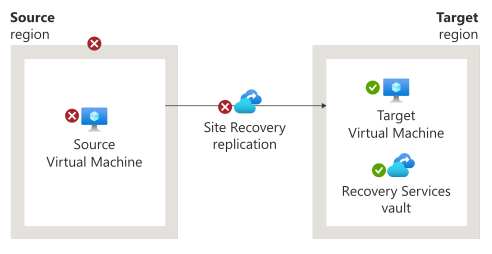
The diagram shows the source region and the target region. Two failures are shown in the source VM. An arrow labeled Site Recovery replication points to the target region. The target region includes the target VM and the Recovery Services vault.
Failure in the target region: Because the target region is unavailable, replication stops, and you can't fail over to the target until the region is healthy.
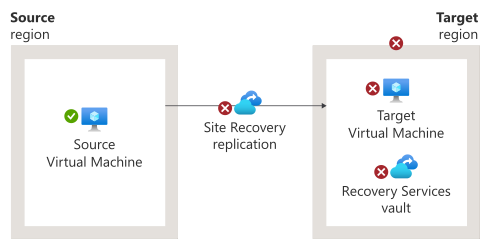
The diagram shows the source region and the target region. The source region contains the source VM. An arrow labeled Site Recovery replication points to the target region. An X indicates a replication failure. The target region includes the target VM and the Recovery Services vault. Failures are indicated in the target VM and Recovery Services vault.
Failure in the region that contains the vault: If you deploy the vault into a third region (not the source or target region) and that region experiences a failure, Site Recovery continues to replicate your data. However, you can't initiate any operations, including failover or failback, until the vault is healthy.
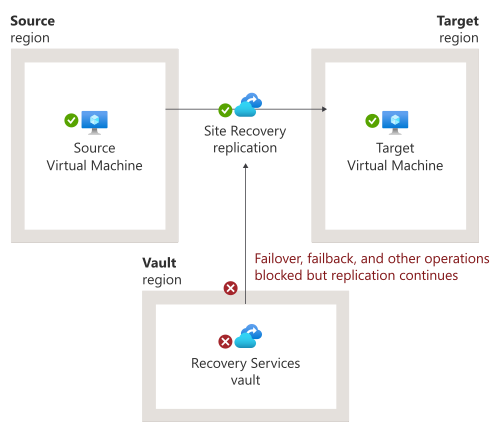
The diagram shows the source region, target region, and the vault region. An arrow labeled Site Recovery replication to points from the source VM to the VM in the target region. A failure is indicated in the Recovery Services vault. An arrow labeled failover, failback, and other operations blocked but replication continues points from the Services Recovery vault to Site Recovery replication.
Region recovery
You're responsible for initiating failback for servers or VMs that you failed over during the region outage. For more information, see the following articles:
Zone-to-zone and region-to-region replication of Azure VMs: Fail back Azure VM to the primary region
On-premises-to-Azure replication:
Physical-to-Azure replication: Physical-server-to-Azure DR architecture
Hyper-V-to-Azure replication: Hyper-V-to-Azure DR architecture
VMware-to-Azure replication: On-premises DR failover and failback
Test for region failures
It's important to perform regular DR drills that test your VM failover and overall response procedures. Design your DR drills to prevent impact to your production environment. For more information, see the following articles:
Zone-to-zone and region-to-region replication of Azure VMs: Run a DR drill for Azure VMs
On-premises-to-Azure replication:
Physical-to-Azure replication: Run a DR drill to Azure
Hyper-V-to-Azure replication: Run a DR drill to Azure
VMware-to-Azure replication: Run a DR drill to Azure
Resilience to configuration and replication problems
A DR solution is only reliable when you know that it works before a disaster occurs. Monitor Site Recovery to detect problems such as configuration errors or VM replication health problems. For more information, see Monitor Site Recovery.
We recommend that you configure Azure Monitor alerts so that you're informed about problems with replication health. For more information, see Built-in Azure Monitor alerts for Site Recovery.
Resilience to service maintenance
Azure automatically manages updates and maintenance for the core Site Recovery service. Maintenance operations don't require downtime and don't interrupt replication of your VMs and servers.
However, you're responsible for applying updates to Site Recovery components on your VMs and servers, including the mobility agent when required.
Important
We strongly recommend that you enable automatic updates for agents. If the agent version falls more than four versions behind, replication is turned off and your workload's recoverability is compromised.
For more information, see Service updates in Site Recovery.
Service-level agreement
The service-level agreement (SLA) for Azure services describes the expected availability of each service and the conditions that your solution must meet to achieve that availability expectation. For more information, see SLAs for online services.
For Site Recovery, separate SLAs cover:
Service availability, which means that Site Recovery is available to fail over protected instances. A protected instance is a VM or physical server that replicates to a secondary location. To be eligible for this SLA, you must retry failed failover attempts at least every 30 minutes.
Recovery time objective (RTO), which is the time from when you trigger a failover (or your scripts trigger it) to when the target VM runs. This time excludes manual actions or script execution.
The SLA provides service credits only when the secondary region has sufficient compute capacity.