Note
Access to this page requires authorization. You can try signing in or changing directories.
Access to this page requires authorization. You can try changing directories.
This article describes an advanced fault tolerance capability for full-service applications in two availability zones (AZs) by utilizing a third AZ.
Important
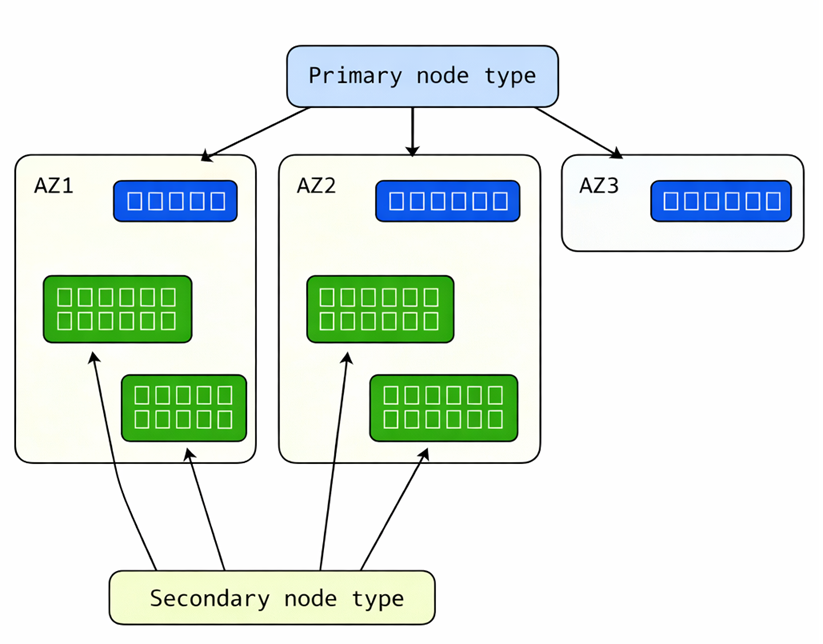
This feature requires a three-zone cluster layout:
- Two large zones for regular service workload.
- One small zone for seed-node quorum support.
On-demand auxiliary replicas help protect write availability during planned maintenance in two-zone application deployments by temporarily preserving safer replica distribution.
Overview
In 2-AZ deployments, planned operations such as application upgrades, cluster upgrades, and node deactivations can temporarily remove one replica from a partition.
If a zone outage happens during that window, the partition can drop below write quorum and enter quorum loss.
The availability zone ring feature reduces this risk by creating a temporary auxiliary replica during planned maintenance and removing it after the original replica returns.
What is an auxiliary replica?
Auxiliary replicas are specialized replicas intended for advanced replicator-level scenarios that are outside the normal roles of Primary, IdleSecondary, and ActiveSecondary.
Key behavior:
- Auxiliary replicas are not granted read or write access.
- Service Fabric does not consider auxiliary replicas as primary-election targets during balancing or failover.
- They can observe replication for scenarios such as auditing, monitoring, or transient replication-side processing.
This capability is intended for advanced workloads and can require corresponding application replicator changes.
Why use auxiliary replicas?
Without this feature, a planned replica-down event plus a zone failure can force a partition into quorum loss.
With this feature enabled, Service Fabric creates a temporary auxiliary replica in the same availability zone as the replica that's planned to be down before the replica-down event. This auxiliary replica can preserve quorum in that same failure window.
Benefits:
- Improves availability during planned maintenance in 2-AZ application deployments.
- Helps maintain safer cross-zone write quorum distribution.
- Enables a more capacity-optimized three-zone topology for customers who do not want full workload capacity in all zones.
- Adds no steady-state replica overhead because auxiliary replicas are temporary.
Example failure scenario
Scenario: Availability Zone 1 becomes unavailable while a planned replica-down event is in progress in Availability Zone 2.
Without on-demand auxiliary replicas:
- One regular replica is already offline for maintenance.
- A zone outage removes additional replicas.
- The partition can enter quorum loss.
With on-demand auxiliary replicas:
- Service Fabric creates an auxiliary replica before the planned replica-down event.
- If the zone outage occurs in the same window, an additional replica remains available.
- The partition is more likely to preserve write quorum and recover automatically.
Important
Protection is expected only when replicas are healthy before the outage window. If a replica is already unexpectedly down before a zone failure, quorum loss can still occur.
Prerequisites
Your application code must support auxiliary replicas (custom
IReplicatorscenarios).Service Fabric 11.5 or later.
Service Fabric classic (SFRP) cluster topology across three zones:
- Two large zones (for example, Zone 1 and Zone 2) host regular service replicas and seed nodes.
- One small zone (for example, Zone 3) hosts seed nodes only.
Configure on-demand auxiliary replicas
Step 1: Enable cluster-level fabric settings
Add these settings to the cluster fabric configuration:
| Section | Parameter | Value |
|---|---|---|
Common |
EnableAuxiliaryReplicas |
true |
PlacementAndLoadBalancing |
OnDemandReplicaConstraintPriority |
0 |
Example snippet:
"fabricSettings": [
  {
    "name": "Common",
    "parameters": [
      {
        "name": "EnableAuxiliaryReplicas",
        "value": "true"
      }
    ]
  },
  {
    "name": "PlacementAndLoadBalancing",
    "parameters": [
      {
        "name": "OnDemandReplicaConstraintPriority",
        "value": "0"
      }
    ]
  }
]
Step 2: Configure each target stateful service
Use the following service settings:
| Setting | Value |
|---|---|
| Target replica set size | Minimum 4 |
| Minimum replica set size | 3 |
| Enable on-demand auxiliary replica | true |
| Has persisted state | true |
To keep user services off the seed-only zone, use a placement constraint such as NodeTypeName != ntSeed.
Step 3: Verify runtime behavior
After deployment:
- Start a rolling upgrade or node deactivation.
- Observe partition replica set changes.
- Confirm an auxiliary replica appears before the planned replica-down event.
- Confirm the auxiliary replica is removed after maintenance completes.