Note
Access to this page requires authorization. You can try signing in or changing directories.
Access to this page requires authorization. You can try changing directories.
Applies to: ✔️ Linux VMs ✔️ Windows VMs ✔️ Uniform scale set ✔️ Flexible scale sets
Important
This feature is currently in Preview. See the Preview Terms of Use for legal terms that apply to Azure features that are in beta, preview, or otherwise not yet released into general availability.
On-demand Capacity Reservation Group (CRG) can be shared with other subscriptions. Using this option can make it easier to manage some common configuration needs:
Reuse of capacity reserved for disaster recovery. Reserved capacity is the primary means to obtain capacity assurance in another region or zone in the event of the primary region or zone becoming unavailable. Reservation sharing supports reuse of disaster recovery capacity by subscriptions, hosting less critical workloads such as development and testing, or subscriptions used to run job-oriented workloads. Capacity reuse can save on total capacity costs and drive more value from the reserved capacity.
Central management of capacity. Quota requests and term commitments are often administered by a central operations team as part of cost management. Now, reserved capacity needs can be assessed and managed more centrally to align on capacity and cost management.
Separate security and capacity concerns. Applications implemented with multiple subscriptions for security reasons can operate from a common pool of capacity. This pattern is common with service providers serving their own end customers.
More cost-effective scale-out with capacity assurance. Applications that scale at different rates and times can share one pool of reserved capacity.
How to share a Capacity Reservation Group
Sharing reserved capacity requires at least two subscriptions:
- Provider subscription - the subscription that creates and hosts the Capacity Reservation Group and member Capacity Reservations.
- Consumer subscription - another subscription that is granted access to the reserved capacity, obtaining the ability to deploy virtual machines (VMs) with the Capacity Reservation Service Level Agreement (SLA).
A given Capacity Reservation Group can be shared with up to 100 consumer subscriptions. All the member Capacity Reservations in the Group will be accessible from consumer subscriptions.
Configuring a Capacity Reservation Group sharing relationship has three steps:
- In the Consumer subscription, configure an On Demand capacity Reservation (ODCR) owner from the Producer subscription with the rights
Microsoft.Compute/capacityReservationGroups/share/action. - In the Producer subscription, add the Consumer subscription ID to the Capacity Reservation Group shared list. See Share a capacity Reservation Group to learn how to add a Consumer subscription to the sharing profile.
- In the Producer subscription, configure at least one VM owner in the Consumer subscription with the following rights:
Microsoft.Compute/capacityReservationGroups/readMicrosoft.Compute/capacityReservationGroups/deployMicrosoft.Compute/capacityReservationGroups/capacityReservations/readMicrosoft.Compute/capacityReservationGroups/capacityReservations/deploy
If the ODCR owner and the VM owner already have either Owner or Contributor Azure role in both the Provider and Consumer subscriptions, then no further action is needed for granting share, read, and deploy permissions. To learn more on how to assign an Azure role, see Role Assignment Steps or Azure custom role
Once complete, a VM owner in the Consumer subscription can enumerate the shared CRG. View the list of Capacity Reservation Groups for a subscription and deploy VMs by setting the capacityReservationGroup property on Virtual Machines or Virtual Machine Scale Sets. Keep in mind, the ability to modify the Capacity Reservation Group (CRG) remains only with the ODCR administrator in the producer subscription.
Note
There are no extra charges for using the shared Capacity Reservation Group feature. Unused reservations are charged to the subscription that owns the reservation. VM usage is charged to the subscription that uses the capacity reservation as it does today. For details on how Reserved Instance (RI) applies to the feature, see Use of Reserved Instances with shared Capacity Reservation Groups section.
Usage patterns
The Provider subscription sharing a Capacity Reservation Group can allow:
- Consumer subscriptions to access a specific Capacity Reservation Group in the Provider subscription
- Consumer subscription to access all Capacity Reservation Groups created in the Provider subscription
- All Consumer subscriptions in a specific Management Group to access the Capacity Reservation Group
Note
Azure strongly recommends using one main Provider subscription to host Capacity Reservation Groups for each application, workload, or usage scope to share across other subscriptions. Creating Capacity Reservation Groups in many different subscriptions and then cross-sharing in a matrix fashion will create management challenges and lead to confusion at VM deployment.
Prerequisites for sharing a Capacity Reservation Group
- An ODCR owner in the Provider subscription must have sufficient rights to be able to share a CRG
- A VM owner in the Consumer subscription must have sufficient rights to be able to make deployments in capacity reservation (CR) in shared CRG
- A VM being deployed in the shared CRG must match the VM SKU, region, and zone if applicable
- All subscriptions must be enabled with
Microsoft.Compute
Limitations of sharing a Capacity Reservation Group
Limitations by design:
- Sharing works with an explicit list of target Consumer subscriptions. Azure doesn't support wildcard or tenant level sharing.
- A CRG can be shared with a maximum of 100 Consumer subscriptions.
- Sharing is done per Capacity Reservation Group, which grants access to all member Capacity Reservations. Individual Capacity Reservations can't be shared. To isolate specific Capacity Reservations, create multiple Capacity Reservation Groups and share only those Capacity Reservations that contain shared capacity.
- By default, Capacity Reservation Group administrators in the subscription owning a Capacity Reservation Group can't modify VM instances deployed by other subscriptions. If such VM access is desired, more rights to VMs on the shared subscriptions must be granted separately.
Limitations for Preview:
- Reprovisioning of Virtual Machine Scale Set VMs using a shared Capacity Reservation Group isn't supported during a zone outage.
- There is a known issue of Capacity Reservation Groups - List by Subscription ID not giving the right response if there is no CRG created by the subscription making the
GETcall to list shared CRGs in the region. To get the correct response, ensure you have a local CRG created in the subscription making the API call in the same region where you would like to enumerate the shared CRGs. Alternatively, use the Azure Resource Graph query provided to get the list of CRGs shared with your subscription.
Share a Capacity Reservation Group
Capacity Reservation Groups are shared by adding Consumer subscriptions in the sharing profile of newly created or existing Capacity Reservation Groups. Once shared, the subscriptions which are part of the sharing profile can deploy VMs or Virtual Machine Scale Sets in the shared Capacity Reservation Group.
Add sharing profile to a new Capacity Reservation Group
Share a Capacity Reservation Group during creation by adding subscriptions in the sharing profile.
To create a Capacity Reservation Group with sharing profile from the portal, follow the steps:
- Open the Azure portal.
- In the search bar, enter capacity reservation groups.
- Select Capacity reservation groups from the options.
- Select Create.
- On the Basics tab, create a capacity reservation group:
- Select a subscription.
- Select or create a resource group.
- Name your group.
- Select a region.
- Optionally, select Availability zones or allow Azure to choose for you.
- Select Next.
- On the Reservations tab, create at least one capacity reservation:
- Give each reservation a reservation name, the quantity of VM instances, and select a unique VM size.
- Billing information based on your selections appears in the Cost/month column.
- Select Next.
- On Sharing tab, share the capacity reservation group:
- Select Add Subscriptions.
- Select subscriptions to add.
- Select Add.
- Select Next.
- On the Tags tab, optionally create tags.
- Select Next.
- On the Review + Create tab, review your capacity reservation group information.
- Select Create.
Add sharing profile to an existing Capacity Reservation Group
Add a sharing profile and share with subscriptions for an existing Capacity Reservation Group.
To add subscriptions to the sharing profile of an existing capacity reservation group from the portal, follow the steps:
- Open the Azure portal.
- Go to your capacity reservation group.
- Select Settings of the capacity reservation group.
- Select Sharing
- Select Add subscriptions
- Select the subscriptions to add
- Select Add
- Select Save
Stop sharing a Capacity Reservation Group
The Capacity Reservation Group owner can stop sharing a Capacity Reservation Group with a subscription or all subscriptions at any time.
Unsharing of a Capacity Reservation Group with a cross subscription ID is done while a VM or Virtual Machine Scale Set from cross subscriptions remains associated with the Capacity Reservation Group. The associated resources get SLA until deallocation or reallocation.
Once unsharing happens, any VM or scale set previously associated to the CRG would fail to associate upon deallocation or reallocation. Avoid this failure by removing the association from the CRG.
Unsharing a Capacity Reservation Group with a subscription
To unshare a Capacity Reservation Group with a subscription from the sharing profile, remove the subscription from the sharing profile.
To remove subscriptions from the sharing profile of an existing capacity reservation group from the portal, follow the steps:
- Open the Azure portal.
- Go to your capacity reservation group.
- Select Settings of the capacity reservation group.
- Select Sharing
- Select the subscriptions to remove
- Select Stop sharing
- Select Save
Unsharing a Capacity Reservation Group with all subscriptions
To unshare a Capacity Reservation Group with all consumer subscriptions, remove all subscriptions from the sharing profile.
To remove subscriptions from the sharing profile of an existing capacity reservation group from the portal, follow the steps:
- Open the Azure portal.
- Go to your capacity reservation group.
- Select Settings of the capacity reservation group.
- Select Sharing
- Select all subscriptions to remove
- Select Stop sharing
- Select Save
Delete a shared Capacity Reservation Group
See Modify a Capacity Reservation for deletion guidance.
- Users with sufficient rights can delete the shared Capacity Reservation Group.
- Azure allows a Capacity Reservation Group to be deleted when all the member capacity reservations are deleted.
- Azure allows a Capacity Reservation to be deleted when no VMs are associated to the Capacity Reservation.
- Unsharing of a CRG with a shared subscription happens as part of the shared Capacity Reservation Group deletion process.
Using a shared Capacity Reservation Group
Once the Capacity Reservation Group is successfully shared, users with sufficient rights from a Consumer subscription can deploy a VM or Virtual Machine Scale Set in a shared Capacity Reservation Group.
Note
The Provider subscription deploying the shared CRG will need to hold its own quota for deploying the CRG. The Consumer subscription making a deployment in the shared reservation group will need to hold its own quota.
Availability zone mapping with shared zonal Capacity Reservation Groups
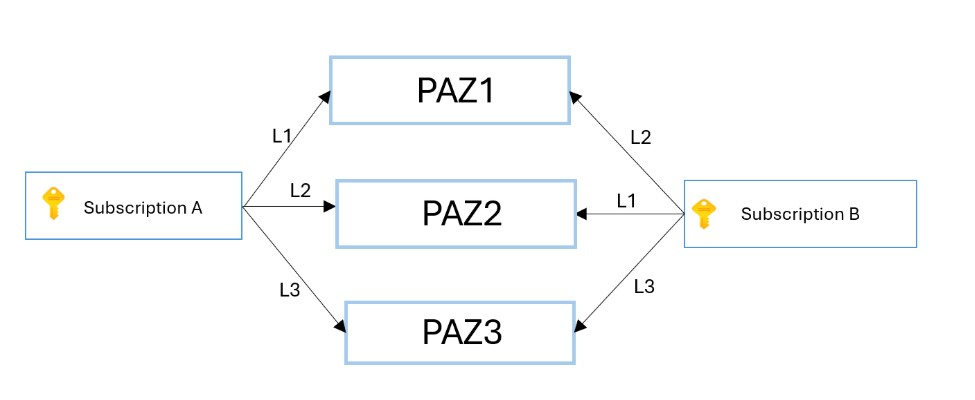
The availability zones visible to each Azure subscription represent a logical mapping to underlying groups of physical data centers that constitute a physical zone. To promote efficient distribution of resources across availability zones, each Azure subscription gets a random logical to physical mapping of zones. For example, subscription A (Provider subscription) and subscription B (Consumer subscription) can have different logical mappings.
Consider the following example:
If subscription A deploys to AZ1, the deployment goes to physical zone 1. But if subscription B deploys to AZ1, the deployment goes to physical zone 2:
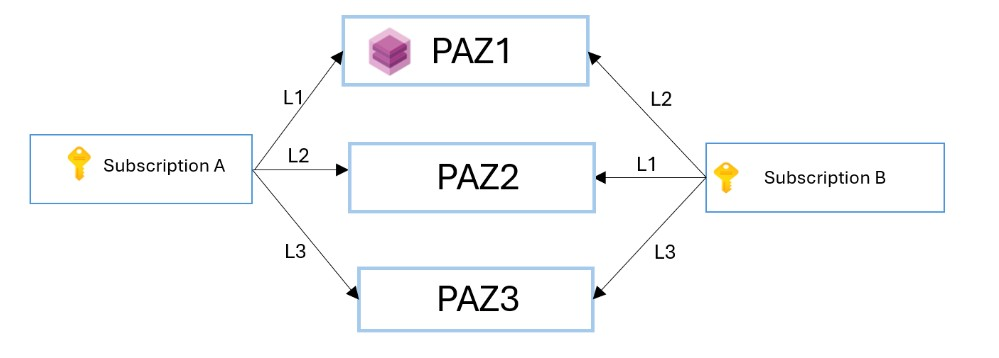
Now consider a Capacity Reservation deployed by Subscription A to logical AZ1. The result is reserved capacity in physical zone 1.
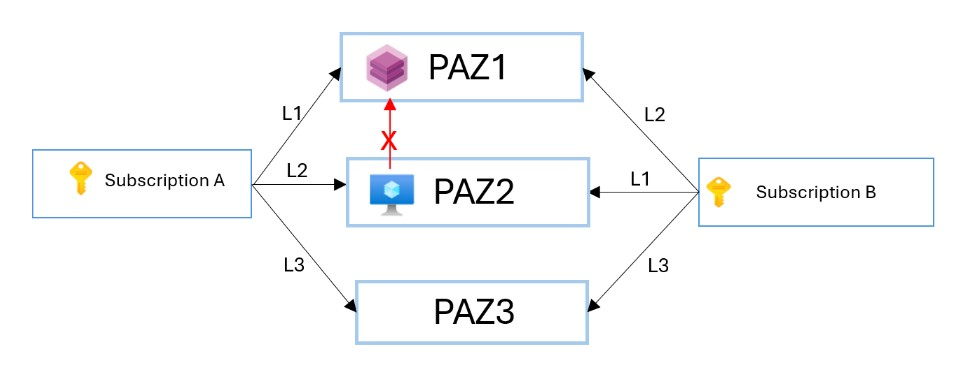
If subscription B deployed a VM to logical AZ1 using the shared Capacity Reservation Group, the deployment would fail because subscription B AZ1 resolves to physical zone 2, and there's no reserved capacity in physical zone 2.
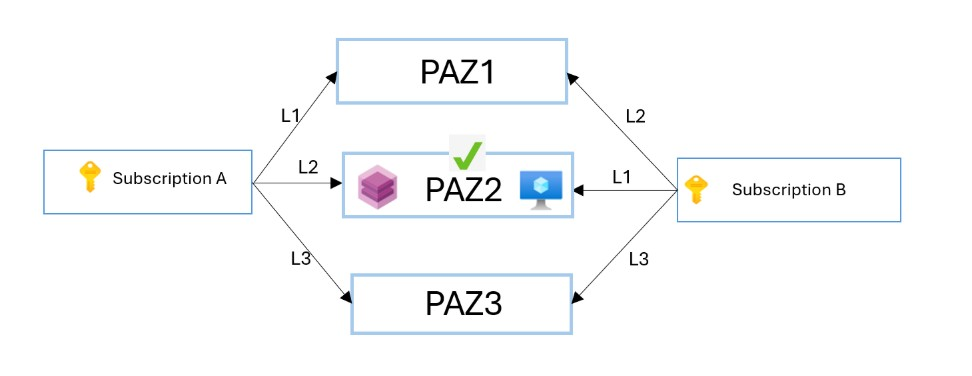
The solution is to reconcile the logical to physical mappings for subscription A and subscription B. Subscription B should deploy to AZ2 to access reserved capacity in physical zone 1.
When using a shared Capacity Reservation Group with zones, all subscriptions have the logical view of availability zones from the CRG subscription, which is likely different than the logical view of availability zones from the target subscription. When deploying a VM or scale set to a shared CRG, you must remap the zones. To ensure that the Azure resources are efficiently distributed across Availability zones in a Region, each subscription has independent logical zone mapping for Availability zones. This means that logical to physical zone mapping may or may not be the same across subscriptions.
To check the Physical Zone and Logical Zone mapping for your subscription, see Subscriptions - List Locations - REST API (Azure Resource Management). For more information, see Physical and Logical availability zones.
Secure existing zonal workloads using zero size reservation in Shared capacity Reservation Group
Zonally deployed virtual machines or virtual machine scale sets from Consumer subscription can be converted to using a shared Capacity Reservation without reallocation. If you do not have capacity in an existing shared capacity reservation group, you can start by creating a zero size matching reservation to secure your workloads. The basic process involves 3 steps:
Create a shared Capacity Reservation Group and then matching capacity reservations in each target zone with the reserved quantity set to zero. This requires no additional quota or capacity for the Provider subscription. For more information on how to create a reservation, see Create a capacity reservation.
Associate existing running zonal virtual machine or virtual machine scale set from the Consumer subscription to the shared capacity reservation group. Set the Virtual Machine or Virtual Machine Scale Set (VMSS) capacityReservationGroup property to the desired shared Capacity Reservation Group. When complete, each target capacity reservation will be overallocated.
Increase the reserved quantity of each capacity reservation (CR) to match the allocated Virtual Machine (VM) count. The Provider subscription must have sufficient quota to accomodate the workloads from the Consumer subscription for this step. See Using a shared Capacity Reservation Group. For more information on how to update the reserved count, see Capacity reservation modify
After the quantity increase, you should see the CR in a fully allocated state with all the virtual machines or virtual machine scale sets allocated. See View VM allocation with the Instance View.
For more information, see Zonal Virtual Machine or Zonal Virtual Machine Scale Set.
Use of Reserved Instances with shared Capacity Reservation Groups
Sharing a Capacity Reservation Group doesn't alter the scope of any Reserved Instances or Savings Plans. If either the CRG or the VM is deployed from a scope not covered by prepaid discounts, the pay-as-you-go price is charged.
To share Reserved Instance discounts between a Capacity Reservation Group and VMs deployed from a Consumer subscription, the Provider subscription and the Consumer subscription must share the same Reserved Instance scope. If the two subscriptions share an enrollment or a management group, then Reserved Instances set to the corresponding scope works automatically.
Associate or create a single Virtual Machine with shared Capacity Reservation Group
A single Virtual Machine can be deployed in a shared Capacity Reservation Group. See Associate a virtual machine to a Capacity Reservation group.
Remove a single Virtual Machine from Shared Capacity Reservation Group
A single Virtual Machine can be removed from a Shared Capacity Reservation Group. See Remove a virtual machine association from a Capacity Reservation group.
Associate or create a Virtual Machine Scale Set with shared Capacity Reservation Group
Virtual Machine Scale Sets in Flexible and Uniform orchestration mode can be deployed in a shared Capacity Reservation Group. To learn more, see Associate a scale set -Flexible and Associate a scale set - Uniform.
Remove Virtual Machine Scale Set from Shared Capacity Reservation Group
Virtual Machine Scale Sets in Flexible and Uniform orchestration mode can be removed from a shared Capacity Reservation Group. To learn more, see Remove a scale set.
View shared Capacity Reservation Group
Once a Capacity Reservation Group is shared successfully, the reservations are immediately available for use with single Virtual Machines and Virtual Machine Scale Sets.
View the subscription IDs the Capacity Reservation Group are shared with from the sharing profile.
To learn more, see Create a Capacity Reservation.
- Open the Azure portal.
- Go to your capacity reservation group.
- Select Settings of the capacity reservation group.
- Select Sharing.
- View a list of the subscriptions the capacity reservation group is shared with.
View the list of Capacity Reservation Groups for a subscription
The list of all Capacity Reservation Groups that are created locally or shared with by other subscriptions can be viewed for a given subscription. Extra parameter resourceIdsonly needs to be passed to view the shared Capacity Reservation Groups.
Capacity Reservation Groups - List by Subscription ID
By default, obtaining a list of Capacity Reservation Groups returns only those owned by the subscription. To add the Capacity Reservation Groups shared to the subscription, the additional parameter of resourceIdsOnly must be set to sharedwithsubscription.
Enable fetching Resource IDs for all CRG resources shared with the subscription:
GET https://management.chinacloudapi.cn/subscriptions/{subscriptionId}/providers/Microsoft.Compute/capacityReservationGroups?api-version=2023-09-01&resourceIdsOnly=sharedwithsubscription
Enable fetching Resource IDs for all CRG resources shared with the subscription and created in the subscription:
GET https://management.chinacloudapi.cn/subscriptions/{subscriptionId}/providers/Microsoft.Compute/capacityReservationGroups?api-version=2023-09-01&resourceIdsOnly=All
Enable fetching Resource IDs for all CRG resources created in the subscription:
GET https://management.chinacloudapi.cn/subscriptions/{subscriptionId}/providers/Microsoft.Compute/capacityReservationGroups?api-version=2023-09-01&resourceIdsOnly=CreatedInSubscription
{
    "value": [
        {
            "id": "/subscriptions/{subscriptionId1}/resourceGroups/{resourceGroupName1} /providers/Microsoft.Compute/capacityReservationGroups/{CapacityReservationGroupName1} ",
            "type": "Microsoft.Compute/capacityReservationGroups",
            "location": "ChinaNorth2"
        },
        {
            "id": "/subscriptions/{subscriptionId2}/resourceGroups/{resourceGroupName2} /providers/Microsoft.Compute/capacityReservationGroups/{CapacityReservationGroupName2} ",
            "type": "Microsoft.Compute/capacityReservationGroups",
            "location": "ChinaNorth2"
        }
    ]
}
To learn more, see Capacity Reservation Group - List by subscription.
Azure Resource Graph
Use the Azure Resource Graph to view the list of all Capacity Reservation Groups that are shared with and created locally within a given subscription.
To view the CRG list, go to Azure Resource Graph Explorer and try this query.
Enable fetching Resource IDs for all CRG resources shared with subscription ID 1 and created within subscription ID 1:
resources
|where type == "microsoft.compute/capacityreservationgroups"
|where properties["sharingProfile"] contains "{subscriptionId1}" or subscriptionId == "{subscriptionId1}"
|project name, id
Enable fetching Resource IDs for all CRG resources shared with subscription ID 1:
resources
|where type == "microsoft.compute/capacityreservationgroups"
|where properties["sharingProfile"] contains "{subscriptionId}"
|project name, id