Nota:
El acceso a esta página requiere autorización. Puede intentar iniciar sesión o cambiar directorios.
El acceso a esta página requiere autorización. Puede intentar cambiar los directorios.
本文演示如何在 AKS 群集中使用高级容器网络服务设置 L7 策略。 仅在查看第 7 层策略概述 页上列出的限制和注意事项后继续。
先决条件
- 拥有有效订阅的 Azure 帐户。 如果没有订阅,请在开始之前创建一个试用帐户。
如需在本地运行 CLI 参考命令,请安装 Azure CLI。 如果在 Windows 或 macOS 上运行,请考虑在 Docker 容器中运行 Azure CLI。 有关详细信息,请参阅如何在 Docker 容器中运行 Azure CLI。
如果使用本地安装,请使用 az login 命令登录到Azure CLI。 若要完成身份验证过程,请遵循终端中显示的步骤。 有关其他登录选项,请参阅使用 Azure CLI 登录。
出现提示时,请在首次使用时安装 Azure CLI 扩展。 有关扩展的详细信息,请参阅 将扩展与 Azure CLI 配合使用。
运行az version命令,以查看已安装的版本和依赖库。 若要升级到最新版本,请运行az upgrade。
本文中的步骤所需的最低 Azure CLI 版本为 2.79.0。 运行 az --version 即可查找版本。 如果需要进行安装或升级,请参阅安装 Azure CLI。
启用高级容器网络服务
若要继续,必须有一个启用了高级容器网络服务的 AKS 群集。
具有高级容器网络服务标志 az aks create 的 --enable-acns 命令创建一个新的 AKS 群集,它具有所有高级容器网络服务功能。 这些功能包括:
注释
从 Kubernetes 版本 1.29 开始,具有 Cilium 数据平面的群集支持容器网络可观测性和容器网络安全。
对于此演示, --acns-advanced-networkpolicies 参数必须设置为“L7”才能启用 L7 策略。 将此参数设置为“L7”还会启用 FQDN 筛选。 如果只想启用 FQDN 筛选,请将参数设置为“FQDN”。 若要禁用这两种功能,可以按照 “禁用容器网络安全”中提供的说明进行作。
export CLUSTER_NAME="<aks-cluster-name>"

# Create an AKS cluster
az aks create \
    --name $CLUSTER_NAME \
    --resource-group $RESOURCE_GROUP \
    --generate-ssh-keys \
    --network-plugin azure \
    --network-dataplane cilium \
    --enable-acns \
    --acns-advanced-networkpolicies L7
在现有群集上启用高级容器网络服务
具有高级容器网络服务标志 az aks update 的 --enable-acns 命令使用所有高级容器网络服务功能(包括容器网络可观测性和容器网络安全功能)更新现有 AKS 群集。
注释
只有具有 Cilium 数据平面的群集才支持高级容器网络服务的容器网络安全功能。
对于此演示, --acns-advanced-networkpolicies 参数必须设置为“L7”才能启用 L7 策略。 将此参数设置为“L7”还会启用 FQDN 筛选。 如果只想启用 FQDN 筛选,请将参数设置为“FQDN”。 若要禁用这两种功能,可以按照 “禁用容器网络安全”中提供的说明进行作。
az aks update \
    --resource-group $RESOURCE_GROUP \
    --name $CLUSTER_NAME \
    --enable-acns \
    --acns-advanced-networkpolicies L7
获取群集凭据
使用 az aks get-credentials 命令获取群集凭据。
az aks get-credentials --name $CLUSTER_NAME --resource-group $RESOURCE_GROUP
在 AKS 群集上设置 http-server 应用程序
将以下 YAML 应用到 AKS 群集以设置 http-server 应用程序。
apiVersion: apps/v1
kind: Deployment
metadata:
  name: http-server
  labels:
    app: http-server
spec:
  replicas: 1
  selector:
    matchLabels:
      app: http-server
  template:
    metadata:
      labels:
        app: http-server
    spec:
      containers:
      - name: http-server
        image: nginx:latest
        ports:
        - containerPort: 8080
        volumeMounts:
        - name: config-volume
          mountPath: /etc/nginx/conf.d
      volumes:
      - name: config-volume
        configMap:
          name: nginx-config

---
apiVersion: v1
kind: Service
metadata:
  name: http-server
spec:
  selector:
    app: http-server
  ports:
  - protocol: TCP
    port: 80
    targetPort: 8080

---
apiVersion: v1
kind: ConfigMap
metadata:
  name: nginx-config
data:
  default.conf: |
    server {
        listen 8080;

        location / {
            return 200 "Hello from the server root!\n";
        }

        location /products {
            return 200 "Listing products...\n";
        }
    }
在 AKS 群集上设置 http-客户端应用程序
将以下 YAML 应用到 AKS 群集以设置 http-client 应用程序。
apiVersion: apps/v1
kind: Deployment
metadata:
  name: http-client
  labels:
    app: http-client
spec:
  replicas: 1
  selector:
    matchLabels:
      app: http-client
  template:
    metadata:
      labels:
        app: http-client
    spec:
      containers:
      - name: http-client
        image: curlimages/curl:latest
        command: ["sleep", "infinity"]
使用策略测试连接
接下来,应用以下第 7 层策略,仅允许从 GET 应用程序的 http-client 请求到达 /products 的 http-server 终结点。
apiVersion: cilium.io/v2
kind: CiliumNetworkPolicy
metadata:
  name: allow-get-products
spec:
  description: "Allow only GET requests to /products from http-client to http-server"
  endpointSelector:
    matchLabels:
      app: http-server
  ingress:
  - fromEndpoints:
    - matchLabels:
        app: http-client
    toPorts:
    - ports:
      - port: "8080"
        protocol: TCP
      rules:
        http:
        - method: "GET"
          path: "/products"
验证策略
若要验证策略的强制实施,请从 http-client Pod 执行以下命令:
kubectl exec -it <your-http-client-pod-name> -n default -- curl -v http://http-server:80/products
运行上述命令时,你应该预期得到类似于 Listing products... 的输出。
kubectl exec -it <your-http-client-pod-name> -n default -- curl -v -XPOST http://http-server:80/products -d "test=data"
运行上述命令时,你应该预期得到类似于 Access Denied 的输出。
观察 L7 指标
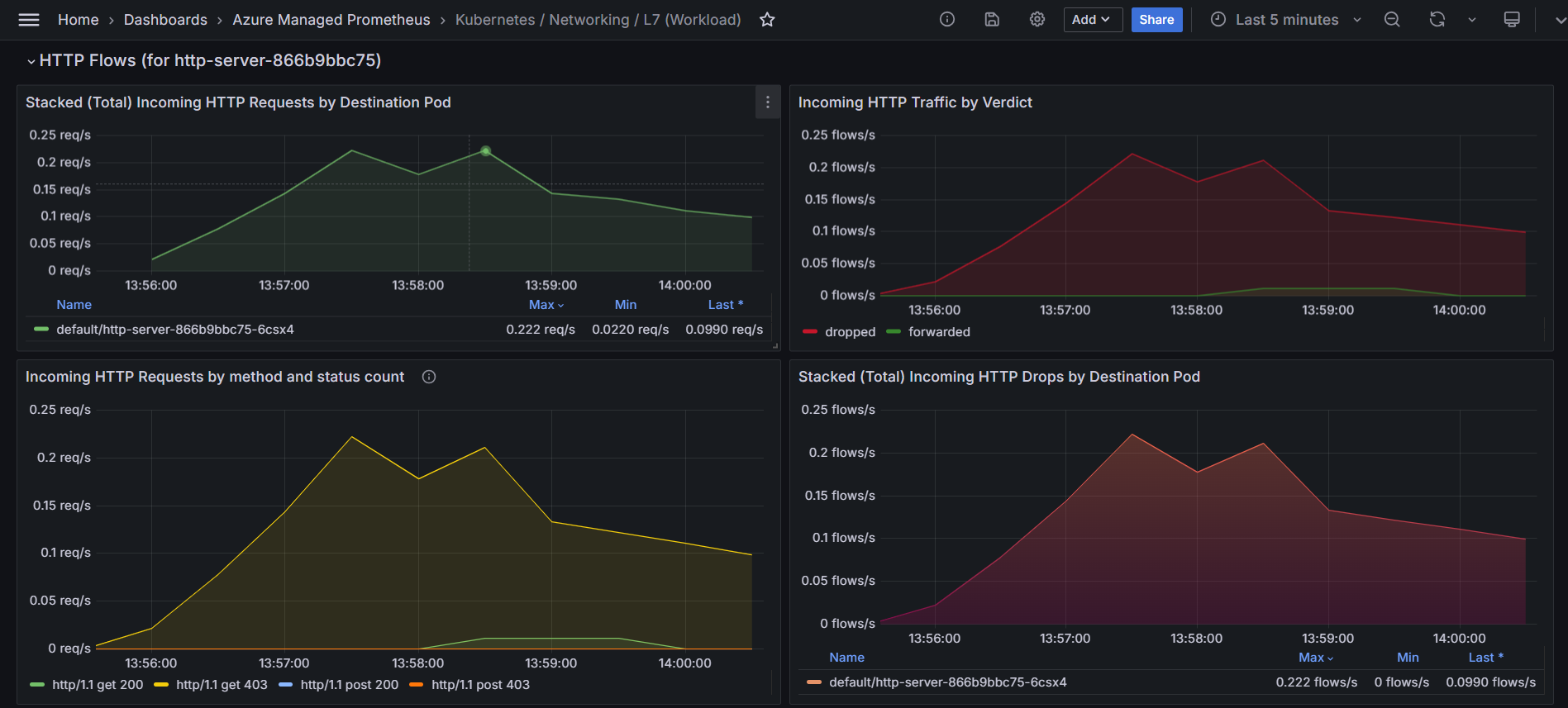
如果已启用高级容器网络服务的容器网络可观测性,则可以可视化 Grafana 上的流量。
为了简化对这些 L7 指标的分析,我们提供了预配置的Azure 托管 Grafana仪表板。 您可以在 > 文件夹中找到它们,文件名如 “Kubernetes/Networking/L7(命名空间)” 和 “Kubernetes/Networking/L7(工作负载)”。
可得到类似于下面的指标:
清理资源
如果不打算使用此应用程序,请使用 az group delete 命令删除本文中创建的其他资源。
az group delete --name $RESOURCE_GROUP
后续步骤
本作指南文章介绍了如何为 AKS 群集启用和应用高级容器网络服务的 L7 策略。
- 有关 Azure Kubernetes 服务的高级容器网络服务(AKS)的详细信息,请参阅 Azure Kubernetes 服务的高级容器网络服务(AKS)是什么?。