Nota:
El acceso a esta página requiere autorización. Puede intentar iniciar sesión o cambiar directorios.
El acceso a esta página requiere autorización. Puede intentar cambiar los directorios.
云服务、虚拟机、虚拟机规模集和 Service Fabric 都使用 Azure 诊断扩展来收集数据。 Azure 诊断将数据发送到 Azure 存储表。 但是,可以使用 Azure 诊断扩展 1.5 或更高版本,将所有或部分数据传输到其他位置。
本文介绍如何将数据从 Azure 诊断扩展发送到 Application Insights。
重要
Azure 诊断扩展已于 2026 年 3 月 31 日弃用,不再受支持。 不推荐进行此扩展的新部署。 若要确保持续支持和访问新功能,请迁移到此处推荐的替代解决方案。
诊断配置说明
Azure 诊断扩展 1.5 引入了汇聚点,它是用于发送诊断数据的额外位置。
Application Insights 数据终端的示例配置:
<SinksConfig>
    <Sink name="ApplicationInsights">
      <ApplicationInsights>{Insert ConnectionString}</ApplicationInsights>
      <Channels>
        <Channel logLevel="Error" name="MyTopDiagData"  />
        <Channel logLevel="Verbose" name="MyLogData"  />
      </Channels>
    </Sink>
</SinksConfig>
"SinksConfig": {
    "Sink": [
        {
            "name": "ApplicationInsights",
            "ApplicationInsights": "{Insert ConnectionString}",
            "Channels": {
                "Channel": [
                    {
                        "logLevel": "Error",
                        "name": "MyTopDiagData"
                    },
                    {
                        "logLevel": "Error",
                        "name": "MyLogData"
                    }
                ]
            }
        }
    ]
}
Sink的name属性是一个用于唯一标识接收器的字符串值。
ApplicationInsights 元素指定发送 Azure 诊断数据的 Application Insights 资源的连接字符串。
- 如果没有现有的 Application Insights 资源,请参阅创建新的 Application Insights 资源。
- 如果要使用 Azure SDK 2.8 及更高版本开发云服务,则会自动填充连接字符串。 该值基于打包云服务项目时 APPLICATIONINSIGHTS_CONNECTION_STRING 服务配置设置,请参阅 将 Application Insights 与云服务配合使用。
Channels 元素包含一个或多个 Channels 元素。
- name 属性唯一引用该通道。
- 使用 loglevel 属性可以指定通道允许的日志级别。 可用日志级别从最多信息到最少信息的顺序依次为:
- “详细”
- 信息
- 警告
- 错误
- 严重
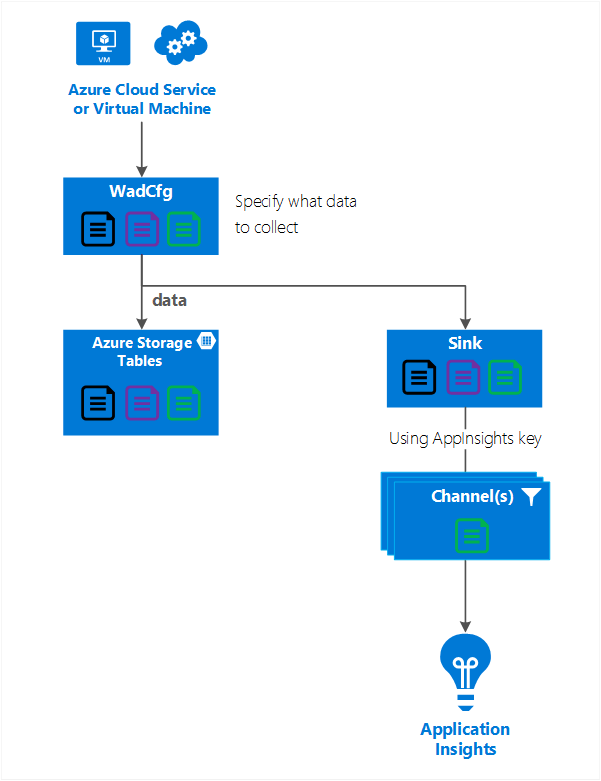
通道的作用类似于筛选器,可让你选择要发送到目标接收器的特定日志级别。 例如,可以收集详细日志并将其发送到存储,但只将错误日志发送到接收器。
下图显示了这种关系。
下图汇总了配置值及其工作原理。 还可以在层次结构中不同级别下的配置中包含多个接收器。 位于顶层的汇聚点用作全局设置,而在单个元素中指定的汇聚点则像是对该全局设置的覆盖。
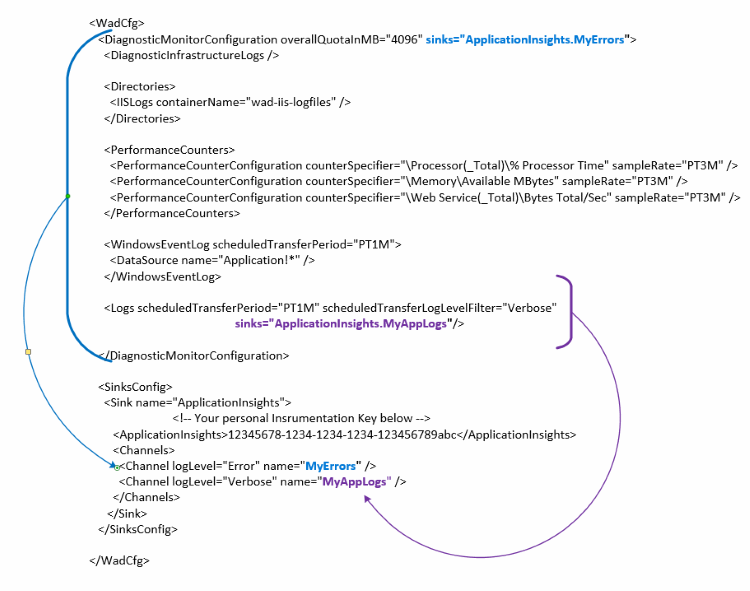
完整的数据汇集点配置示例
下面是公共配置文件的完整示例。该文件:
- 可以将所有错误发送到 Application Insights(在 DiagnosticMonitorConfiguration 节点中指定)。
- 此外,还会发送应用程序日志的详细级别日志(在 Logs 节点中指定)。
<WadCfg>
  <DiagnosticMonitorConfiguration overallQuotaInMB="4096"
       sinks="ApplicationInsights.MyTopDiagData"> <!-- All info below sent to this channel -->
    <DiagnosticInfrastructureLogs />
    <PerformanceCounters>
      <PerformanceCounterConfiguration counterSpecifier="\Processor(_Total)\% Processor Time" sampleRate="PT3M" />
      <PerformanceCounterConfiguration counterSpecifier="\Memory\Available MBytes" sampleRate="PT3M" />
    </PerformanceCounters>
    <WindowsEventLog scheduledTransferPeriod="PT1M">
      <DataSource name="Application!*" />
    </WindowsEventLog>
    <Logs scheduledTransferPeriod="PT1M" scheduledTransferLogLevelFilter="Verbose"
            sinks="ApplicationInsights.MyLogData"/> <!-- This specific info sent to this channel -->
  </DiagnosticMonitorConfiguration>

<SinksConfig>
    <Sink name="ApplicationInsights">
      <ApplicationInsights>{Insert ConnectionString}</ApplicationInsights>
      <Channels>
        <Channel logLevel="Error" name="MyTopDiagData"  />
        <Channel logLevel="Verbose" name="MyLogData"  />
      </Channels>
    </Sink>
  </SinksConfig>
</WadCfg>
"WadCfg": {
    "DiagnosticMonitorConfiguration": {
        "overallQuotaInMB": 4096,
        "sinks": "ApplicationInsights.MyTopDiagData", "_comment": "All info below sent to this channel",
        "DiagnosticInfrastructureLogs": {
        },
        "PerformanceCounters": {
            "PerformanceCounterConfiguration": [
                {
                    "counterSpecifier": "\\Processor(_Total)\\% Processor Time",
                    "sampleRate": "PT3M"
                },
                {
                    "counterSpecifier": "\\Memory\\Available MBytes",
                    "sampleRate": "PT3M"
                }
            ]
        },
        "WindowsEventLog": {
            "scheduledTransferPeriod": "PT1M",
            "DataSource": [
                {
                    "name": "Application!*"
                }
            ]
        },
        "Logs": {
            "scheduledTransferPeriod": "PT1M",
            "scheduledTransferLogLevelFilter": "Verbose",
            "sinks": "ApplicationInsights.MyLogData", "_comment": "This specific info sent to this channel"
        }
    },
    "SinksConfig": {
        "Sink": [
            {
                "name": "ApplicationInsights",
                "ApplicationInsights": "{Insert ConnectionString}",
                "Channels": {
                    "Channel": [
                        {
                            "logLevel": "Error",
                            "name": "MyTopDiagData"
                        },
                        {
                            "logLevel": "Verbose",
                            "name": "MyLogData"
                        }
                    ]
                }
            }
        ]
    }
}
在上面的配置中,以下各行的含义如下所述:
发送 Azure 诊断收集的所有数据
<DiagnosticMonitorConfiguration overallQuotaInMB="4096" sinks="ApplicationInsights">
"DiagnosticMonitorConfiguration": {
    "overallQuotaInMB": 4096,
    "sinks": "ApplicationInsights",
}
只将错误日志发送到 Application Insights 接收器
<DiagnosticMonitorConfiguration overallQuotaInMB="4096" sinks="ApplicationInsights.MyTopDiagdata">
"DiagnosticMonitorConfiguration": {
    "overallQuotaInMB": 4096,
    "sinks": "ApplicationInsights.MyTopDiagData",
}
将详细的应用程序日志发送到 Application Insights
<Logs scheduledTransferPeriod="PT1M" scheduledTransferLogLevelFilter="Verbose" sinks="ApplicationInsights.MyLogData"/>
"DiagnosticMonitorConfiguration": {
    "overallQuotaInMB": 4096,
    "sinks": "ApplicationInsights.MyLogData",
}
限制
- 通道只能记录类型,而不能记录性能计数器。 如果使用性能计数器元素指定数据通道,该通道将被忽略。
- 通道的日志级别不能高于 Azure 诊断所收集的日志级别。 例如,不能在 Logs 元素中收集应用程序日志错误,并且不能尝试向 Application Insight 接收器发送详细日志。 scheduledTransferLogLevelFilter 属性必须确保收集的日志数量始终等于或大于您尝试发送到接收器的日志数量。
- 无法将 Azure 诊断扩展收集的 Blob 数据发送到 Application Insights。 例如,Directories 节点下指定的任何数据。 对于崩溃转储,实际崩溃转储将发送到 Blob 存储,且仅将有关崩溃转储已生成的通知发送到 Application Insights。
后续步骤
- 了解如何在 Application Insights 中查看 Azure 诊断信息。
- 使用 PowerShell 为应用程序启用 Azure 诊断扩展。
- 使用 Visual Studio 为应用程序启用 Azure 诊断扩展。