Nota:
El acceso a esta página requiere autorización. Puede intentar iniciar sesión o cambiar directorios.
El acceso a esta página requiere autorización. Puede intentar cambiar los directorios.
使用查找表来处理任务中的
For each 任务迭代传递参数数组给嵌套任务,为每个嵌套任务提供其运行所需的信息。 如果使用任务值引用传递参数数组,则参数数组限制为 10,000 个字符,或 48 KB。 如果要传递到嵌套任务的数据量较大,则不能直接使用输入、任务值或作业参数来传递该数据。
传递完整数据的一种替代方法是将任务数据存储为 JSON 文件,并在任务输入中传入一个查找键,而不是传递完整的数据。 嵌套任务可以使用密钥来检索每次迭代所需的特定数据。
以下示例演示了一个示例 JSON 配置文件,以及如何将参数传递给在 JSON 配置中查找值的嵌套任务。
示例 JSON 配置
此示例配置是一个步骤列表,每个迭代都有相应的参数(args)(此示例仅展示三个步骤)。 假定此 JSON 文件保存为 /Workspace/Users/<user>/copy-filtered-table-config.json。 我们在嵌套任务中引用它。
{
  "steps": [
    {
      "key": "table_1",
      "args": {
        "catalog": "my-catalog",
        "schema": "my-schema",
        "source_table": "raw_data_table_1",
        "destination_table": "filtered_table_1",
        "filter_column": "col_a",
        "filter_value": "value_1"
      }
    },
    {
      "key": "table_2",
      "args": {
        "catalog": "my-catalog",
        "schema": "my-schema",
        "source_table": "raw_data_table_2",
        "destination_table": "filtered_table_2",
        "filter_column": "col_b",
        "filter_value": "value_2"
      }
    },
    {
      "key": "table_3",
      "args": {
        "catalog": "my-catalog",
        "schema": "my-schema",
        "source_table": "raw_data_table_3",
        "destination_table": "filtered_table_3",
        "filter_column": "col_c",
        "filter_value": "value_3"
      }
    }
  ]
}
示例 For each 任务
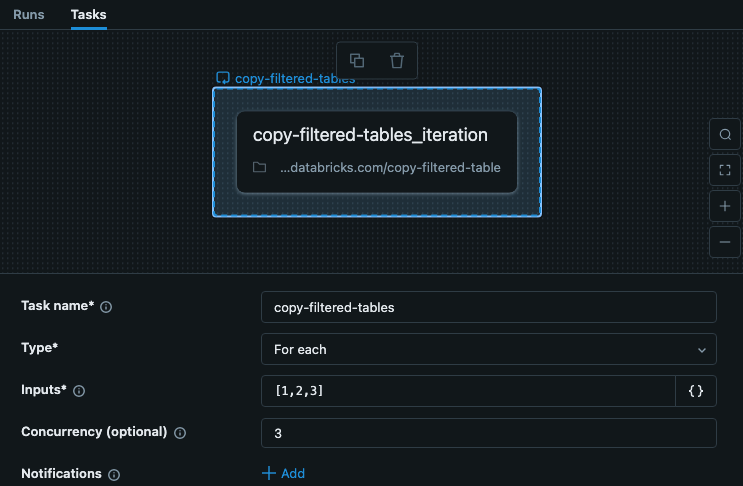
作业中的 For each 任务包括每次迭代的键输入。 此示例展示了一个名叫copy-filtered-tables的任务,其中输入已设置为["table_1","table_2","table_3"]。 此列表限制为 10,000 个字符,但由于你只是传递密钥,所以它比完整数据要小得多。
在此示例中,步骤不依赖于其他步骤或任务,因此我们可以设置大于 1 的并发,使任务运行速度更快。
示例嵌套任务
嵌套任务接收来自父For each任务的输入。 在此示例中,我们将输入设置为用作配置文件的 Key。 下图显示了嵌套任务,包括设置名为 、值为 key 的参数{{input}}。
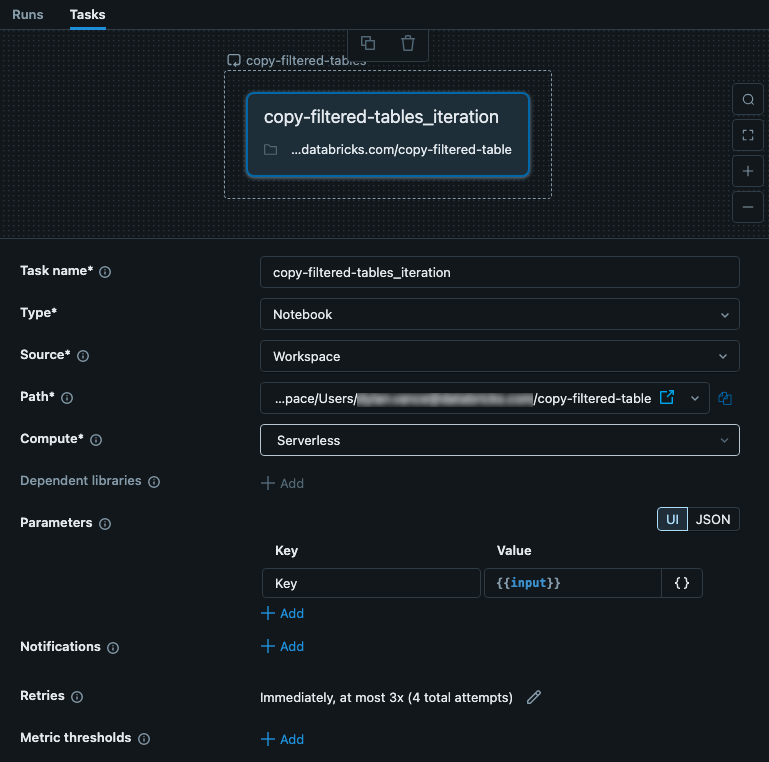
此任务是包含代码的笔记本。 在笔记本中,可以使用以下 Python 代码读取输入,并将其用作配置 JSON 文件中的密钥。 来自 JSON 文件的数据用于读取、筛选和写入表中的数据。
注释
若要查看从实时 Delta 表而不是静态 JSON 文件驱动 For each 任务的示例,请参阅 使用控制表驱动 For each 作业。
# copy-filtered-table (iteratable task code to read a table, filter by a value, and write as a new table)

from pyspark.sql.functions import expr
from types import SimpleNamespace

import json

# If the notebook is run outside of a job with a key parameter, this provides
# a default. This allows testing outside of a For each task
dbutils.widgets.text("key", "table_1", "key")

# load configuration (note that the path must be set to valid configuration file)
config_path = "/Workspace/Users/<user>/copy-filtered-table-config.json"
with open(config_path, "r") as file:
    config = json.loads(file.read())

# look up step and arguments
key = dbutils.widgets.get("key")
current_step = next((step for step in config['steps'] if step['key'] == key), None)
if current_step is None:
    raise ValueError(f"Could not find step '{key}' in the configuration")

args = SimpleNamespace(**current_step["args"])

# read the source table defined for the step, and filter it
df = spark.read.table(f"{args.catalog}.{args.schema}.{args.source_table}") \
          .filter(expr(f"{args.filter_column} like '%{args.filter_value}%'"))

# write the filtered table to the destination
df.write.mode("overwrite").saveAsTable(f"{args.catalog}.{args.schema}.{args.destination_table}")