Nota:
El acceso a esta página requiere autorización. Puede intentar iniciar sesión o cambiar directorios.
El acceso a esta página requiere autorización. Puede intentar cambiar los directorios.
在 Azure HDInsight default 虚拟网络体系结构中,HDInsight 资源提供程序通过公用网络与群集通信。 本文介绍可用于创建受限 HDInsight 群集(其中仅限通过专用网络进行入站连接)的高级控制措施。
如果想要在 HDInsight 群集与依赖资源之间建立公开连接,请考虑按照 在 Azure HDInsight 中控制网络流量 中的准则来限制群集的连接。 除了限制公共连接之外,还可以将启用Azure Private Link的依赖项资源配置为与 HDInsight 群集一起使用。
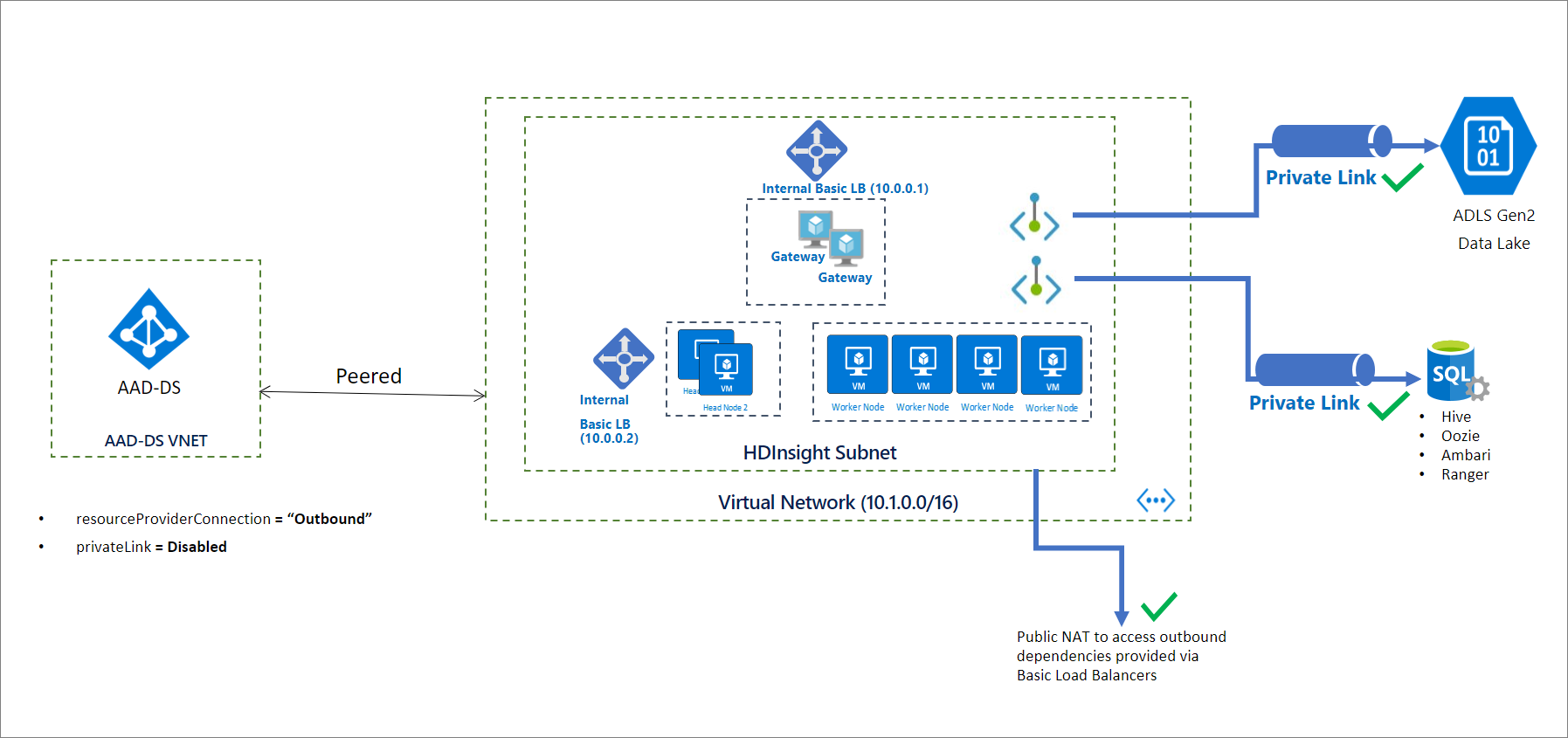
下图显示了在将 resourceProviderConnection 设置为 outbound 时,HDInsight 虚拟网络体系结构可能的样子:
注意
限制公共连接是启用Private Link的先决条件,不应被视为相同的功能。
初始化受限群集
默认情况下,HDInsight 资源提供程序使用公共 IP 地址来与群集建立入站连接。 如果将 resourceProviderConnection 网络属性设置为 outbound,那么它会将与 HDInsight 资源提供程序的连接方向反转,使连接始终从群集内部发起并转出到资源提供程序。
此配置中没有入站连接,无需在网络安全组中配置入站服务标记。 也无需通过用户定义的路由绕过防火墙或网络虚拟设备。
注意
Microsoft Azure Government 中的实现仍可能需要网络安全组或用户定义路由中的入站服务标记。-->
创建群集后,通过添加受限 HDInsight 群集所需的 DNS 记录来设置适当的 DNS 解析。 以下规范名称 DNS 记录(CNAME)是在Azure托管的公共 DNS 区域中创建的:azurehdinsight.cn。
<clustername> CNAME <clustername>-int
若要使用完全限定的域名 (FQDN) 访问群集,可以根据需要使用以下任一方法:
- 直接使用内部负载均衡器的专用 IP 地址。
- 使用自己的专用 DNS 区域替代群集终结点。 在这种情况下,区域名称必须是
azurehdinsight.cn。
例如,对于专用 DNS 区域 azurehdinsight.cn,可根据需要添加专用 IP 地址:
<clustername>        A   10.0.0.1
<clustername-ssh>    A   10.0.0.2
注意
建议不要将受限群集与启用公共连接的其他群集置于同一虚拟网络(包含 azurehdinsight.cn 专用 DNS 区域)中。 这可能会导致意外的 DNS 解析行为或冲突。
为了简化 DNS 设置,我们将返回 FQDN 和相应的专用 IP 地址作为群集 GET 响应的一部分。 可以使用此 PowerShell 代码片段开始:
<#
    This script is an example to help you get started with automation and can be adjusted based on your needs.
    This script assumes:
    - The HDInsight cluster has already been created, and the context where this script is run has permissions to read/write resources in the same resource group.
    - The private DNS zone resource exists in the same subscription as the HDInsight cluster.
We recommend that you use the latest version of the Az.HDInsight module.

#>
$subscriptionId = "<Replace with subscription for deploying HDInsight clusters, and containing private DNS zone resource>"

$clusterName = "<Replace with cluster name>"
$clusterResourceGroupName = "<Replace with resource group name>"

# For example, azurehdinsight.cn for public cloud.
$dnsZoneName = "<Replace with private DNS zone name>"
$dnsZoneResourceGroupName = "<Replace with private DNS zone resource group name>"

Connect-AzAccount -Environment AzureChinaCloud -SubscriptionId $subscriptionId

# 1. Get cluster endpoints
$clusterEndpoints = $(Get-AzHDInsightCluster -ClusterName $clusterName ` -ResourceGroupName $clusterResourceGroupName).ConnectivityEndpoints

$endpointMapping = @{}

foreach($endpoint in $clusterEndpoints)
{
    $label = $endpoint.Location.ToLower().Replace(".$dnsZoneName".ToLower(), "")
    $ip = $endpoint.PrivateIPAddress

    $endpointMapping.Add($label, $ip)
}

# 2. Confirm that the DNS zone exists.
Get-AzPrivateDnsZone -ResourceGroupName $dnsZoneResourceGroupName -Name $dnsZoneName -ErrorAction Stop

# 3. Update DNS entries for the cluster in the private DNS zone:
# - If the entries already exist, update to the new IP.
# - If the entries don't exist, create them.
$recordSets = Get-AzPrivateDnsRecordSet -ZoneName $dnsZoneName -ResourceGroupName $dnsZoneResourceGroupName -RecordType A

foreach($label in $endpointMapping.Keys)
{
    $updateRecord = $null

    foreach($record in $recordSets)
    {
        if($record.Name -eq $label)
        {
            $updateRecord = $record
            break;
        }

    }

    if($null -ne $updateRecord)
    {
        $updateRecord.Records[0].Ipv4Address = $endpointMapping[$label]
        Set-AzPrivateDnsRecordSet -RecordSet $updateRecord | Out-Null
    }
    else
    {
        New-AzPrivateDnsRecordSet `
            -ResourceGroupName $dnsZoneResourceGroupName `
            -ZoneName $dnsZoneName `
            -Name $label `
            -RecordType A `
            -Ttl 3600 `
            -PrivateDnsRecord (New-AzPrivateDnsRecordConfig -Ipv4Address $endpointMapping[$label]) | Out-Null
    }
}
将私有链接连接添加到依赖于群集的资源(可选)
通过将 resourceProviderConnection 配置为 outbound,也可以借助专用终结点访问特定于群集的资源。 这些资源包括:
- 存储:Azure Data Lake Storage Gen2和Azure Blob Storage
- SQL 元存储:Apache Ranger、Ambari、Oozie 和 Hive
- Azure Key Vault
不一定要使用专用终结点来访问这些资源, 但如果打算使用专用终结点来访问这些资源,则必须创建这些资源,配置专用终结点和 DNS 条目,然后再创建 HDInsight 群集。 应该可以通过专用终结点或其他方式从群集子网内部访问所有这些资源。 如果计划使用专用终结点,建议利用群集子网。
在通过专用终结点连接到 Azure Data Lake Storage Gen2 时,请确保 Gen2 存储帐户已为 blob 和 dfs 设置终结点。 有关详细信息,请参阅创建专用终结点。
使用防火墙(可选)
HDInsight 群集仍可连接到公共 Internet 以获取出站依赖项。 如果想要限制访问,可以配置防火墙,但并非一定要这样做。
创建群集
以下 JSON 代码片段包括必须在Azure Resource Manager模板中配置的两个网络属性来创建专用 HDInsight 群集:
networkProperties: {
    "resourceProviderConnection": "Outbound"
}
有关包含许多 HDInsight 企业安全功能(包括 Private Link)的完整模板,请参阅 HDInsight 企业安全模板。
若要使用 PowerShell 创建群集,请参阅示例。
若要使用 Azure CLI 创建群集,请参阅 example。