Nota:
El acceso a esta página requiere autorización. Puede intentar iniciar sesión o cambiar directorios.
El acceso a esta página requiere autorización. Puede intentar cambiar los directorios.
注释
此功能目前处于公开预览状态。 此预览版未随附服务级别协议,建议不要用于生产工作负载。 某些功能可能不受支持或者受限。 有关详细信息,请参阅 Azure 预览版的使用条款。
了解如何创建一个支持 MCP 的智能解决方案,该解决方案将 Azure AI Search 与 Foundry 代理服务集成,以实现 agentic 检索。 可以将此体系结构用于需要对大型知识域进行复杂推理的对话应用程序,例如客户支持或技术故障排除。
在本教程中,你将:
- 为 Azure AI Search 和 Microsoft Foundry 配置基于角色的访问
- 在 Azure AI Search 中创建搜索索引、知识源和知识库
- 为 Azure AI Search 和 Microsoft Foundry 之间的 MCP 通信创建项目连接
- 在 Microsoft Foundry 中创建代理,该代理使用 MCP 工具进行检索
- 通过与代理聊天来测试解决方案
- 查看优化解决方案的提示
小窍门
想立即开始吗? 在 GitHub 上克隆 agentic-retrieval-pipeline-example Python 笔记本。 笔记本中包含本教程中的代码,以可以直接运行的格式呈现。
先决条件
在任何区域中提供代理检索的 Azure AI 搜索服务。
Microsoft Foundry 项目 和资源。 创建项目时,资源会自动创建。
用于查询时向量化并部署到项目中的文本嵌入模型。 此解决方案使用
text-embedding-3-large。为代理的项目部署的 LLM。 此解决方案使用
gpt-4.1-mini。使用 Microsoft Entra ID 进行免密身份验证的 Azure CLI。
最新版本的 Python。
Visual Studio Code 带有 Python 和 Jupyter 扩展。
了解解决方案
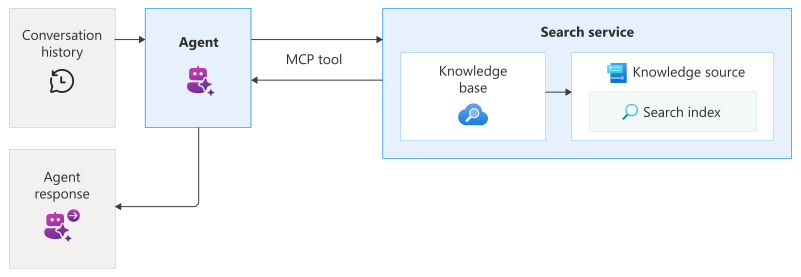
此解决方案结合了 Azure AI Search 和 Microsoft Foundry 来创建端到端检索管道:
Azure AI Search托管知识库,用于处理查询规划、查询执行和结果合成。 创建搜索索引用于存储内容,创建引用该索引的知识源,以及创建从该知识源执行混合检索的知识库。
Microsoft Foundry 托管 Azure OpenAI 模型部署、project连接和代理。 您创建一个项目连接,指向您的知识库的 MCP 终结点,然后创建一个代理,该代理使用 MCP 工具访问知识库。
用户通过与调用代理的客户端应用(如聊天机器人)交互来启动查询处理。 代理使用 MCP 工具协调对knowledge base的请求并合成响应。 聊天机器人调用代理时,MCP 工具会在Azure AI Search中调用knowledge base,并将响应发送到代理和聊天机器人。
配置访问
在开始之前,请确保你有权访问内容和操作。 建议使用 Microsoft Entra ID 进行身份验证,并使用基于角色的访问进行授权。 必须是 Owner 或 User Access Administrator 才能分配角色。 如果角色设置不可行,请改用基于密钥的身份验证方式。
若要为此解决方案配置访问权限,请执行以下步骤。
登录到 Azure portal。
启用系统分配的托管身份以用于搜索服务和项目。 可以在每个资源的标识页上执行此操作。
-
角色 被分派人 目的 Search Service参与者 用户帐户 创建对象 搜索索引数据贡献者 用户帐户 加载数据 搜索索引数据读取者 用户帐户和项目托管标识 读取索引内容 在项目的父资源中,分配以下角色。
角色 被分派人 目的 Azure AI 用户 用户帐户 Access模型部署和创建代理 Azure AI 项目经理 用户帐户 创建项目连接并在代理中使用MCP工具 认知服务用户 搜索服务托管标识 访问知识库
配置你的环境
创建在本地系统上命名
tutorial-agentic-retrieval的文件夹。在 Visual Studio Code 中打开文件夹。
选择 “查看 > 命令面板”,然后选择 “Python:创建环境”。 按照提示创建虚拟环境。
选择终端 > 新建终端。
安装所需程序包。
pip install azure-ai-projects==2.0.0b1 azure-mgmt-cognitiveservices azure-identity ipykernel dotenv azure-search-documents==11.7.0b2 requests openai在
.env文件夹中创建一个名为tutorial-agentic-retrieval的文件。将以下变量添加到
.env文件中,将占位符值替换为你自己的值。AZURE_SEARCH_ENDPOINT = https://{your-service-name}.search.azure.cn PROJECT_ENDPOINT = https://{your-resource-name}.services.ai.azure.com/api/projects/{your-project-name} PROJECT_RESOURCE_ID = /subscriptions/{subscription-id}/resourceGroups/{resource-group-name}/providers/Microsoft.CognitiveServices/accounts/{account-name}/projects/{project-name} AZURE_OPENAI_ENDPOINT = https://{your-resource-name}.openai.azure.com AZURE_OPENAI_EMBEDDING_DEPLOYMENT = text-embedding-3-large AGENT_MODEL = gpt-4.1-mini可以在Azure portal中找到终结点和资源 ID:
AZURE_SEARCH_ENDPOINT位于您的搜索服务的Overview页上。PROJECT_ENDPOINT位于您的项目的 Endpoints 页上。PROJECT_RESOURCE_ID位于项目的 Properties 页上。AZURE_OPENAI_ENDPOINT位于项目的父资源的 Endpoints 页上。
若要使用 Microsoft Entra ID 进行无密钥身份验证,请登录到Azure帐户。 如果有多个订阅,请选择包含 Azure AI 搜索和Microsoft Foundry 资源的订阅。
az login在
tutorial.ipynb文件夹中创建一个名为tutorial-agentic-retrieval的文件。 在下一部分中,将代码单元格添加到此文件。
生成解决方案
在本部分中,将创建代理检索解决方案的组件。 将每个代码片段添加到笔记本中的 tutorial.ipynb 单独代码单元,并按顺序运行单元格。
本节中的步骤包括:
加载连接
以下代码从 .env 文件中加载环境变量,并建立与 Azure AI Search 和 Microsoft Foundry 的连接。
import os

from azure.identity import DefaultAzureCredential
from azure.mgmt.core.tools import parse_resource_id
from dotenv import load_dotenv

load_dotenv(override=True) # Take environment variables from .env

project_endpoint = os.environ["PROJECT_ENDPOINT"]
project_resource_id = os.environ["PROJECT_RESOURCE_ID"]
project_connection_name = os.getenv("PROJECT_CONNECTION_NAME", "earthknowledgeconnection")
agent_model = os.getenv("AGENT_MODEL", "gpt-4.1-mini")
agent_name = os.getenv("AGENT_NAME", "earth-knowledge-agent")
endpoint = os.environ["AZURE_SEARCH_ENDPOINT"]
credential = DefaultAzureCredential()
knowledge_source_name = os.getenv("AZURE_SEARCH_KNOWLEDGE_SOURCE_NAME", "earth-knowledge-source")
index_name = os.getenv("AZURE_SEARCH_INDEX", "earth-at-night")
azure_openai_endpoint = os.environ["AZURE_OPENAI_ENDPOINT"]
azure_openai_embedding_deployment = os.getenv("AZURE_OPENAI_EMBEDDING_DEPLOYMENT", "text-embedding-3-large")
azure_openai_embedding_model = os.getenv("AZURE_OPENAI_EMBEDDING_MODEL", "text-embedding-3-large")
base_name = os.getenv("AZURE_SEARCH_AGENT_NAME", "earth-knowledge-base")

# Parse the resource ID to extract subscription and other components
parsed_resource_id = parse_resource_id(project_resource_id)
subscription_id = parsed_resource_id['subscription']
resource_group = parsed_resource_id['resource_group']
account_name = parsed_resource_id['name']
project_name = parsed_resource_id['child_name_1']
创建搜索索引
在Azure AI Search中,索引是结构化数据集合。 以下代码创建索引来存储knowledge base的可搜索内容。
索引架构包含文档标识和页面内容、嵌入和数字的字段。 该架构还包含用于语义排序和向量搜索的配置,该配置利用你部署的 text-embedding-3-large 模型将文本转换为向量,并根据语义相似度匹配相关文档。
有关此步骤的详细信息,请参阅 创建索引以在 Azure AI Search 进行代理检索。
from azure.search.documents.indexes import SearchIndexClient
from azure.search.documents.indexes.models import (
    AzureOpenAIVectorizer, AzureOpenAIVectorizerParameters,
    HnswAlgorithmConfiguration, SearchField, SearchIndex,
    SemanticConfiguration, SemanticField, SemanticPrioritizedFields,
    SemanticSearch, VectorSearch, VectorSearchProfile
)

index = SearchIndex(
    name=index_name,
    fields=[
        SearchField(name="id", type="Edm.String", key=True, filterable=True, sortable=True, facetable=True),
        SearchField(name="page_chunk", type="Edm.String", filterable=False, sortable=False, facetable=False),
        SearchField(name="page_embedding_text_3_large", type="Collection(Edm.Single)", stored=False, vector_search_dimensions=3072, vector_search_profile_name="hnsw_text_3_large"),
        SearchField(name="page_number", type="Edm.Int32", filterable=True, sortable=True, facetable=True)
    ],
    vector_search=VectorSearch(
        profiles=[VectorSearchProfile(name="hnsw_text_3_large", algorithm_configuration_name="alg", vectorizer_name="azure_openai_text_3_large")],
        algorithms=[HnswAlgorithmConfiguration(name="alg")],
        vectorizers=[
            AzureOpenAIVectorizer(
                vectorizer_name="azure_openai_text_3_large",
                parameters=AzureOpenAIVectorizerParameters(
                    resource_url=azure_openai_endpoint,
                    deployment_name=azure_openai_embedding_deployment,
                    model_name=azure_openai_embedding_model
                )
            )
        ]
    ),
    semantic_search=SemanticSearch(
        default_configuration_name="semantic_config",
        configurations=[
            SemanticConfiguration(
                name="semantic_config",
                prioritized_fields=SemanticPrioritizedFields(
                    content_fields=[
                        SemanticField(field_name="page_chunk")
                    ]
                )
            )
        ]
    )
)

index_client = SearchIndexClient(endpoint=endpoint, credential=credential)
index_client.create_or_update_index(index)
print(f"Index '{index_name}' created or updated successfully")
将文档上传到索引
目前,索引为空。 以下代码使用来自 NASA 地球的夜间电子书中的 JSON 文档填充索引。 根据Azure AI Search的要求,每个文档都符合索引架构中定义的字段和数据类型。
有关此步骤的详细信息,请参阅 将数据推送到索引。
import requests
from azure.search.documents import SearchIndexingBufferedSender

url = "https://raw.githubusercontent.com/Azure-Samples/azure-search-sample-data/refs/heads/main/nasa-e-book/earth-at-night-json/documents.json"
documents = requests.get(url).json()

with SearchIndexingBufferedSender(endpoint=endpoint, index_name=index_name, credential=credential) as client:
    client.upload_documents(documents=documents)

print(f"Documents uploaded to index '{index_name}'")
创建知识来源
知识源是对源数据的可重用引用。 以下代码创建了一个以之前创建的索引为目标的知识源。
source_data_fields 指定引文引用中包含哪些索引字段。 此示例仅包含人类可读字段,以避免在响应中产生冗长、难以解释的嵌入。
有关此步骤的详细信息,请参阅 创建搜索索引知识源。
from azure.search.documents.indexes import SearchIndexClient
from azure.search.documents.indexes.models import (
    SearchIndexFieldReference, SearchIndexKnowledgeSource,
    SearchIndexKnowledgeSourceParameters
)

ks = SearchIndexKnowledgeSource(
    name=knowledge_source_name,
    description="Knowledge source for Earth at night data",
    search_index_parameters=SearchIndexKnowledgeSourceParameters(
        search_index_name=index_name,
        source_data_fields=[SearchIndexFieldReference(name="id"), SearchIndexFieldReference(name="page_number")]
    ),
)

index_client = SearchIndexClient(endpoint=endpoint, credential=credential)
index_client.create_or_update_knowledge_source(knowledge_source=ks)
print(f"Knowledge source '{knowledge_source_name}' created or updated successfully.")
创建知识库
以下代码创建一个知识库,用于协调从知识源进行代理检索。 该代码还存储了知识库的 MCP 终结点,代理将使用该终结点访问知识库。
若要与 Foundry 代理服务集成,knowledge base配置了以下参数:
output_mode设置为抽取式数据,为代理提供逐字、未处理的内容,用于基础和推理。 替代模式答案合成返回预生成的答案,这些答案限制了代理在源内容上推理的能力。retrieval_reasoning_effort设置为最小工作量,这会绕过基于 LLM 的查询计划来降低成本和延迟。 为了进行其他推理工作,知识库使用 LLM 在检索之前重构用户查询。
有关此步骤的详细信息,请参阅 在 Azure AI Search 中创建知识库。
from azure.search.documents.indexes import SearchIndexClient
from azure.search.documents.indexes.models import (
    KnowledgeBase, KnowledgeRetrievalMinimalReasoningEffort,
    KnowledgeRetrievalOutputMode, KnowledgeSourceReference
)

knowledge_base = KnowledgeBase(
    name=base_name,
    knowledge_sources=[
        KnowledgeSourceReference(
            name=knowledge_source_name
        )
    ],
    output_mode=KnowledgeRetrievalOutputMode.EXTRACTIVE_DATA,
    retrieval_reasoning_effort=KnowledgeRetrievalMinimalReasoningEffort()
)

index_client = SearchIndexClient(endpoint=endpoint, credential=credential)
index_client.create_or_update_knowledge_base(knowledge_base=knowledge_base)
print(f"Knowledge base '{base_name}' created or updated successfully")

mcp_endpoint = f"{endpoint}/knowledgebases/{base_name}/mcp?api-version=2025-11-01-Preview"
设置一个项目客户端
使用 AIProjectClient 创建与 Microsoft Foundry project 的客户端连接。 project可能尚不包含任何代理,但如果已完成本教程,则此处列出了代理。
from azure.ai.projects import AIProjectClient

project_client = AIProjectClient(endpoint=project_endpoint, credential=credential)

list(project_client.agents.list())
创建项目连接
以下代码在 Microsoft Foundry 中创建一个项目连接,该连接指向知识库的 MCP 终结点。 此连接使用项目托管标识对 Azure AI Search 进行身份验证。
import requests
from azure.identity import get_bearer_token_provider

bearer_token_provider = get_bearer_token_provider(credential, "https://management.chinacloudapi.cn/.default")
headers = {
    "Authorization": f"Bearer {bearer_token_provider()}",
}

response = requests.put(
    f"https://management.chinacloudapi.cn{project_resource_id}/connections/{project_connection_name}?api-version=2025-10-01-preview",
    headers=headers,
    json={
        "name": project_connection_name,
        "type": "Microsoft.MachineLearningServices/workspaces/connections",
        "properties": {
            "authType": "ProjectManagedIdentity",
            "category": "RemoteTool",
            "target": mcp_endpoint,
            "isSharedToAll": True,
            "audience": "https://search.azure.cn/",
            "metadata": { "ApiType": "Azure" }
        }
    }
)

response.raise_for_status()
print(f"Connection '{project_connection_name}' created or updated successfully.")
使用 MCP 工具创建代理
以下代码创建使用 MCP 工具配置的代理。 当代理收到用户查询时,它可以通过 MCP 工具调用知识库,以检索用于响应基础的相关内容。
代理定义包括指定其行为的指令,以及您之前创建的项目连接。 根据我们的试验,这些说明在最大程度地提高knowledge base调用的准确性并确保正确的引文格式方面是有效的。
有关此步骤的详细信息,请参阅 快速入门:创建新代理。
from azure.ai.projects.models import PromptAgentDefinition, MCPTool

instructions = """
You are a helpful assistant that must use the knowledge base to answer all the questions from user. You must never answer from your own knowledge under any circumstances.
Every answer must always provide annotations for using the MCP knowledge base tool and render them as: `【message_idx:search_idx†source_name】`
If you cannot find the answer in the provided knowledge base you must respond with "I don't know".
"""

mcp_kb_tool = MCPTool(
    server_label="knowledge-base",
    server_url=mcp_endpoint,
    require_approval="never",
    allowed_tools=["knowledge_base_retrieve"],
    project_connection_id=project_connection_name
)

agent = project_client.agents.create_version(
    agent_name=agent_name,
    definition=PromptAgentDefinition(
        model=agent_model,
        instructions=instructions,
        tools=[mcp_kb_tool]
    )
)

print(f"AI agent '{agent_name}' created or updated successfully")
与代理聊天
客户端应用使用来自 Azure OpenAI 的 Conversations 和 Responses API 与代理交互。
以下代码创建聊天并将用户消息传递给代理,类似于典型的聊天体验。 代理确定何时通过 MCP 工具调用knowledge base,并返回带引用的自然语言答案。 设置 tool_choice="required"可确保代理在处理查询时始终使用knowledge base工具。
# Get the OpenAI client for responses and conversations
openai_client = project_client.get_openai_client()

conversation = openai_client.conversations.create()

# Send initial request that will trigger the MCP tool
response = openai_client.responses.create(
    conversation=conversation.id,
    tool_choice="required",
    input="""
        Why do suburban belts display larger December brightening than urban cores even though absolute light levels are higher downtown?
        Why is the Phoenix nighttime street grid is so sharply visible from space, whereas large stretches of the interstate between midwestern cities remain comparatively dim?
    """,
    extra_body={"agent": {"name": agent.name, "type": "agent_reference"}},
)

print(f"Response: {response.output_text}")
响应应类似于以下内容:
Response: Here are evidence-based explanations to your questions:

---

**1. Why do suburban belts display larger December brightening than urban cores, even though absolute light levels are higher downtown?**

- Suburban belts show a *larger percentage increase* in night brightness during December compared to urban cores, largely because suburban residential areas feature more single-family homes and larger yards, which are typically decorated with holiday lights. These areas start from a lower baseline (less bright overall at night compared to dense urban centers), so the relative change (brightening) is much more noticeable.

- In contrast, the downtown core is already very bright at night due to dense commercial lighting and streetlights. While it also sees a December increase (often 20-30% brighter), the *absolute* change is less striking because it begins at a much higher base of illumination.

- This pattern is observed across U.S. cities, with the phenomenon driven by widespread cultural practices and the suburban landscape's suitability for holiday lighting displays. The effect is visible in satellite data and was quantified at 20-50% brighter in December, especially in suburbs and city outskirts.

---

**2. Why is the Phoenix nighttime street grid so sharply visible from space, whereas large stretches of the interstate between midwestern cities remain comparatively dim?**

- Phoenix's sharply visible nighttime street grid from space is a result of its urban layout: the city (like many western U.S. cities) was developed using a regular grid system, with extensive and uniform street lighting and strong urban sprawl. The grid pattern, and the dense network of intersecting surface streets, is brightly illuminated, particularly at intersections, commercial areas, and major thoroughfares.

- The interstate highways between midwestern cities, though significant in length and crucial to national infrastructure, traverse sparsely populated rural areas. These stretches typically have very little artificial lighting (due to low traffic volumes at night and cost considerations), making them much less visible in nighttime satellite imagery. Only nodes (cities and towns) along the route show as bright "pearls" in the darkness, while the "strings" (highways) connecting them remain faint or invisible.

- In summary:
  - Urban areas like Phoenix stand out with strong, connected patterns of light due to dense development and extensive lighting.
  - Rural interstates are sparsely lit, and only their endpoints—cities and large towns—generate notable light visible from space.

---

**References**:
- [Holiday Lights increase most dramatically in suburbs, not downtowns: earth_at_night_508_page_176_verbalized, page 160](4:5)
- [Lighting paths and urban grids are visible from space, while rural highways remain dim: earth_at_night_508_page_124_verbalized, page 108](4:3)
- [Phoenix's grid and surrounding urban structure: earth_at_night_508_page_104_verbalized, page 88](4:1)
检查响应
代理的底层响应包含关于发送到知识库的查询及找到的引文的元数据。 可以检查此元数据,以了解代理如何处理用户输入。
response.to_dict()
清理资源
在您自己的订阅计划中工作时,最好通过删除不再需要的资源来完成项目。 持续运行的资源可能会产生费用。
在 Azure 门户中,从左窗格中选择 “所有资源 ”或 “资源组 ”以查找和管理资源。 可以单独删除资源,也可以删除资源组以一次性删除所有资源。
还可以运行以下代码来删除单个对象:
# Delete the agent
project_client.agents.delete_version(agent.name, agent.version)
print(f"AI agent '{agent.name}' version '{agent.version}' deleted successfully")

# Delete the knowledge base
index_client.delete_knowledge_base(base_name)
print(f"Knowledge base '{base_name}' deleted successfully")

# Delete the knowledge source
index_client.delete_knowledge_source(knowledge_source=knowledge_source_name)
print(f"Knowledge source '{knowledge_source_name}' deleted successfully.")

# Delete the search index
index_client.delete_index(index)
print(f"Index '{index_name}' deleted successfully")
提高数据质量
默认情况下,知识库中的搜索结果合并为可以传递给代理用于基础验证的统一字符串。 Azure AI Search提供以下索引和相关性优化功能,帮助你生成高质量的结果。 可以在搜索索引中实现这些功能,搜索相关性的改进在检索响应的质量中显而易见。
计分配置文件 提供内置的加权标准。 索引必须指定默认计分配置文件,当查询包含与该配置文件关联的字段时,检索引擎将使用该配置文件。
语义配置 是必需的,但你可以确定哪些字段的优先级并用于排名。
对于纯文本内容,可以使用 分析器 控制索引期间的标记化。
对于多模式或图像内容,您可以在索引期间使用技能集将图像内容语言化以生成图像的 LLM 描述,或通过经典的 OCR 和图像分析来处理图像。
控制子查询数
可以通过设置knowledge base上的检索推理工作量来控制子查询数。 推理工作确定查询规划的 LLM 处理级别,范围从最小(无 LLM 处理)到中等(更深入的搜索和后续迭代)。
对于非最小推理工作,LLM 根据以下因素确定子查询数:
- 用户查询
- 聊天历史记录
- 语义排名器输入约束
控制发送到代理的上下文
响应API控制发送到代理和知识库的内容。 若要优化性能和相关性,请调整代理说明,以汇总或筛选聊天历史记录,然后再将其发送到 MCP 工具。
控制成本和限制运作
有关查询计划的见解,请查看知识库响应中 activity 数组的输出令牌。
提高性能
若要优化性能和降低延迟,请考虑以下策略:
汇总消息会话。
使用
gpt-4.1-mini或执行速度更快的较小模型。设置
maxOutputSize在检索操作上,以控制响应的大小或maxRuntimeInSeconds时间受限的处理。