Nota:
El acceso a esta página requiere autorización. Puede intentar iniciar sesión o cambiar directorios.
El acceso a esta página requiere autorización. Puede intentar cambiar los directorios.
在本快速入门中,使用Azure 资源管理器模板在Azure门户中部署Azure AI 搜索服务。
Azure 资源管理器模板是定义项目基础结构和配置的 JavaScript 对象表示法 (JSON) 文件。 模板使用声明性语法。 你可以在不编写用于创建部署的编程命令序列的情况下,描述预期部署。
部署仅使用模板中包含的属性。 如果需要更多自定义,例如 设置网络安全,则可以将服务更新为部署后任务。 若要以最少的步骤自定义现有服务,请使用 Azure CLI 或 Azure PowerShell。 如果要评估预览功能,请使用管理 REST API。
如果你的环境满足先决条件,而且你熟悉如何使用 ARM 模板,请选择“部署到 Azure”按钮。 Azure 门户中会打开模板。

先决条件
如果没有 Azure 订阅,请在开始前创建一个试用版订阅。
查看模板
本快速入门使用了 Azure Quickstart Templates 中的一个模板。
{
  "$schema": "https://schema.management.azure.com/schemas/2019-04-01/deploymentTemplate.json#",
  "contentVersion": "1.0.0.0",
  "metadata": {
    "_generator": {
      "name": "bicep",
      "version": "0.5.6.12127",
      "templateHash": "11257266040777038564"
    }
  },
  "parameters": {
    "name": {
      "type": "string",
      "maxLength": 60,
      "minLength": 2,
      "metadata": {
        "description": "Service name must only contain lowercase letters, digits or dashes, cannot use dash as the first two or last one characters, cannot contain consecutive dashes, and is limited between 2 and 60 characters in length."
      }
    },
    "sku": {
      "type": "string",
      "defaultValue": "standard",
      "metadata": {
        "description": "The pricing tier of the search service you want to create (for example, basic or standard)."
      },
      "allowedValues": [
        "free",
        "basic",
        "standard",
        "standard2",
        "standard3",
        "storage_optimized_l1",
        "storage_optimized_l2"
      ]
    },
    "replicaCount": {
      "type": "int",
      "defaultValue": 1,
      "maxValue": 12,
      "minValue": 1,
      "metadata": {
        "description": "Replicas distribute search workloads across the service. You need at least two replicas to support high availability of query workloads (not applicable to the free tier)."
      }
    },
    "partitionCount": {
      "type": "int",
      "defaultValue": 1,
      "allowedValues": [
        1,
        2,
        3,
        4,
        6,
        12
      ],
      "metadata": {
        "description": "Partitions allow for scaling of document count as well as faster indexing by sharding your index over multiple search units."
      }
    },
    "hostingMode": {
      "type": "string",
      "defaultValue": "default",
      "allowedValues": [
        "default",
        "highDensity"
      ],
      "metadata": {
        "description": "Applicable only for SKUs set to standard3. You can set this property to enable a single, high density partition that allows up to 1000 indexes, which is much higher than the maximum indexes allowed for any other SKU."
      }
    },
    "location": {
      "type": "string",
      "defaultValue": "[resourceGroup().location]",
      "metadata": {
        "description": "Location for all resources."
      }
    }
  },
  "resources": [
    {
      "type": "Microsoft.Search/searchServices",
      "apiVersion": "2020-08-01",
      "name": "[parameters('name')]",
      "location": "[parameters('location')]",
      "sku": {
        "name": "[parameters('sku')]"
      },
      "properties": {
        "replicaCount": "[parameters('replicaCount')]",
        "partitionCount": "[parameters('partitionCount')]",
        "hostingMode": "[parameters('hostingMode')]"
      }
    }
  ]
}
该模板定义以下 Azure 资源:
- Microsoft.Search/searchServices:创建 Azure AI 搜索服务
部署模板
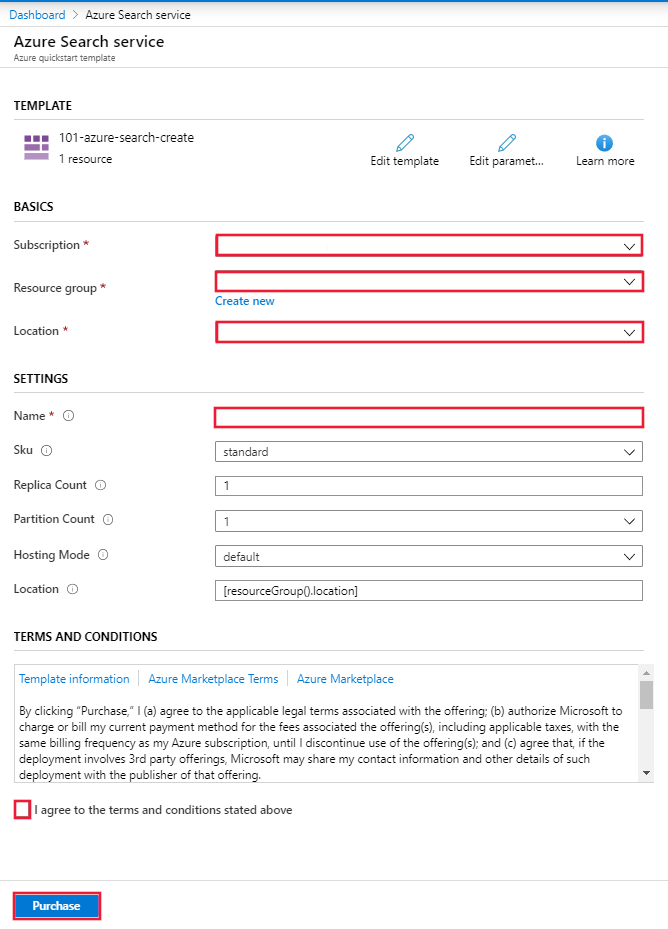
选择下图登录到 Azure 并打开一个模板。 该模板将创建一个 Azure AI 搜索资源。
Azure门户显示可用于轻松提供参数值的窗体。 某些参数预填充了模板中的默认值。 提供订阅、资源组、位置和服务名称。 如果要在 AI 扩充 管道中使用 Azure AI 服务,例如分析文本的二进制图像文件,请选择提供 Azure AI 搜索和 Azure AI 服务的位置。 除非使用无密钥连接(预览版),否则 Azure AI 搜索服务必须位于同一区域中,才能使用 AI 扩充工作负载。 完成表单后,同意条款和条件,然后选择购买按钮以完成部署。
查看已部署的资源
部署完成后,可以在 Azure 门户中访问新的资源组和新搜索服务。
清理资源
其他 Azure AI 搜索快速入门和教程都是在本快速入门的基础上编写的。 如果打算继续使用后续快速入门和教程,可能需要保留此资源。 不再需要资源时,可以删除资源组。 删除资源组会删除Azure AI 搜索服务和相关资源。
相关内容
在本快速入门中,你已使用 ARM 模板创建了Azure AI 搜索服务,然后验证了部署。 若要详细了解 Azure AI 搜索和 Azure 资源管理器,请参阅以下文章: