Nota:
El acceso a esta página requiere autorización. Puede intentar iniciar sesión o cambiar directorios.
El acceso a esta página requiere autorización. Puede intentar cambiar los directorios.
注意
基本计划和标准计划于 2025 年 3 月 17 日进入退休期。 有关详细信息,请参阅 Azure Spring Apps 停用公告。
本文介绍如何创建将权限委托给 Azure Spring Apps 资源的自定义角色。 自定义角色通过各种默认权限对 Azure 内置角色进行扩展。
我们将实现以下自定义角色。
开发人员角色:
- 部署
- 测试
- 重启应用
- 应用 Git 存储库中的应用配置以及对其进行更改
- 获取日志流
DevOps 工程师角色:
- 在 Azure Spring Apps 云中创建、读取、更新和删除任何内容
运营 - 现场可靠性工程角色:
- 重启应用
- 获取日志流
- 无法对应用或配置进行更改
Azure Pipelines/Jenkins/GitHub Actions 角色:
- 执行创建、读取、更新和删除操作
- 使用 Terraform 或 ARM 模板在 Azure Spring Apps 和应用的服务实例中创建和配置任何内容:Azure Pipelines、Jenkins 和 GitHub Actions
定义开发人员角色
开发人员角色包括重启应用和查看其日志流的权限。 此角色无法对应用或配置进行更改。
在 Azure 门户中,打开你要在其中分配自定义角色的订阅。
打开“访问控制(IAM)”。
选择 添加。
选择“添加自定义角色”。
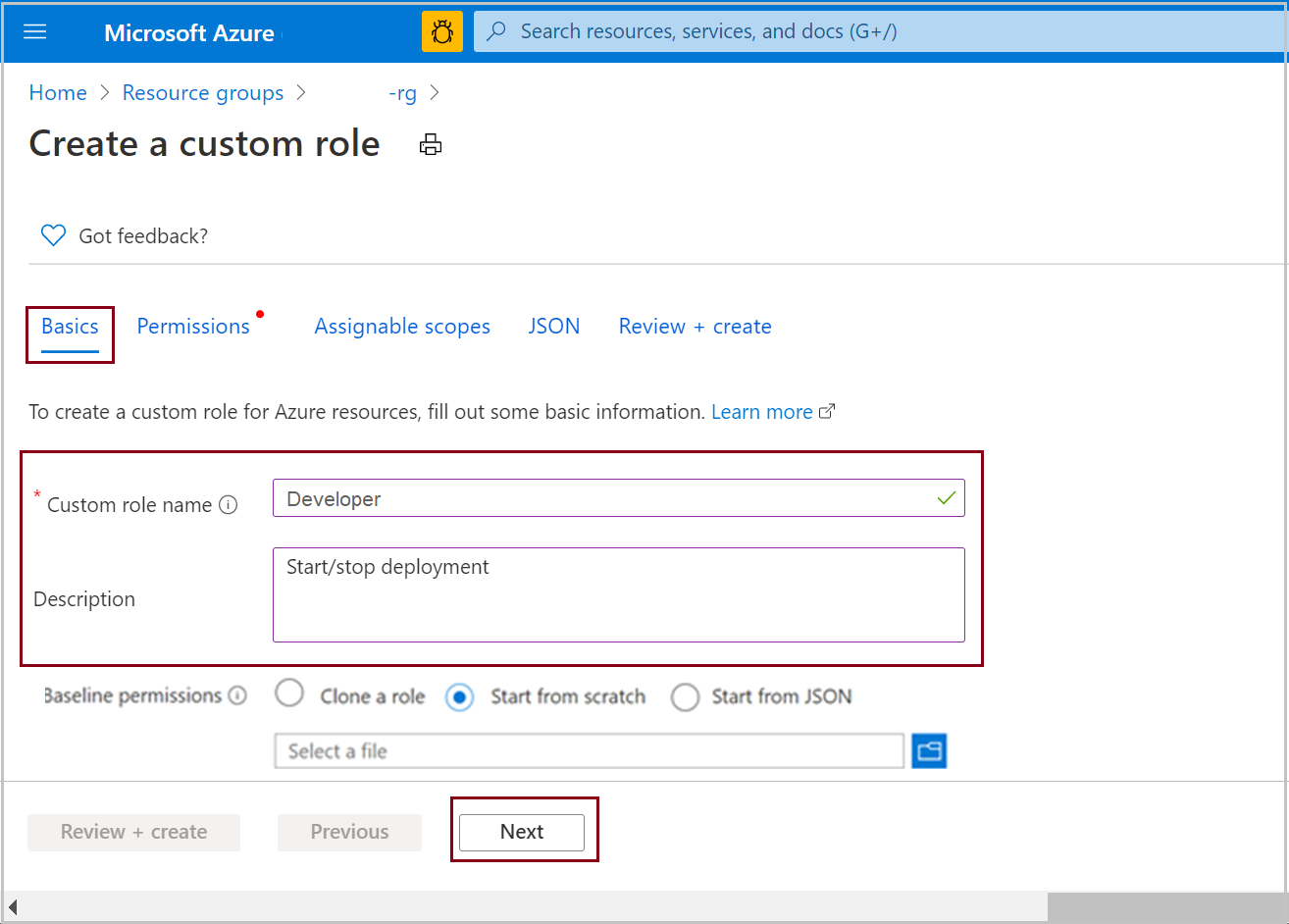
选择“下一步”:
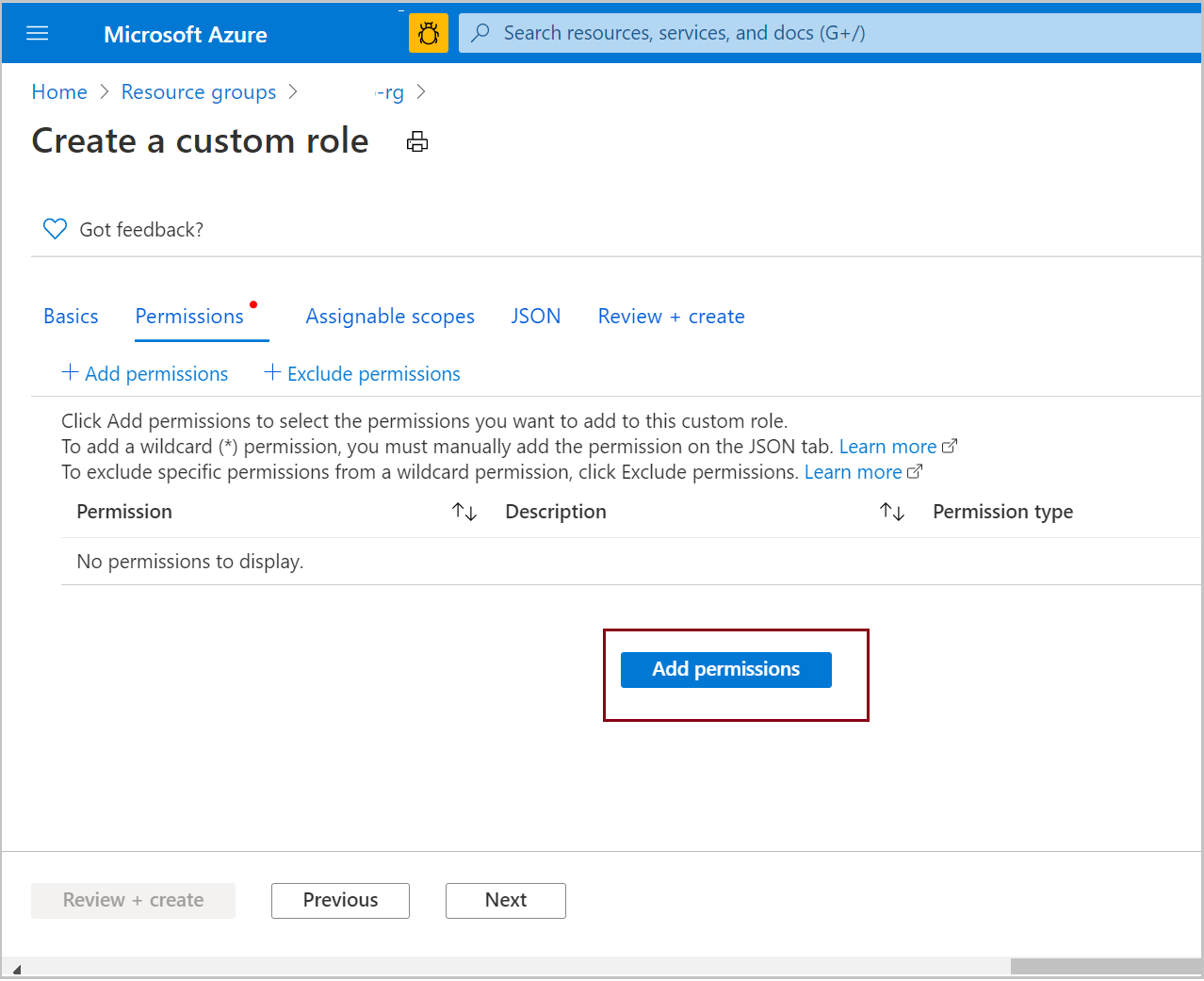
选择“添加权限”:
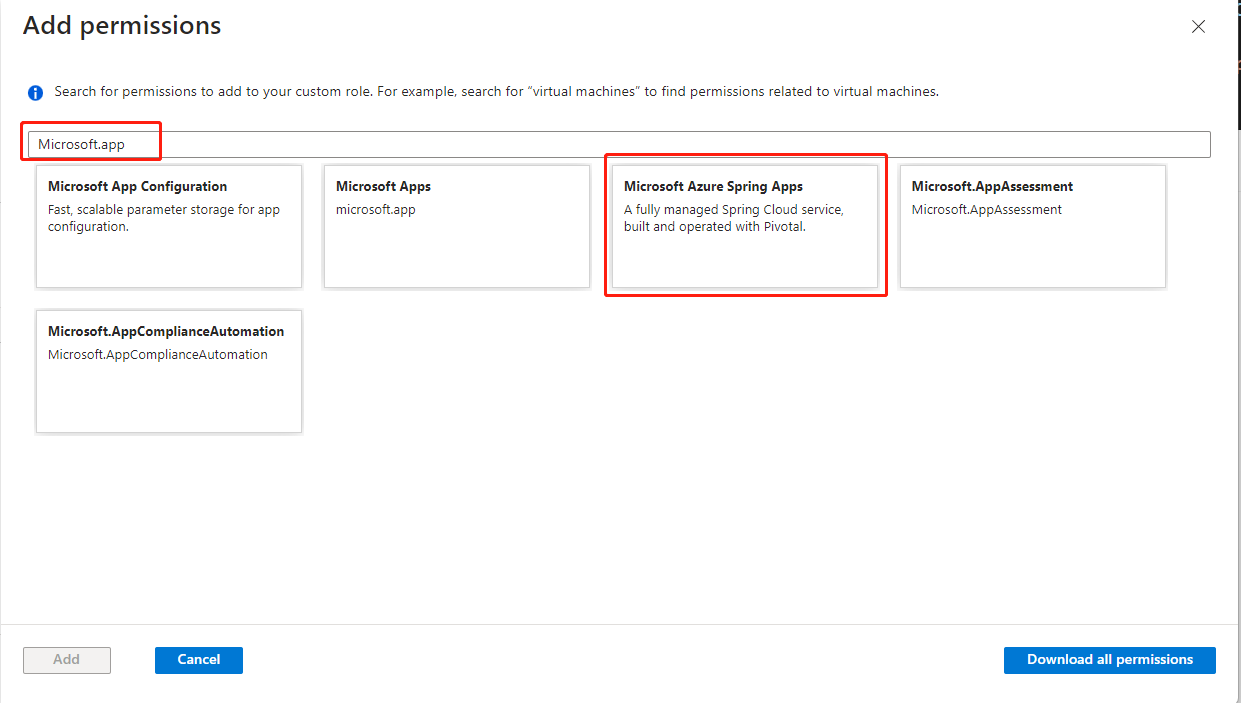
在搜索框中,搜索“Microsoft.app”。 选择“Azure Spring Apps”:
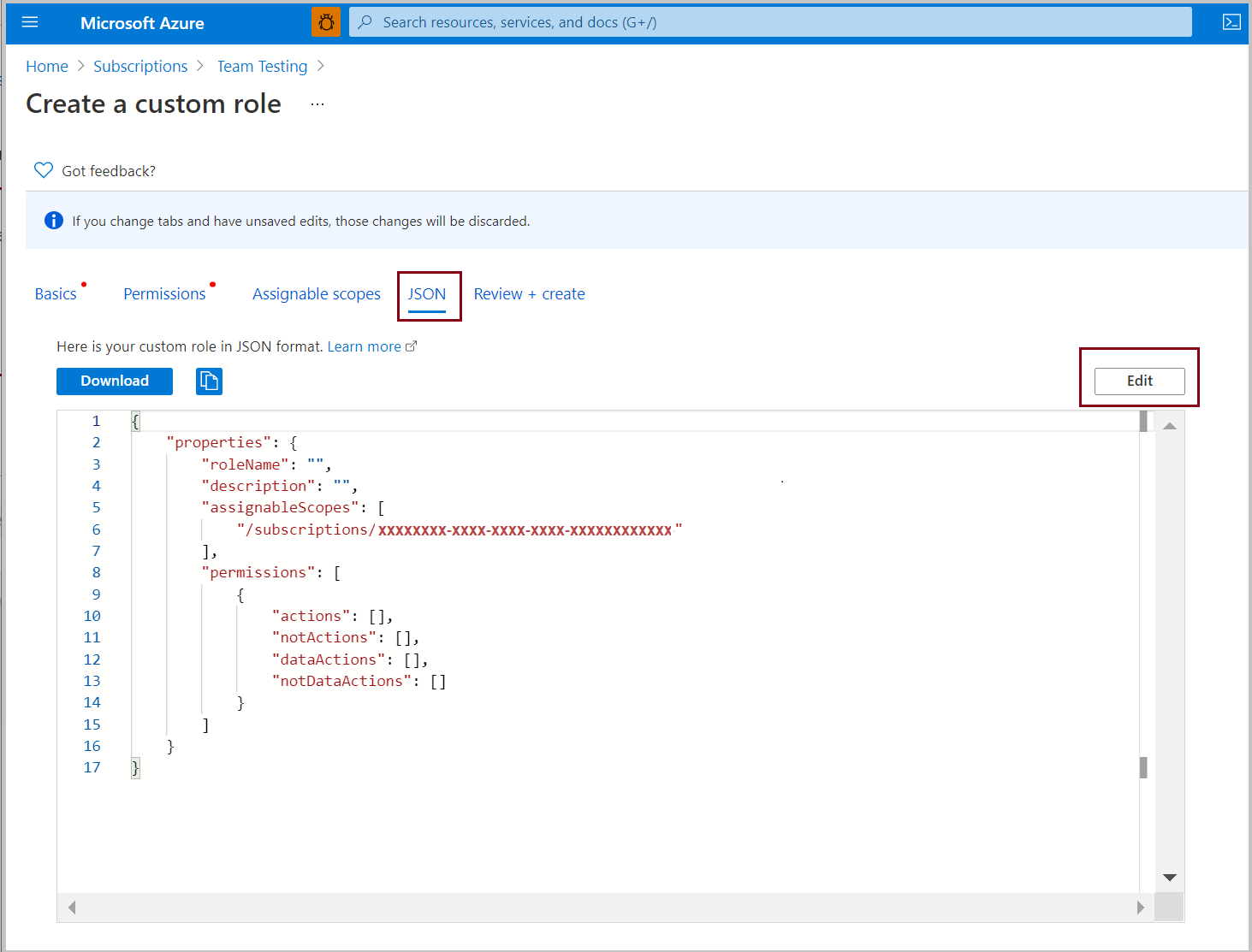
选择开发人员角色的权限。
在“Microsoft.AppPlatform/Spring”下,选择:
- 写入:创建或更新 Azure Spring Apps 服务实例
- 读取:获取 Azure Spring Apps 服务实例
- 其他:列出 Azure Spring Apps 服务实例测试密钥
在“Microsoft.AppPlatform/Spring/apps”下,选择:
- 读取:读取 Azure Spring Apps 应用程序
- 其他:获取 Azure Spring Apps 应用程序资源上传 URL
在“Microsoft.AppPlatform/Spring/apps/bindings”下,选择:
- 读取:读取 Azure Spring Apps 应用程序绑定
在“Microsoft.AppPlatform/Spring/apps/deployments”下,选择:
- 写入:写入 Azure Spring Apps 应用程序部署
- 读取:读取 Azure Spring Apps 应用程序部署
- 其他:启动 Azure Spring Apps 应用程序部署
- 其他:停止 Azure Spring Apps 应用程序部署
- 其他:重启 Azure Spring Apps 应用程序部署
- 其他:获取 Azure Spring Apps 应用程序部署日志文件 URL
在“Microsoft.AppPlatform/Spring/apps/domains”下,选择:
- 读取:读取 Azure Spring Apps 应用程序自定义域
在“Microsoft.AppPlatform/Spring/certificates”下,选择:
- 读取:读取 Azure Spring Apps 证书
在“Microsoft.AppPlatform/locations/operationResults/Spring”下,选择:
- 读取:读取操作结果
在“Microsoft.AppPlatform/locations/operationStatus/operationId”下,选择:
- 读取:读取操作状态
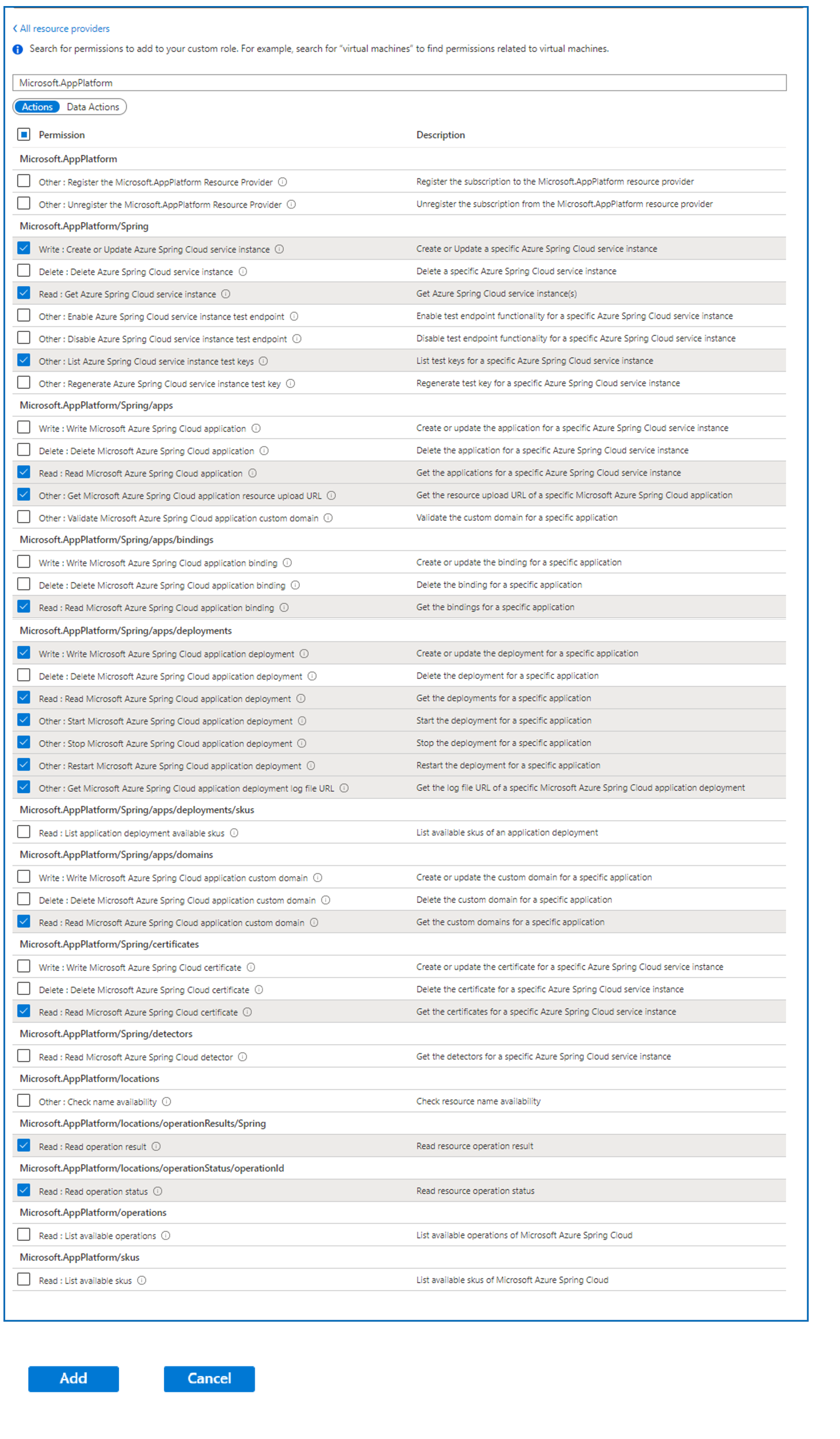
选择 添加。
检查这些权限。
选择“查看并创建”。
定义 DevOps 工程师角色
此过程定义有权部署、测试和重启 Azure Spring Apps 应用的角色。
重复用于添加开发人员角色的过程的步骤 1 到 4。
选择 DevOps 工程师角色的权限:
在“Microsoft.AppPlatform/Spring”下,选择:
- 写入:创建或更新 Azure Spring Apps 服务实例
- 删除:删除 Azure Spring Apps 服务实例
- 读取:获取 Azure Spring Apps 服务实例
- 其他:启用 Azure Spring Apps 服务实例测试终结点
- 其他:禁用 Azure Spring Apps 服务实例测试终结点
- 其他:列出 Azure Spring Apps 服务实例测试密钥
- 其他:重新生成 Azure Spring Apps 服务实例测试密钥
在“Microsoft.AppPlatform/Spring/apps”下,选择:
- 写入: 写入 Azure Spring Apps 应用程序
- 删除: 删除 Azure Spring Apps 应用程序
- 读取:读取 Azure Spring Apps 应用程序
- 其他:获取 Azure Spring Apps 应用程序资源上传 URL
- 其他: 验证 Azure Spring Apps 应用程序自定义域
在“Microsoft.AppPlatform/Spring/apps/bindings”下,选择:
- 写入: 写入 Azure Spring Apps 应用程序绑定
- 删除: 删除 Azure Spring Apps 应用程序绑定
- 读取:读取 Azure Spring Apps 应用程序绑定
在“Microsoft.AppPlatform/Spring/apps/deployments”下,选择:
- 写入:写入 Azure Spring Apps 应用程序部署
- 删除:删除 Azure Spring Apps 应用程序部署
- 读取:读取 Azure Spring Apps 应用程序部署
- 其他:启动 Azure Spring Apps 应用程序部署
- 其他:停止 Azure Spring Apps 应用程序部署
- 其他:重启 Azure Spring Apps 应用程序部署
- 其他:获取 Azure Spring Apps 应用程序部署日志文件 URL
在“Microsoft.AppPlatform/Spring/apps/deployments/skus”下,选择:
- 读取:列出应用程序部署可用的 SKU
在“Microsoft.AppPlatform/locations”下,选择:
- 其他:检查名称可用性
在“Microsoft.AppPlatform/locations/operationResults/Spring”下,选择:
- 读取:读取操作结果
在“Microsoft.AppPlatform/locations/operationStatus/operationId”下,选择:
- 读取:读取操作状态
在“Microsoft.AppPlatform/skus”下,选择:
- 读取:列出可用的 SKU

选择 添加。
检查这些权限。
选择“查看并创建”。

定义运营 - 现场可靠性工程角色
此过程定义有权部署、测试和重启 Azure Spring Apps 应用的角色。
重复用于添加开发人员角色的过程的步骤 1 到 4。
选择 Ops - 站点可靠性工程角色的权限:
在“Microsoft.AppPlatform/Spring”下,选择:
- 读取:获取 Azure Spring Apps 服务实例
- 其他:列出 Azure Spring Apps 服务实例测试密钥
在“Microsoft.AppPlatform/Spring/apps”下,选择:
- 读取:读取 Azure Spring Apps 应用程序
在“Microsoft.AppPlatform/apps/deployments”下,选择:
- 读取:读取 Azure Spring Apps 应用程序部署
- 其他:启动 Azure Spring Apps 应用程序部署
- 其他:停止 Azure Spring Apps 应用程序部署
- 其他:重启 Azure Spring Apps 应用程序部署
在“Microsoft.AppPlatform/locations/operationResults/Spring”下,选择:
- 读取:读取操作结果
在“Microsoft.AppPlatform/locations/operationStatus/operationId”下,选择:
- 读取:读取操作状态
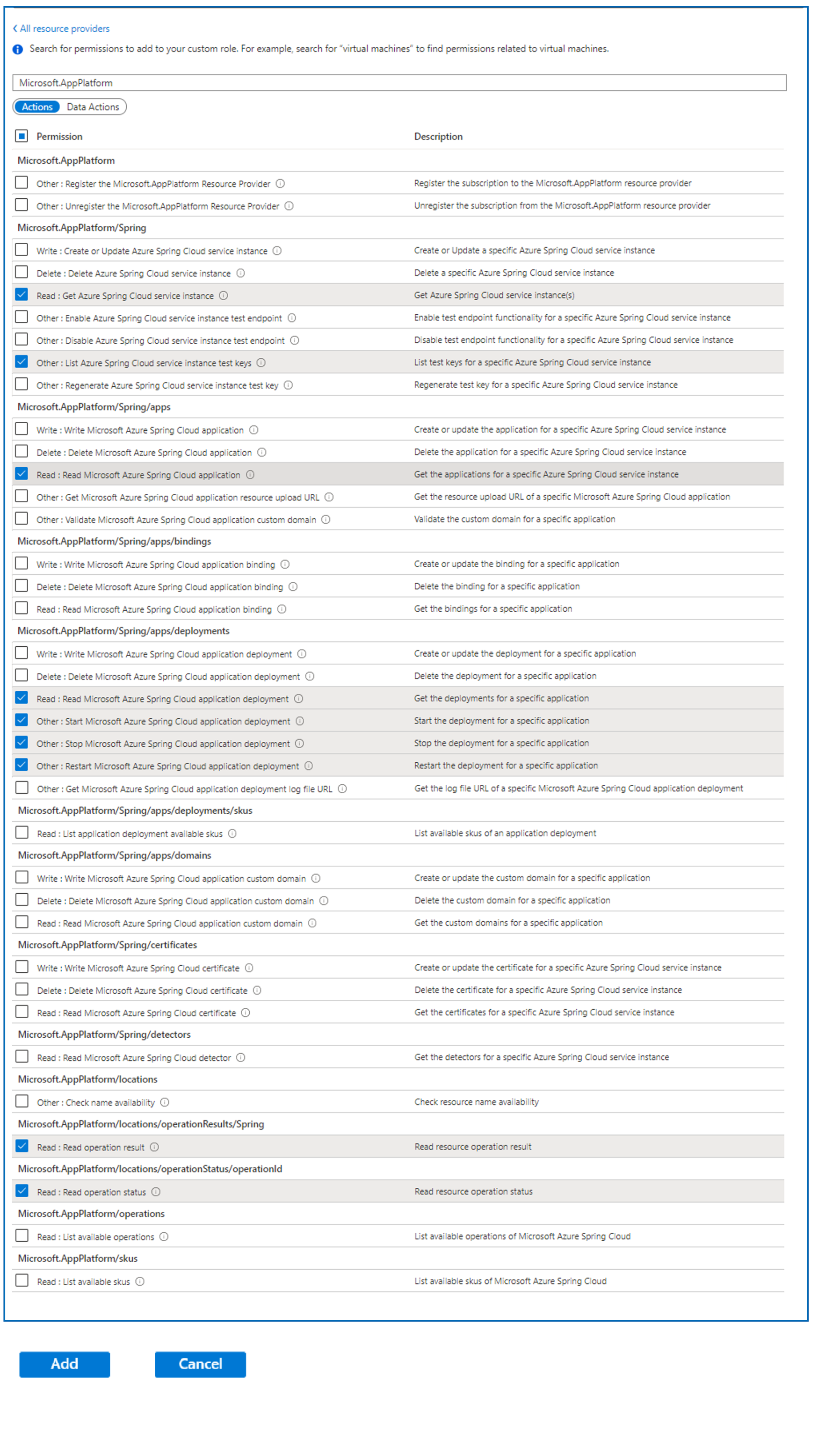
选择 添加。
检查这些权限。
选择“查看并创建”。
定义 Azure Pipelines/Jenkins/GitHub Actions 角色
此角色可以在具有服务实例的 Azure Spring Apps 和应用中创建和配置任何内容。 此角色用于发布或部署代码。
重复用于添加开发人员角色的过程的步骤 1 到 4。
打开“权限”选项。
选择 Azure Pipelines/Jenkins/GitHub Actions 角色的权限:
在“Microsoft.AppPlatform/Spring”下,选择:
- 写入:创建或更新 Azure Spring Apps 服务实例
- 删除:删除 Azure Spring Apps 服务实例
- 读取:获取 Azure Spring Apps 服务实例
- 其他:启用 Azure Spring Apps 服务实例测试终结点
- 其他:禁用 Azure Spring Apps 服务实例测试终结点
- 其他:列出 Azure Spring Apps 服务实例测试密钥
- 其他:重新生成 Azure Spring Apps 服务实例测试密钥
在“Microsoft.AppPlatform/Spring/apps”下,选择:
- 写入: 写入 Azure Spring Apps 应用程序
- 删除: 删除 Azure Spring Apps 应用程序
- 读取:读取 Azure Spring Apps 应用程序
- 其他:获取 Azure Spring Apps 应用程序资源上传 URL
- 其他: 验证 Azure Spring Apps 应用程序自定义域
在“Microsoft.AppPlatform/Spring/apps/bindings”下,选择:
- 写入: 写入 Azure Spring Apps 应用程序绑定
- 删除: 删除 Azure Spring Apps 应用程序绑定
- 读取:读取 Azure Spring Apps 应用程序绑定
在“Microsoft.AppPlatform/Spring/apps/deployments”下,选择:
- 写入:写入 Azure Spring Apps 应用程序部署
- 删除:删除 Azure Spring Apps 应用程序部署
- 读取:读取 Azure Spring Apps 应用程序部署
- 其他:启动 Azure Spring Apps 应用程序部署
- 其他:停止 Azure Spring Apps 应用程序部署
- 其他:重启 Azure Spring Apps 应用程序部署
- 其他:获取 Azure Spring Apps 应用程序部署日志文件 URL
在“Microsoft.AppPlatform/Spring/apps/deployments/skus”下,选择:
- 读取:列出应用程序部署可用的 SKU
在“Microsoft.AppPlatform/locations”下,选择:
- 其他:检查名称可用性
在“Microsoft.AppPlatform/locations/operationResults/Spring”下,选择:
- 读取:读取操作结果
在“Microsoft.AppPlatform/locations/operationStatus/operationId”下,选择:
- 读取:读取操作状态
在“Microsoft.AppPlatform/skus”下,选择:
- 读取:列出可用的 SKU
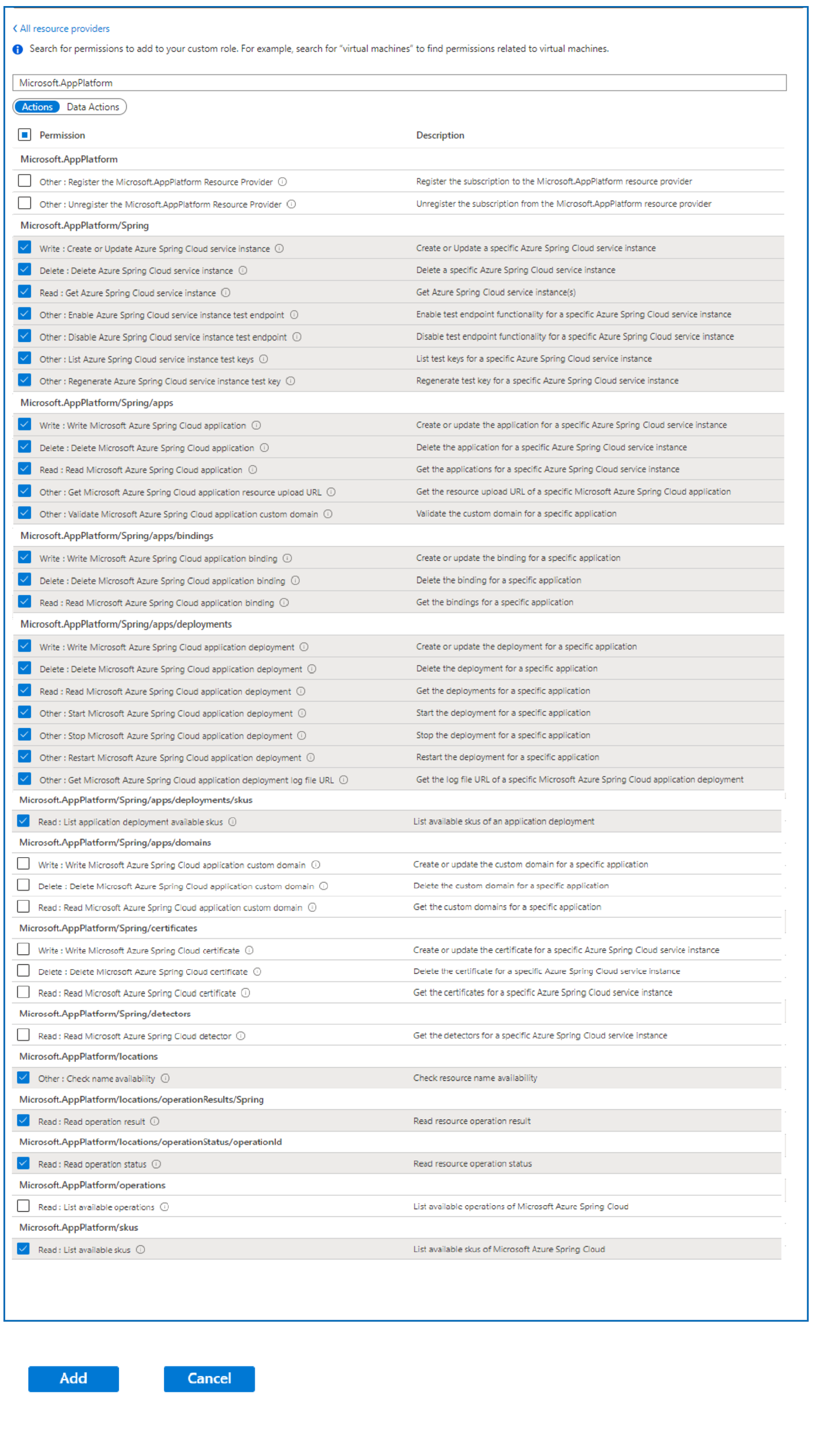
选择 添加。
检查这些权限。
选择“查看并创建”。
后续步骤
有关定义自定义权限的三种方法的详细信息,请参阅: