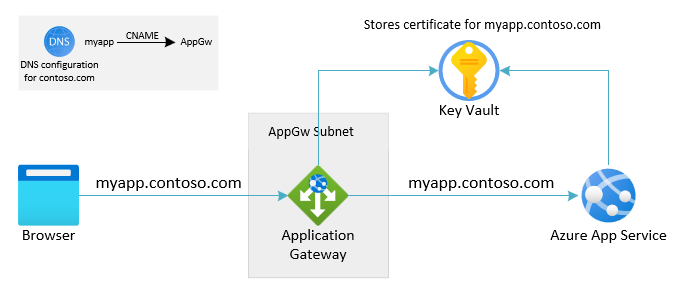
使用自定义域将用户或客户端路由到应用程序网关。 使用指向应用程序网关 DNS 的 CNAME 别名设置 DNS。 应用程序网关的 DNS 地址显示在关联的公共 IP 地址的“概述”页上。 或者,创建直接指向该 IP 地址的 A 记录。 (对于应用程序网关 V1,如果你停止并启动服务,VIP 可能会更改,这使得该选项并非所需。)
应配置应用服务,以便它使用自定义域名作为传入主机接受来自应用程序网关的流量。 有关如何将自定义域映射到应用服务的详细信息,请参阅教程:将现有的自定义 DNS 名称映射到 Azure 应用服务。若要验证域,应用服务只需添加 TXT 记录。 不需要对 CNAME 或 A 记录进行更改。 自定义域的 DNS 配置仍定向到应用程序网关。
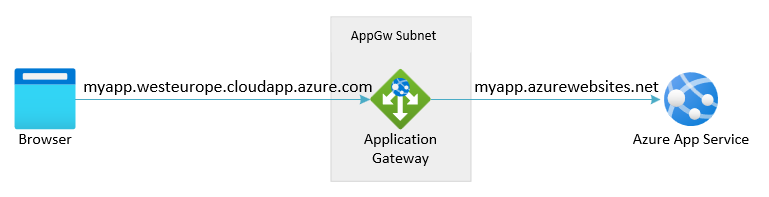
当没有可用的自定义域时,用户或客户端可以使用网关的 IP 地址或其 DNS 地址访问应用程序网关。 应用程序网关的 DNS 地址可以在关联的公共 IP 地址的“概述”页上找到。 没有可用的自定义域名意味着在应用程序网关上没有可用的公开签名证书用于 TLS。 客户端会被限制为使用带有自签名证书的 HTTP 或 HTTPS,而这两者都并非所需。
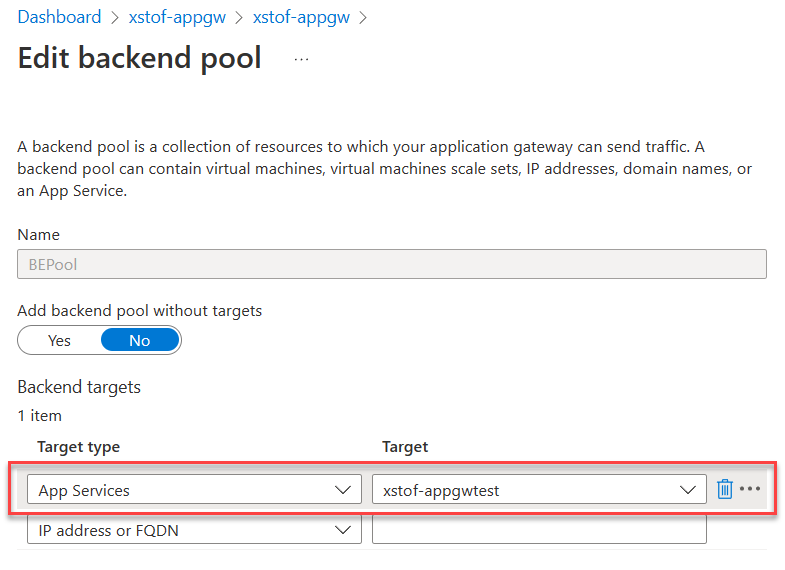
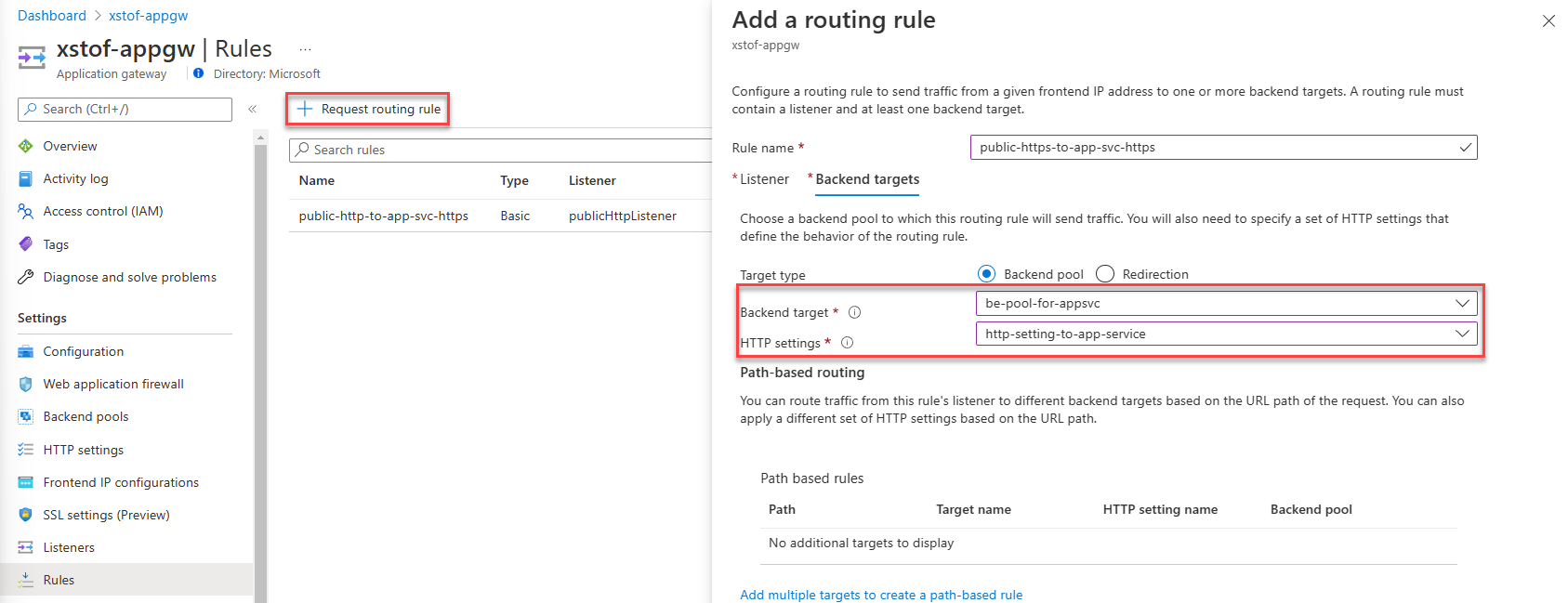
下拉列表仅填充与应用程序网关位于同一订阅中的应用服务。 如果要使用与应用程序网关所在的订阅不同的订阅中的应用服务,则无需在“目标”下拉列表中选择应用服务,请选择 IP 地址或主机名选项,然后输入应用服务的主机名(example.chinacloudsites.cn)。 如果将专用终结点用于应用服务,则应改用专用终结点的 FQDN 或 IP 地址。
选择“保存”。
# Fully qualified default domain name of the web app:
$webAppFQDN = "<nameofwebapp>.chinacloudsites.cn"

# For Application Gateway: both name, resource group and name for the backend pool to create:
$rgName = "<name of resource group for App Gateway>"
$appGwName = "<name of the App Gateway>"
$appGwBackendPoolNameForAppSvc = "<name for backend pool to be added>"

# Get existing Application Gateway:
$gw = Get-AzApplicationGateway -Name $appGwName -ResourceGroupName $rgName

# Add a new Backend Pool with App Service in there:
Add-AzApplicationGatewayBackendAddressPool -Name $appGwBackendPoolNameForAppSvc -ApplicationGateway $gw -BackendFqdns $webAppFQDN

# Update Application Gateway with the new added Backend Pool:
Set-AzApplicationGateway -ApplicationGateway $gw
# Configure Application Gateway to connect to App Service using the incoming hostname
$rgName = "<name of resource group for App Gateway>"
$appGwName = "<name of the App Gateway>"
$customProbeName = "<name for custom health probe>"
$customDomainName = "<FQDN for custom domain associated with App Service>"
$httpSettingsName = "<name for http settings to be created>"

# Get existing Application Gateway:
$gw = Get-AzApplicationGateway -Name $appGwName -ResourceGroupName $rgName

# Add custom health probe using custom domain name:
Add-AzApplicationGatewayProbeConfig -Name $customProbeName -ApplicationGateway $gw -Protocol Https -HostName $customDomainName -Path "/" -Interval 30 -Timeout 120 -UnhealthyThreshold 3
$probe = Get-AzApplicationGatewayProbeConfig -Name $customProbeName -ApplicationGateway $gw

# Add HTTP Settings to use towards App Service:
Add-AzApplicationGatewayBackendHttpSettings -Name $httpSettingsName -ApplicationGateway $gw -Protocol Https -Port 443 -Probe $probe -CookieBasedAffinity Disabled -RequestTimeout 30

# Update Application Gateway with the new added HTTP settings and probe:
Set-AzApplicationGateway -ApplicationGateway $gw
# Configure Application Gateway to connect to backend using default App Service hostname
$rgName = "<name of resource group for App Gateway>"
$appGwName = "<name of the App Gateway>"
$httpSettingsName = "<name for http settings to be created>"

# Get existing Application Gateway:
$gw = Get-AzApplicationGateway -Name $appGwName -ResourceGroupName $rgName

# Add HTTP Settings to use towards App Service:
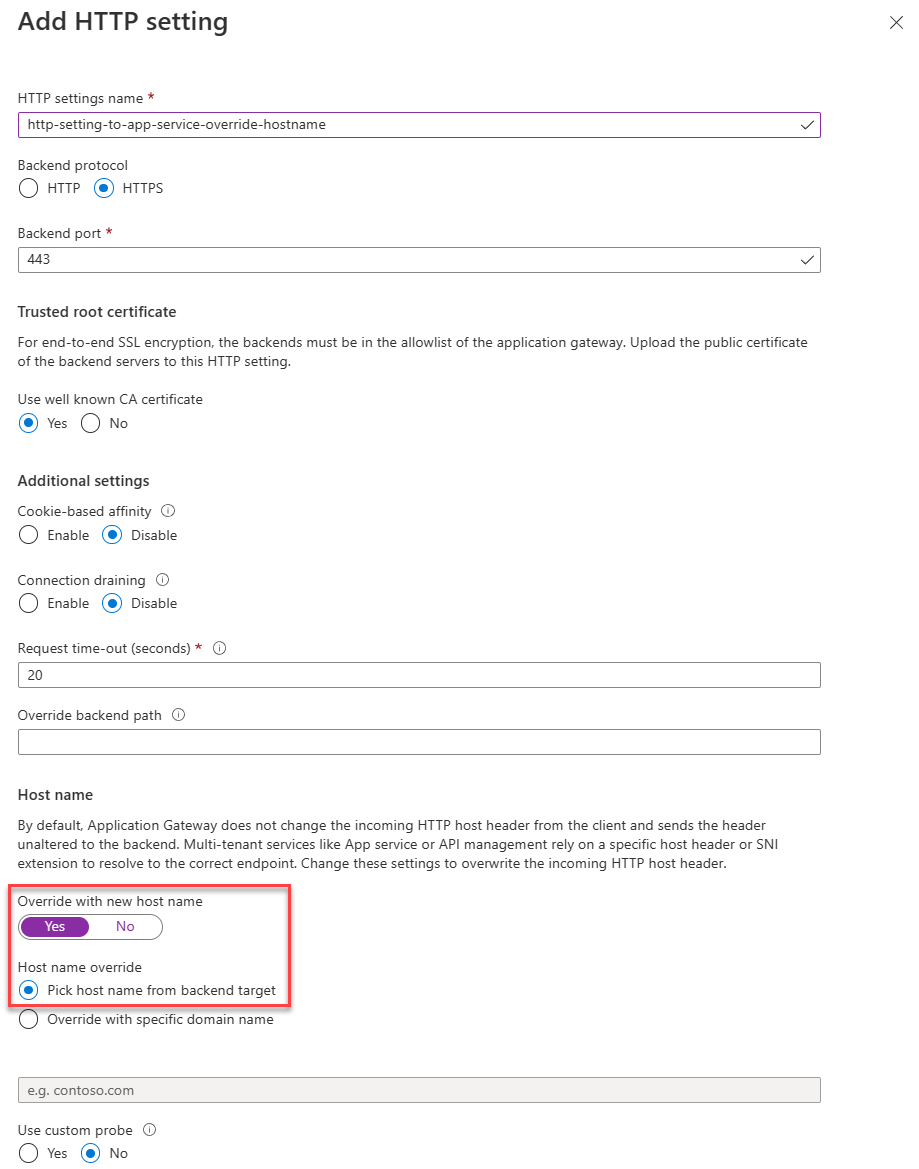
Add-AzApplicationGatewayBackendHttpSettings -Name $httpSettingsName -ApplicationGateway $gw -Protocol Https -Port 443 -PickHostNameFromBackendAddress -CookieBasedAffinity Disabled -RequestTimeout 30

# Update Application Gateway with the new added HTTP settings and probe:
Set-AzApplicationGateway -ApplicationGateway $gw
# This script assumes that:
# - a certificate was imported in Azure Key Vault already
# - a managed identity was assigned to Application Gateway with access to the certificate
# - there is no HTTP listener defined yet for HTTPS on port 443

$rgName = "<name of resource group for App Gateway>"
$appGwName = "<name of the App Gateway>"
$appGwSSLCertificateName = "<name for ssl cert to be created within Application Gateway"
$appGwSSLCertificateKeyVaultSecretId = "<key vault secret id for the SSL certificate to use>"
$httpListenerName = "<name for the listener to add>"

# Get existing Application Gateway:
$gw = Get-AzApplicationGateway -Name $appGwName -ResourceGroupName $rgName

# Create SSL certificate object for Application Gateway:
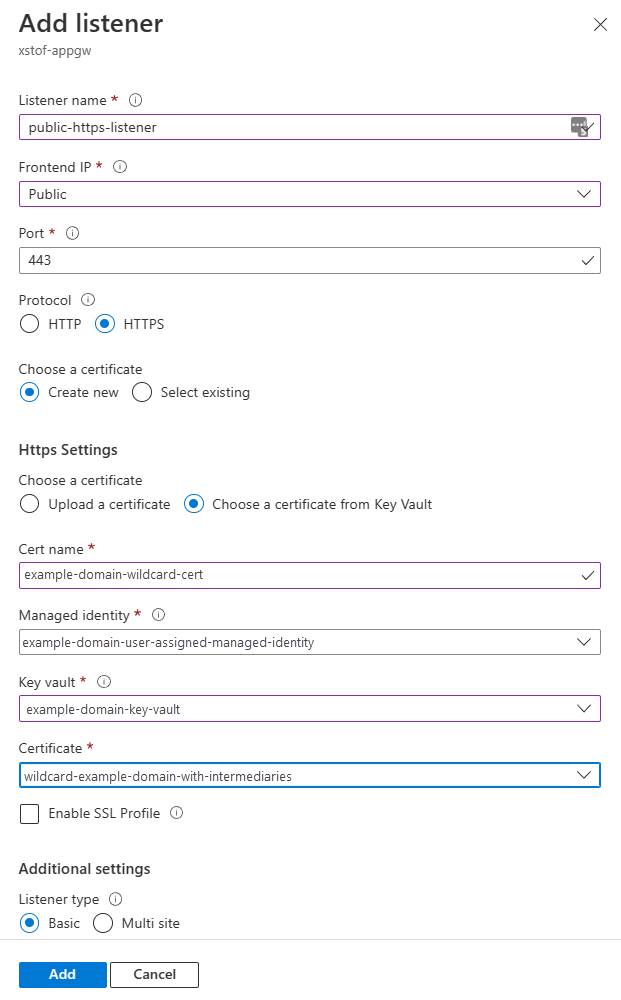
Add-AzApplicationGatewaySslCertificate -Name $appGwSSLCertificateName -ApplicationGateway $gw -KeyVaultSecretId $appGwSSLCertificateKeyVaultSecretId
$sslCert = Get-AzApplicationGatewaySslCertificate -Name $appGwSSLCertificateName -ApplicationGateway $gw

# Fetch public ip associated with Application Gateway:
$ipAddressResourceId = $gw.FrontendIPConfigurations.PublicIPAddress.Id
$ipAddressResource = Get-AzResource -ResourceId $ipAddressResourceId
$publicIp = Get-AzPublicIpAddress -ResourceGroupName $ipAddressResource.ResourceGroupName -Name $ipAddressResource.Name

$frontendIpConfig = $gw.FrontendIpConfigurations | Where-Object {$_.PublicIpAddress -ne $null}

$port = New-AzApplicationGatewayFrontendPort -Name "port_443" -Port 443
Add-AzApplicationGatewayFrontendPort -Name "port_443" -ApplicationGateway $gw -Port 443
Add-AzApplicationGatewayHttpListener -Name $httpListenerName -ApplicationGateway $gw -Protocol Https -FrontendIPConfiguration $frontendIpConfig -FrontendPort $port -SslCertificate $sslCert

# Update Application Gateway with the new HTTPS listener:
Set-AzApplicationGateway -ApplicationGateway $gw
在许多情况下,端口 80 上的 HTTP 的公共侦听器存在。 以下脚本会创建一个(如果尚未存在)。
$rgName = "<name of resource group for App Gateway>"
$appGwName = "<name of the App Gateway>"
$httpListenerName = "<name for the listener to add if not exists yet>"

# Get existing Application Gateway:
$gw = Get-AzApplicationGateway -Name $appGwName -ResourceGroupName $rgName

# Check if HTTP listener on port 80 already exists:
$port = $gw.FrontendPorts | Where-Object {$_.Port -eq 80}
$listener = $gw.HttpListeners | Where-Object {$_.Protocol.ToString().ToLower() -eq "http" -and $_.FrontendPort.Id -eq $port.Id}

if ($listener -eq $null){
    $frontendIpConfig = $gw.FrontendIpConfigurations | Where-Object {$_.PublicIpAddress -ne $null}
    Add-AzApplicationGatewayHttpListener -Name $httpListenerName -ApplicationGateway $gw -Protocol Http -FrontendIPConfiguration $frontendIpConfig -FrontendPort $port

    # Update Application Gateway with the new HTTPS listener:
    Set-AzApplicationGateway -ApplicationGateway $gw
}