Remarque
L’accès à cette page nécessite une autorisation. Vous pouvez essayer de vous connecter ou de modifier des répertoires.
L’accès à cette page nécessite une autorisation. Vous pouvez essayer de modifier des répertoires.
注意
建议使用 Azure Az PowerShell 模块与 Azure 交互。 若要开始,请参阅安装 Azure PowerShell。 若要了解如何迁移到 Az PowerShell 模块,请参阅 将 Azure PowerShell 从 AzureRM 迁移到 Az。
本文介绍如何使用三种不同的方法在 Azure 虚拟机(VM)或 Azure 虚拟机规模集上运行 Application Insights Profiler for .NET:
- Visual Studio 和 Azure 资源管理器
- PowerShell
选择首选方法选项卡以:
本指南介绍如何:
- 将 Application Insights SDK 添加到应用程序。
- 确认 Application Insights SDK 的最新稳定版本。
- 启用 .NET Profiler。
注意
目前,本地服务器不支持适用于 .NET 的 Application Insights Profiler。
先决条件
一个正常运行的 ASP.NET Core 应用程序。
若要查看 Azure 诊断扩展的 Azure 资源管理器模板(ARM 模板):
将 Application Insights SDK 添加到应用程序
在 Visual Studio 中打开 ASP.NET Core 项目。
选择项目>添加 Application Insights 遥测。
选择 Azure Application Insights,然后选择“ 下一步”。
选择 Application Insights 资源所在的订阅,然后选择“ 下一步”。
选择保存连接字符串的位置,然后选择“ 下一步”。
选择“完成”。
注意
有关完整说明(包括如何在不使用 Visual Studio 的 ASP.NET Core 应用程序上启用 Application Insights),请参阅 监视 .NET 和 Node.js 应用程序。
确认最新稳定版本的 Application Insights SDK
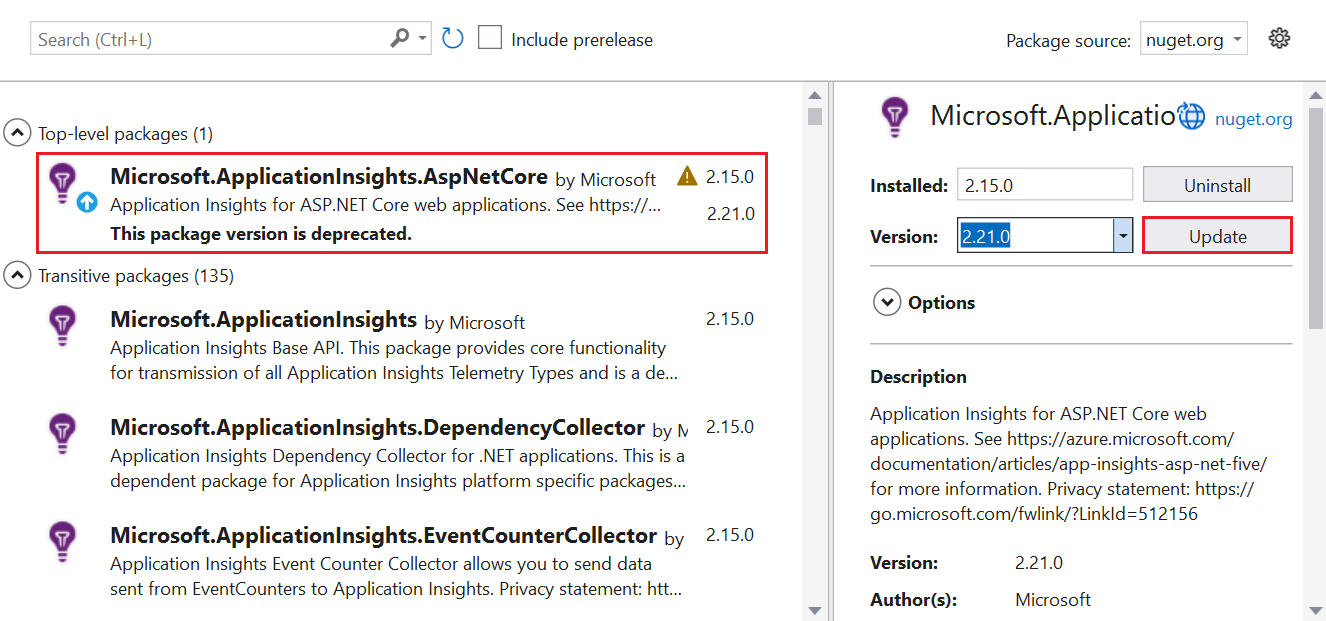
前往项目>管理 NuGet 软件包。
选择“Microsoft.ApplicationInsights.AspNetCore”。
在侧窗格中,从下拉列表中选择最新版本的 SDK。
选择“更新”。
启用 .NET Profiler
可以通过以下方式启用 Profiler:
- 在 ASP.NET Core 应用程序中使用 Azure 资源管理器模板和 Visual Studio。 推荐。
- 使用 PowerShell 命令。
安装 Azure 诊断扩展
选择要使用的 ARM 模板:
在模板中,找到
extension类型的资源。在 Visual Studio 中,转到安装 Application Insights SDK 时添加的 ASP.NET Core 应用程序中的
arm.json文件。将模板中的资源类型
extension添加到arm.json文件,以使用 Azure 诊断设置 VM 或虚拟机规模集。在
WadCfg标记中,将 Application Insights 连接字符串添加到MyApplicationInsightsProfilerSink。"WadCfg": { "SinksConfig": { "Sink": [ { "name": "MyApplicationInsightsProfilerSink", "ApplicationInsightsProfiler": "YOUR_APPLICATION_INSIGHTS_INSTRUMENTATION_KEY" } ] } }部署应用程序。