Remarque
L’accès à cette page nécessite une autorisation. Vous pouvez essayer de vous connecter ou de modifier des répertoires.
L’accès à cette page nécessite une autorisation. Vous pouvez essayer de modifier des répertoires.
本文介绍如何查看授予 Microsoft Entra 租户中应用程序的权限。 检测到恶意应用程序或应用程序拥有的权限超过必要权限时,可能需要查看权限。 了解如何使用 Microsoft Graph API 和现有 PowerShell 版本撤销向应用程序授予的权限。
本文中的步骤适用于通过用户或管理员同意添加到 Microsoft Entra 租户的所有应用程序。 有关同意应用程序的详细信息,请参阅用户和管理员同意。
先决条件
要查看向应用程序授予的权限,需满足以下条件:
- 一个具有活动订阅的 Microsoft Entra 帐户。 创建帐户。
- 以下角色之一:
- 云应用程序管理员
- 应用程序管理员。
- 不是管理员的服务主体所有者能够使刷新令牌失效。
在 Microsoft Entra 管理中心中查看与撤销权限
可以访问 Microsoft Entra 管理中心来查看授予应用的权限。 可以撤销管理员为整个组织授予的权限,并且可以获取上下文 PowerShell 脚本来执行其他操作。
有关如何还原已撤销或删除的权限的信息,请参阅还原授予应用程序的权限。
若要查看已授予整个组织或特定用户或组的应用程序权限,请执行以下操作:
- 至少以云应用程序管理员身份登录到 Microsoft Entra 管理中心。
- 请导航到 Entra ID>企业应用程序>所有应用程序。
- 选择想要限制访问的应用程序。
- 选择“权限”。
- 若要查看适用于整个组织的权限,请选择“管理员同意”选项卡。若要查看授予特定用户或组的权限,请选择“用户同意”选项卡。
- 若要查看给定权限的详细信息,请从列表中选择权限。 “权限详细信息”窗格随即打开。
查看向应用程序授予的权限后,可以撤销管理员为整个组织授予的权限。
注意
不能通过门户在“用户同意”选项卡中撤销权限。 可以使用 Microsoft Graph API 调用或 PowerShell cmdlet 撤销这些权限。 有关详细信息,请转到本文的 PowerShell 和 Microsoft Graph 选项卡。
若要在“管理员同意”选项卡中撤销权限,请执行以下操作:
- 在“管理员同意”选项卡中查看权限列表。
- 选择要撤销的权限,然后选择该权限的 ... 控件。
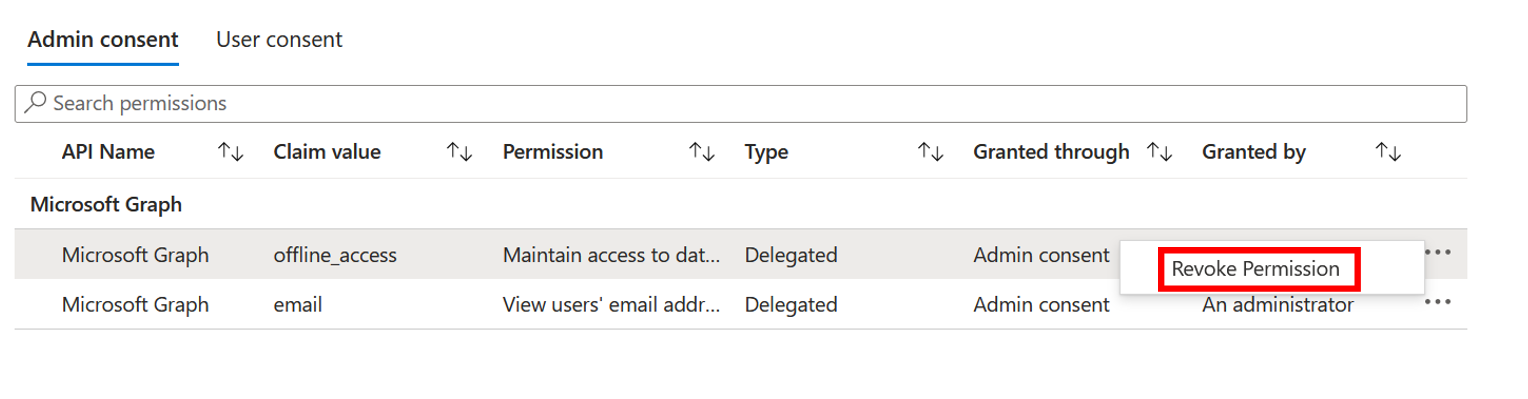
- 选择“撤销权限”。
使用 Microsoft Entra PowerShell 查看和撤销权限
使用以下Microsoft Entra PowerShell 脚本撤销授予应用程序的所有权限。 至少需要云应用程序管理员登录。
Connect-Entra -Environment China -ClientId 'YOUR_CLIENT_ID' -TenantId 'YOUR_TENANT_ID' -scopes "Application.ReadWrite.All", "DelegatedPermissionGrant.ReadWrite.All", "AppRoleAssignment.ReadWrite.All"

# Get Service Principal using objectId
$app_name = "<app-displayName>"
$sp = Get-EntraServicePrincipal -Filter "displayName eq '$app_name'"

# Get all delegated permissions for the service principal
$spOAuth2PermissionsGrants = Get-EntraOAuth2PermissionGrant -All | Where-Object { $_.clientId -eq $sp.ObjectId }

# Remove all delegated permissions granted to the service principal
$spOAuth2PermissionsGrants | ForEach-Object {
    Remove-EntraOAuth2PermissionGrant -ObjectId $_.ObjectId
}

# Get all application permissions for the service principal
$spApplicationPermissions = Get-EntraServicePrincipalAppRoleAssignment -ObjectId $sp.ObjectId -All | Where-Object { $_.PrincipalType -eq "ServicePrincipal" }

# Remove all application permissions
$spApplicationPermissions | ForEach-Object {
    Remove-EntraServicePrincipalAppRoleAssignment -ObjectId $_.PrincipalId -AppRoleAssignmentId $_.objectId
}
使用 Microsoft Entra PowerShell 删除所有用户和组分配
使用以下脚本为应用程序的用户或组删除 appRoleAssignments。
Connect-Entra -Environment China -ClientId 'YOUR_CLIENT_ID' -TenantId 'YOUR_TENANT_ID' -scopes "Application.ReadWrite.All", "AppRoleAssignment.ReadWrite.All"
#Retrieve the service principal object ID.
$app_name = "<Your App's display name>"
$sp = Get-EntraServicePrincipal -Filter "displayName eq '$app_name'"
$sp.ObjectId

# Get Microsoft Entra App role assignments using objectId of the Service Principal
$assignments = Get-EntraServicePrincipalAppRoleAssignedTo -ObjectId $sp.ObjectId -All $true

# Remove all users and groups assigned to the application
$assignments | ForEach-Object {
    if ($_.PrincipalType -eq "User") {
        Remove-EntraUserAppRoleAssignment -ObjectId $_.PrincipalId -AppRoleAssignmentId $_.ObjectId
    } elseif ($_.PrincipalType -eq "Group") {
        Remove-EntraGroupAppRoleAssignment -ObjectId $_.PrincipalId -AppRoleAssignmentId $_.ObjectId
    }
}
使用 Microsoft Graph PowerShell 查看与撤销权限
使用以下 Microsoft Graph PowerShell 脚本可撤销向应用程序授予的所有权限。 至少需要云应用程序管理员登录。
Connect-MgGraph -Environment China -ClientId 'YOUR_CLIENT_ID' -TenantId 'YOUR_TENANT_ID' -Scopes "Application.ReadWrite.All", "Directory.ReadWrite.All", "DelegatedPermissionGrant.ReadWrite.All", "AppRoleAssignment.ReadWrite.All"

# Get Service Principal using objectId
$sp = Get-MgServicePrincipal -ServicePrincipalID "<ServicePrincipal objectID>"

Example: Get-MgServicePrincipal -ServicePrincipalId 'aaaaaaaa-bbbb-cccc-1111-222222222222'

# Get all delegated permissions for the service principal
$spOAuth2PermissionsGrants= Get-MgOauth2PermissionGrant -All| Where-Object { $_.clientId -eq $sp.Id }

# Remove all delegated permissions
$spOauth2PermissionsGrants |ForEach-Object {
  Remove-MgOauth2PermissionGrant -OAuth2PermissionGrantId $_.Id
}

# Get all application permissions for the service principal
$spApplicationPermissions = Get-MgServicePrincipalAppRoleAssignment -ServicePrincipalId $Sp.Id -All | Where-Object { $_.PrincipalType -eq "ServicePrincipal" }

# Remove all application permissions
$spApplicationPermissions | ForEach-Object {
Remove-MgServicePrincipalAppRoleAssignedTo -ServicePrincipalId $Sp.Id  -AppRoleAssignmentId $_.Id
}
使用 Microsoft Graph PowerShell 删除所有用户和组分配
使用以下脚本为应用程序的用户或组删除 appRoleAssignments。
Connect-MgGraph -Environment China -ClientId 'YOUR_CLIENT_ID' -TenantId 'YOUR_TENANT_ID' -Scopes "Application.ReadWrite.All", "Directory.ReadWrite.All", "AppRoleAssignment.ReadWrite.All"

# Get Service Principal using objectId
$sp = Get-MgServicePrincipal -ServicePrincipalID "<ServicePrincipal objectID>"

Example: Get-MgServicePrincipal -ServicePrincipalId 'aaaaaaaa-bbbb-cccc-1111-222222222222'

# Get Microsoft Entra App role assignments using objectID of the Service Principal
$spApplicationPermissions = Get-MgServicePrincipalAppRoleAssignedTo -ServicePrincipalID $sp.Id -All | Where-Object { $_.PrincipalType -eq "ServicePrincipal" }

# Revoke refresh token for all users assigned to the application
  $spApplicationPermissions | ForEach-Object {
  Remove-MgServicePrincipalAppRoleAssignment -ServicePrincipalId $_.PrincipalId -AppRoleAssignmentId $_.Id
}
注意
撤销当前授予的权限不会阻止用户重新同意应用程序请求的权限。 需要阻止应用程序通过动态许可请求权限。 如果要完全阻止用户同意,请阅读配置用户同意应用程序的方式。
要考虑的其他授权
委派权限和应用程序权限并不是授予应用程序和用户对受保护资源的访问权限的唯一方法。 管理员应了解可能允许访问敏感信息的其他授权系统。 Microsoft 各种授权系统的示例包括 Microsoft Entra 内置角色、Exchange RBAC 和 Teams 资源特定的同意。