Remarque
L’accès à cette page nécessite une autorisation. Vous pouvez essayer de vous connecter ou de modifier des répertoires.
L’accès à cette page nécessite une autorisation. Vous pouvez essayer de modifier des répertoires.
本快速入门介绍如何使用 Azure PowerShell 以三种不同的复原类型(“最大复原能力”、“高复原能力”和“标准复原能力”)创建 ExpressRoute 线路。 你将了解如何使用 PowerShell cmdlet 检查线路状态以及更新、删除线路或对线路取消预配。
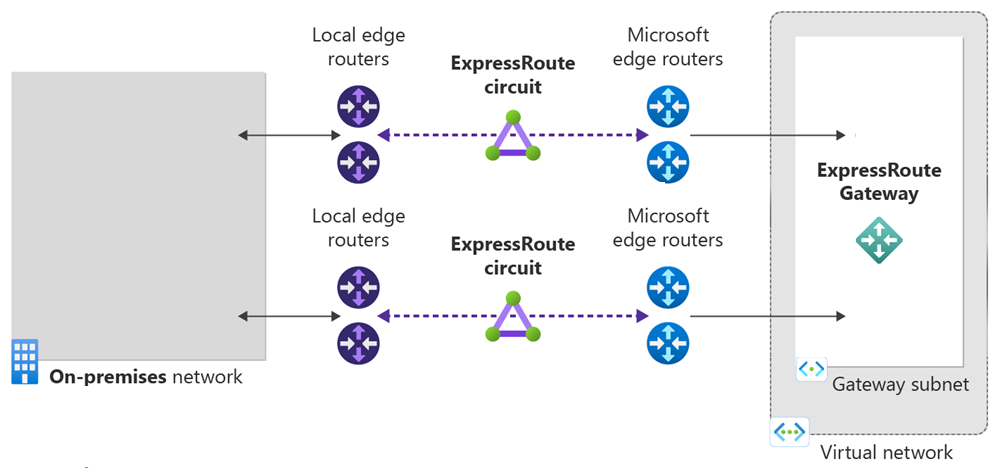
先决条件
创建和预配 ExpressRoute 线路
登录到 Azure 帐户,然后选择订阅
若要在本地登录,请使用提升的权限打开 PowerShell 控制台,并运行 cmdlet 以进行连接。
Connect-AzAccount -Environment AzureChinaCloud
如果有多个订阅,请获取 Azure 订阅的列表。
Get-AzSubscription
指定要使用的订阅。
Select-AzSubscription -SubscriptionName "Name of subscription"
获取支持的提供商、位置和带宽的列表
在创建 ExpressRoute 线路之前,需要支持的连接服务提供商、位置和带宽选项的列表。
PowerShell cmdlet Get-AzExpressRouteServiceProvider 会返回此信息,后续步骤中会用到此信息:
Get-AzExpressRouteServiceProvider
检查连接服务提供商是否已在该处列出。 请记下以下信息,稍后在创建线路时需要用到:
- 名称
- PeeringLocations
- 提供的带宽
您现在可以开始创建 ExpressRoute 电路。
获取可复原位置的列表
如果要创建复原类型为最大复原能力的 ExpressRoute 线路,则需要知道可复原位置的列表。 下面是检索此信息的步骤:
复制脚本
# Clone the setup script from GitHub.
git clone https://github.com/Azure-Samples/azure-docs-powershell-samples/
# Change to the directory where the script is located.
CD azure-docs-powershell-samples/expressroute/
运行可复原位置脚本
运行 Get-AzExpressRouteResilientLocations.ps1 脚本来获取可复原位置的列表。 以下示例显示了如何获取特定订阅的可复原位置,这些位置按距离硅谷的距离进行排序:
$SubscriptionId = Get-AzureSubscription -SubscriptionName "<SubscriptionName>"
highAvailabilitySetup/Get-AzExpressRouteResilientLocations.ps1 -SubscriptionId $SubscriptionId -RelativeLocation "silicon valley"
如果未指定位置,则会得到所有可复原位置的列表。
创建 ExpressRoute 线路
如果尚未有资源组,则在创建 ExpressRoute 线路之前,必须先创建一个资源组。 可以通过运行 New-AzResourceGroup cmdlet 来执行此操作:
$resourceGroupName = (New-AzResourceGroup -Name "ExpressRouteResourceGroup" -Location "China North").ResourceGroupName
如果你已有一个资源组,则可以使用 Get-AzResourceGroup 将资源组名称获取到变量中:
$resourceGroupName = (Get-AzResourceGroup -Name "<ResourceGroupName>").ResourceGroupName
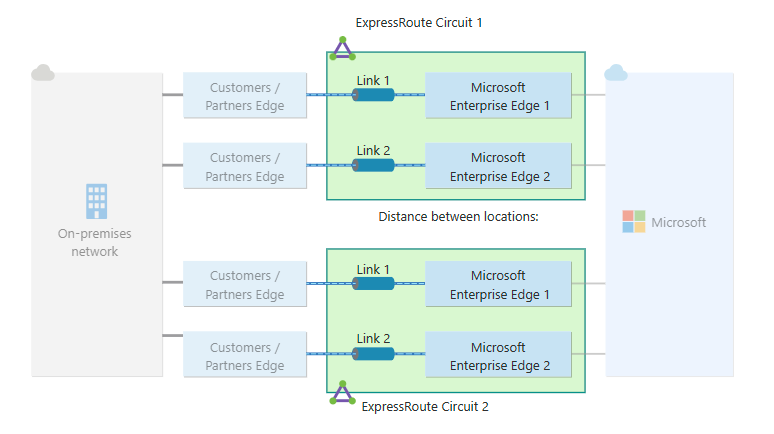
最大复原能力(推荐使用)为 ExpressRoute 连接提供最高级别的复原能力。 它在两个不同的 ExpressRoute 接入点提供两个具有本地冗余的 ExpressRoute 电路。
以下示例显示了如何通过 Equinix 在硅谷和华盛顿特区创建两条具有本地冗余的 ExpressRoute 线路。 如果使用的是其他提供商和其他设置,请在发出请求时替换该信息。
注释
此示例使用 New-AzHighAvailabilityExpressRouteCircuits.ps1 脚本。 必须从 GitHub 克隆该脚本来创建线路。 有关详细信息,请参阅克隆脚本。
$SubscriptionId = Get-AzureSubscription -SubscriptionName "<SubscriptionName>"
highAvailabilitySetup/New-AzHighAvailabilityExpressRouteCircuits.ps1 -SubscriptionId $SubscriptionId -ResourceGroupName $resourceGroupName -Location "chinanorth" -Name1 $circuit1Name -Name2 $circuit2Name -SkuFamily1 "MeteredData" -SkuFamily2 "MeteredData" -SkuTier1 "Standard" -SkuTier2 "Standard" -ServiceProviderName1 "Equinix" -ServiceProviderName2 "Equinix" -PeeringLocation1 "Silicon Valley" -PeeringLocation2 "Washington DC" -BandwidthInMbps 1000
注释
最大复原能力针对 ExpressRoute 位置中位置范围内的中断和连接故障提供最大程度的保护。 强烈建议对所有关键工作负荷和生产工作负荷使用此选项。
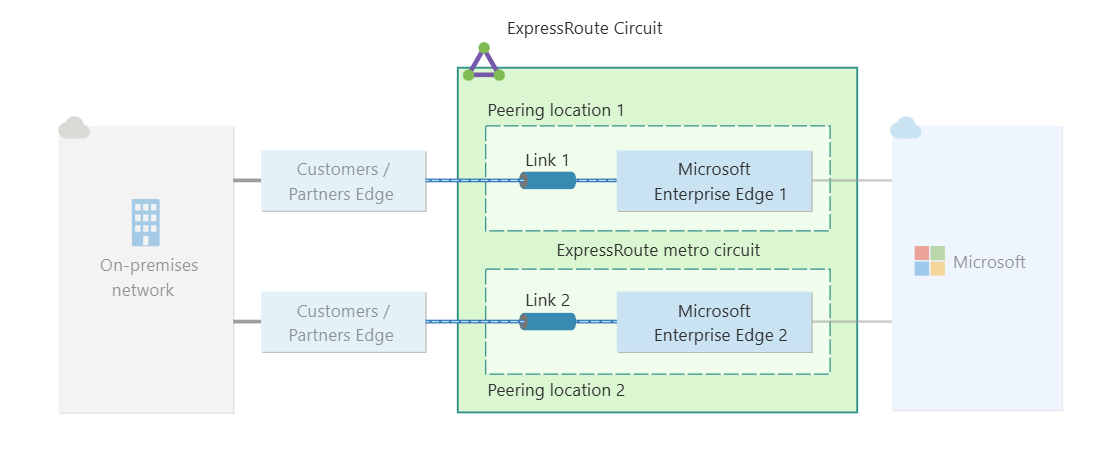
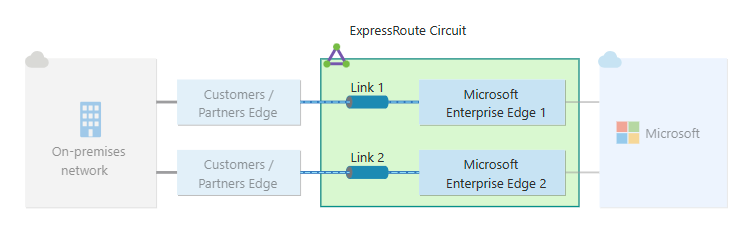
请确保指定合适的 SKU 层和 SKU 系列:
- SKU 层确定 ExpressRoute 线路是“标准”线路还是“高级”线路。 可以指定“标准”或“高级”。
- SKU 系列确定计费类型。 可以指定“MeteredData”以获取数据流量套餐,指定“UnlimitedData”以获取不限流量套餐。 可以将计费类型从“MeteredData”更改为“UnlimitedData”,但不能将类型从“UnlimitedData”更改为“MeteredData”。
重要
从发布服务密钥的那一刻起,将对 ExpressRoute 线路进行计费。 确保连接服务提供商准备好预配线路后就执行此操作。
响应将包含服务密钥。 可以通过运行以下命令获取所有这些参数的详细说明:
get-help New-AzExpressRouteCircuit -detailed
列出所有 ExpressRoute 线路
若要获取已创建的所有 ExpressRoute 线路的列表,请运行 Get-AzExpressRouteCircuit 命令:
Get-AzExpressRouteCircuit -Name "ExpressRouteARMCircuit" -ResourceGroupName "ExpressRouteResourceGroup"
响应类似于以下示例:
Name                             : ExpressRouteARMCircuit
ResourceGroupName                : ExpressRouteResourceGroup
Location                         : chinanorth
Id                               : /subscriptions/***************************/resourceGroups/ExpressRouteResourceGroup/providers/Microsoft.Network/expressRouteCircuits/ExpressRouteARMCircuit
Etag                             : W/"################################"
ProvisioningState                : Succeeded
Sku                              : {
                                    "Name": "Standard_MeteredData",
                                    "Tier": "Standard",
                                    "Family": "MeteredData"
                                    }
CircuitProvisioningState          : Enabled
ServiceProviderProvisioningState  : NotProvisioned
ServiceProviderNotes              :
ServiceProviderProperties         : {
                                    "ServiceProviderName": "Beijing Telecom Ethernet",
                                    "PeeringLocation": "Beijing",
                                    "BandwidthInMbps": 200
                                    }
ServiceKey                        : **************************************
Peerings                          : []
可以随时使用 Get-AzExpressRouteCircuit cmdlet 检索此信息。 进行不带任何参数的调用将列出所有线路。 服务密钥会在 ServiceKey 字段中列出:
Get-AzExpressRouteCircuit
响应类似于以下示例:
Name                             : ExpressRouteARMCircuit
ResourceGroupName                : ExpressRouteResourceGroup
Location                         : chinanorth
Id                               : /subscriptions/***************************/resourceGroups/ExpressRouteResourceGroup/providers/Microsoft.Network/expressRouteCircuits/ExpressRouteARMCircuit
Etag                             : W/"################################"
ProvisioningState                : Succeeded
Sku                              : {
                                    "Name": "Standard_MeteredData",
                                    "Tier": "Standard",
                                    "Family": "MeteredData"
                                    }
CircuitProvisioningState         : Enabled
ServiceProviderProvisioningState : NotProvisioned
ServiceProviderNotes             :
ServiceProviderProperties        : {
                                    "ServiceProviderName": "Beijing Telecom Ethernet",
                                    "PeeringLocation": "Beijing",
                                    "BandwidthInMbps": 200
                                    }
ServiceKey                       : **************************************
Peerings                         : []
将服务密钥发送给连接服务提供商进行预配
ServiceProviderProvisioningState 提供有关服务提供商端当前预配状态的信息。 CircuitProvisioningState 提供 Azure 端的状态信息。 有关线路预配状态的详细信息,请参阅工作流。
创建新的 ExpressRoute 线路时,线路将为以下状态:
ServiceProviderProvisioningState : NotProvisioned
CircuitProvisioningState         : Enabled
当连接服务提供商正在为你启用线路时,线路将更改为以下状态:
ServiceProviderProvisioningState : Provisioning
CircuitProvisioningState         : Enabled
若要使用 ExpressRoute 线路,该线路必须处于以下状态:
ServiceProviderProvisioningState : Provisioned
CircuitProvisioningState         : Enabled
定期检查线路密钥的状态
通过检查服务密钥的状态,可了解提供商何时预配了线路。 配置线路后,ServiceProviderProvisioningState 会显示为已预配,如以下例所示:
Get-AzExpressRouteCircuit -Name "ExpressRouteARMCircuit" -ResourceGroupName "ExpressRouteResourceGroup"
响应类似于以下示例:
Name                             : ExpressRouteARMCircuit
ResourceGroupName                : ExpressRouteResourceGroup
Location                         : chinanorth
Id                               : /subscriptions/***************************/resourceGroups/ExpressRouteResourceGroup/providers/Microsoft.Network/expressRouteCircuits/ExpressRouteARMCircuit
Etag                             : W/"################################"
ProvisioningState                : Succeeded
Sku                              : {
                                    "Name": "Standard_MeteredData",
                                    "Tier": "Standard",
                                    "Family": "MeteredData"
                                    }
CircuitProvisioningState         : Enabled
ServiceProviderProvisioningState : Provisioned
ServiceProviderNotes             :
ServiceProviderProperties        : {
                                    "ServiceProviderName": "Beijing Telecom Ethernet",
                                    "PeeringLocation": "Beijing",
                                    "BandwidthInMbps": 200
                                    }
ServiceKey                       : **************************************
Peerings                         : []
创建路由配置
有关分步说明,请参阅 ExpressRoute 线路路由配置一文,了解如何创建和修改线路对等互连。
重要
这些说明仅适用于由提供第 2 层连接服务的服务提供商创建的线路。 如果服务提供商提供第 3 层托管服务(通常是 IP VPN,如 MPLS),则连接服务提供商会配置和管理路由。
将虚拟网络链接到 ExpressRoute 线路
接下来,将虚拟网络链接到 ExpressRoute 线路。 使用 Resource Manager 部署模式时,请参阅将虚拟网络链接到 ExpressRoute 线路一文。
获取 ExpressRoute 线路的状态
可以随时使用 Get-AzExpressRouteCircuit cmdlet 检索此信息。 进行不带任何参数的调用将列出所有线路。
Get-AzExpressRouteCircuit
其响应类似于如下示例:
Name                             : ExpressRouteARMCircuit
ResourceGroupName                : ExpressRouteResourceGroup
Location                         : chinanorth
Id                               : /subscriptions/***************************/resourceGroups/ExpressRouteResourceGroup/providers/Microsoft.Network/expressRouteCircuits/ExpressRouteARMCircuit
Etag                             : W/"################################"
ProvisioningState                : Succeeded
Sku                              : {
                                    "Name": "Standard_MeteredData",
                                    "Tier": "Standard",
                                    "Family": "MeteredData"
                                    }
CircuitProvisioningState         : Enabled
ServiceProviderProvisioningState : Provisioned
ServiceProviderNotes             :
ServiceProviderProperties        : {
                                        "ServiceProviderName": "Beijing Telecom Ethernet",
                                        "PeeringLocation": "Beijing",
                                        "BandwidthInMbps": 200
                                    }
ServiceKey                       : **************************************
Peerings                         : []
可以通过将资源组名称和线路名称作为参数传递给调用来获取有关特定 ExpressRoute 线路的信息:
Get-AzExpressRouteCircuit -Name "ExpressRouteARMCircuit" -ResourceGroupName "ExpressRouteResourceGroup"
响应类似于以下示例:
Name                             : ExpressRouteARMCircuit
ResourceGroupName                : ExpressRouteResourceGroup
Location                         : chinanorth
Id                               : /subscriptions/***************************/resourceGroups/ExpressRouteResourceGroup/providers/Microsoft.Network/expressRouteCircuits/ExpressRouteARMCircuit
Etag                             : W/"################################"
ProvisioningState                : Succeeded
Sku                              : {
                                        "Name": "Standard_MeteredData",
                                        "Tier": "Standard",
                                        "Family": "MeteredData"
                                    }
CircuitProvisioningState         : Enabled
ServiceProviderProvisioningState : Provisioned
ServiceProviderNotes             :
ServiceProviderProperties        : {
                                        "ServiceProviderName": "Beijing Telecom Ethernet",
                                        "PeeringLocation": "Beijing",
                                        "BandwidthInMbps": 200
                                    }
ServiceKey                       : **************************************
Peerings                         : []
可以通过运行以下命令获取所有这些参数的详细说明:
get-help Get-AzExpressRouteCircuit -detailed
修改 ExpressRoute 线路
可以在不影响连接的情况下修改 ExpressRoute 线路的某些属性。
可以在不停机的情况下执行以下任务:
启用或禁用您的 ExpressRoute 线路的 ExpressRoute 高级附加组件。
增加 ExpressRoute 线路的带宽,前提是端口上有可用容量。 不支持对线路的带宽进行降级。
将计量套餐从数据流量套餐更改为无限制流量套餐。 不支持将数据流量套餐从“不限流量”更改为“按流量计费”。
可以启用和禁用“允许经典操作”。
有关限制和局限性的详细信息,请参阅 ExpressRoute 常见问题解答。
启用 ExpressRoute 高级版外接程序
可以使用以下 PowerShell 代码段为现有线路启用 ExpressRoute 高级版外接程序:
$ckt = Get-AzExpressRouteCircuit -Name "ExpressRouteARMCircuit" -ResourceGroupName "ExpressRouteResourceGroup"

$ckt.Sku.Tier = "Premium"
$ckt.sku.Name = "Premium_MeteredData"

Set-AzExpressRouteCircuit -ExpressRouteCircuit $ckt
线路现已启用 ExpressRoute 高级版附加功能。 一旦命令成功运行,Azure 就会开始为高级附加功能计费。
禁用 ExpressRoute 高级版附加项
重要
如果使用的资源超出了标准线路允许的范围,此操作可能会失败。
请注意以下信息:
- 从高级版降级到标准版之前,必须确保链接到线路的虚拟网络数少于 10 个。 否则,更新请求会失败,Azure 会按高级费率向你收费。
- 必须首先取消其他地理政治区域的所有虚拟网络的链接。 如果不删除链接,更新请求将失败,Azure 会继续按高级费率向你收费。
- 专用对等互连要求您的整个路由表中的路由数必须少于 4,000。 如果你的路由表大小大于 4,000 路由,BGP 会话将会中断。 只有当发布的前缀数量低于 4,000 时,BGP 会话才会重新建立。
可以使用以下 PowerShell cmdlet 为现有线路禁用 ExpressRoute 高级版外接程序:
$ckt = Get-AzExpressRouteCircuit -Name "ExpressRouteARMCircuit" -ResourceGroupName "ExpressRouteResourceGroup"

$ckt.Sku.Tier = "Standard"
$ckt.sku.Name = "Standard_MeteredData"

Set-AzExpressRouteCircuit -ExpressRouteCircuit $ckt
更新 ExpressRoute 线路带宽
有关提供商支持的带宽选项,请查看 ExpressRoute 常见问题解答。 你可以选择比你现有电路尺寸更大的任何尺寸。
重要
如果现有端口容量不足,可能需要重新创建 ExpressRoute 线路。 如果该位置没有其他可用容量,则无法升级线路。
无法在不中断的情况下减少 ExpressRoute 线路的带宽。 带宽降级需要取消对 ExpressRoute 线路的预配,并重新预配新的 ExpressRoute 线路。
确定所需的大小后,可以使用以下命令调整线路的大小。
$ckt = Get-AzExpressRouteCircuit -Name "ExpressRouteARMCircuit" -ResourceGroupName "ExpressRouteResourceGroup"

$ckt.ServiceProviderProperties.BandwidthInMbps = 1000

Set-AzExpressRouteCircuit -ExpressRouteCircuit $ckt
你的电路在 Azure 端升级。 然后必须联系网络服务提供商,让他们那边根据此更改更新配置。 发出此通知后,Azure 将开始为更新的带宽选项计费。
将 SKU 从按流量计费转为不受限制
通过使用下面的 PowerShell 代码片段,可以更改 ExpressRoute 线路的 SKU:
$ckt = Get-AzExpressRouteCircuit -Name "ExpressRouteARMCircuit" -ResourceGroupName "ExpressRouteResourceGroup"

$ckt.Sku.Family = "UnlimitedData"
$ckt.sku.Name = "Premium_UnlimitedData"

Set-AzExpressRouteCircuit -ExpressRouteCircuit $ckt
控制对经典环境和资源管理器环境的访问
查看将 ExpressRoute 线路从经典部署模型转移到 Resource Manager 部署模型中的说明。
解除配置 ExpressRoute 电路
请注意以下信息:
- 所有虚拟网络、路由筛选器和授权都必须从 ExpressRoute 线路解除关联。 如果此操作失败,请查看是否有虚拟网络链接到了该线路。
- 如果 ExpressRoute 线路服务提供商的预配状态为“正在预配”或“已预配”,则需要与服务提供商联系,撤销他们一端的线路预配。 在服务提供商完成取消预配线路并通知Microsoft之前,Azure 会继续预留资源和计费。
- 如果服务提供商已将线路解除预配(即服务提供商预配状态设置为“未预配”),则可以删除线路。 线路的计费过程停止。
清理资源
可以通过运行以下命令来删除 ExpressRoute 线路:
Remove-AzExpressRouteCircuit -ResourceGroupName "ExpressRouteResourceGroup" -Name "ExpressRouteARMCircuit"
后续步骤
创建线路并将其预配到提供商后,继续执行下一步,以配置对等互连: