使用 Azure Monitor OpenTelemetry 检测工具时,你会获得类似于使用 Application Insights SDK 的体验。 有关详细信息和功能比较,请参阅 功能的发布状态。
使用 Application Insights .NET软件开发工具包 (SDK) 3.x 从 Application Insights .NET SDK 2.x 升级到基于 OpenTelemetry(OTel)的实现。 3.x SDK 保留大多数 TelemetryClient 和 TelemetryConfiguration 应用程序编程接口(API),并使用 Azure Monitor OpenTelemetry 导出程序将遥测数据发送到 Application Insights。
大多数经典 Track* 调用在升级后继续工作,但它们通过发出 OpenTelemetry 信号的内部映射层进行路由。
如果生成新应用程序或已使用 Azure Monitor OpenTelemetry 发行版,请改用 Azure Monitor OpenTelemetry Distro。 不要在同一应用程序中使用 Application Insights .NET SDK 3.x 和 Azure Monitor OpenTelemetry Distro。
Application Insights .NET SDK 3.x 概述
Application Insights .NET SDK 3.x 提供以下 NuGet 包:
-
Microsoft.ApplicationInsights 和 TelemetryClient 的 TelemetryConfiguration
-
Microsoft.ApplicationInsights.AspNetCore 用于 ASP.NET(Active Server Pages .NET)Core Web应用
- 用于工作服务与控制台应用程序的
Microsoft.ApplicationInsights.WorkerService
- 在 .NET Framework 上的 ASP.NET 应用的
Microsoft.ApplicationInsights.Web
- 用于 NLog 集成的
Microsoft.ApplicationInsights.NLogTarget (测试版)
使用存储库文档获取代码示例和详细的迁移指南:
升级到 3.x
步骤 1:删除对不兼容包的引用
删除这些包,因为它们与 SDK 3.x 不兼容:
Microsoft.ApplicationInsights.WindowsServer.TelemetryChannelMicrosoft.ApplicationInsights.DependencyCollectorMicrosoft.ApplicationInsights.EventCounterCollectorMicrosoft.ApplicationInsights.PerfCounterCollectorMicrosoft.ApplicationInsights.WindowsServerMicrosoft.Extensions.Logging.ApplicationInsightsMicrosoft.ApplicationInsights.Log4NetAppenderMicrosoft.ApplicationInsights.TraceListenerMicrosoft.ApplicationInsights.DiagnosticSourceListenerMicrosoft.ApplicationInsights.EtwCollectorMicrosoft.ApplicationInsights.EventSourceListener
SDK 3.x 不会发布这些包的 3.x 版本。 请改用 Application Insights .NET SDK 3.x 概述中列出的支持的 3.x 包。 以下部分介绍了这些包的预期替换项。 在某些情况下,该功能内置于支持的 3.x 包中,或由 OpenTelemetry API 替换。
注释
此列表仅包括Microsoft包。 如果使用依赖于 Microsoft.ApplicationInsights 2.x 的第三方包(例如,Serilog.Sinks.ApplicationInsights),请验证这些包在升级之前是否支持 SDK 3.x。 按照包维护者的指南进行操作。
步骤 2:将包版本升级到 3.x
将任何剩余支持的 Application Insights 包升级到最新的 3.x 版本。
重要
不要在同一应用程序中混合 Application Insights 2.x 和 3.x 包。 将所有 Application Insights 包引用一起升级。
步骤 3:更新代码和配置以适应重大更改
请查看重大变更参考文档和详细的迁移指南。 大多数应用程序需要更新以下一个或多个区域中的代码或配置:
| 2.x API、设置或模式 |
3.x 指南 |
TrackPageView |
删除 TrackPageView 调用。 .NET 3.x SDK 中删除了页面视图跟踪。 |
TrackEvent、TrackException和TrackAvailability的重载包含IDictionary<string, double> metrics |
删除自定义指标参数。 使用TrackMetric()单独跟踪指标。 |
GetMetric 使用 MetricConfiguration 或 MetricAggregationScope |
请使用 GetMetric 的简化重载。 指标配置和聚合在 SDK 3.x 内部管理。 |
InstrumentationKey 配置或 TelemetryClient.InstrumentationKey |
使用 TelemetryConfiguration.ConnectionString 并提供连接字符串,而不是仪器密钥。 SDK 3.x 需要连接字符串,如果未配置,则启动时可能会失败。 对于测试场景,可以使用虚拟连接字符串,例如InstrumentationKey=00000000-0000-0000-0000-000000000000。 |
TelemetryClient() 或 TelemetryConfiguration.Active |
使用 TelemetryConfiguration.CreateDefault()显式创建配置,并将其传递给 new TelemetryClient(config)。 |
TelemetryModule、 TelemetryInitializer或 TelemetryProcessor 自定义 |
应将自定义初始化器或处理器迁移到基于 OpenTelemetry 的处理器。 应删除对内置 2.x 处理器、初始值设定项和模块的引用。 有关详细信息,请参阅 迁移指南。 |
ITelemetryChannel 或 TelemetryConfiguration.TelemetryChannel |
由于 3.x 在内部合并了Azure Monitor导出程序,因此删除了经典通道抽象。 对于测试,请使用兼容 OpenTelemetry 的验证,例如内存导出器。 |
EnableAdaptiveSampling |
将自适应采样替换为 TracesPerSecond 或 SamplingRatio。 |
面向 .NET Framework 4.5.2 的 Microsoft.ApplicationInsights.Web |
目标.NET Framework 4.6.2 或更高版本。 |
| 指标名称和命名空间约定 |
若要遵循 OpenTelemetry 仪器命名语法,请更新 name、metricId、metricNamespace 的值以及用于 TrackMetric()、GetMetric() 和 MetricIdentifier 的值。 指标名称和命名空间必须以字母开头,并且只能包含字母、数字、_、.或-/。 不允许包含空格。 |
替换被移除的可扩展性点
Application Insights .NET SDK 2.x 提供了特定于 Application Insights 的扩展性类型,例如遥测模块、初始值设定项、处理器和通道。 Application Insights .NET SDK 3.x 改用 OpenTelemetry 扩展性。
有关替换 2.x 扩展点(包括边缘情况)的详细指南,请参阅 迁移指南。
小窍门
基于资源的值(如角色元数据)可以流经 OpenTelemetry 资源映射,而不是在每个遥测项上显示。 如果需要每个遥测项上的键值对,请使用 GlobalProperties 或自定义处理器。
Application Insights .NET SDK 3.x 支持两种跟踪采样模式(请求和依赖项):
- 为基于百分比的采样设置
SamplingRatio (0.0 到 1.0)。
- 将
TracesPerSecond设置为限速采样(默认值:每秒 5 个轨迹)。
SDK 3.x 对请求和依赖项应用相同的采样设置。 SDK 3.x 不支持请求和依赖项的单独采样设置。
在请求或依赖项被纳入采样时,SDK 3.x 默认会将父级跟踪的采样决策应用于相关日志。 若要禁用该行为,请设置为 EnableTraceBasedLogsSamplerfalse.
可以在SamplingRatio、TracesPerSecond或EnableTraceBasedLogsSampler中设置TelemetryConfiguration、appsettings.json和applicationinsights.config。
排查升级问题
使用以下步骤在升级到 SDK 3.x 期间验证遥测数据:
- 确认在启动之前配置了完整的连接字符串。 如果在测试中验证遥测数据而不使用实际资源,请使用测试用连接字符串。
- 收集 Application Insights 自我诊断日志,以识别配置错误和导出程序故障。
- 添加 OpenTelemetry 控制台导出程序,以验证跟踪、指标和日志在依赖 Azure Monitor 摄取之前是否按照预期发出。
- 如果之前通过模拟
ITelemetryChannel 对遥测进行了单元测试,请切换到适用于 OpenTelemetry 的验证,例如内存中导出程序或用于非生产环境的测试导出程序。
- 通过验证父子跟踪决策,确认采样设置的行为符合预期。
- 验证服务名称、角色名称、角色实例和环境等资源属性,以确保在 Application Insights 中正确归属。
- 如果迁移了自定义扩充,请验证属性是否显示在预期位置。 基于资源的映射可能与 2.x 行为不同。
有关详细的故障排除指南和示例,请使用以下资源:
升级到 3.x 时,通常没有任何代码更改。 3.x SDK 依赖项是 2.x SDK 依赖项的无操作(no-op)API 版本。 但是,当与 3.x Java 代理一起使用时,3.x Java 代理会为其提供实现。 因此,自定义检测与 3.x Java 代理提供的新自动检测相关联。
步骤 1:更新依赖项
| 2.x 依赖项 |
Action |
注解 |
applicationinsights-core |
将版本更新到 3.4.3 或更高版本 |
|
applicationinsights-web |
将版本更新到 3.4.3 或更高版本,并从文件中删除 Application Insights Web 筛选器 web.xml 。 |
|
applicationinsights-web-auto |
替换为 3.4.3 或更高版本的 applicationinsights-web |
|
applicationinsights-logging-log4j1_2 |
删除依赖项,并从 Log4j 配置中删除 Application Insights 追加器。 |
3.x Java 代理会自动配置 Log4j 1.2,因此不再需要 Log4j 1.2 appender。 |
applicationinsights-logging-log4j2 |
删除依赖项,并从 Log4j 配置中删除 Application Insights 追加器。 |
不需要 Log4j 2 "appender",因为 3.x Java 代理自动监视 Log4j 2。 |
applicationinsights-logging-logback |
删除依赖项,并从 Logback 配置中删除 Application Insights 追加器。 |
不需要 Logback 追加器,因为 3.x Java 代理自动执行 Logback。 |
applicationinsights-spring-boot-starter |
替换为 3.4.3 或更高版本的 applicationinsights-web |
云角色名称不再默认为 spring.application.name。 若要了解如何配置云角色名称,请参阅 Configure Azure Monitor OpenTelemetry。 |
步骤 2:添加 3.x Java 代理
将 3.x Java 代理添加到Java虚拟机(JVM)命令行参数,例如:
-javaagent:path/to/applicationinsights-agent-3.7.5.jar
如果使用 Application Insights 2.x Java 代理,只需将现有的 -javaagent:... 替换为前面的示例。
注释
如果使用 applicationinsights-spring-boot-starter,可以使用 Spring Boot 集成而不是 Java 代理。 请参阅 3.x Spring Boot 以获取指南。
请参阅 Configure Azure Monitor OpenTelemetry。
其他说明
本文档的其余部分介绍了从 2.x 升级到 3.x 时可能会遇到的限制和更改,以及一些有用的解决方法。
TelemetryInitializers
使用 3.x 代理时,2.x SDK TelemetryInitializers 不会运行。 可以通过在 Application Insights Java 3.x 中配置 自定义维度 或使用 继承属性,解决许多以前需要编写 TelemetryInitializer 的用例。
TelemetryProcessors
使用 3.x 代理时,2.x SDK 中的 TelemetryProcessors 不会运行。 许多以前需要编写 TelemetryProcessor 的用例可以通过配置采样替代在 Application Insights Java 3.x 中解决。
单个 JVM 中的多个应用程序
在 Application Insights Java 3.x 中使用云角色名称重写(预览版)和/或连接字符串重写(预览版)支持此用例。
操作名称
在 Application Insights Java 2.x SDK 中,在某些情况下,操作名称包含完整路径,例如:
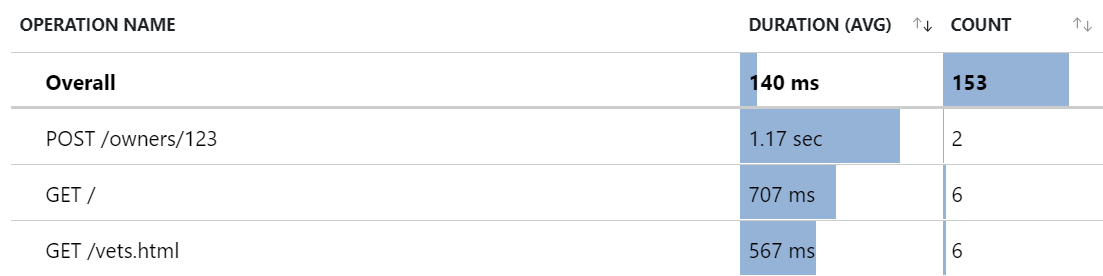
Application Insights 中的操作名称Java 3.x 更改为在 Application Insights 门户 U/X 中提供更好的聚合视图,例如:
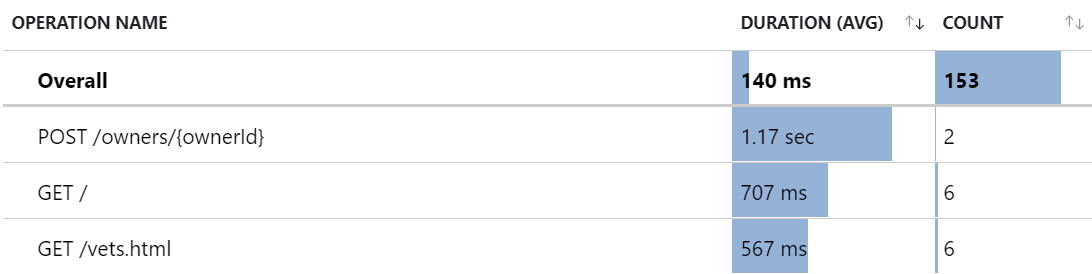
但是,对于某些应用程序,你可能仍然更喜欢以前操作名称下的 U/X 聚合视图。 在这种情况下,可以使用 3.x 中的 遥测处理器 (预览)功能复制以前的行为。
以下代码片段配置三个遥测处理器,这些处理器合并以复制以前的行为。
遥测处理器执行以下作(按顺序):
第一个遥测处理器是一个属性处理器(类型为 attribute),这意味着它适用于所有具有属性的遥测(当前包括 requests 和 dependencies,并且不久也将包括 traces)。
它匹配任何具有名为http.request.method和url.path的属性的遥测数据。
然后将url.path属性提取为新属性,并命名为tempName。
第二个遥测处理器是范围处理器(具有类型 span),这意味着它适用于 requests 和 dependencies。
它匹配任何具有属性名为tempPath的区段。
然后,它会从属性 tempPath更新范围名称。
最后一个遥测处理器是属性处理器,与第一个遥测处理器的类型相同。
它与任何具有名为tempPath属性的遥测匹配。
然后,它会删除命名 tempPath的属性,并且该属性显示为自定义维度。
{
  "preview": {
    "processors": [
      {
        "type": "attribute",
        "include": {
          "matchType": "strict",
          "attributes": [
            { "key": "http.request.method" },
            { "key": "url.path" }
          ]
        },
        "actions": [
          {
            "key": "url.path",
            "pattern": "https?://[^/]+(?<tempPath>/[^?]*)",
            "action": "extract"
          }
        ]
      },
      {
        "type": "span",
        "include": {
          "matchType": "strict",
          "attributes": [
            { "key": "tempPath" }
          ]
        },
        "name": {
          "fromAttributes": [ "http.request.method", "tempPath" ],
          "separator": " "
        }
      },
      {
        "type": "attribute",
        "include": {
          "matchType": "strict",
          "attributes": [
            { "key": "tempPath" }
          ]
        },
        "actions": [
          { "key": "tempPath", "action": "delete" }
        ]
      }
    ]
  }
}
采样和日志丢失
默认情况下,从 3.4 代理开始启用速率限制采样,这可能会导致意外丢失的日志。
Project示例
此 Java 2.x SDK 项目已迁移到使用 3.x Java 代理的新项目。
本指南提供了两个选项,用于从 Application Insights Node.js SDK 2.X 升级到 OpenTelemetry。
全新安装
获取 OpenTelemetry JavaScript 应用程序编程接口 (API) 和软件开发工具包 (SDK) 的必备知识。
从项目中卸载 applicationinsights 依赖项。
npm uninstall applicationinsights
从代码中删除 SDK 2.X 实现。
从代码中删除所有 Application Insights 工具。 删除在其中初始化、修改或调用 Application Insights 客户端的所有部分。
使用 Azure Monitor OpenTelemetry 发行版启用 Application Insights。
重要
在导入任何其他内容之前,必须调用 useAzureMonitor。 如果首先导入其他库,则可能会丢失遥测数据。
请按照 入门指南 开始使用 Azure Monitor OpenTelemetry 发行版。
Azure Monitor OpenTelemetry 发行版更改和限制
- Application Insights SDK 2.X 中的 API 在 Azure Monitor OpenTelemetry 发行版中不可用。 虽然 Application Insights SDK 3.X 为遥测引入(如自定义事件和指标)提供了非中断性升级路径,但大多数 SDK 2.X API 不受支持,并且需要对基于 OpenTelemetry 的 API 进行代码更改。
- 尚不支持按作名称筛选依赖项、日志和异常。
Upgrade
升级 applicationinsights 包依赖项。
npm update applicationinsights
重新生成应用程序。
测试应用程序。
若要避免在 Application Insights SDK 3.X 中使用不受支持的配置选项,请参阅不受支持的属性。
如果 SDK 在主版本更改后记录了有关不支持使用 API 的警告,而你需要相关的功能,请继续使用 Application Insights SDK 2.X。
更改和限制
以下更改和限制适用于这两条升级路径。
Node.js 版本支持
Application Insights 3.x SDK 在 Azure SDK for JavaScript 和 OpenTelemetry 都支持某个 Node.js 版本时,也会支持该 Node.js 版本。 有关 OpenTelemetry 的当前运行时支持,请访问 OpenTelemetry 支持的运行时。
如果使用较旧的 Node.js 版本(如 Node 8),OpenTelemetry 解决方案可以运行,但可能产生意外行为或破坏性更改。 Application Insights SDK 依赖于适用于 JavaScript 的Azure SDK,而 JavaScript 支持策略的Azure SDK不能保证对达到生命周期结束 Node.js 版本的支持。 有关详细信息,请转到 Azure SDK for JS 支持策略。
配置选项
Application Insights SDK 版本 2.X 提供在 Azure Monitor OpenTelemetry 发行版或主版本升级到 Application Insights SDK 3.X 中不可用的配置选项。 若要查找这些更改以及我们仍然支持的选项,请参阅 SDK 配置文档。
扩展指标
Application Insights SDK 2.X 支持扩展指标;但是,对这些指标的支持在 ApplicationInsights SDK 版本 3.X 和 Azure Monitor OpenTelemetry 发行版中结束。
遥测处理器
虽然 Azure Monitor OpenTelemetry 发行版和 Application Insights SDK 3.X 不支持 TelemetryProcessors,但它们确实允许传递跨度和日志记录处理器。 有关如何的详细信息,请参阅 Azure Monitor OpenTelemetry 发行版项目。
此示例演示的操作等同于创建并应用一个在 Application Insights SDK 2.X 中附加自定义属性的遥测处理器。
const applicationInsights = require("applicationinsights");
applicationInsights.setup("YOUR_CONNECTION_STRING");
applicationInsights.defaultClient.addTelemetryProcessor(addCustomProperty);
applicationInsights.start();

function addCustomProperty(envelope: EnvelopeTelemetry) {
    const data = envelope.data.baseData;
    if (data?.properties) {
        data.properties.customProperty = "Custom Property Value";
    }
    return true;
}
此示例演示如何修改 Azure Monitor OpenTelemetry 发行版实现,以将 SpanProcessor 传递给发行版的配置。
import { Context, Span} from "@opentelemetry/api";
import { ReadableSpan, SpanProcessor } from "@opentelemetry/sdk-trace-base";
const { useAzureMonitor } = require("@azure/monitor-opentelemetry");

class SpanEnrichingProcessor implements SpanProcessor {
    forceFlush(): Promise<void> {
        return Promise.resolve();
    }
    onStart(span: Span, parentContext: Context): void {
        return;
    }
    onEnd(span: ReadableSpan): void {
        span.attributes["custom-attribute"] = "custom-value";
    }
    shutdown(): Promise<void> {
        return Promise.resolve();
    }
}

const options = {
    azureMonitorExporterOptions: {
        connectionString: "YOUR_CONNECTION_STRING"
    },
    spanProcessors: [new SpanEnrichingProcessor()],
};
useAzureMonitor(options);
按照以下步骤将Python应用程序迁移到 Azure Monitor OpenTelemetry Distro。
步骤 1:卸载 OpenCensus 库
卸载与 OpenCensus 相关的所有库,包括以opencensus-*开头的所有 Pypi 包。
pip freeze | grep opencensus | xargs pip uninstall -y
步骤 2:从代码中删除 OpenCensus
从代码中删除 OpenCensus SDK 的所有实例和 Azure Monitor OpenCensus 导出程序。
检查以opencensus开头的导入语句,以查找必须删除的所有集成、导出者和 OpenCensus API/SDK 实例。
下面是必须删除的导入语句的示例。
from opencensus.ext.azure import metrics_exporter
from opencensus.stats import aggregation as aggregation_module
from opencensus.stats import measure as measure_module

from opencensus.ext.azure.trace_exporter import AzureExporter
from opencensus.trace.samplers import ProbabilitySampler
from opencensus.trace.tracer import Tracer

from opencensus.ext.azure.log_exporter import AzureLogHandler
步骤 3:熟悉 OpenTelemetry Python API/SDK
以下文档提供了 OpenTelemetry Python API/SDK 的先决条件知识。
注释
OpenTelemetry Python和 OpenCensus Python具有不同的 API 图面、自动收集功能和载入说明。
步骤 4:设置 Azure Monitor OpenTelemetry 发行版
请按照 入门 页面入驻 Azure Monitor OpenTelemetry 发行版。
更改和限制
从 OpenCensus 迁移到 OpenTelemetry 时,可能会遇到以下更改和限制。
早于 3.7 的 Python 版本
基于 OpenTelemetry 的Python监视支持 Python 3.7 及更高版本。 OpenTelemetry 不支持 Python 2.7、3.4、3.5 或 3.6。
Python 2.7、3.4、3.5 和 3.6 已经停止维护。 有关版本状态,请转到 Python 版本支持。
如果仍然使用 Python 2.7、3.4、3.5 或 3.6,OpenTelemetry 解决方案虽然可以运行,但可能会产生意外行为或重大变更,而这些是 Microsoft 不支持的。
对于 OpenCensus,opencensus-ext-azure 的上一个已发布版本在这些Python版本上运行。 该项目不会发布新版本。
配置
OpenCensus Python提供了一些与遥测集合和导出相关的配置选项。 使用 OpenTelemetry Python API 和 SDK 来实现相同的配置等。 OpenTelemetry Azure 监视器 Python 发行版更像是一个满足您的 Python 应用程序最常见监视需求的全方位工具。 由于发行版封装了 OpenTelemetry API/SDk,因此发行版目前可能不支持某些不常见用例的配置。 相反,您可以选择采用 Azure 监控 OpenTelemetry 导出程序,结合 OpenTelemetry API/SDK 来满足您的监控需求。 其中一些配置包括:
- 自定义传播器
- 自定义采样器
- 添加额外的范围/日志处理器/指标读取器
与Azure Functions的集成
为了为调用Azure函数内其他Python应用程序的Python应用程序提供分布式跟踪功能,提供了允许连接的分布式图形的包 opencensus-extension-azure-functions。
目前,适用于Azure Monitor的 OpenTelemetry 解决方案不支持此方案。 解决方法是,可以在Azure函数应用程序中手动传播跟踪上下文,如以下示例所示。
from opentelemetry.context import attach, detach
from opentelemetry.trace.propagation.tracecontext import \
  TraceContextTextMapPropagator

# Context parameter is provided for the body of the function
def main(req, context):
  functions_current_context = {
    "traceparent": context.trace_context.Traceparent,
    "tracestate": context.trace_context.Tracestate
  }
  parent_context = TraceContextTextMapPropagator().extract(
      carrier=functions_current_context
  )
  token = attach(parent_context)

  ...
  # Function logic
  ...
  detach(token)
扩展和导出程序
OpenCensus SDK 提供收集遥测的集成和发送遥测的导出器。 在 OpenTelemetry 中,集成被称为探测工具。 OpenTelemetry 还使用术语出口器。
OpenTelemetry Python检测和导出程序涵盖 OpenCensus 集并添加更多库。 OpenTelemetry 提供库覆盖范围和功能的直接升级。
Azure Monitor OpenTelemetry 发行版包括几个常用的 OpenTelemetry Python 检测工具。 使用这些工具,而无需添加代码。 Microsoft支持这些仪表。
至于此列表中不包含的其他 OpenTelemetry Python instrumentations,用户仍可以手动检测它们。 但是,必须注意,在这些情况下无法保证或支持稳定性和行为。 因此,请自行决定使用它们。
如果你想要建议将某个社区检测库加入我们的发行版,请在我们的反馈社区中发帖阐述想法或投票赞成。 对于导出器,Azure Monitor OpenTelemetry 发行版随附了 Azure Monitor OpenTelemetry 导出器。 如果还想使用其他导出程序,可以将其与发行版中结合使用,如以下示例所示。
TelemetryProcessors
OpenTelemetry 世界中没有 TelemetryProcessors 的概念,但可以使用 API 和类来复制相同的行为。
设置云角色名称和云角色实例
按照此处的说明操作,了解如何为遥测设置云角色名称和云角色实例。 OpenTelemetry Azure Monitor发行版自动从环境变量中提取值,并填充相应的字段。
使用 SpanProcessors 修改范围
即将推出。
使用视图修改指标
即将推出。
OpenCensus Python Azure Monitor导出程序自动收集称为 性能计数器的系统和性能相关指标。 这些指标显示在 Application Insights 实例的performanceCounters中。 在 OpenTelemetry 中,我们不再将这些指标显式发送到performanceCounters。 可以在标准指标下找到与传入/传出请求相关的指标。 如果希望 OpenTelemetry 自动收集系统相关的性能指标,可以使用由 OpenTelemetry Python 社区贡献的实验性系统指标instrumentation 组件。 此包是实验性的,不受Microsoft正式支持。
Support
若要查看故障排除步骤、支持选项或提供 OpenTelemetry 反馈,请参阅 OpenTelemetry 故障排除、支持和Azure Monitor Application Insights 的反馈。