Observação
O acesso a essa página exige autorização. Você pode tentar entrar ou alterar diretórios.
O acesso a essa página exige autorização. Você pode tentar alterar os diretórios.
适用于: Azure Data Factory Azure Synapse Analytics
Azure Data Factory 或 Synapse Analytics 的 HDInsight MapReduce 活动在 管道中调用 MapReduce 程序,可在 您自己的 HDInsight 群集上或 按需 HDInsight 群集上进行。 本文基于数据转换活动一文,它概述了数据转换和受支持的转换活动。
若要了解详细信息,请阅读有关 Azure Data Factory 和 Synapse Analytics 的简介文章,并在阅读本文之前阅读本教程:Tutorial:转换数据。
请参阅 Pig 和 Hive,了解如何通过管道使用 HDInsight Pig 和 Hive 活动在 HDInsight 群集上运行脚本。
使用 UI 将 HDInsight MapReduce 活动添加到管道
要将 HDInsight MapReduce 活动用于管道,请完成以下步骤:
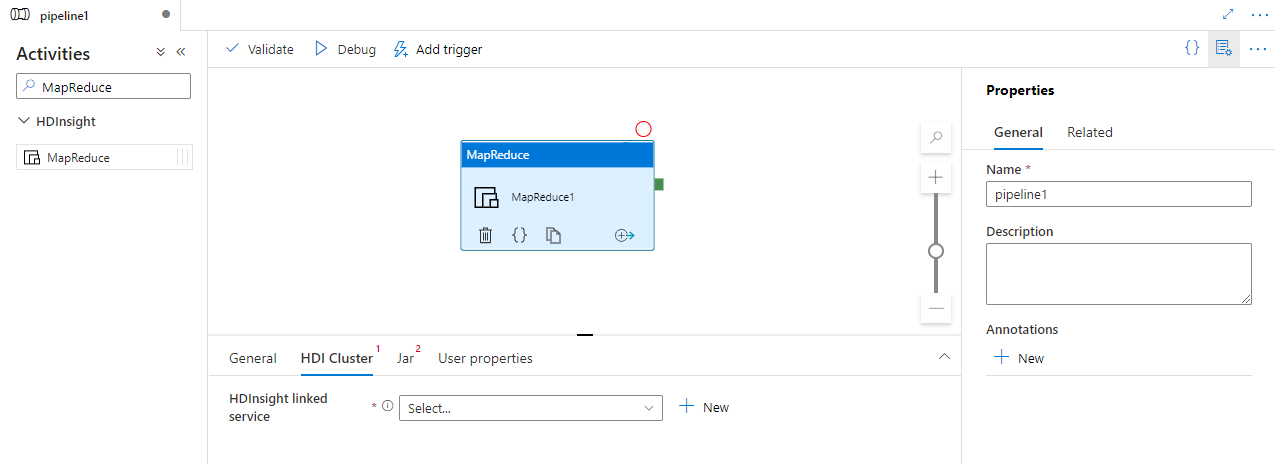
在“管道活动”窗格中搜索 MapReduce,然后将 MapReduce 活动拖到管道画布上。
在画布上选择新的 MapReduce 活动(如果尚未选择)。
选择“HDI 群集”选项卡以选择或创建新的链接到 HDInsight 群集的服务,该群集将用于执行 MapReduce 活动。
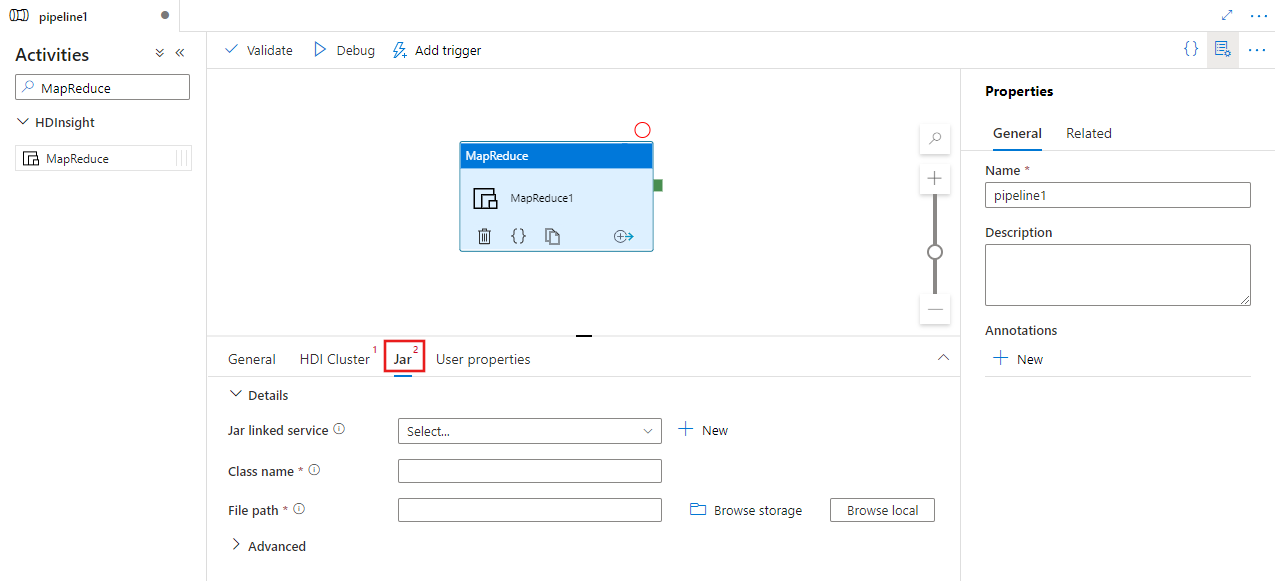
选择 Jar 选项卡,以选择或创建与托管脚本的 Azure Storage 帐户关联的新的 Jar 关联服务。 指定要在其中执行的类名,以及存储位置内的文件路径。 还可以配置高级详细信息,包括 Jar 库位置、调试配置以及要传递给脚本的自变量和参数。
语法
{
    "name": "Map Reduce Activity",
    "description": "Description",
    "type": "HDInsightMapReduce",
    "linkedServiceName": {
        "referenceName": "MyHDInsightLinkedService",
        "type": "LinkedServiceReference"
    },
    "typeProperties": {
        "className": "org.myorg.SampleClass",
        "jarLinkedService": {
            "referenceName": "MyAzureStorageLinkedService",
            "type": "LinkedServiceReference"
        },
        "jarFilePath": "MyAzureStorage/jars/sample.jar",
        "getDebugInfo": "Failure",
        "arguments": [
            "-SampleHadoopJobArgument1"
        ],
        "defines": {
            "param1": "param1Value"
        }
    }
}
语法详细信息
| 属性 | 描述 | 必需 |
|---|---|---|
| 名称 | 活动名称 | 是 |
| 描述 | 描述活动用途的文本 | 否 |
| 类型 | 对于 MapReduce 活动,活动类型是 HDinsightMapReduce | 是 |
| 链接服务名称 (linkedServiceName) | 引用注册为链接服务的 HDInsight 群集。 若要了解此链接服务,请参阅计算链接服务一文。 | 是 |
| className | 要执行的类的名称 | 是 |
| jarLinkedService | 对用于存储 Jar 文件的Azure Storage链接服务的引用。 此处仅支持 Azure Blob Storage 和 ADLS Gen2 链接服务。 如果未指定此链接服务,将使用 HDInsight 链接服务中定义的Azure Storage链接服务。 | 否 |
| jarFilePath | 提供 jarLinkedService 引用的Azure Storage中存储的 Jar 文件的路径。 文件名称需区分大小写。 | 是 |
| jarlibs | jarLinkedService 中定义的 Azure Storage 存储的作业所引用的 Jar 库文件路径的字符串数组。 文件名称需区分大小写。 | 否 |
| 获取调试信息 | 指定日志文件何时复制到 HDInsight 群集(或 jarLinkedService 指定的)使用的Azure Storage。 允许的值:无(None)、总是(Always)或失败(Failure)。 默认值:无。 | 否 |
| 参数 | 指定 Hadoop 作业的参数数组。 参数以命令行参数的形式传递到每个任务。 | 否 |
| 定义 | 在 Hive 脚本中指定参数作为键/值对,以供引用。 | 否 |
示例
可使用 HDInsight MapReduce 活动在 HDInsight 群集中运行任何 MapReduce jar 文件。 在管道的以下示例 JSON 定义中,配置了HDInsight 活动,以便运行 Mahout JAR 文件。
{
    "name": "MapReduce Activity for Mahout",
    "description": "Custom MapReduce to generate Mahout result",
    "type": "HDInsightMapReduce",
    "linkedServiceName": {
        "referenceName": "MyHDInsightLinkedService",
        "type": "LinkedServiceReference"
    },
    "typeProperties": {
        "className": "org.apache.mahout.cf.taste.hadoop.similarity.item.ItemSimilarityJob",
        "jarLinkedService": {
            "referenceName": "MyStorageLinkedService",
            "type": "LinkedServiceReference"
        },
        "jarFilePath": "adfsamples/Mahout/jars/mahout-examples-0.9.0.2.2.7.1-34.jar",
        "arguments": [
            "-s",
            "SIMILARITY_LOGLIKELIHOOD",
            "--input",
            "wasb://adfsamples@spestore.blob.core.chinacloudapi.cn/Mahout/input",
            "--output",
            "wasb://adfsamples@spestore.blob.core.chinacloudapi.cn/Mahout/output/",
            "--maxSimilaritiesPerItem",
            "500",
            "--tempDir",
            "wasb://adfsamples@spestore.blob.core.chinacloudapi.cn/Mahout/temp/mahout"
        ]
    }
}
可以在参数部分为 MapReduce 程序指定任意参数。 运行时,可在 MapReduce 框架中看到几个额外的参数(例如:mapreduce.job.tags)。 要区分自己的参数和 MapReduce 参数,请考虑将选项和值同时作为参数使用,如下例所示(-s、--input、--output 等选项后面紧接相应的值)。
相关内容
参阅以下文章了解如何以其他方式转换数据: