Observação
O acesso a essa página exige autorização. Você pode tentar entrar ou alterar diretórios.
O acesso a essa página exige autorização. Você pode tentar alterar os diretórios.
在本快速入门中,你将向现有Azure AI 搜索索引添加语义排名,并运行语义查询以提高结果相关性。 使用语言选项卡选择首选 SDK 或 REST 工作流。
在本快速入门中,你将使用 .NET 的 Azure AI 搜索客户端库,将语义排名添加到现有搜索索引,并查询该索引。
语义排名是查询端功能,它使用计算机读取理解来重新评分搜索结果,从而将与语义上最相关的匹配项提升到列表顶部。 可以将语义配置添加到现有索引,而无需重新生成。 语义排名对于信息性或描述性文本最为有效。
小窍门
想立即开始吗? 在 GitHub 上下载 source code。
先决条件
具有活动订阅的Azure帐户。 免费创建帐户。
启用了具有语义排名器的Azure AI 搜索 service。
一个 索引 ,其描述性文本字段属性为
searchable和retrievable。 此快速入门假设使用hotels-sample 索引。.NET 9 或更高版本。
Git 克隆示例存储库。
使用 Azure CLI 实现与 Microsoft Entra ID 的无密钥身份验证。
配置访问权限
在开始之前,请确保你有权访问Azure AI 搜索中的内容和操作。 本快速入门使用 Microsoft Entra ID 进行身份验证,并通过基于角色的访问控制进行授权。 你必须是 所有者 或 用户访问管理员 才能分配角色。 如果角色设置不可行,请改用基于密钥的身份验证方式。
要配置建议的基于角色的访问权限:
将以下角色分配给 用户帐户。
搜索服务贡献者
搜索索引数据读取者
注释
与其他创建和加载索引的快速入门不同,本快速入门假定现有索引已包含数据,因此不需要 搜索索引数据参与者 角色。
获取端点
每个Azure AI 搜索服务都有一个 endpoint,这是一个唯一的 URL,用于标识并提供对服务的网络访问。 在后面的部分中,您将指定此终结点,以便以编程方式连接到您的搜索服务。
若要获取端点,请执行以下步骤:
在 Azure 门户中,转到你的搜索服务。
在左窗格中,选择“ 概述”。
记下终结点,该终结点应类似于
https://my-service.search.azure.cn。
从索引开始
本快速入门将修改现有索引,添加语义配置。 建议使用 hotels-sample 索引,可以使用Azure门户向导在几分钟内创建该索引。
若要使用不同的索引,请在整个示例代码中替换语义配置中的索引名称、语义配置中的字段名称和查询 select 语句中的字段名称。 索引应包含标记为searchable 和retrievable的描述性文本字段。
在语义排名之前查看和查询 hotels-sample 索引:
在 Azure 门户中,转到你的搜索服务。
在左窗格中,选择 “搜索管理>索引”。
选择hotels-sample。
选择 语义配置 以查看任何现有配置。 如果在向导创建流期间启用了语义排名,则应提供默认配置。
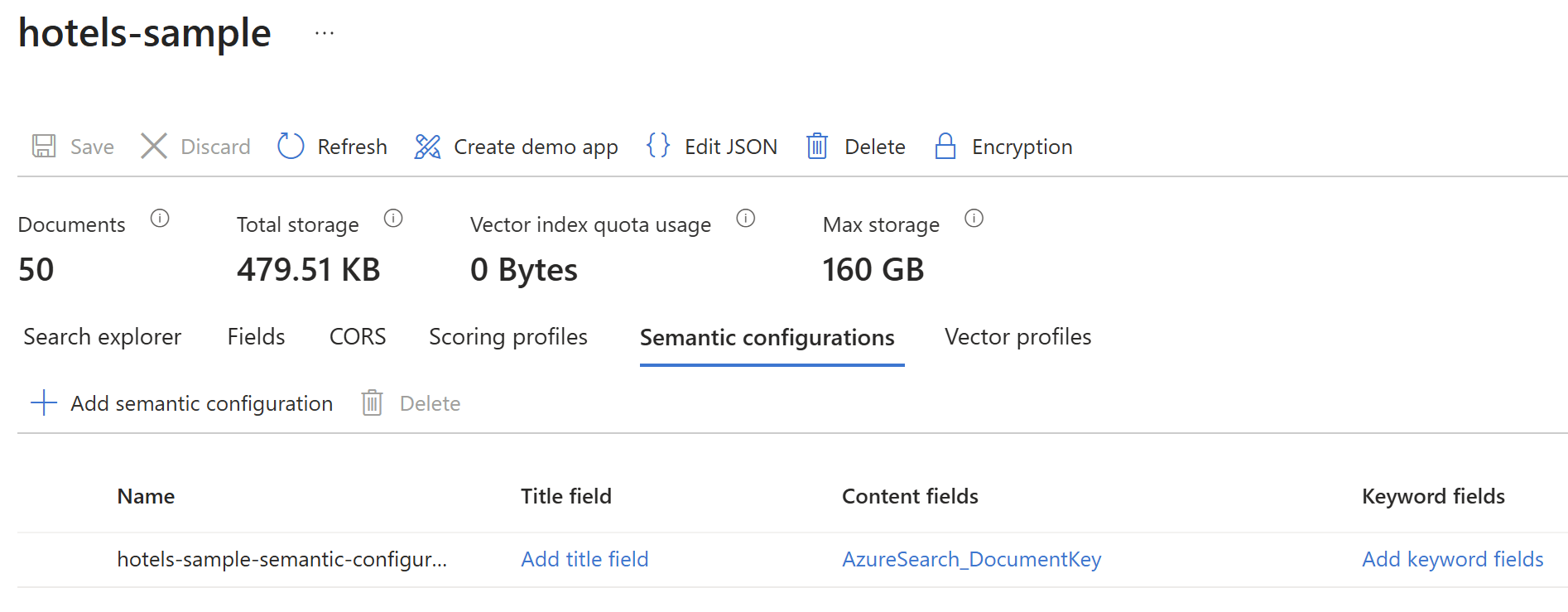
选择搜索资源管理器,然后选择查看>JSON视图。
将以下 JSON 粘贴到查询编辑器中。
{ "search": "walking distance to live music", "select": "HotelId, HotelName, Description", "count": true }选择“搜索”以运行查询。
响应应类似于以下示例。 这是按 BM25 排名的全文查询,因此结果与单个查询词和语言变体匹配,而不是查询的整体含义。 例如,
walking匹配walk,而live和music是独立匹配的,而不是作为一个短语进行匹配。"@odata.count": 30, "value": [ { "@search.score": 5.004435, "HotelId": "2", "HotelName": "Old Century Hotel", "Description": "The hotel is situated in a nineteenth century plaza, which has been expanded and renovated to the highest architectural standards to create a modern, functional and first-class hotel in which art and unique historical elements coexist with the most modern comforts. The hotel also regularly hosts events like wine tastings, beer dinners, and live music." }, { "@search.score": 4.555706, "HotelId": "24", "HotelName": "Uptown Chic Hotel", "Description": "Chic hotel near the city. High-rise hotel in downtown, within walking distance to theaters, art galleries, restaurants and shops. Visit Seattle Art Museum by day, and then head over to Benaroya Hall to catch the evening's concert performance." }, { "@search.score": 3.5625167, "HotelId": "4", "HotelName": "Sublime Palace Hotel", "Description": "Sublime Cliff Hotel is located in the heart of the historic center of Sublime in an extremely vibrant and lively area within short walking distance to the sites and landmarks of the city and is surrounded by the extraordinary beauty of churches, buildings, shops and monuments. Sublime Cliff is part of a lovingly restored 19th century resort, updated for every modern convenience." }, ... // Trimmed for brevity ]小窍门
此查询显示响应在应用语义排名之前的外观。 配置语义配置后,添加
"queryType": "semantic"并"semanticConfiguration": "semantic-config"查看同一查询按语义排名的不同方式。
设置环境
使用 Git 克隆示例存储库。
git clone https://github.com/Azure-Samples/azure-search-dotnet-samples转到快速入门文件夹。
cd azure-search-dotnet-samples/quickstart-semantic-ranking在
BuildIndex/Program.cs中,将占位符值endpoint替换为在 Get endpoint 中获取到的 URL。请对
QueryIndex/Program.cs重复上一步。若要使用 Microsoft Entra ID 进行无密钥身份验证,请登录到Azure帐户。 如果有多个订阅,请选择包含Azure AI 搜索服务的订阅。
az login
运行代码
运行第一个项目以通过语义配置更新索引。
dotnet run --project BuildIndex运行第二个项目以查询索引。 按 Enter 在查询之间查看从简单查询到带有标题和答案的语义查询的进度。
dotnet run --project QueryIndex
输出
第一个项目使用语义配置来更新酒店样本索引。 输出包括语义配置的确认。
Here's a list of all indexes on the search service. You should see hotels-sample:
hotels-sample

Added new semantic configuration 'semantic-config' to the index definition.
Index updated successfully.
Here is the revised index definition:
{
  "Name": "hotels-sample",
  ... // Trimmed for brevity
  "SemanticSearch": {
    "DefaultConfigurationName": "semantic-config",
    "Configurations": [
      {
        "Name": "hotels-sample-semantic-configuration",
        ... // Trimmed for brevity
      },
      {
        "Name": "semantic-config",
        "PrioritizedFields": {
          "TitleField": {
            "FieldName": "HotelName"
          },
          "ContentFields": [
            {
              "FieldName": "Description"
            }
          ],
          "KeywordsFields": [
            {
              "FieldName": "Tags"
            }
          ]
        },
        "RankingOrder": {}
      }
    ]
  }
}
第二个项目运行四个查询。 输出包括具有相关性分数、标题和答案的搜索结果。
Query 1: Simple query using the search string 'walking distance to live music'.
HotelId: 2
HotelName: Old Century Hotel
Description: The hotel is situated in a nineteenth century plaza, which has been expanded and renovated to the highest architectural standards to create a modern, functional and first-class hotel in which art and unique historical elements coexist with the most modern comforts. The hotel also regularly hosts events like wine tastings, beer dinners, and live music.
@search.score: 5.004435
----------------------------------------
HotelId: 24
HotelName: Uptown Chic Hotel
Description: Chic hotel near the city. High-rise hotel in downtown, within walking distance to theaters, art galleries, restaurants and shops. Visit Seattle Art Museum by day, and then head over to Benaroya Hall to catch the evening's concert performance.
@search.score: 4.555706
----------------------------------------
... // Trimmed for brevity
Press Enter to continue to the next query...

Query 2: Semantic query (no captions, no answers) for 'walking distance to live music'.
HotelId: 24
HotelName: Uptown Chic Hotel
Description: Chic hotel near the city. High-rise hotel in downtown, within walking distance to theaters, art galleries, restaurants and shops. Visit Seattle Art Museum by day, and then head over to Benaroya Hall to catch the evening's concert performance.
@search.score: 4.555706
@search.rerankerScore: 2.613231658935547
----------------------------------------
HotelId: 2
HotelName: Old Century Hotel
Description: The hotel is situated in a nineteenth century plaza, which has been expanded and renovated to the highest architectural standards to create a modern, functional and first-class hotel in which art and unique historical elements coexist with the most modern comforts. The hotel also regularly hosts events like wine tastings, beer dinners, and live music.
@search.score: 5.004435
@search.rerankerScore: 2.271434783935547
----------------------------------------
... // Trimmed for brevity
Press Enter to continue to the next query...

Query 3: Semantic query with captions.
Caption: Chic hotel near the city. High-rise hotel in downtown, within walking distance to<em> theaters, </em>art galleries, restaurants and shops. Visit<em> Seattle Art Museum </em>by day, and then head over to<em> Benaroya Hall </em>to catch the evening's concert performance.
HotelId: 24
HotelName: Uptown Chic Hotel
Description: Chic hotel near the city. High-rise hotel in downtown, within walking distance to theaters, art galleries, restaurants and shops. Visit Seattle Art Museum by day, and then head over to Benaroya Hall to catch the evening's concert performance.
@search.score: 4.555706
@search.rerankerScore: 2.613231658935547
----------------------------------------
... // Trimmed for brevity
Press Enter to continue to the next query...

Query 4: Semantic query with a verbatim answer from the Description field for 'what's a good hotel for people who like to read'.
Extractive Answers:
  Nature is Home on the beach. Explore the shore by day, and then come home to our shared living space to relax around a stone fireplace, sip something warm, and explore the<em> library </em>by night. Save up to 30 percent. Valid Now through the end of the year. Restrictions and blackouts may apply.
----------------------------------------
... // Trimmed for brevity
了解代码
注释
本部分中的代码片段可能已修改为可读性。 有关完整的工作示例,请参阅源代码。
运行代码后,让我们分解关键步骤:
配置和身份验证
这两个项目共享相同的配置模式。 这些文件 Program.cs 定义搜索终结点,并使用 DefaultAzureCredential 进行无密钥身份验证。
var endpoint = new Uri("PUT-YOUR-SEARCH-SERVICE-ENDPOINT-HERE");
var credential = new DefaultAzureCredential();
var indexClient = new SearchIndexClient(endpoint, credential);
要点:
-
DefaultAzureCredential使用Microsoft Entra ID提供无密钥身份验证。 它链接多个凭据类型,包括来自az login的Azure CLI凭据。 -
SearchIndexClient管理索引级作,例如更新索引架构。 -
SearchClient处理文档级作,例如查询索引。
使用语义配置更新索引
以下代码将 BuildIndex/Program.cs 语义配置添加到现有索引。 此作不会删除任何搜索文档,并且添加配置后索引仍可正常运行。
static void AddSemanticConfiguration(
    SearchIndex index,
    string semanticConfigName)
{
    if (index.SemanticSearch == null)
    {
        index.SemanticSearch = new SemanticSearch();
    }
    var configs = index.SemanticSearch.Configurations;
    if (!configs.Any(c => c.Name == semanticConfigName))
    {
        var prioritizedFields =
            new SemanticPrioritizedFields
        {
            TitleField = new SemanticField("HotelName"),
            ContentFields =
            {
                new SemanticField("Description")
            },
            KeywordsFields =
            {
                new SemanticField("Tags")
            }
        };

        configs.Add(
            new SemanticConfiguration(
                semanticConfigName,
                prioritizedFields
            )
        );
    }
    index.SemanticSearch.DefaultConfigurationName =
        semanticConfigName;
}
要点:
- 语义配置指定用于语义排名的字段。
- 可以在不重新生成的情况下将语义配置添加到现有索引。
-
TitleField设置表示文档标题的字段。 -
ContentFields设置包含主内容的字段。 -
KeywordsFields设置包含关键字或标记的字段。
查询索引
QueryIndex project按顺序运行四个查询,从简单的关键字搜索到带有标题和答案的语义排名。
简单查询
第一个查询是不使用语义排名的简单关键字搜索。 此查询用作比较有语义重排和无语义重排结果的基线。
await RunQuery(client, searchText, new SearchOptions
{
    Size = 5,
    QueryType = SearchQueryType.Simple,
    IncludeTotalCount = true,
    Select = { "HotelId", "HotelName", "Description" }
});
要点:
-
SearchQueryType.Simple使用默认的 BM25 排名算法。 - 结果仅按关键字相关性 (
@search.score) 进行排名。
语义查询(无标题,无答案)
下一个查询添加没有标题或答案的语义排名。 以下代码显示了调用语义排名的最低要求。
var semanticOptions = new SearchOptions
{
    Size = 5,
    QueryType = SearchQueryType.Semantic,
    SemanticSearch = new SemanticSearchOptions
    {
        SemanticConfigurationName = "semantic-config"
    },
    IncludeTotalCount = true,
    Select =
    {
        "HotelId", "HotelName", "Description"
    }
};
await RunQuery(client, searchText, semanticOptions);
要点:
-
SearchQueryType.Semantic对查询启用语义排名。 -
SemanticConfigurationName指定要使用的语义配置。 -
@search.rerankerScore指示语义相关性(更高越好)。 - 术语查询的初始结果使用语义排名模型重新记录。 对于此数据集和查询,语义排名的效果在排名较低的结果中更为明显。
带有题注的语义查询
以下代码添加了说明文字,以提取每个结果中最相关的段落,并对重要术语和短语应用命中高亮显示。
var captionsOptions = new SearchOptions
{
    Size = 5,
    QueryType = SearchQueryType.Semantic,
    SemanticSearch = new SemanticSearchOptions
    {
        SemanticConfigurationName = "semantic-config",
        QueryCaption =
            new QueryCaption(QueryCaptionType.Extractive)
        {
            HighlightEnabled = true
        }
    },
    IncludeTotalCount = true,
    Select =
    {
        "HotelId", "HotelName", "Description"
    }
};
captionsOptions.HighlightFields.Add("Description");
await RunQuery(
    client, searchText, captionsOptions, showCaptions: true
);
要点:
-
QueryCaption启用从内容字段中提取的字幕。 - 字幕呈现出最相关的段落,并在重要术语周围添加
<em>标记。
带答案的语义查询
最终查询将添加语义答案。 此查询使用不同的搜索字符串 (searchText2),因为当查询短语为问题时,语义答案效果最佳。 答案是直接从您的索引中提取的逐字文本,而不是由聊天生成模型生成的响应。
查询和索引内容必须紧密对齐,才能返回答案。 如果没有候选项满足置信度阈值,则响应不包括答案。 此示例使用已知问题来生成结果,以便查看语法。 如果答案对方案不起作用,请从代码中省略 QueryAnswer 。 对于组合答案,请考虑 使用 RAG 模式 或 代理检索。
var answersOptions = new SearchOptions
{
    Size = 5,
    QueryType = SearchQueryType.Semantic,
    SemanticSearch = new SemanticSearchOptions
    {
        SemanticConfigurationName = "semantic-config",
        QueryAnswer =
            new QueryAnswer(QueryAnswerType.Extractive)
    },
    IncludeTotalCount = true,
    Select =
    {
        "HotelId", "HotelName", "Description"
    }
};
await RunQuery(
    client, searchText2, answersOptions, showAnswers: true
);
要点:
-
QueryAnswer支持问答型查询的提取答案功能。 - 答案是从索引中提取的逐字内容,而不是生成的文本。
在本快速入门中,你将使用 Azure AI 搜索 Java 客户端库,将语义排序添加到现有的搜索索引并查询该索引。
语义排名是查询端功能,它使用计算机读取理解来重新评分搜索结果,从而将与语义上最相关的匹配项提升到列表顶部。 可以将语义配置添加到现有索引,而无需重新生成。 语义排名对于信息性或描述性文本最为有效。
小窍门
想立即开始吗? 在 GitHub 上下载 source code。
先决条件
具有活动订阅的Azure帐户。 免费创建帐户。
一个 索引 ,其描述性文本字段属性为
searchable和retrievable。 此快速入门假设使用hotels-sample 索引。Git 克隆示例存储库。
使用 Azure CLI 实现与 Microsoft Entra ID 的无密钥身份验证。
配置访问权限
在开始之前,请确保你有权访问Azure AI 搜索中的内容和操作。 本快速入门使用 Microsoft Entra ID 进行身份验证,并通过基于角色的访问控制进行授权。 你必须是 所有者 或 用户访问管理员 才能分配角色。 如果角色设置不可行,请改用基于密钥的身份验证方式。
要配置建议的基于角色的访问权限:
将以下角色分配给 用户帐户。
搜索服务贡献者
搜索索引数据读取者
注释
与其他创建和加载索引的快速入门不同,本快速入门假定现有索引已包含数据,因此不需要 搜索索引数据参与者 角色。
获取端点
每个Azure AI 搜索服务都有一个 endpoint,这是一个唯一的 URL,用于标识并提供对服务的网络访问。 在后面的部分中,您将指定此终结点,以便以编程方式连接到您的搜索服务。
若要获取端点,请执行以下步骤:
在 Azure 门户中,转到你的搜索服务。
在左窗格中,选择“ 概述”。
记下终结点,该终结点应类似于
https://my-service.search.azure.cn。
从索引开始
本快速入门将修改现有索引,添加语义配置。 建议使用 hotels-sample 索引,可以使用Azure门户向导在几分钟内创建该索引。
若要使用不同的索引,请在整个示例代码中替换语义配置中的索引名称、语义配置中的字段名称和查询 select 语句中的字段名称。 索引应包含标记为searchable 和retrievable的描述性文本字段。
在语义排名之前查看和查询 hotels-sample 索引:
在 Azure 门户中,转到你的搜索服务。
在左窗格中,选择 “搜索管理>索引”。
选择hotels-sample。
选择 语义配置 以查看任何现有配置。 如果在向导创建流期间启用了语义排名,则应提供默认配置。
选择搜索资源管理器,然后选择查看>JSON视图。
将以下 JSON 粘贴到查询编辑器中。
{ "search": "walking distance to live music", "select": "HotelId, HotelName, Description", "count": true }选择“搜索”以运行查询。
响应应类似于以下示例。 这是按 BM25 排名的全文查询,因此结果与单个查询词和语言变体匹配,而不是查询的整体含义。 例如,
walking匹配walk,而live和music是独立匹配的,而不是作为一个短语进行匹配。"@odata.count": 30, "value": [ { "@search.score": 5.004435, "HotelId": "2", "HotelName": "Old Century Hotel", "Description": "The hotel is situated in a nineteenth century plaza, which has been expanded and renovated to the highest architectural standards to create a modern, functional and first-class hotel in which art and unique historical elements coexist with the most modern comforts. The hotel also regularly hosts events like wine tastings, beer dinners, and live music." }, { "@search.score": 4.555706, "HotelId": "24", "HotelName": "Uptown Chic Hotel", "Description": "Chic hotel near the city. High-rise hotel in downtown, within walking distance to theaters, art galleries, restaurants and shops. Visit Seattle Art Museum by day, and then head over to Benaroya Hall to catch the evening's concert performance." }, { "@search.score": 3.5625167, "HotelId": "4", "HotelName": "Sublime Palace Hotel", "Description": "Sublime Cliff Hotel is located in the heart of the historic center of Sublime in an extremely vibrant and lively area within short walking distance to the sites and landmarks of the city and is surrounded by the extraordinary beauty of churches, buildings, shops and monuments. Sublime Cliff is part of a lovingly restored 19th century resort, updated for every modern convenience." }, ... // Trimmed for brevity ]小窍门
此查询显示响应在应用语义排名之前的外观。 配置语义配置后,添加
"queryType": "semantic"并"semanticConfiguration": "semantic-config"查看同一查询按语义排名的不同方式。
设置环境
使用 Git 克隆示例存储库。
git clone https://github.com/Azure-Samples/azure-search-java-samples转到快速入门文件夹。
cd azure-search-java-samples/quickstart-semantic-ranking在
src/main/resources/application.properties中,将占位符值azure.search.endpoint替换为在 Get endpoint 中获取到的 URL。编译项目以解析依赖项,包括 azure-search-documents。
mvn compile生成完成后,请验证输出中是否未显示任何错误。
若要使用 Microsoft Entra ID 进行无密钥身份验证,请登录到Azure帐户。 如果有多个订阅,请选择包含Azure AI 搜索服务的订阅。
az login
运行代码
获取现有索引设置。
mvn compile exec:java "-Dexec.mainClass=com.azure.search.quickstart.GetIndexSettings"使用语义配置更新索引。
mvn compile exec:java "-Dexec.mainClass=com.azure.search.quickstart.UpdateIndexSettings"运行语义查询。
mvn compile exec:java "-Dexec.mainClass=com.azure.search.quickstart.SemanticQuery"使用标题运行语义查询。
mvn compile exec:java "-Dexec.mainClass=com.azure.search.quickstart.SemanticQueryWithCaptions"运行带有答案的语义查询。
mvn compile exec:java "-Dexec.mainClass=com.azure.search.quickstart.SemanticAnswer"
输出
输出 GetIndexSettings.java 的结果是索引的名称、其字段及其语义配置。 添加新配置之前,索引只有默认配置。
Index name: hotels-sample
Number of fields: 23
Field: HotelId, Type: Edm.String, Searchable: true
Field: HotelName, Type: Edm.String, Searchable: true
Field: Description, Type: Edm.String, Searchable: true
// Trimmed for brevity
Semantic search configurations: 1
Configuration name: hotels-sample-semantic-configuration
输出UpdateIndexSettings.java 列出了索引上所有的语义配置,包括代码添加的配置,随后是成功消息。
// Trimmed for brevity
Configuration name: semantic-config
Title field: HotelName
Keywords fields: Tags
Content fields: Description
----------------------------------------
Semantic configuration updated successfully.
输出 SemanticQuery.java 返回由语义排序器评分重新排序的所有匹配文档。
Search result #1:
  Re-ranker Score: 2.61
  HotelId: 24
  HotelName: Uptown Chic Hotel
  Description: Chic hotel near the city. High-rise hotel in downtown, within walking distance to theaters, art galleries, restaurants and shops. Visit Seattle Art Museum by day, and then head over to Benaroya Hall to catch the evening's concert performance.

Search result #2:
  Re-ranker Score: 2.27
  HotelId: 2
  HotelName: Old Century Hotel
  Description: The hotel is situated in a nineteenth century plaza, which has been expanded and renovated to the highest architectural standards to create a modern, functional and first-class hotel in which art and unique historical elements coexist with the most modern comforts. The hotel also regularly hosts events like wine tastings, beer dinners, and live music.

Search result #3:
  Re-ranker Score: 1.99
  HotelId: 4
  HotelName: Sublime Palace Hotel
  Description: Sublime Cliff Hotel is located in the heart of the historic center of Sublime in an extremely vibrant and lively area within short walking distance to the sites and landmarks of the city and is surrounded by the extraordinary beauty of churches, buildings, shops and monuments. Sublime Cliff is part of a lovingly restored 19th century resort, updated for every modern convenience.
// Trimmed for brevity
SemanticQueryWithCaptions.java 的输出添加了一个带有命中高亮显示的标题元素,并在搜索字段旁边显示。 标题是结果中最相关的段落。 如果索引包含较大的文本,标题有助于提取最有趣的句子。
Search result #1:
  Re-ranker Score: 2.61
  HotelName: Uptown Chic Hotel
  Description: Chic hotel near the city. High-rise hotel in downtown, within walking distance to theaters, art galleries, restaurants and shops. Visit Seattle Art Museum by day, and then head over to Benaroya Hall to catch the evening's concert performance.

  Caption with highlights: Chic hotel near the city. High-rise hotel in downtown, within walking distance to<em> theaters, </em>art galleries, restaurants and shops. Visit<em> Seattle Art Museum </em>by day, and then head over to<em> Benaroya Hall </em>to catch the evening's concert performance.
------------------------------------------------------------
Search result #2:
  Re-ranker Score: 2.27
  HotelName: Old Century Hotel
  Description: The hotel is situated in a nineteenth century plaza, which has been expanded and renovated to the highest architectural standards to create a modern, functional and first-class hotel in which art and unique historical elements coexist with the most modern comforts. The hotel also regularly hosts events like wine tastings, beer dinners, and live music.

  Caption text: The hotel is situated in a nineteenth century plaza, which has been expanded and renovated to the highest architectural standards to create a modern, functional and first-class hotel in which art and unique historical elements coexist with the most modern comforts. The hotel also regularly hosts events like wine tastings, beer dinners, and live.
------------------------------------------------------------
// Trimmed for brevity
输出 SemanticAnswer.java 包括从与问题最匹配的结果之一拉取的语义答案,后跟带标题的搜索结果。
Semantic answer result #1:
Semantic Answer: Nature is Home on the beach. Explore the shore by day, and then come home to our shared living space to relax around a stone fireplace, sip something warm, and explore the<em> library </em>by night. Save up to 30 percent. Valid Now through the end of the year. Restrictions and blackouts may apply.
Semantic Answer Score: 0.98

Search Results:

Search result #1:
Re-ranker Score: 2.12
Hotel: Stay-Kay City Hotel
Description: This classic hotel is fully-refurbished and ideally located on the main commercial artery of the city in the heart of Beijing. A few minutes away is Times Square and the historic centre of the city, as well as other places of interest that make Beijing one of America's most attractive and cosmopolitan cities.
Caption: This classic hotel is<em> fully-refurbished </em>and ideally located on the main commercial artery of the city in the heart of Beijing. A few minutes away is Times Square and the historic centre of the city, as well as other places of interest that make Beijing one of America's most attractive and cosmopolitan cities.

Search result #2:
Re-ranker Score: 2.07
Hotel: Double Sanctuary Resort
Description: 5 star Luxury Hotel - Biggest Rooms in the city. #1 Hotel in the area listed by Traveler magazine. Free WiFi, Flexible check in/out, Fitness Center & espresso in room.
Caption: <em>5 star Luxury Hotel </em>-<em> Biggest </em>Rooms in the city. #1 Hotel in the area listed by Traveler magazine. Free WiFi, Flexible check in/out, Fitness Center & espresso in room.
// Trimmed for brevity
了解代码
注释
本部分中的代码片段可能已修改为可读性。 有关完整的工作示例,请参阅源代码。
运行代码后,让我们分解关键步骤:
配置和身份验证
该 SearchConfig.java 类从 application.properties 中加载属性并创建一个 DefaultAzureCredential 用于无密钥身份验证的属性。
import com.azure.identity.DefaultAzureCredential;
import com.azure.identity.DefaultAzureCredentialBuilder;

import java.io.IOException;
import java.io.InputStream;
import java.util.Properties;

public class SearchConfig {
    private static final Properties properties =
        new Properties();

    static {
        try (InputStream input = SearchConfig.class
            .getClassLoader()
            .getResourceAsStream(
                "application.properties")) {
            properties.load(input);
        } catch (IOException e) {
            throw new RuntimeException(
                "Failed to load application.properties",
                e);
        }
    }

    public static final String SEARCH_ENDPOINT =
        properties.getProperty(
            "azure.search.endpoint");
    public static final String INDEX_NAME =
        properties.getProperty(
            "azure.search.index.name");
    public static final String SEMANTIC_CONFIG_NAME =
        properties.getProperty(
            "semantic.configuration.name");

    public static final DefaultAzureCredential
        CREDENTIAL = new DefaultAzureCredentialBuilder()
            .build();
}
要点:
-
DefaultAzureCredential使用Microsoft Entra ID提供无密钥身份验证。 它链接多个凭据类型,包括来自az login的Azure CLI凭据。 - 属性从类路径中的
application.properties文件中加载。 - 静态字段(
SEARCH_ENDPOINT、INDEX_NAME、SEMANTIC_CONFIG_NAME、CREDENTIAL)在project中的所有类之间共享。
使用语义配置更新索引
该 UpdateIndexSettings.java 类将语义配置添加到现有 hotels-sample 索引。 此作不会删除任何搜索文档,并且添加配置后索引仍可正常运行。
import com.azure.search.documents.indexes
    .SearchIndexClientBuilder;
import com.azure.search.documents.indexes.models
    .SearchIndex;
import com.azure.search.documents.indexes.models
    .SemanticConfiguration;
import com.azure.search.documents.indexes.models
    .SemanticField;
import com.azure.search.documents.indexes.models
    .SemanticPrioritizedFields;
import com.azure.search.documents.indexes.models
    .SemanticSearch;

import java.util.ArrayList;
import java.util.List;

var indexClient = new SearchIndexClientBuilder()
    .endpoint(SearchConfig.SEARCH_ENDPOINT)
    .credential(SearchConfig.CREDENTIAL)
    .buildClient();

SearchIndex existingIndex =
    indexClient.getIndex(SearchConfig.INDEX_NAME);

var prioritizedFields =
    new SemanticPrioritizedFields()
        .setTitleField(
            new SemanticField("HotelName"))
        .setKeywordsFields(
            List.of(new SemanticField("Tags")))
        .setContentFields(
            List.of(
                new SemanticField("Description")));

var newSemanticConfiguration =
    new SemanticConfiguration(
        SearchConfig.SEMANTIC_CONFIG_NAME,
        prioritizedFields);

SemanticSearch semanticSearch =
    existingIndex.getSemanticSearch();
if (semanticSearch == null) {
    semanticSearch = new SemanticSearch();
    existingIndex.setSemanticSearch(semanticSearch);
}

List<SemanticConfiguration> configurations =
    semanticSearch.getConfigurations();
if (configurations == null) {
    configurations = new ArrayList<>();
    semanticSearch.setConfigurations(configurations);
}

configurations.add(newSemanticConfiguration);

indexClient.createOrUpdateIndex(existingIndex);
要点:
-
SemanticPrioritizedFields定义语义排名器计算的字段。setTitleField设置文档标题,setContentFields设置主内容,并setKeywordsFields设置关键字或标记字段。 -
SemanticConfiguration将名称与优先字段配对,确定在查询时要使用的语义配置。 -
createOrUpdateIndex将更新的架构推送到search service,而无需重新生成索引或删除文档。
查询索引
以下三个类按顺序查询索引,从基本语义搜索到带有标题和答案的语义排名。
语义查询(无标题,无答案)
第一个查询添加语义排名,但没有提供字幕或答案。 该 SemanticQuery.java 类显示调用语义排名的最低要求。
import com.azure.search.documents
    .SearchClientBuilder;
import com.azure.search.documents.SearchDocument;
import com.azure.search.documents.models.QueryType;
import com.azure.search.documents.models.SearchOptions;
import com.azure.search.documents.models.SearchResult;
import com.azure.search.documents.models
    .SemanticSearchOptions;
import com.azure.search.documents.util
    .SearchPagedIterable;

var searchClient = new SearchClientBuilder()
    .endpoint(SearchConfig.SEARCH_ENDPOINT)
    .indexName(SearchConfig.INDEX_NAME)
    .credential(SearchConfig.CREDENTIAL)
    .buildClient();

var searchOptions = new SearchOptions()
    .setQueryType(QueryType.SEMANTIC)
    .setSemanticSearchOptions(
        new SemanticSearchOptions()
            .setSemanticConfigurationName(
                SearchConfig.SEMANTIC_CONFIG_NAME))
    .setSelect("HotelId", "HotelName", "Description");

SearchPagedIterable results = searchClient.search(
    "walking distance to live music",
    searchOptions, null);

for (SearchResult result : results) {
    var document = result.getDocument(
        SearchDocument.class);
    double rerankerScore = result
        .getSemanticSearch().getRerankerScore();

    System.out.printf("Re-ranker Score: %.2f%n",
        rerankerScore);
    System.out.printf("HotelName: %s%n",
        document.get("HotelName"));
    System.out.printf("Description: %s%n%n",
        document.get("Description"));
}
要点:
-
QueryType.SEMANTIC对查询启用语义排名。 -
setSemanticConfigurationName指定要使用的语义配置。 -
SearchPagedIterable提供一个可迭代对象以遍历重新排序的结果。 每个SearchResult都包含一个用于重新评分的getSemanticSearch()访问器。
带有题注的语义查询
该 SemanticQueryWithCaptions.java 类添加了字幕,用于从每个结果中提取最相关的段落,且将命中高亮应用于重要术语和短语。
import com.azure.search.documents.models
    .QueryCaption;
import com.azure.search.documents.models
    .QueryCaptionResult;
import com.azure.search.documents.models
    .QueryCaptionType;

var searchOptions = new SearchOptions()
    .setQueryType(QueryType.SEMANTIC)
    .setSemanticSearchOptions(
        new SemanticSearchOptions()
            .setSemanticConfigurationName(
                SearchConfig.SEMANTIC_CONFIG_NAME)
            .setQueryCaption(
                new QueryCaption(
                    QueryCaptionType.EXTRACTIVE)
                    .setHighlightEnabled(true)))
    .setSelect(
        "HotelId", "HotelName", "Description");

SearchPagedIterable results = searchClient.search(
    "walking distance to live music",
    searchOptions, null);

for (SearchResult result : results) {
    List<QueryCaptionResult> captions =
        result.getSemanticSearch()
            .getQueryCaptions();
    if (captions != null && !captions.isEmpty()) {
        QueryCaptionResult caption = captions.get(0);
        if (caption.getHighlights() != null) {
            System.out.printf(
                "Caption: %s%n",
                caption.getHighlights());
        }
    }
}
要点:
-
QueryCaption(QueryCaptionType.EXTRACTIVE)启用从内容字段中提取的字幕。 -
setHighlightEnabled(true)在标题中围绕重要术语添加<em>标记。 - 每个
SearchResult都在语义搜索访问器上提供getQueryCaptions()。
带答案的语义查询
该 SemanticAnswer.java 类添加语义答案。 这个类使用问题作为搜索文本,因为当查询被表述为问题时,语义处理的答案效果最佳。 答案是直接从您的索引中提取的逐字文本,而不是由聊天生成模型生成的响应。
查询和索引内容必须紧密对齐,才能返回答案。 如果没有候选项满足置信度阈值,则响应不包括答案。 此示例使用已知问题来生成结果,以便查看语法。 如果答案对方案不起作用,请从代码中省略 setQueryAnswer 。 对于组合答案,请考虑 使用 RAG 模式 或 代理检索。
import com.azure.search.documents.models
    .QueryAnswer;
import com.azure.search.documents.models
    .QueryAnswerResult;
import com.azure.search.documents.models
    .QueryAnswerType;

var searchOptions = new SearchOptions()
    .setQueryType(QueryType.SEMANTIC)
    .setSemanticSearchOptions(
        new SemanticSearchOptions()
            .setSemanticConfigurationName(
                SearchConfig.SEMANTIC_CONFIG_NAME)
            .setQueryCaption(
                new QueryCaption(
                    QueryCaptionType.EXTRACTIVE))
            .setQueryAnswer(
                new QueryAnswer(
                    QueryAnswerType.EXTRACTIVE)))
    .setSelect(
        "HotelName", "Description", "Category");

SearchPagedIterable results = searchClient.search(
    "What's a good hotel for people who like to read",
    searchOptions, null);

List<QueryAnswerResult> semanticAnswers =
    results.getSemanticResults().getQueryAnswers();

for (QueryAnswerResult answer :
    semanticAnswers != null ? semanticAnswers
        : List.<QueryAnswerResult>of()) {
    if (answer.getHighlights() != null) {
        System.out.printf(
            "Semantic Answer: %s%n",
            answer.getHighlights());
    } else {
        System.out.printf(
            "Semantic Answer: %s%n",
            answer.getText());
    }
    System.out.printf(
        "Semantic Answer Score: %.2f%n",
        answer.getScore());
}
要点:
-
QueryAnswer(QueryAnswerType.EXTRACTIVE)支持问答型查询的提取答案功能。 - 答案是从索引中提取的逐字内容,而不是生成的文本。
-
results.getSemanticResults().getQueryAnswers()从搜索结果中单独检索答案对象。
在本快速入门中,你将使用适用于 JavaScript 的 Azure AI 搜索 客户端库,将 语义排名 添加到现有搜索索引,并查询该索引。
语义排名是查询端功能,它使用计算机读取理解来重新评分搜索结果,从而将与语义上最相关的匹配项提升到列表顶部。 可以将语义配置添加到现有索引,而无需重新生成。 语义排名对于信息性或描述性文本最为有效。
小窍门
想立即开始吗? 在 GitHub 上下载 source code。
先决条件
具有活动订阅的Azure帐户。 免费创建帐户。
一个 索引 ,其描述性文本字段属性为
searchable和retrievable。 此快速入门假设使用hotels-sample 索引。Node.js 20 LTS 或更高版本。
Git 克隆示例存储库。
使用 Azure CLI 实现与 Microsoft Entra ID 的无密钥身份验证。
配置访问权限
在开始之前,请确保你有权访问Azure AI 搜索中的内容和操作。 本快速入门使用 Microsoft Entra ID 进行身份验证,并通过基于角色的访问控制进行授权。 你必须是 所有者 或 用户访问管理员 才能分配角色。 如果角色设置不可行,请改用基于密钥的身份验证方式。
要配置建议的基于角色的访问权限:
将以下角色分配给 用户帐户。
搜索服务贡献者
搜索索引数据读取者
注释
与其他创建和加载索引的快速入门不同,本快速入门假定现有索引已包含数据,因此不需要 搜索索引数据参与者 角色。
获取端点
每个Azure AI 搜索服务都有一个 endpoint,这是一个唯一的 URL,用于标识并提供对服务的网络访问。 在后面的部分中,您将指定此终结点,以便以编程方式连接到您的搜索服务。
若要获取端点,请执行以下步骤:
在 Azure 门户中,转到你的搜索服务。
在左窗格中,选择“ 概述”。
记下终结点,该终结点应类似于
https://my-service.search.azure.cn。
从索引开始
本快速入门将修改现有索引,添加语义配置。 建议使用 hotels-sample 索引,可以使用Azure门户向导在几分钟内创建该索引。
若要使用不同的索引,请在整个示例代码中替换语义配置中的索引名称、语义配置中的字段名称和查询 select 语句中的字段名称。 索引应包含标记为searchable 和retrievable的描述性文本字段。
在语义排名之前查看和查询 hotels-sample 索引:
在 Azure 门户中,转到你的搜索服务。
在左窗格中,选择 “搜索管理>索引”。
选择hotels-sample。
选择 语义配置 以查看任何现有配置。 如果在向导创建流期间启用了语义排名,则应提供默认配置。
选择搜索资源管理器,然后选择查看>JSON视图。
将以下 JSON 粘贴到查询编辑器中。
{ "search": "walking distance to live music", "select": "HotelId, HotelName, Description", "count": true }选择“搜索”以运行查询。
响应应类似于以下示例。 这是按 BM25 排名的全文查询,因此结果与单个查询词和语言变体匹配,而不是查询的整体含义。 例如,
walking匹配walk,而live和music是独立匹配的,而不是作为一个短语进行匹配。"@odata.count": 30, "value": [ { "@search.score": 5.004435, "HotelId": "2", "HotelName": "Old Century Hotel", "Description": "The hotel is situated in a nineteenth century plaza, which has been expanded and renovated to the highest architectural standards to create a modern, functional and first-class hotel in which art and unique historical elements coexist with the most modern comforts. The hotel also regularly hosts events like wine tastings, beer dinners, and live music." }, { "@search.score": 4.555706, "HotelId": "24", "HotelName": "Uptown Chic Hotel", "Description": "Chic hotel near the city. High-rise hotel in downtown, within walking distance to theaters, art galleries, restaurants and shops. Visit Seattle Art Museum by day, and then head over to Benaroya Hall to catch the evening's concert performance." }, { "@search.score": 3.5625167, "HotelId": "4", "HotelName": "Sublime Palace Hotel", "Description": "Sublime Cliff Hotel is located in the heart of the historic center of Sublime in an extremely vibrant and lively area within short walking distance to the sites and landmarks of the city and is surrounded by the extraordinary beauty of churches, buildings, shops and monuments. Sublime Cliff is part of a lovingly restored 19th century resort, updated for every modern convenience." }, ... // Trimmed for brevity ]小窍门
此查询显示响应在应用语义排名之前的外观。 配置语义配置后,添加
"queryType": "semantic"并"semanticConfiguration": "semantic-config"查看同一查询按语义排名的不同方式。
设置环境
使用 Git 克隆示例存储库。
git clone https://github.com/Azure-Samples/azure-search-javascript-samples转到快速入门文件夹。
cd azure-search-javascript-samples/quickstart-semantic-ranking-js在
sample.env中,将占位符值AZURE_SEARCH_ENDPOINT替换为在 Get endpoint 中获取到的 URL。将
sample.env重命名为.env。mv sample.env .env安装依赖项。
npm install安装完成后,应会在项目目录中看到一个
node_modules文件夹。若要使用 Microsoft Entra ID 进行无密钥身份验证,请登录到Azure帐户。 如果有多个订阅,请选择包含Azure AI 搜索服务的订阅。
az login
运行代码
获取现有索引设置。
node -r dotenv/config src/getIndexSettings.js使用语义配置更新索引。
node -r dotenv/config src/updateIndexSettings.js运行语义查询。
node -r dotenv/config src/semanticQuery.js使用标题运行语义查询。
node -r dotenv/config src/semanticQueryReturnCaptions.js运行带有答案的语义查询。
node -r dotenv/config src/semanticAnswer.js
输出
该 getIndexSettings.js 脚本返回索引的名称、其字段和任何现有语义配置。
Getting semantic ranking index settings...
Index name: hotels-sample
Number of fields: 23
Field: HotelId, Type: Edm.String, Searchable: true
Field: HotelName, Type: Edm.String, Searchable: true
Field: Description, Type: Edm.String, Searchable: true
Field: Description_fr, Type: Edm.String, Searchable: true
Field: Category, Type: Edm.String, Searchable: true
Field: Tags, Type: Collection(Edm.String), Searchable: true
// Trimmed for brevity
Semantic ranking configurations: 1
Configuration name: hotels-sample-semantic-configuration
Title field: undefined
该 updateIndexSettings.js 脚本返回索引上的所有语义配置,包括代码添加的那一项,并随后显示成功消息。
Semantic configurations:
----------------------------------------
Configuration name: hotels-sample-semantic-configuration
Title field: undefined
Keywords fields:
Content fields: AzureSearch_DocumentKey
----------------------------------------
Configuration name: semantic-config
Title field: HotelName
Keywords fields: Tags
Content fields: Description
----------------------------------------
Semantic configuration updated successfully.
该 semanticQuery.js 脚本返回由语义排名重新排名器分数排序的所有匹配文档。
Search result #1:
  Re-ranker Score: 2.613231658935547
  HotelId: 24
  HotelName: Uptown Chic Hotel
  Description: Chic hotel near the city. High-rise hotel in downtown, within walking distance to theaters, art galleries, restaurants and shops. Visit Seattle Art Museum by day, and then head over to Benaroya Hall to catch the evening's concert performance.

Search result #2:
  Re-ranker Score: 2.271434783935547
  HotelId: 2
  HotelName: Old Century Hotel
  Description: The hotel is situated in a nineteenth century plaza, which has been expanded and renovated to the highest architectural standards to create a modern, functional and first-class hotel in which art and unique historical elements coexist with the most modern comforts. The hotel also regularly hosts events like wine tastings, beer dinners, and live music.

Search result #3:
  Re-ranker Score: 1.9861756563186646
  HotelId: 4
  HotelName: Sublime Palace Hotel
  Description: Sublime Cliff Hotel is located in the heart of the historic center of Sublime in an extremely vibrant and lively area within short walking distance to the sites and landmarks of the city and is surrounded by the extraordinary beauty of churches, buildings, shops and monuments. Sublime Cliff is part of a lovingly restored 19th century resort, updated for every modern convenience.
// Trimmed for brevity
该 semanticQueryReturnCaptions.js 脚本返回一个说明元素,并在搜索字段中突出显示命中。 标题是结果中最相关的段落。 如果索引包含较大的文本,标题有助于提取最有趣的句子。
Search result #1:
  Re-ranker Score: 2.613231658935547
  HotelName: Uptown Chic Hotel
  Description: Chic hotel near the city. High-rise hotel in downtown, within walking distance to theaters, art galleries, restaurants and shops. Visit Seattle Art Museum by day, and then head over to Benaroya Hall to catch the evening's concert performance.

  Caption with highlights: Chic hotel near the city. High-rise hotel in downtown, within walking distance to<em> theaters, </em>art galleries, restaurants and shops. Visit<em> Seattle Art Museum </em>by day, and then head over to<em> Benaroya Hall </em>to catch the evening's concert performance.
------------------------------------------------------------
Search result #2:
  Re-ranker Score: 2.271434783935547
  HotelName: Old Century Hotel
  Description: The hotel is situated in a nineteenth century plaza, which has been expanded and renovated to the highest architectural standards to create a modern, functional and first-class hotel in which art and unique historical elements coexist with the most modern comforts. The hotel also regularly hosts events like wine tastings, beer dinners, and live music.

  Caption text: The hotel is situated in a nineteenth century plaza, which has been expanded and renovated to the highest architectural standards to create a modern, functional and first-class hotel in which art and unique historical elements coexist with the most modern comforts. The hotel also regularly hosts events like wine tastings, beer dinners, and live.
------------------------------------------------------------
// Trimmed for brevity
该 semanticAnswer.js 脚本返回从与问题最匹配的结果之一拉取的语义答案,后跟带有标题的搜索结果。
Answers:

Semantic answer result #1:
Semantic Answer: Nature is Home on the beach. Explore the shore by day, and then come home to our shared living space to relax around a stone fireplace, sip something warm, and explore the<em> library </em>by night. Save up to 30 percent. Valid Now through the end of the year. Restrictions and blackouts may apply.
Semantic Answer Score: 0.9829999804496765

Search Results:

Search result #1:
2.124817371368408
Stay-Kay City Hotel
This classic hotel is fully-refurbished and ideally located on the main commercial artery of the city in the heart of Beijing. A few minutes away is Times Square and the historic centre of the city, as well as other places of interest that make Beijing one of America's most attractive and cosmopolitan cities.
Caption: This classic hotel is<em> fully-refurbished </em>and ideally located on the main commercial artery of the city in the heart of Beijing. A few minutes away is Times Square and the historic centre of the city, as well as other places of interest that make Beijing one of America's most attractive and cosmopolitan cities.
// Trimmed for brevity
了解代码
注释
本部分中的代码片段可能已修改为可读性。 有关完整的工作示例,请参阅源代码。
运行代码后,让我们分解关键步骤:
配置和身份验证
文件 config.js 加载环境变量并创建 DefaultAzureCredential 身份验证。
import { DefaultAzureCredential }
    from "@azure/identity";

export const searchEndpoint =
    process.env.AZURE_SEARCH_ENDPOINT
    || "PUT-YOUR-SEARCH-SERVICE-ENDPOINT-HERE";
export const indexName =
    process.env.AZURE_SEARCH_INDEX_NAME
    || "hotels-sample";
export const semanticConfigurationName =
    process.env.SEMANTIC_CONFIGURATION_NAME
    || "semantic-config";

export const credential = new DefaultAzureCredential();
要点:
-
DefaultAzureCredential使用Microsoft Entra ID提供无密钥身份验证。 它链接多个凭据类型,包括来自az login的Azure CLI凭据。 - 使用
.env从dotenv文件加载环境变量。
使用语义配置更新索引
该文件 updateIndexSettings.js 将语义配置添加到现有 hotels-sample 索引。 此作不会删除任何搜索文档,并且添加配置后索引仍可正常运行。
import { SearchIndexClient }
    from "@azure/search-documents";
import {
    searchEndpoint, indexName,
    credential, semanticConfigurationName
} from "./config.js";

const indexClient = new SearchIndexClient(
    searchEndpoint, credential
);
const existingIndex =
    await indexClient.getIndex(indexName);

const fields = {
    titleField: { name: "HotelName" },
    keywordsFields: [{ name: "Tags" }],
    contentFields: [{ name: "Description" }]
};

const newSemanticConfiguration = {
    name: semanticConfigurationName,
    prioritizedFields: fields
};

if (existingIndex.semanticSearch
    && existingIndex.semanticSearch.configurations) {
    existingIndex.semanticSearch.configurations
        .push(newSemanticConfiguration);
} else {
    existingIndex.semanticSearch = {
        configurations: [newSemanticConfiguration]
    };
}

await indexClient.createOrUpdateIndex(existingIndex);
要点:
- 语义配置指定用于语义排名的字段。
titleField定义文档标题,contentFields定义主内容,并keywordsFields定义关键字或标记字段。 - 创建配置对象并将其推送到现有索引的
semanticSearch.configurations数组。 -
createOrUpdateIndex将更新的架构推送到search service,而无需重新生成索引或删除文档。
查询索引
查询脚本按顺序运行三个查询,从基本语义搜索到带有标题和答案的语义排名。
语义查询(无标题,无答案)
以下代码显示了调用语义排名的最低要求。
import { SearchClient }
    from "@azure/search-documents";
import {
    credential, searchEndpoint,
    indexName, semanticConfigurationName
} from "./config.js";

const searchClient = new SearchClient(
    searchEndpoint, indexName, credential
);

const results = await searchClient.search(
    "walking distance to live music",
    {
        queryType: "semantic",
        semanticSearchOptions: {
            configurationName:
                semanticConfigurationName
        },
        select: [
            "HotelId", "HotelName", "Description"
        ]
    }
);
要点:
-
queryType: "semantic"对查询启用语义排名。 -
semanticSearchOptions.configurationName指定要使用的语义配置。 - 结果
rerankerScore表示语义相关性(更高越好)。
带有题注的语义查询
以下代码添加了说明文字,以提取每个结果中最相关的段落,并对重要术语和短语应用命中高亮显示。
const results = await searchClient.search(
    "walking distance to live music",
    {
        queryType: "semantic",
        semanticSearchOptions: {
            configurationName:
                semanticConfigurationName,
            captions: {
                captionType: "extractive",
                highlight: true
            }
        },
        select: [
            "HotelId", "HotelName", "Description"
        ]
    }
);

for await (const result of results.results) {
    const captions = result.captions;
    if (captions && captions.length > 0) {
        const caption = captions[0];
        if (caption.highlights) {
            console.log(
                `Caption: ${caption.highlights}`
            );
        }
    }
}
要点:
-
captions.captionType: "extractive"启用从内容字段中提取的字幕。 - 字幕呈现出最相关的段落,并在重要术语周围添加
<em>标记。
带答案的语义查询
最终查询将添加语义答案。 此查询使用问题作为搜索文本,因为当查询短语为问题时,语义答案效果最佳。 答案是直接从您的索引中提取的逐字文本,而不是由聊天生成模型生成的响应。
查询和索引内容必须紧密对齐,才能返回答案。 如果没有候选项满足置信度阈值,则响应不包括答案。 此示例使用已知问题来生成结果,以便查看语法。 如果答案对方案不起作用,请从代码中省略 answers 。 对于组合答案,请考虑 使用 RAG 模式 或 代理检索。
const results = await searchClient.search(
    "What's a good hotel for people who "
    + "like to read",
    {
        queryType: "semantic",
        semanticSearchOptions: {
            configurationName:
                semanticConfigurationName,
            captions: {
                captionType: "extractive"
            },
            answers: {
                answerType: "extractive"
            }
        },
        select: [
            "HotelName", "Description", "Category"
        ]
    }
);

const semanticAnswers = results.answers;
for (const answer of semanticAnswers || []) {
    if (answer.highlights) {
        console.log(
            `Semantic Answer: ${answer.highlights}`
        );
    } else {
        console.log(
            `Semantic Answer: ${answer.text}`
        );
    }
    console.log(
        `Semantic Answer Score: ${answer.score}`
    );
}
要点:
-
answers.answerType: "extractive"支持问答型查询的提取答案功能。 - 答案是从索引中提取的逐字内容,而不是生成的文本。
-
results.answers从搜索结果中单独检索答案对象。
在本快速入门中,你将使用 Azure AI 搜索 Python 客户端库,将语义排名添加到现有搜索索引中,并查询该索引。
语义排名是查询端功能,它使用计算机读取理解来重新评分搜索结果,从而将与语义上最相关的匹配项提升到列表顶部。 可以将语义配置添加到现有索引,而无需重新生成。 语义排名对于信息性或描述性文本最为有效。
小窍门
想立即开始吗? 在 GitHub 上下载 source code。
先决条件
具有活动订阅的Azure帐户。 免费创建帐户。
一个 索引 ,其描述性文本字段属性为
searchable和retrievable。 此快速入门假设使用hotels-sample 索引。Python 3.10 或更高版本。
Git 克隆示例存储库。
使用 Azure CLI 实现与 Microsoft Entra ID 的无密钥身份验证。
配置访问权限
在开始之前,请确保你有权访问Azure AI 搜索中的内容和操作。 本快速入门使用 Microsoft Entra ID 进行身份验证,并通过基于角色的访问控制进行授权。 你必须是 所有者 或 用户访问管理员 才能分配角色。 如果角色设置不可行,请改用基于密钥的身份验证方式。
要配置建议的基于角色的访问权限:
将以下角色分配给 用户帐户。
搜索服务贡献者
搜索索引数据读取者
注释
与其他创建和加载索引的快速入门不同,本快速入门假定现有索引已包含数据,因此不需要 搜索索引数据参与者 角色。
获取端点
每个Azure AI 搜索服务都有一个 endpoint,这是一个唯一的 URL,用于标识并提供对服务的网络访问。 在后面的部分中,您将指定此终结点,以便以编程方式连接到您的搜索服务。
若要获取端点,请执行以下步骤:
在 Azure 门户中,转到你的搜索服务。
在左窗格中,选择“ 概述”。
记下终结点,该终结点应类似于
https://my-service.search.azure.cn。
从索引开始
本快速入门将修改现有索引,添加语义配置。 建议使用 hotels-sample 索引,可以使用Azure门户向导在几分钟内创建该索引。
若要使用不同的索引,请在整个示例代码中替换语义配置中的索引名称、语义配置中的字段名称和查询 select 语句中的字段名称。 索引应包含标记为searchable 和retrievable的描述性文本字段。
在语义排名之前查看和查询 hotels-sample 索引:
在 Azure 门户中,转到你的搜索服务。
在左窗格中,选择 “搜索管理>索引”。
选择hotels-sample。
选择 语义配置 以查看任何现有配置。 如果在向导创建流期间启用了语义排名,则应提供默认配置。
选择搜索资源管理器,然后选择查看>JSON视图。
将以下 JSON 粘贴到查询编辑器中。
{ "search": "walking distance to live music", "select": "HotelId, HotelName, Description", "count": true }选择“搜索”以运行查询。
响应应类似于以下示例。 这是按 BM25 排名的全文查询,因此结果与单个查询词和语言变体匹配,而不是查询的整体含义。 例如,
walking匹配walk,而live和music是独立匹配的,而不是作为一个短语进行匹配。"@odata.count": 30, "value": [ { "@search.score": 5.004435, "HotelId": "2", "HotelName": "Old Century Hotel", "Description": "The hotel is situated in a nineteenth century plaza, which has been expanded and renovated to the highest architectural standards to create a modern, functional and first-class hotel in which art and unique historical elements coexist with the most modern comforts. The hotel also regularly hosts events like wine tastings, beer dinners, and live music." }, { "@search.score": 4.555706, "HotelId": "24", "HotelName": "Uptown Chic Hotel", "Description": "Chic hotel near the city. High-rise hotel in downtown, within walking distance to theaters, art galleries, restaurants and shops. Visit Seattle Art Museum by day, and then head over to Benaroya Hall to catch the evening's concert performance." }, { "@search.score": 3.5625167, "HotelId": "4", "HotelName": "Sublime Palace Hotel", "Description": "Sublime Cliff Hotel is located in the heart of the historic center of Sublime in an extremely vibrant and lively area within short walking distance to the sites and landmarks of the city and is surrounded by the extraordinary beauty of churches, buildings, shops and monuments. Sublime Cliff is part of a lovingly restored 19th century resort, updated for every modern convenience." }, ... // Trimmed for brevity ]小窍门
此查询显示响应在应用语义排名之前的外观。 配置语义配置后,添加
"queryType": "semantic"并"semanticConfiguration": "semantic-config"查看同一查询按语义排名的不同方式。
设置环境
使用 Git 克隆示例存储库。
git clone https://github.com/Azure-Samples/azure-search-python-samples导航到快速入门文件夹,并在Visual Studio Code中打开它。
cd azure-search-python-samples/Quickstart-Semantic-Ranking
code .
在
sample.env中,将占位符值AZURE_SEARCH_ENDPOINT替换为在 Get endpoint 中获取到的 URL。将
sample.env重命名为.env。mv sample.env .env打开
semantic-ranking-quickstart.ipynb。按 Ctrl+Shift+P,选择 笔记本:选择笔记本内核,然后按照提示创建虚拟环境。 为依赖项选择 requirements.txt 。
完成后,应该会在项目目录中看到一个
.venv文件夹。若要使用 Microsoft Entra ID 进行无密钥身份验证,请登录到Azure帐户。 如果有多个订阅,请选择包含Azure AI 搜索服务的订阅。
az login
运行代码
Install packages and set variables运行单元以安装所需的包并加载环境变量。按顺序运行其余单元格以添加语义配置并查询索引。
输出
Get the index definition 单元格的输出包括索引的名称、其字段以及任何现有的语义配置。
Index name: hotels-sample
Number of fields: 23
Field: HotelId, Type: Edm.String, Searchable: True
Field: HotelName, Type: Edm.String, Searchable: True
Field: Description, Type: Edm.String, Searchable: True
Field: Description_fr, Type: Edm.String, Searchable: True
Field: Category, Type: Edm.String, Searchable: True
Field: Tags, Type: Collection(Edm.String), Searchable: True
// Trimmed for brevity
Semantic config: hotels-sample-semantic-configuration
Title field: HotelName
单元格Add a semantic configuration to the index的输出列出了所有索引上的语义配置,包括代码添加的配置,并且最后显示一条成功消息。
Semantic configurations:
----------------------------------------
  Configuration: hotels-sample-semantic-configuration
    Title field: HotelName
    Keywords fields: Category
    Content fields: Description

  Configuration: semantic-config
    Title field: HotelName
    Keywords fields: Tags
    Content fields: Description

✅ Semantic configuration successfully added!
单元格的 Run a term query 输出返回按 BM25 分数排序的所有匹配文档。 此基线查询不使用语义排名。
5.360838
4
Sublime Palace Hotel
Description: Sublime Cliff Hotel is located in the heart of the
historic center of Sublime in an extremely vibrant and lively area
within short walking distance to the sites and landmarks of the city
and is surrounded by the extraordinary beauty of churches, buildings,
shops and monuments. Sublime Cliff is part of a lovingly restored
19th century resort, updated for every modern convenience.
4.691083
2
Old Century Hotel
Description: The hotel is situated in a nineteenth century plaza,
which has been expanded and renovated to the highest architectural
standards to create a modern, functional and first-class hotel in
which art and unique historical elements coexist with the most
modern comforts. The hotel also regularly hosts events like wine
tastings, beer dinners, and live music.
// Trimmed for brevity
单元格的 Run a semantic query 输出返回按语义重新排名器分数排序的所有匹配文档。
2.613231658935547
24
Uptown Chic Hotel
Description: Chic hotel near the city. High-rise hotel in downtown,
within walking distance to theaters, art galleries, restaurants and
shops. Visit Seattle Art Museum by day, and then head over to
Benaroya Hall to catch the evening's concert performance.
2.271434783935547
2
Old Century Hotel
Description: The hotel is situated in a nineteenth century plaza,
which has been expanded and renovated to the highest architectural
standards to create a modern, functional and first-class hotel in
which art and unique historical elements coexist with the most
modern comforts. The hotel also regularly hosts events like wine
tastings, beer dinners, and live music.
// Trimmed for brevity
单元格的 Return captions 输出会添加一个带有搜索命中高亮显示的标题元素,位于搜索字段旁边。 标题是结果中最相关的段落。 如果索引包含较大的文本,标题有助于提取最有趣的句子。
2.613231658935547
24
Uptown Chic Hotel
Description: Chic hotel near the city. High-rise hotel in downtown,
within walking distance to theaters, art galleries, restaurants and
shops. Visit Seattle Art Museum by day, and then head over to
Benaroya Hall to catch the evening's concert performance.
Caption: Chic hotel near the city. High-rise hotel in downtown,
within walking distance to<em> theaters, </em>art galleries,
restaurants and shops. Visit<em> Seattle Art Museum </em>by day, and
then head over to<em> Benaroya Hall </em>to catch the evening's
concert performance.
// Trimmed for brevity
单元格的 Return semantic answers 输出包括从最匹配问题的其中一个结果中提取的语义答案,后跟带标题的搜索结果。
Semantic Answer: Nature is Home on the beach. Explore the shore by
day, and then come home to our shared living space to relax around a
stone fireplace, sip something warm, and explore the<em> library
</em>by night. Save up to 30 percent. Valid Now through the end of
the year. Restrictions and blackouts may apply.
Semantic Answer Score: 0.9829999804496765
了解代码
注释
本部分中的代码片段可能已修改为可读性。 有关完整的工作示例,请参阅源代码。
运行代码后,让我们分解关键步骤:
配置和身份验证
单元 Install packages and set variables 加载环境变量并创建 DefaultAzureCredential 身份验证。
from dotenv import load_dotenv
from azure.identity import DefaultAzureCredential
from azure.identity import get_bearer_token_provider
import os

load_dotenv(override=True)

search_endpoint = os.environ["AZURE_SEARCH_ENDPOINT"]
credential = DefaultAzureCredential()
index_name = os.getenv(
    "AZURE_SEARCH_INDEX", "hotels-sample"
)
要点:
-
DefaultAzureCredential使用Microsoft Entra ID提供无密钥身份验证。 它链接多个凭据类型,包括来自az login的Azure CLI凭据。 - 使用
.env从python-dotenv文件加载环境变量。
使用语义配置更新索引
该 Add a semantic configuration to the index 单元格将语义配置添加到现有 hotels-sample 索引。 此作不会删除任何搜索文档,并且添加配置后索引仍可正常运行。
from azure.search.documents.indexes.models import (
    SemanticConfiguration,
    SemanticField,
    SemanticPrioritizedFields,
    SemanticSearch
)

new_semantic_config = SemanticConfiguration(
    name="semantic-config",
    prioritized_fields=SemanticPrioritizedFields(
        title_field=SemanticField(field_name="HotelName"),
        keywords_fields=[
            SemanticField(field_name="Tags")
        ],
        content_fields=[
            SemanticField(field_name="Description")
        ]
    )
)

if existing_index.semantic_search is None:
    existing_index.semantic_search = SemanticSearch(
        configurations=[new_semantic_config]
    )
else:
    existing_index.semantic_search.configurations.append(
        new_semantic_config
    )

result = index_client.create_or_update_index(existing_index)
要点:
- 语义配置指定用于语义排名的字段。
title_field设置文档标题,content_fields设置主内容,并keywords_fields设置关键字或标记字段。 - 通过
SemanticConfiguration创建配置及其关联的SemanticPrioritizedFields模型,然后将其附加到现有索引中。 -
create_or_update_index将更新的架构推送到search service,而无需重新生成索引或删除文档。
查询索引
查询单元格按顺序运行四个查询:首先是基线关键字搜索,然后是三个功能增强的语义排名变体。
术语查询(基线)
该 Run a term query 单元格使用 BM25 评分运行关键字搜索。 此基线查询不使用语义排名,用作比较点。
from azure.search.documents import SearchClient

search_client = SearchClient(
    endpoint=search_endpoint,
    index_name=index_name,
    credential=credential
)

results = search_client.search(
    query_type='simple',
    search_text="walking distance to live music",
    select='HotelId,HotelName,Description',
    include_total_count=True
)
要点:
-
query_type='simple'使用 BM25 评分指定关键字搜索。 - 结果中
@search.score表示 BM25 相关性评分。
语义查询(无标题,无答案)
该 Run a semantic query 单元格显示调用语义排名的最低要求。
from azure.search.documents import SearchClient

search_client = SearchClient(
    endpoint=search_endpoint,
    index_name=index_name,
    credential=credential
)

results = search_client.search(
    query_type='semantic',
    semantic_configuration_name='semantic-config',
    search_text="walking distance to live music",
    select='HotelId,HotelName,Description',
    query_caption='extractive'
)
要点:
-
query_type='semantic'对查询启用语义排名。 -
semantic_configuration_name指定要使用的语义配置。 - 结果
@search.reranker_score表示语义相关性(更高越好)。
带有题注的语义查询
每个结果的Return captions单元格都添加字幕,从中提取最相关的段落,并对重要术语和短语进行命中高亮显示。
results = search_client.search(
    query_type='semantic',
    semantic_configuration_name='semantic-config',
    search_text="walking distance to live music",
    select='HotelName,HotelId,Description',
    query_caption='extractive'
)

for result in results:
    captions = result["@search.captions"]
    if captions:
        caption = captions[0]
        if caption.highlights:
            print(f"Caption: {caption.highlights}\n")
要点:
-
query_caption='extractive'启用从内容字段中提取的字幕。 - 字幕呈现出最相关的段落,并在重要术语周围添加
<em>标记。
带答案的语义查询
该 Return semantic answers 单元格添加语义答案。 此查询使用问题作为搜索文本,因为当查询短语为问题时,语义答案效果最佳。 答案是直接从您的索引中提取的逐字文本,而不是由聊天生成模型生成的响应。
查询和索引内容必须紧密对齐,才能返回答案。 如果没有候选项满足置信度阈值,则响应不包括答案。 此示例使用已知问题来生成结果,以便查看语法。 如果答案对方案不起作用,请从代码中省略 query_answer 。 对于组合答案,请考虑 使用 RAG 模式 或 代理检索。
results = search_client.search(
    query_type='semantic',
    semantic_configuration_name='semantic-config',
    search_text="what's a good hotel for people who "
                "like to read",
    select='HotelName,Description,Category',
    query_caption='extractive',
    query_answer="extractive",
)

semantic_answers = results.get_answers()
for answer in semantic_answers:
    if answer.highlights:
        print(f"Semantic Answer: {answer.highlights}")
    else:
        print(f"Semantic Answer: {answer.text}")
    print(f"Semantic Answer Score: {answer.score}\n")
要点:
-
query_answer="extractive"支持问答型查询的提取答案功能。 - 答案是从索引中提取的逐字内容,而不是生成的文本。
-
results.get_answers()从搜索结果中单独检索答案对象。
在本快速入门中,你将使用适用于 JavaScript 的 Azure AI 搜索 客户端库(与 TypeScript 兼容)将 semantic 排名添加到现有搜索索引并查询索引。
语义排名是查询端功能,它使用计算机读取理解来重新评分搜索结果,从而将与语义上最相关的匹配项提升到列表顶部。 可以将语义配置添加到现有索引,而无需重新生成。 语义排名对于信息性或描述性文本最为有效。
小窍门
想立即开始吗? 在 GitHub 上下载 source code。
先决条件
具有活动订阅的Azure帐户。 免费创建帐户。
一个 索引 ,其描述性文本字段属性为
searchable和retrievable。 此快速入门假设使用hotels-sample 索引。Node.js 20 LTS 或更高版本来运行已编译的代码。
使用TypeScript 将 TypeScript 编译为 JavaScript。
Git 克隆示例存储库。
使用 Azure CLI 实现与 Microsoft Entra ID 的无密钥身份验证。
配置访问权限
在开始之前,请确保你有权访问Azure AI 搜索中的内容和操作。 本快速入门使用 Microsoft Entra ID 进行身份验证,并通过基于角色的访问控制进行授权。 你必须是 所有者 或 用户访问管理员 才能分配角色。 如果角色设置不可行,请改用基于密钥的身份验证方式。
要配置建议的基于角色的访问权限:
将以下角色分配给 用户帐户。
搜索服务贡献者
搜索索引数据读取者
注释
与其他创建和加载索引的快速入门不同,本快速入门假定现有索引已包含数据,因此不需要 搜索索引数据参与者 角色。
获取端点
每个Azure AI 搜索服务都有一个 endpoint,这是一个唯一的 URL,用于标识并提供对服务的网络访问。 在后面的部分中,您将指定此终结点,以便以编程方式连接到您的搜索服务。
若要获取端点,请执行以下步骤:
在 Azure 门户中,转到你的搜索服务。
在左窗格中,选择“ 概述”。
记下终结点,该终结点应类似于
https://my-service.search.azure.cn。
从索引开始
本快速入门将修改现有索引,添加语义配置。 建议使用 hotels-sample 索引,可以使用Azure门户向导在几分钟内创建该索引。
若要使用不同的索引,请在整个示例代码中替换语义配置中的索引名称、语义配置中的字段名称和查询 select 语句中的字段名称。 索引应包含标记为searchable 和retrievable的描述性文本字段。
在语义排名之前查看和查询 hotels-sample 索引:
在 Azure 门户中,转到你的搜索服务。
在左窗格中,选择 “搜索管理>索引”。
选择hotels-sample。
选择 语义配置 以查看任何现有配置。 如果在向导创建流期间启用了语义排名,则应提供默认配置。
选择搜索资源管理器,然后选择查看>JSON视图。
将以下 JSON 粘贴到查询编辑器中。
{ "search": "walking distance to live music", "select": "HotelId, HotelName, Description", "count": true }选择“搜索”以运行查询。
响应应类似于以下示例。 这是按 BM25 排名的全文查询,因此结果与单个查询词和语言变体匹配,而不是查询的整体含义。 例如,
walking匹配walk,而live和music是独立匹配的,而不是作为一个短语进行匹配。"@odata.count": 30, "value": [ { "@search.score": 5.004435, "HotelId": "2", "HotelName": "Old Century Hotel", "Description": "The hotel is situated in a nineteenth century plaza, which has been expanded and renovated to the highest architectural standards to create a modern, functional and first-class hotel in which art and unique historical elements coexist with the most modern comforts. The hotel also regularly hosts events like wine tastings, beer dinners, and live music." }, { "@search.score": 4.555706, "HotelId": "24", "HotelName": "Uptown Chic Hotel", "Description": "Chic hotel near the city. High-rise hotel in downtown, within walking distance to theaters, art galleries, restaurants and shops. Visit Seattle Art Museum by day, and then head over to Benaroya Hall to catch the evening's concert performance." }, { "@search.score": 3.5625167, "HotelId": "4", "HotelName": "Sublime Palace Hotel", "Description": "Sublime Cliff Hotel is located in the heart of the historic center of Sublime in an extremely vibrant and lively area within short walking distance to the sites and landmarks of the city and is surrounded by the extraordinary beauty of churches, buildings, shops and monuments. Sublime Cliff is part of a lovingly restored 19th century resort, updated for every modern convenience." }, ... // Trimmed for brevity ]小窍门
此查询显示响应在应用语义排名之前的外观。 配置语义配置后,添加
"queryType": "semantic"并"semanticConfiguration": "semantic-config"查看同一查询按语义排名的不同方式。
设置环境
使用 Git 克隆示例存储库。
git clone https://github.com/Azure-Samples/azure-search-javascript-samples转到快速入门文件夹。
cd azure-search-javascript-samples/quickstart-semantic-ranking-ts在
sample.env中,将占位符值AZURE_SEARCH_ENDPOINT替换为在 Get endpoint 中获取到的 URL。将
sample.env重命名为.env。mv sample.env .env安装依赖项。
npm install安装完成后,应会在项目目录中看到一个
node_modules文件夹。将 TypeScript 文件编译为 JavaScript。
npm run build若要使用 Microsoft Entra ID 进行无密钥身份验证,请登录到Azure帐户。 如果有多个订阅,请选择包含Azure AI 搜索服务的订阅。
az login
运行代码
获取现有索引设置。
node -r dotenv/config dist/getIndexSettings.js使用语义配置更新索引。
node -r dotenv/config dist/updateIndexSettings.js运行语义查询。
node -r dotenv/config dist/semanticQuery.js使用标题运行语义查询。
node -r dotenv/config dist/semanticQueryReturnCaptions.js运行带有答案的语义查询。
node -r dotenv/config dist/semanticAnswer.js注释
这些命令运行
.js文件夹中已编译的dist文件。 TypeScript 代码必须先转译为 JavaScript,然后 Node.js 才能执行它,这就是为什么你以前运行npm run build的原因。
输出
该 getIndexSettings.js 脚本返回索引名称、字段计数、具有类型和可搜索状态的字段详细信息以及任何现有语义配置。
Index name: hotels-sample
Number of fields: 23
Field: HotelId, Type: Edm.String, Searchable: true
Field: HotelName, Type: Edm.String, Searchable: true
Field: Description, Type: Edm.String, Searchable: true
// Trimmed for brevity
Semantic ranking configurations: 1
Configuration name: hotels-sample-semantic-configuration
Title field: undefined
该 updateIndexSettings.js 脚本返回所有语义配置,包括添加的配置。
Semantic configurations:
----------------------------------------
Configuration name: hotels-sample-semantic-configuration
Title field: undefined
Keywords fields:
Content fields: AzureSearch_DocumentKey
----------------------------------------
Configuration name: semantic-config
Title field: HotelName
Keywords fields: Tags
Content fields: Description
----------------------------------------
Semantic configuration updated successfully.
该 semanticQuery.js 脚本返回按重新评分排序的结果。
Search result #1:
  Re-ranker Score: 2.613231658935547
  HotelId: 24
  HotelName: Uptown Chic Hotel
  Description: Chic hotel near the city. High-rise hotel in downtown,
  within walking distance to theaters, art galleries, restaurants and
  shops. Visit Seattle Art Museum by day, and then head over to
  Benaroya Hall to catch the evening's concert performance.

Search result #2:
  Re-ranker Score: 2.271434783935547
  HotelId: 2
  HotelName: Old Century Hotel
  Description: The hotel is situated in a nineteenth century plaza...
  // Trimmed for brevity
该 semanticQueryReturnCaptions.js 脚本返回具有命中突出显示的提取式字幕。 标题是结果中最相关的段落。
Search result #1:
  Re-ranker Score: 2.613231658935547
  HotelName: Uptown Chic Hotel
  Description: Chic hotel near the city. High-rise hotel in downtown,
  within walking distance to theaters, art galleries, restaurants and
  shops. Visit Seattle Art Museum by day, and then head over to
  Benaroya Hall to catch the evening's concert performance.

  Caption with highlights: Chic hotel near the city. High-rise hotel
  in downtown, within walking distance to<em> theaters, </em>art
  galleries, restaurants and shops. Visit<em> Seattle Art Museum
  </em>by day, and then head over to<em> Benaroya Hall </em>to catch
  the evening's concert performance.
------------------------------------------------------------
Search result #2:
  Re-ranker Score: 2.271434783935547
  HotelName: Old Century Hotel
  // Trimmed for brevity
该 semanticAnswer.js 脚本返回从与问题最匹配的结果中提取的语义答案(逐字内容)。
Semantic answer result #1:
Semantic Answer: Nature is Home on the beach. Explore the shore by
day, and then come home to our shared living space to relax around
a stone fireplace, sip something warm, and explore the<em> library
</em>by night. Save up to 30 percent. Valid Now through the end of
the year. Restrictions and blackouts may apply.
Semantic Answer Score: 0.9829999804496765

Search Results:

Search result #1:
2.124817371368408
Stay-Kay City Hotel
This classic hotel is fully-refurbished and ideally located on the
main commercial artery of the city in the heart of Beijing...
Caption: This classic hotel is<em> fully-refurbished </em>and
ideally located on the main commercial artery of the city...
// Trimmed for brevity
了解代码
注释
本部分中的代码片段可能已修改为可读性。 有关完整的工作示例,请参阅源代码。
运行代码后,让我们分解关键步骤:
配置和身份验证
文件 config.ts 加载环境变量,创建 DefaultAzureCredential 身份验证,并定义 HotelDocument 类型安全的接口。
import { DefaultAzureCredential }
    from "@azure/identity";

export const searchEndpoint =
    process.env.AZURE_SEARCH_ENDPOINT
    || "PUT-YOUR-SEARCH-SERVICE-ENDPOINT-HERE";
export const indexName =
    process.env.AZURE_SEARCH_INDEX_NAME
    || "hotels-sample";
export const semanticConfigurationName =
    process.env.SEMANTIC_CONFIGURATION_NAME
    || "semantic-config";

export const credential = new DefaultAzureCredential();

export interface HotelDocument {
    HotelId: string;
    HotelName: string;
    Description: string;
    Category: string;
    Tags: string[];
}
要点:
-
DefaultAzureCredential使用Microsoft Entra ID提供无密钥身份验证。 它链接多个凭据类型,包括来自az login的Azure CLI凭据。 -
HotelDocument接口为搜索结果提供编译时类型检查,确保对文档字段的类型安全访问。 - 使用
.env从dotenv文件加载环境变量。
使用语义配置更新索引
该文件 updateIndexSettings.ts 将语义配置添加到现有 hotels-sample 索引。 此作不会删除任何搜索文档,并且添加配置后索引仍可正常运行。 TypeScript 类型注释可确保配置与预期的架构匹配。
import {
    SearchIndexClient,
    SemanticConfiguration,
    SemanticPrioritizedFields,
    SemanticField
} from "@azure/search-documents";
import {
    searchEndpoint, indexName,
    credential, semanticConfigurationName
} from "./config.js";

const indexClient = new SearchIndexClient(
    searchEndpoint, credential
);
const existingIndex =
    await indexClient.getIndex(indexName);

const fields: SemanticPrioritizedFields = {
    titleField: { name: "HotelName" },
    keywordsFields: [
        { name: "Tags" }
    ] as SemanticField[],
    contentFields: [
        { name: "Description" }
    ] as SemanticField[]
};

const newSemanticConfiguration:
    SemanticConfiguration = {
    name: semanticConfigurationName,
    prioritizedFields: fields
};

if (existingIndex.semanticSearch
    && existingIndex.semanticSearch.configurations) {
    existingIndex.semanticSearch.configurations
        .push(newSemanticConfiguration);
} else {
    existingIndex.semanticSearch = {
        configurations: [newSemanticConfiguration]
    };
}

await indexClient.createOrUpdateIndex(existingIndex);
要点:
- TypeScript 类型,例如
SemanticPrioritizedFields、SemanticConfiguration和SemanticField,提供对配置结构的编译时验证。 -
titleField设置文档标题,contentFields设置主内容,并keywordsFields设置关键字或标记字段。 -
createOrUpdateIndex将更新的架构推送到search service,而无需重新生成索引或删除文档。
查询索引
查询脚本按顺序运行三个查询,从基本语义搜索到带有标题和答案的语义排名。
语义查询(无标题,无答案)
该 semanticQuery.ts 脚本显示了调用具有类型安全结果的语义排名的最低要求。
import { SearchClient }
    from "@azure/search-documents";
import {
    HotelDocument, credential,
    searchEndpoint, indexName,
    semanticConfigurationName
} from "./config.js";

const searchClient =
    new SearchClient<HotelDocument>(
        searchEndpoint, indexName, credential
    );

const results = await searchClient.search(
    "walking distance to live music",
    {
        queryType: "semantic",
        semanticSearchOptions: {
            configurationName:
                semanticConfigurationName
        },
        select: [
            "HotelId", "HotelName", "Description"
        ]
    }
);
要点:
-
SearchClient<HotelDocument>为结果中的文档字段提供类型安全的访问,并在select和result.document中自动补全字段名称。 -
queryType: "semantic"对查询启用语义排名。 -
semanticSearchOptions.configurationName指定要使用的语义配置。
带有题注的语义查询
该 semanticQueryReturnCaptions.ts 脚本添加了题注,以便从每个结果中提取最相关的段落,并对重要术语和短语进行了命中突出显示。
const results = await searchClient.search(
    "walking distance to live music",
    {
        queryType: "semantic",
        semanticSearchOptions: {
            configurationName:
                semanticConfigurationName,
            captions: {
                captionType: "extractive",
                highlight: true
            }
        },
        select: [
            "HotelId", "HotelName", "Description"
        ]
    }
);

for await (const result of results.results) {
    const captions = result.captions;
    if (captions && captions.length > 0) {
        const caption = captions[0];
        if (caption.highlights) {
            console.log(
                `Caption: ${caption.highlights}`
            );
        }
    }
}
要点:
-
captions.captionType: "extractive"启用从内容字段中提取的字幕。 - 字幕呈现出最相关的段落,并在重要术语周围添加
<em>标记。
带答案的语义查询
该 semanticAnswer.ts 脚本添加语义答案。 它使用问题作为搜索文本,因为当查询短语为问题时,语义答案效果最佳。 答案是直接从您的索引中提取的逐字文本,而不是由聊天生成模型生成的响应。
查询和索引内容必须紧密对齐,才能返回答案。 如果没有候选项满足置信度阈值,则响应不包括答案。 此示例使用已知问题来生成结果,以便查看语法。 如果答案对方案不起作用,请从代码中省略 answers 。 对于组合答案,请考虑 使用 RAG 模式 或 代理检索。
const results = await searchClient.search(
    "What's a good hotel for people who "
    + "like to read",
    {
        queryType: "semantic",
        semanticSearchOptions: {
            configurationName:
                semanticConfigurationName,
            captions: {
                captionType: "extractive"
            },
            answers: {
                answerType: "extractive"
            }
        },
        select: [
            "HotelName", "Description", "Category"
        ]
    }
);

const semanticAnswers = results.answers;
for (const answer of semanticAnswers || []) {
    if (answer.highlights) {
        console.log(
            `Semantic Answer: ${answer.highlights}`
        );
    } else {
        console.log(
            `Semantic Answer: ${answer.text}`
        );
    }
    console.log(
        `Semantic Answer Score: ${answer.score}`
    );
}
要点:
-
answers.answerType: "extractive"支持问答型查询的提取答案功能。 - 答案是从索引中提取的逐字内容,而不是生成的文本。
-
results.answers从搜索结果中单独检索答案对象。
在本快速入门中,你将使用 Azure AI 搜索 REST API 将 语义排名 添加到现有搜索索引中并对其进行查询。
语义排名是查询端功能,它使用计算机读取理解来重新评分搜索结果,从而将与语义上最相关的匹配项提升到列表顶部。 可以将语义配置添加到现有索引,而无需重新生成。 语义排名对于信息性或描述性文本最为有效。
小窍门
想立即开始吗? 在 GitHub 上下载 source code。
先决条件
具有活动订阅的Azure帐户。 免费创建帐户。
一个 索引 ,其描述性文本字段属性为
searchable和retrievable。 此快速入门假设使用hotels-sample 索引。Git 克隆示例存储库。
使用 Azure CLI 实现与 Microsoft Entra ID 的无密钥身份验证。
配置访问权限
在开始之前,请确保你有权访问Azure AI 搜索中的内容和操作。 本快速入门使用 Microsoft Entra ID 进行身份验证,并通过基于角色的访问控制进行授权。 你必须是 所有者 或 用户访问管理员 才能分配角色。 如果角色设置不可行,请改用基于密钥的身份验证方式。
要配置建议的基于角色的访问权限:
将以下角色分配给 用户帐户。
搜索服务贡献者
搜索索引数据读取者
注释
与其他创建和加载索引的快速入门不同,本快速入门假定现有索引已包含数据,因此不需要 搜索索引数据参与者 角色。
获取端点
每个Azure AI 搜索服务都有一个 endpoint,这是一个唯一的 URL,用于标识并提供对服务的网络访问。 在后面的部分中,您将指定此终结点,以便以编程方式连接到您的搜索服务。
若要获取端点,请执行以下步骤:
在 Azure 门户中,转到你的搜索服务。
在左窗格中,选择“ 概述”。
记下终结点,该终结点应类似于
https://my-service.search.azure.cn。
从索引开始
本快速入门将修改现有索引,添加语义配置。 建议使用 hotels-sample 索引,可以使用Azure门户向导在几分钟内创建该索引。
若要使用不同的索引,请在整个示例代码中替换语义配置中的索引名称、语义配置中的字段名称和查询 select 语句中的字段名称。 索引应包含标记为searchable 和retrievable的描述性文本字段。
在语义排名之前查看和查询 hotels-sample 索引:
在 Azure 门户中,转到你的搜索服务。
在左窗格中,选择 “搜索管理>索引”。
选择hotels-sample。
选择 语义配置 以查看任何现有配置。 如果在向导创建流期间启用了语义排名,则应提供默认配置。
选择搜索资源管理器,然后选择查看>JSON视图。
将以下 JSON 粘贴到查询编辑器中。
{ "search": "walking distance to live music", "select": "HotelId, HotelName, Description", "count": true }选择“搜索”以运行查询。
响应应类似于以下示例。 这是按 BM25 排名的全文查询,因此结果与单个查询词和语言变体匹配,而不是查询的整体含义。 例如,
walking匹配walk,而live和music是独立匹配的,而不是作为一个短语进行匹配。"@odata.count": 30, "value": [ { "@search.score": 5.004435, "HotelId": "2", "HotelName": "Old Century Hotel", "Description": "The hotel is situated in a nineteenth century plaza, which has been expanded and renovated to the highest architectural standards to create a modern, functional and first-class hotel in which art and unique historical elements coexist with the most modern comforts. The hotel also regularly hosts events like wine tastings, beer dinners, and live music." }, { "@search.score": 4.555706, "HotelId": "24", "HotelName": "Uptown Chic Hotel", "Description": "Chic hotel near the city. High-rise hotel in downtown, within walking distance to theaters, art galleries, restaurants and shops. Visit Seattle Art Museum by day, and then head over to Benaroya Hall to catch the evening's concert performance." }, { "@search.score": 3.5625167, "HotelId": "4", "HotelName": "Sublime Palace Hotel", "Description": "Sublime Cliff Hotel is located in the heart of the historic center of Sublime in an extremely vibrant and lively area within short walking distance to the sites and landmarks of the city and is surrounded by the extraordinary beauty of churches, buildings, shops and monuments. Sublime Cliff is part of a lovingly restored 19th century resort, updated for every modern convenience." }, ... // Trimmed for brevity ]小窍门
此查询显示响应在应用语义排名之前的外观。 配置语义配置后,添加
"queryType": "semantic"并"semanticConfiguration": "semantic-config"查看同一查询按语义排名的不同方式。
设置环境
使用 Git 克隆示例存储库。
git clone https://github.com/Azure-Samples/azure-search-rest-samples导航到快速入门文件夹,并在Visual Studio Code中打开它。
cd azure-search-rest-samples/Quickstart-semantic-ranking
code .
在
semantic-index-update.rest中,将占位符值@searchUrl替换为在 Get endpoint 中获取到的 URL。请对
semantic-query.rest重复上一步。若要使用 Microsoft Entra ID 进行无密钥身份验证,请登录到Azure帐户。 如果有多个订阅,请选择包含Azure AI 搜索服务的订阅。
az login在使用 Microsoft Entra ID 进行无密钥身份验证时,生成访问令牌。
az account get-access-token --scope https://search.azure.cn/.default --query accessToken --output tsv在这两个
.rest文件中,将占位符值@personalAccessToken替换为上一步中的令牌。
运行代码
打开
semantic-index-update.rest。在第一个 GET 请求上选择 “发送请求 ”以验证连接。
相邻窗格中应该会显示响应。 如果有现有索引,则按名称列出它们。 如果 HTTP 状态码是
200 OK,则可以继续。发送将
### Update the hotels-sample index to include a semantic configuration语义配置添加到索引的请求。如果收到
400 Bad Request错误,索引架构与示例不同。 发送### Get the schema of the index请求,复制响应 JSON,将源代码中的semantic部分添加到 JSON 中,并用合并的模式替换 PUT 请求的正文。切换到
semantic-query.rest,并按顺序发送请求:首先进行简单查询以作基线比较,然后用排名、标题和答案进行语义查询。
输出
请求 Send a search query to the hotels-sample index 返回按 BM25 相关性排名的结果,该结果由 @search.score 字段指示。
{
  "@odata.count": 30,
  "value": [
    {
      "@search.score": 5.004435,
      "HotelId": "2",
      "HotelName": "Old Century Hotel",
      "Description": "The hotel is situated in a nineteenth century plaza..."
    },
    // Trimmed for brevity
  ]
}
在请求中添加 Send a search query to the hotels-sample index with semantic ranking 和 @search.rerankerScore。 请注意,顺序与简单查询不同。
{
  "@odata.count": 30,
  "@search.answers": [],
  "value": [
    {
      "@search.score": 4.555706,
      "@search.rerankerScore": 2.613231658935547,
      "HotelId": "24",
      "HotelName": "Uptown Chic Hotel",
      "Description": "Chic hotel near the city. High-rise hotel in downtown..."
    },
    // Trimmed for brevity
  ]
}
请求 Return captions in the query 添加提取的文本和突出显示的 @search.captions。
{
  "value": [
    {
      "@search.score": 4.555706,
      "@search.rerankerScore": 2.613231658935547,
      "@search.captions": [
        {
          "text": "Chic hotel near the city. High-rise hotel in downtown, within walking distance to theaters, art galleries, restaurants and shops...",
          "highlights": "Chic hotel near the city. High-rise hotel in downtown, within walking distance to<em> theaters, </em>art galleries, restaurants and shops..."
        }
      ],
      "HotelId": "24",
      "HotelName": "Uptown Chic Hotel"
    },
    // Trimmed for brevity
  ]
}
当查询以问题形式呈现时,Return semantic answers in the query 请求会在 @search.answers 返回提取的答案。
{
  "@odata.count": 46,
  "@search.answers": [
    {
      "key": "38",
      "text": "Nature is Home on the beach. Explore the shore by day, and then come home to our shared living space to relax around a stone fireplace, sip something warm, and explore the library by night...",
      "highlights": "Nature is Home on the beach. Explore the shore by day, and then come home to our shared living space to relax around a stone fireplace, sip something warm, and explore the<em> library </em>by night...",
      "score": 0.9829999804496765
    }
  ],
  "value": [
    {
      "@search.score": 2.060124,
      "@search.rerankerScore": 2.124817371368408,
      "@search.captions": [
        {
          "text": "This classic hotel is fully-refurbished and ideally located on the main commercial artery of the city...",
          "highlights": "This classic hotel is<em> fully-refurbished </em>and ideally located on the main commercial artery of the city..."
        }
      ],
      "HotelId": "1",
      "HotelName": "Stay-Kay City Hotel"
    },
    // Trimmed for brevity
  ]
}
了解代码
注释
本部分中的代码片段可能已修改为可读性。 有关完整的工作示例,请参阅源代码。
运行代码后,让我们分解关键步骤:
配置和身份验证
这两 .rest 个文件都定义顶部的变量,以便在所有请求中重复使用。
@searchUrl = PUT-YOUR-SEARCH-SERVICE-URL-HERE
@personalAccessToken = PUT-YOUR-PERSONAL-ACCESS-TOKEN-HERE
@api-version = 2026-04-01
要点:
-
@searchUrl是您的搜索服务的终结点。 -
@personalAccessToken是通过Azure命令行界面获得的Microsoft Entra ID令牌。 这会将 API 密钥替换为无密钥身份验证。 -
Authorization: Bearer {{personalAccessToken}}包含在用于身份验证的每个请求标头中。
使用语义配置更新索引
请求 ### Update the hotels-sample index to include a semantic configuration 发送 semantic-index-update.rest 完整索引架构以及新 semantic 节。 REST API 需要任何更新作的完整架构,因此不能仅发送语义配置。
关键添加部分是 semantic :
"semantic": {
    "configurations": [
        {
            "name": "semantic-config",
            "rankingOrder":
                "BoostedRerankerScore",
            "prioritizedFields": {
                "titleField": {
                    "fieldName": "HotelName"
                },
                "prioritizedContentFields": [
                    {
                        "fieldName": "Description"
                    }
                ],
                "prioritizedKeywordsFields": [
                    {
                        "fieldName": "Tags"
                    }
                ]
            }
        }
    ]
}
要点:
-
titleField标识包含用于语义评估的文档标题的字段。 -
prioritizedContentFields标识主内容字段。 语义排名器在评分相关性时先评估这些结果。 -
prioritizedKeywordsFields标识其他上下文的关键字或标记字段。 -
rankingOrder: BoostedRerankerScore将 BM25 分数与语义重排器分数组合在一起。 - REST API 需要 PUT 操作的完整模式。 只有该
semantic节是新的;所有其他字段保持不变。
查询索引
请求从semantic-query.rest简单的关键字搜索到带有说明和答案的语义排名。 所有查询都是对 文档 - 搜索Post(REST API)的POST请求。
简单查询
### Send a search query to the hotels-sample index 请求仅仅是一个不使用语义排名的简单关键字搜索。 它作为比较有或没有语义重排时结果的参考点。
{
    "search":
        "walking distance to live music",
    "select":
        "HotelId, HotelName, Description",
    "count": true,
    "queryType": "simple"
}
要点:
-
queryType: "simple"使用默认的 BM25 排名算法。 - 结果仅按关键字相关性 (
@search.score) 进行排名。
语义查询(无标题,无答案)
请求 ### Send a search query to the hotels-sample index with semantic ranking 添加语义排名。 以下 JSON 显示了调用语义排名的最低要求。
{
    "search":
        "walking distance to live music",
    "select":
        "HotelId, HotelName, Description",
    "count": true,
    "queryType": "semantic",
    "semanticConfiguration": "semantic-config"
}
要点:
-
queryType: "semantic"对查询启用语义排名。 -
semanticConfiguration指定要使用的语义配置。
带有题注的语义查询
该 ### Return captions in the query 请求添加说明文字,以便从每个结果中提取最相关的段落,同时对重要的术语和短语进行命中高亮显示。
{
    "search":
        "walking distance to live music",
    "select":
        "HotelId, HotelName, Description",
    "count": true,
    "queryType": "semantic",
    "semanticConfiguration": "semantic-config",
    "captions": "extractive|highlight-true"
}
要点:
-
captions: "extractive|highlight-true"启用提取式字幕,并在重要术语周围添加<em>标签。 - 字幕显示在每个结果的
@search.captions数组中。
带答案的语义查询
请求 ### Return semantic answers in the query 添加语义答案。 它使用问题作为搜索文本,因为当查询短语为问题时,语义答案效果最佳。 答案是直接从您的索引中提取的逐字文本,而不是由聊天生成模型生成的响应。
查询和索引内容必须紧密对齐,才能返回答案。 如果没有候选项满足置信度阈值,则响应不包括答案。 此示例使用已知问题来生成结果,以便查看语法。 如果答案对方案不起作用,请省略请求中的 answers 参数。 对于组合答案,请考虑 使用 RAG 模式 或 代理检索。
{
    "search":
        "what's a good hotel for people who like to read",
    "select":
        "HotelId, HotelName, Description",
    "count": true,
    "queryType": "semantic",
    "semanticConfiguration": "semantic-config",
    "captions": "extractive|highlight-true",
    "answers": "extractive"
}
要点:
-
answers: "extractive"支持问答型查询的提取答案功能。 - 答案显示在顶级
@search.answers数组中,独立于单个结果。 - 答案是从索引中提取的逐字内容,而不是生成的文本。
清理资源
在您自己的订阅计划中工作时,最好通过删除不再需要的资源来完成项目。 持续运行的资源可能会产生费用。
在Azure门户中,从左窗格中选择“所有资源或资源组以查找和管理资源。 可以单独删除资源,也可以删除资源组以一次性删除所有资源。