通过使用 Azure CLI 部署 AKS 群集,开始使用适用于 AKS 的 Azure 容器 Linux (ACL)。
在此快速入门中,您将学习如何:
- 使用适用于 AKS 的 ACL 创建 AKS 集群。
- 使用 Azure CLI 部署群集。
- 使用一组微服务和 Web 前端运行示例多容器应用程序,以模拟零售方案。
注释
本文包含仅出于评估目的部署具有默认设置的群集的步骤。 在部署生产就绪群集之前,建议熟悉 基线参考体系结构 ,以考虑它如何符合业务需求。
Important
如果在 AKS 上使用 Azure 容器 Linux (ACL),请确保查看以下注意事项和限制:
- ACL 自 AKS v1.34 起正式发布。
- ACL 需要有安全启动和 vTPM 的受信任启动。 非受信任的启动变体不可用。
- Arm64 上的 ACL 要求使用基于 Cobalt 的 (v6) SKU,以支持受信任启动兼容性。
-
NodeImage并且None是唯一受支持的 操作系统(OS)升级通道。Unmanaged和SecurityPatch由于不可变的/usr目录而与 ACL 不兼容。 - 不支持工件流式传输。
- 不支持 Pod Sandboxing。
- 不支持机密虚拟机(CVM)。
- 不支持第 1 代 VM。
先决条件
本快速入门假设读者基本了解 Kubernetes 的概念。 有关详细信息,请参阅 Azure Kubernetes 服务 (AKS) 的 Kubernetes 核心概念。
如果你没有 Azure 帐户,请在开始之前创建一个试用帐户。
如果想要在本地运行 CLI 引用命令,安装 Azure CLI。 如果在 Windows 或 macOS 上运行,请考虑在 Docker 容器中运行 Azure CLI。 有关详细信息,请参阅如何在 Docker 容器中运行 Azure CLI。
- 如果使用本地安装,请使用
az login命令登录到Azure CLI。 若要完成身份验证过程,请遵循终端中显示的步骤。 有关其他登录选项,请参阅 使用 Azure CLI 向 Azure 进行身份验证。 - 出现提示时,请在首次使用时安装 Azure CLI 扩展。 有关扩展的详细信息,请参阅 使用和管理 Azure CLI 中的扩展。
- 需要Azure CLI 2.86.0 或更高版本。 运行
az version以查找已安装的版本和依赖库。 若要升级到最新版本,请运行az upgrade。
- 如果使用本地安装,请使用
确保用于创建群集的标识具有合适的的最低权限。 有关 AKS 的访问和标识的详细信息,请参阅 Azure Kubernetes 服务 (AKS) 的访问和标识选项。
如果有多个 Azure 订阅,请选择相应的订阅 ID,其中应使用
az account set命令对资源进行计费。 有关详细信息,请参阅 如何管理Azure订阅 - Azure CLI。根据 Azure 订阅,可能需要请求增加 vCPU 配额。
注册必需的资源提供程序
可能需要在Azure订阅中注册所需的资源提供程序,例如 Microsoft.ContainerService。
检查注册状态
使用 az provider show 命令检查注册状态。
az provider show --namespace Microsoft.ContainerService --query registrationState
注册资源提供程序
如有必要,请使用 Microsoft.ContainerService 命令注册 az provider register 资源提供程序。
az provider register --namespace Microsoft.ContainerService
定义环境变量
定义以下环境变量,以便在本快速入门中使用。 如果需要,可以将值替换为自己的自定义名称。
export RESOURCE_GROUP="myAKSResourceGroup"
export REGION="chinanorth3"
export CLUSTER_NAME="myAKSCluster"
创建资源组
Azure 资源组是用于部署和管理 Azure 资源的逻辑组。 创建资源组时,系统会提示你指定一个位置。 此位置是资源组元数据的存储位置,也是资源在 Azure 中运行的位置(如果你在创建资源期间未指定其他区域)。
使用 az group create 命令创建资源组。
az group create \
  --name $RESOURCE_GROUP \
  --location $REGION
示例输出:
{
  "id": "/subscriptions/aaaa0a0a-bb1b-cc2c-dd3d-eeeeee4e4e4e/resourceGroups/myAKSResourceGroup",
  "location": "chinanorth3",
  "managedBy": null,
  "name": "myAKSResourceGroup",
  "properties": {
    "provisioningState": "Succeeded"
  },
  "tags": null,
  "type": "Microsoft.Resources/resourceGroups"
}
创建 AKS 群集
使用 az aks create 命令创建 AKS 群集。 该 --os-sku AzureContainerLinux 参数将系统节点池配置为使用 ACL 作为节点 OS。 以下示例创建包含一个节点的群集,并启用系统分配的托管标识:
az aks create \
  --resource-group $RESOURCE_GROUP \
  --name $CLUSTER_NAME \
  --os-sku AzureContainerLinux \
  --node-count 1 \
  --generate-ssh-keys
注释
当你创建新群集时,AKS 会自动创建第二个资源组来存储 AKS 资源。 有关详细信息,请参阅为什么使用 AKS 创建两个资源组?
连接至群集
若要管理 Kubernetes 群集,请使用 Kubernetes 命令行客户端 kubectl。 若要在本地安装 kubectl,请使用 az aks install-cli 命令。
使用
kubectl命令将az aks get-credentials配置为连接到你的 Kubernetes 群集。 此命令将下载凭据,并将 Kubernetes CLI 配置为使用这些凭据。az aks get-credentials \ --resource-group $RESOURCE_GROUP \ --name $CLUSTER_NAME使用
kubectl get命令验证与群集之间的连接。 此命令将返回群集节点的列表。kubectl get nodes
部署应用程序
若要部署应用程序,请使用清单文件创建运行 AKS Store 应用程序所需的所有对象。 Kubernetes 清单文件定义群集的所需状态,例如要运行的容器映像。 该清单包含以下 Kubernetes 部署和服务:
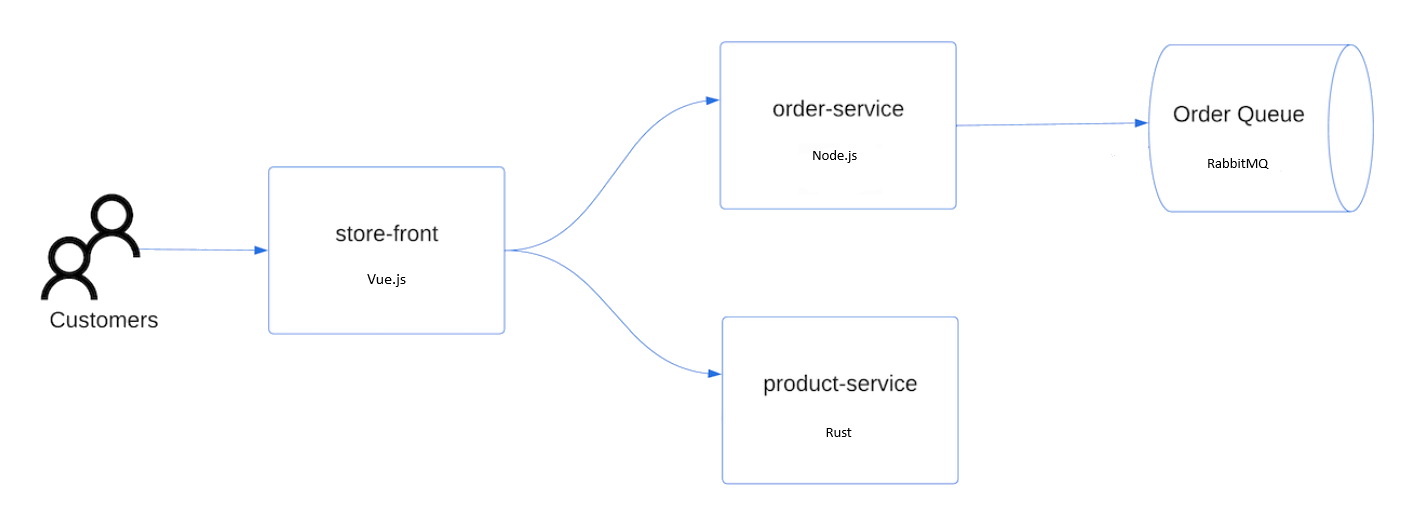
- 店面前台:供客户查看产品和下单的 Web 应用程序。
- 产品服务:显示产品信息。
- 订单服务:下订单。
-
RabbitMQ:订单队列的消息队列。
注释
建议不要运行有状态容器,例如 RabbitMQ,在没有用于生产环境的持久性存储的情况下。 为了简单起见,我们建议使用托管服务,例如 Azure Cosmos DB 或 Azure 服务总线。
创建名为 aks-store-quickstart.yaml 的文件 ,并在以下清单中复制:
apiVersion: apps/v1
kind: StatefulSet
metadata:
  name: rabbitmq
spec:
  serviceName: rabbitmq
  replicas: 1
  selector:
    matchLabels:
      app: rabbitmq
  template:
    metadata:
      labels:
        app: rabbitmq
    spec:
      nodeSelector:
        "kubernetes.io/os": linux
      containers:
      - name: rabbitmq
        image: mcr.microsoft.com/mirror/docker/library/rabbitmq:3.10-management-alpine
        ports:
        - containerPort: 5672
          name: rabbitmq-amqp
        - containerPort: 15672
          name: rabbitmq-http
        env:
        - name: RABBITMQ_DEFAULT_USER
          value: "username"
        - name: RABBITMQ_DEFAULT_PASS
          value: "password"
        resources:
          requests:
            cpu: 10m
            memory: 128Mi
          limits:
            cpu: 250m
            memory: 256Mi
        volumeMounts:
        - name: rabbitmq-enabled-plugins
          mountPath: /etc/rabbitmq/enabled_plugins
          subPath: enabled_plugins
      volumes:
      - name: rabbitmq-enabled-plugins
        configMap:
          name: rabbitmq-enabled-plugins
          items:
          - key: rabbitmq_enabled_plugins
            path: enabled_plugins
---
apiVersion: v1
data:
  rabbitmq_enabled_plugins: |
    [rabbitmq_management,rabbitmq_prometheus,rabbitmq_amqp1_0].
kind: ConfigMap
metadata:
  name: rabbitmq-enabled-plugins
---
apiVersion: v1
kind: Service
metadata:
  name: rabbitmq
spec:
  selector:
    app: rabbitmq
  ports:
    - name: rabbitmq-amqp
      port: 5672
      targetPort: 5672
    - name: rabbitmq-http
      port: 15672
      targetPort: 15672
  type: ClusterIP
---
apiVersion: apps/v1
kind: Deployment
metadata:
  name: order-service
spec:
  replicas: 1
  selector:
    matchLabels:
      app: order-service
  template:
    metadata:
      labels:
        app: order-service
    spec:
      nodeSelector:
        "kubernetes.io/os": linux
      containers:
      - name: order-service
        image: ghcr.io/azure-samples/aks-store-demo/order-service:latest
        ports:
        - containerPort: 3000
        env:
        - name: ORDER_QUEUE_HOSTNAME
          value: "rabbitmq"
        - name: ORDER_QUEUE_PORT
          value: "5672"
        - name: ORDER_QUEUE_USERNAME
          value: "username"
        - name: ORDER_QUEUE_PASSWORD
          value: "password"
        - name: ORDER_QUEUE_NAME
          value: "orders"
        - name: FASTIFY_ADDRESS
          value: "0.0.0.0"
        resources:
          requests:
            cpu: 1m
            memory: 50Mi
          limits:
            cpu: 75m
            memory: 128Mi
        startupProbe:
          httpGet:
            path: /health
            port: 3000
          failureThreshold: 5
          initialDelaySeconds: 20
          periodSeconds: 10
        readinessProbe:
          httpGet:
            path: /health
            port: 3000
          failureThreshold: 3
          initialDelaySeconds: 3
          periodSeconds: 5
        livenessProbe:
          httpGet:
            path: /health
            port: 3000
          failureThreshold: 5
          initialDelaySeconds: 3
          periodSeconds: 3
      initContainers:
      - name: wait-for-rabbitmq
        image: busybox
        command: ['sh', '-c', 'until nc -zv rabbitmq 5672; do echo waiting for rabbitmq; sleep 2; done;']
        resources:
          requests:
            cpu: 1m
            memory: 50Mi
          limits:
            cpu: 75m
            memory: 128Mi
---
apiVersion: v1
kind: Service
metadata:
  name: order-service
spec:
  type: ClusterIP
  ports:
  - name: http
    port: 3000
    targetPort: 3000
  selector:
    app: order-service
---
apiVersion: apps/v1
kind: Deployment
metadata:
  name: product-service
spec:
  replicas: 1
  selector:
    matchLabels:
      app: product-service
  template:
    metadata:
      labels:
        app: product-service
    spec:
      nodeSelector:
        "kubernetes.io/os": linux
      containers:
      - name: product-service
        image: ghcr.io/azure-samples/aks-store-demo/product-service:latest
        ports:
        - containerPort: 3002
        env:
        - name: AI_SERVICE_URL
          value: "http://ai-service:5001/"
        resources:
          requests:
            cpu: 1m
            memory: 1Mi
          limits:
            cpu: 2m
            memory: 20Mi
        readinessProbe:
          httpGet:
            path: /health
            port: 3002
          failureThreshold: 3
          initialDelaySeconds: 3
          periodSeconds: 5
        livenessProbe:
          httpGet:
            path: /health
            port: 3002
          failureThreshold: 5
          initialDelaySeconds: 3
          periodSeconds: 3
---
apiVersion: v1
kind: Service
metadata:
  name: product-service
spec:
  type: ClusterIP
  ports:
  - name: http
    port: 3002
    targetPort: 3002
  selector:
    app: product-service
---
apiVersion: apps/v1
kind: Deployment
metadata:
  name: store-front
spec:
  replicas: 1
  selector:
    matchLabels:
      app: store-front
  template:
    metadata:
      labels:
        app: store-front
    spec:
      nodeSelector:
        "kubernetes.io/os": linux
      containers:
      - name: store-front
        image: ghcr.io/azure-samples/aks-store-demo/store-front:latest
        ports:
        - containerPort: 8080
          name: store-front
        env:
        - name: VUE_APP_ORDER_SERVICE_URL
          value: "http://order-service:3000/"
        - name: VUE_APP_PRODUCT_SERVICE_URL
          value: "http://product-service:3002/"
        resources:
          requests:
            cpu: 1m
            memory: 200Mi
          limits:
            cpu: 1000m
            memory: 512Mi
        startupProbe:
          httpGet:
            path: /health
            port: 8080
          failureThreshold: 3
          initialDelaySeconds: 5
          periodSeconds: 5
        readinessProbe:
          httpGet:
            path: /health
            port: 8080
          failureThreshold: 3
          initialDelaySeconds: 3
          periodSeconds: 3
        livenessProbe:
          httpGet:
            path: /health
            port: 8080
          failureThreshold: 5
          initialDelaySeconds: 3
          periodSeconds: 3
---
apiVersion: v1
kind: Service
metadata:
  name: store-front
spec:
  ports:
  - port: 80
    targetPort: 8080
  selector:
    app: store-front
  type: LoadBalancer
有关 YAML 清单文件的明细,请参阅部署和 YAML 清单。
如果在本地创建并保存 YAML 文件,则可以通过选择 “上传/下载文件 ”按钮并选择本地文件系统中的文件,将清单文件上传到 Cli 中的默认目录。
使用
kubectl apply命令部署应用程序,并指定 YAML 清单的名称。kubectl apply -f aks-store-quickstart.yaml以下示例输出显示部署和服务:
deployment.apps/rabbitmq created
service/rabbitmq created
deployment.apps/order-service created
service/order-service created
deployment.apps/product-service created
service/product-service created
deployment.apps/store-front created
service/store-front created
测试应用程序
应用程序运行时,Kubernetes 服务将向 Internet 公开应用程序前端。 此过程可能需要几分钟才能完成。
使用
kubectl get pods命令查看已部署的 Pod 的状态。 在继续操作之前,请确保所有 Pod 的状态为Running。kubectl get pods检查
store-front应用程序的公共 IP 地址。 使用带有kubectl get service参数的--watch命令来监视进度。kubectl get service store-front --watch服务的 EXTERNAL-IP
store-front输出最初显示为“pending”:NAME TYPE CLUSTER-IP EXTERNAL-IP PORT(S) AGE store-front LoadBalancer 10.0.100.10 <pending> 80:30025/TCP 4h4m在 EXTERNAL-IP 地址从 pending 更改为实际公共 IP 地址后,请使用
CTRL-C来停止kubectl监视进程。以下示例输出显示向服务分配了有效的公共 IP 地址:
NAME          TYPE           CLUSTER-IP    EXTERNAL-IP    PORT(S)        AGE
store-front   LoadBalancer   10.0.100.10   20.62.159.19   80:30025/TCP   4h5m
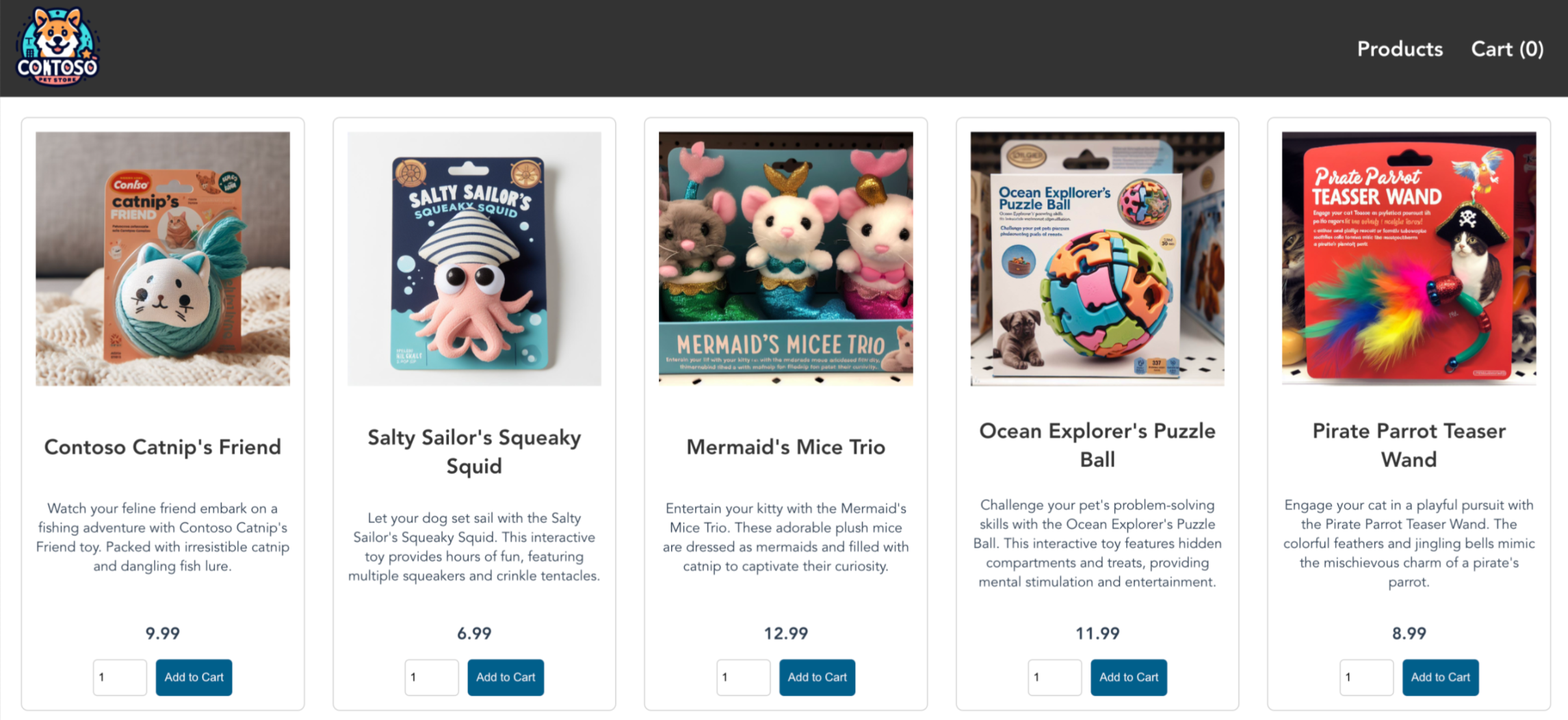
打开 Web 浏览器并转到服务的外部 IP 地址,以查看 Azure 应用商店应用的实际效果。
删除群集
如果不打算完成 AKS 教程,请清理不必要的资源以避免 Azure 计费费用。
使用 az group delete 命令删除资源组、容器服务和所有相关资源。
az group delete --name $RESOURCE_GROUP
AKS 群集是使用系统分配的托管标识创建的,这是本快速入门中使用的默认标识选项。 平台将负责管理此标识,因此你无需手动删除它。
相关内容
在本快速入门中,你已使用 Azure CLI 为 AKS 部署了 AKS 群集,其中包含 ACL。 若要详细了解 AKS 的 ACL,请参阅 用于 Azure Kubernetes 服务 (AKS) 的 Azure Container Linux (ACL)。