Telepresence 是由大使实验室团队创建的云原生计算基金会 (CNCF) 沙盒项目。 Telepresence 使开发人员可以在其开发计算机本地运行服务,同时连接到远程 Kubernetes 群集。 通过此设置,可以更轻松地开发、调试和测试与群集中的其他服务交互的应用程序,而无需在每次进行更改时在 Kubernetes 中重新部署或重新生成整个应用程序。
注释
Telepresence 是一个开源 CNCF 项目。 对于在使用 Telepresence 时可能遇到的问题,Microsoft 不提供支持。 如果你在使用 Telepresence 时确实遇到问题,请访问 Telepresence GitHub 问题页并提交问题。
在本教程中,你会将 AKS 群集连接到 Telepresence,然后修改在本地运行的示例应用程序。
Telepresence 的工作原理
Telepresence 将流量代理注入到工作负载 Pod 中作为挎斗。 流量代理充当代理,将来自 AKS 群集的入站和出站网络流量重新路由到本地计算机。 然后,可以在本地环境中开发和测试,就像本地计算机位于 AKS 群集中一样。 该过程涉及:
- 将 AKS 群集连接到 Telepresence。
- 指定要截获其入站和出站流量的服务或部署,然后重新路由到本地环境。
- 运行服务的本地版本。 Telepresence 通过代理 Pod 将服务的本地版本连接到群集。
先决条件
- AKS 群集。 如果没有可用于本教程的群集,请使用教程 - 创建 Azure Kubernetes 服务 (AKS) 群集创建一个。
-
Kubectl 已安装,并位于用于开发的命令行环境中的路径上。 本教程使用
kubectl管理 Kubernetes 群集。 若要在本地安装kubectl,请使用az aks install-cli命令。 - 安装 Node.js LTS。 运行命令
node --version验证是否已安装 Node.js。
使用 kubectl 连接到群集
注释
相应地设置 $MY_RESOURCE_GROUP_NAME 和 $MY_AKS_CLUSTER_NAME 的值。
在安装 Telepresence 并与 AKS 群集交互之前,请确保已连接到群集。 如果未安装“先决条件”部分中的 kubectl,请执行此操作,之后再继续。
使用
kubectl命令将 配置为连接到你的 AKS 群集。 此命令将下载凭据,并将 Kubernetes CLI 配置为使用这些凭据。az aks get-credentials --resource-group $MY_RESOURCE_GROUP_NAME --name $MY_AKS_CLUSTER_NAME使用 kubectl cluster-info 命令验证与群集之间的连接。 此命令会显示群集的名称,以便确认已连接到要使用的群集。
kubectl cluster-info
克隆示例应用并将其部署到 AKS 群集
本教程中使用的 aks-store-demo 应用是一个基本的应用商店前端应用,包括以下 Kubernetes 部署和服务:
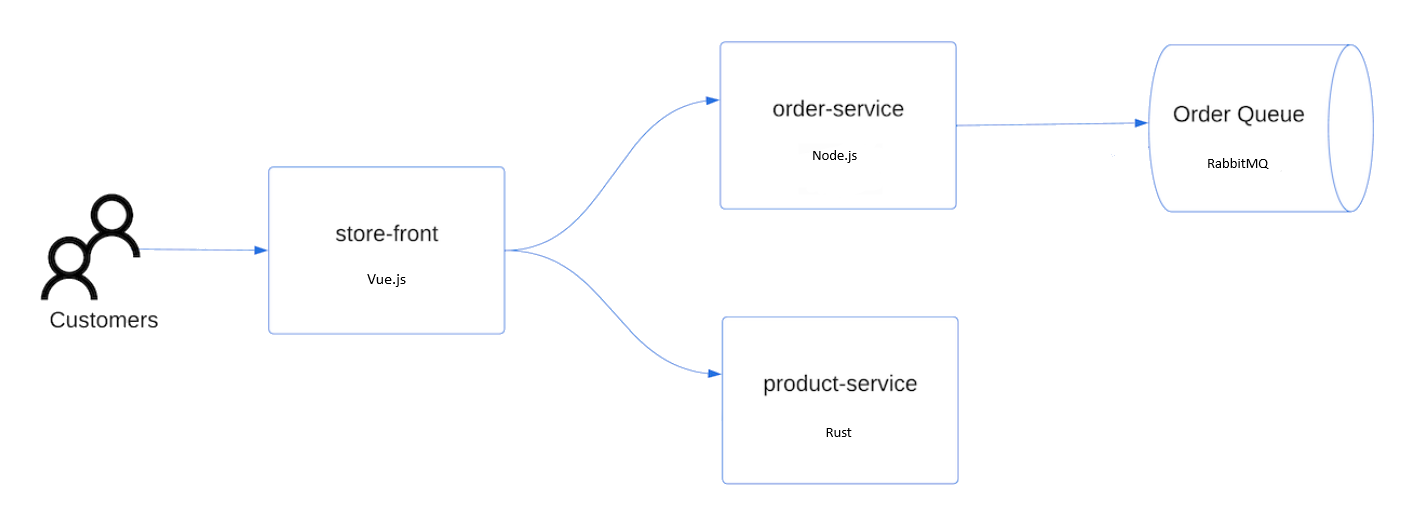
- 门店:Web 应用程序,供客户查看产品和下单。
- 产品服务:显示产品信息。
- 订单服务:下单。
- Rabbit MQ:工单队列的消息队列。
使用 git 可将示例应用程序克隆到开发环境。
git clone https://github.com/Azure-Samples/aks-store-demo.git切换到克隆目录。
cd aks-store-demo将 应用部署到 AKS 群集。
kubectl apply -f aks-store-quickstart.yaml
安装 Telepresence
若要截获 AKS 群集的传入和传出流量,需要在本地计算机上安装 Telepresence 客户端,并将流量管理器安装到 AKS 群集。
安装 Telepresence 客户端
选择在本地计算机上使用的 OS,并安装该版本的 Telepresence。
有关安装说明,请参阅 Telepresence 文档。
安装 Telepresence 流量管理器
为了将云流量路由到本地计算机,Telepresence 将使用流量管理器。 Helm 用于将流量管理器部署到 Kubernetes 群集。
telepresence helm install
截获服务的传入流量
完成以下步骤以截获传入 AKS 群集中的服务的流量并将其路由到本地计算机。
从本地计算机上的命令行运行
telepresence connect以连接到 AKS 群集和 Kubernetes API 服务器。telepresence connect来自
telepresence connect的成功响应显示 Telepresence 连接到的群集名称和默认命名空间,如以下示例所示。Connected to context myAKSCluster, namespace default (https://myAKSCluster-dns-ck7w5t5h.hcp.chinanorth3.cx.prod.service.azk8s.cn:443)使用
telepresence list命令显示可以截获的服务列表。telepresence list成功的响应显示可用服务,如以下示例所示。
order-service  : ready to intercept (traffic-agent not yet installed)
product-service: ready to intercept (traffic-agent not yet installed)
rabbitmq       : ready to intercept (traffic-agent not yet installed)
store-front    : ready to intercept (traffic-agent not yet installed)
使用
kubectl get service service-name --output yaml查找需要截获的流量的来源端口的名称。 在本教程中,请在命令行中输入以下命令。kubectl get service store-front -ojsonpath='{.spec.ports[0].port}'在此示例中,返回要截获的端口 80。
80使用具有以下格式的
telepresence intercept命令,截获 AKS 群集中的服务发出的流量:$ telepresence intercept <service-name> --port <local-port>[:<remote-port>] --env-file <path-to-env-file>-
--port指定 AKS 群集的本地端口和远程端口。 -
--env-file指定 Telepresence 创建 env 文件的路径,该文件包含截获流量所需的环境变量。 有了此文件才能正确截获服务到本地计算机的流量。 如果文件不存在,则 Telepresence 会为你创建该文件。
注释
卷装载需要
sshfs才能在 Linux 和 macOS 版本的 Telepresence 截获期间正常工作。 如果没有安装,请参阅 Telepresence 文档 了解详细信息。对于本教程,请输入以下命令来截获流量。
cd src/store-front
telepresence intercept store-front --port 8080:80 --env-file .env
成功的响应显示 Telepresence 正在截获的连接,如以下示例所示。
Using Deployment store-front Intercept name : store-front State : ACTIVE Workload kind : Deployment Destination : 127.0.0.1:8080 Service Port Identifier: 80/TCP Volume Mount Point : /tmp/telfs-3392425241 Intercepting : all TCP connections-
修改本地代码并查看实时更改
配置 Telepresence 后,可以无缝修改本地代码,并实时查看反映的更改。 这样就可以在本地测试和调试,同时利用 AKS 群集。
在之前克隆的应用程序中导航并打开
components/TopNav.Vue。将
Products导航项更改为New Products(如以下示例所示),并保存更改。<template> <nav> <div class="logo"> <router-link to="/"> <img src="/contoso-pet-store-logo.png" alt="Contoso Pet Store Logo" /> </router-link> </div> <button class="hamburger" @click="toggleNav"> <span class="hamburger-icon"></span> </button> <ul class="nav-links" :class="{ 'nav-links--open': isNavOpen }"> <li><router-link to="/" @click="closeNav">Products</router-link></li> <li> <router-link to="/cart" @click="closeNav">Cart ({{ cartItemCount }})</router-link> </li> </ul> </nav> </template>运行以下命令,以在本地运行应用。
-
npm install- 安装依赖项。 -
npm run serve- 启动开发服务器。
-
转到 AKS 群集中 store-front 服务的公共 IP 时,将存在更新的导航,并且流量将路由到在本地运行的服务版本。 本地更改会得到实时反映,并与 AKS 群集中的其他服务交互。
后续步骤
本教程介绍如何将 Telepresence 与 AKS 上的示例应用程序配合使用。 Telepresence 在其网站上提供了更深入的文档。 其内容包括常见问题解答、故障排除、技术参考、核心概念、教程和社区链接。