本快速入门介绍如何使用 Azure 资源管理器模板(ARM 模板)和 API 版本部署支持 mutual TLS(mTLS)直通 的 Azure 应用程序网关。 在直通模式下,网关请求客户端证书,但不对其进行验证。 证书验证和策略强制实施发生在后端。
主要功能
- 将 SSL 配置文件与 mTLS 传递的监听器关联。
- 网关不需要客户端 CA 证书。
- 该
verifyClientAuthMode属性支持Strict和Passthrough值。 - Portal 支持:可以直接在 Azure 门户中配置 mTLS 传递。
注释
PowerShell 和 CLI 对直通配置的支持当前不可用。 可以使用 Azure 门户或 ARM 模板配置 mTLS 直通。
使用 Azure 门户配置 mTLS 直通
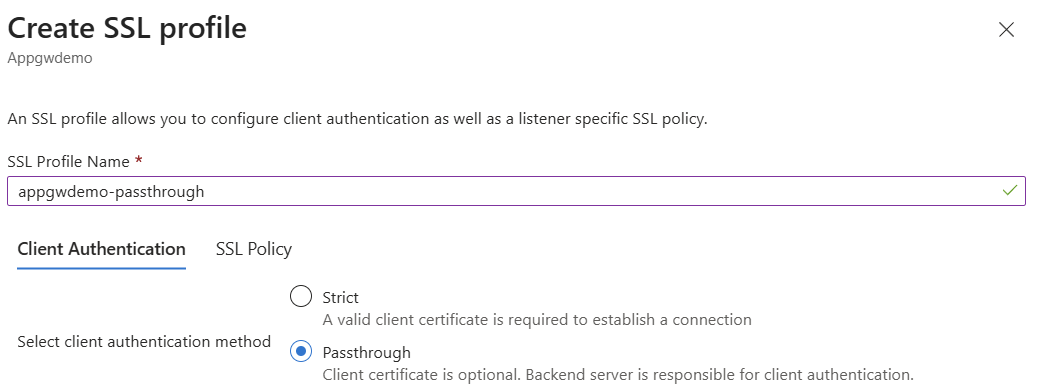
可以在 Azure 门户中直接配置 mTLS 透传,具体方法是使用 Passthrough 客户端身份验证方法创建 SSL 配置文件。
在 Azure 门户中导航到应用程序网关资源。
在 “设置”下,选择 “SSL 配置”。
选择 “+ 添加” 以创建新的 SSL 配置文件。
输入您的 SSL 配置文件名称。
在“客户端身份验证”选项卡上,选择“直通”。
在直通模式下,客户端证书是可选的,后端服务器负责客户端身份验证。
- 根据需要配置 SSL 策略设置。
- 选择 “添加” 以创建 SSL 配置文件。
- 将 SSL 配置文件与 HTTPS 侦听器相关联。
先决条件
- 一个 Azure 订阅和资源组。
- 在本地安装了 Azure CLI。
- SSL 证书(Base64 编码的 PFX)和密码。
- 适用于 Linux VM 管理员的 SSH 密钥(如果适用)。
- 用于传递属性的 API 版本
2025-03-01或更高版本。
使用 mTLS 直通侦听器部署应用程序网关
此模板可创建以下资源:
- 包含两个子网的虚拟网络(一个委托给应用程序网关)。
- 网关前端的公共 IP 地址。
- 应用程序网关(Standard_v2):
- 用于客户端证书传递的 SSL 证书和 SSL 配置文件。
- HTTPS 侦听器和路由规则。
- 指向应用服务的后端池。
使用配置详细信息更新模板,并包含有效的 SSL 证书。
参数文件:deploymentParameters.json
{
    "$schema": "https://schema.management.azure.com/schemas/2015-01-01/deploymentParameters.json#",
    "contentVersion": "1.0.0.0",
    "parameters": {
        "addressPrefix": {
            "value": "10.0.0.0/16"
        },
        "subnetPrefix": {
            "value": "10.0.0.0/24"
        },
        "skuName": {
            "value": "Standard_v2"
        },
        "capacity": {
            "value": 2
        },
        "adminUsername": {
            "value": "ubuntu"
        },
        "adminSSHKey": {
            "value": "<your-ssh-public-key>"
        },
        "certData": {
            "value": "<Base64-encoded-PFX-data>"
        },
        "certPassword": {
            "value": "<certificate-password>"
        }
    }
}
模板文件:deploymentTemplate.json
{
    "$schema": "https://schema.management.azure.com/schemas/2019-04-01/deploymentTemplate.json#",
    "contentVersion": "1.0.0.0",
    "parameters": {
        "addressPrefix": {
            "defaultValue": "10.0.0.0/16",
            "type": "String",
            "metadata": {
                "description": "Address prefix for the Virtual Network"
            }
        },
        "subnetPrefix": {
            "defaultValue": "10.0.0.0/24",
            "type": "String",
            "metadata": {
                "description": "Subnet prefix"
            }
        },
        "skuName": {
            "defaultValue": "Standard_Medium",
            "type": "String",
            "metadata": {
                "description": "Sku Name"
            }
        },
        "capacity": {
            "defaultValue": 2,
            "type": "Int",
            "metadata": {
                "description": "Number of instances"
            }
        },
        "adminUsername": {
            "type": "String"
        },
		"adminSSHKey": {
            "type": "securestring"
        },
        "certData": {
            "type": "String",
            "metadata": {
                "description": "ssl cert data"
            }
        },
        "certPassword": {
            "type": "SecureString",
            "metadata": {
                "description": "ssl cert password"
            }
        }
    },
    "variables": {
        "applicationGatewayName": "mtlsAppGw",
        "idName": "identity",
        "publicIPAddressName": "mtlsPip",
        "virtualNetworkName": "mtlsVnet",
        "subnetName": "appgwsubnet",
        "vnetID": "[resourceId('Microsoft.Network/virtualNetworks',variables('virtualNetworkName'))]",
        "subnetRef": "[concat(variables('vnetID'),'/subnets/',variables('subnetName'))]",
        "publicIPRef": "[resourceId('Microsoft.Network/publicIPAddresses',variables('publicIPAddressName'))]",
        "applicationGatewayID": "[resourceId('Microsoft.Network/applicationGateways',variables('applicationGatewayName'))]",
        "apiVersion": "2025-03-01",
        "identityID": "[resourceId('Microsoft.ManagedIdentity/userAssignedIdentities',variables('idName'))]",
        "backendSubnetId": "[concat(variables('vnetID'),'/subnets/backendsubnet')]"
    },
    "resources": [
        {
            "type": "Microsoft.Network/virtualNetworks",
            "name": "[variables('virtualNetworkName')]",
            "apiVersion": "2024-07-01",
            "location": "[resourceGroup().location]",
            "properties": {
                "addressSpace": {
                    "addressPrefixes": [
                        "[parameters('addressPrefix')]"
                    ]
                },
                "subnets": [
                    {
                        "name": "[variables('subnetName')]",
                        "properties": {
                            "addressPrefix": "[parameters('subnetPrefix')]",
                             "delegations": [
                                {
                                    "name": "Microsoft.Network/applicationGateways",
                                    "properties": {
                                        "serviceName": "Microsoft.Network/applicationGateways"
                                    }
                                }
                            ]
                        }
                    },
                    {
                        "name": "backendSubnet",
                        "properties": {
                            "addressPrefix": "10.0.2.0/24"
                        }
                    }
                ]
            }
        },
        {
            "type": "Microsoft.Network/publicIPAddresses",
            "sku": {
                "name": "Standard"
            },
            "name": "[variables('publicIPAddressName')]",
            "apiVersion": "2024-07-01",
            "location": "[resourceGroup().location]",
            "properties": {
                "publicIPAllocationMethod": "Static"
            }
        },
        {
            "type": "Microsoft.Network/applicationGateways",
            "name": "[variables('applicationGatewayName')]",
            "apiVersion": "[variables('apiVersion')]",
            "location": "[resourceGroup().location]",
            "properties": {
                "sku": {
                    "name": "Standard_v2",
                    "tier": "Standard_v2",
                    "capacity": 3
                },
                "sslCertificates": [
                    {
                        "name": "sslCert",
                        "properties": {
                            "data": "[parameters('certData')]",
                            "password": "[parameters('certPassword')]"
                        }
                    }
                ],
                "sslPolicy": {
                    "policyType": "Predefined",
                    "policyName": "AppGwSslPolicy20220101"
                },
                "sslProfiles": [
                    {
                        "name": "sslnotrustedcert",
                        "id": "[concat(resourceId('Microsoft.Network/applicationGateways',  variables('applicationGatewayName')), '/sslProfiles/sslnotrustedcert')]",
                        "properties": {
                            "clientAuthConfiguration": {
                                "VerifyClientCertIssuerDN": false,
                                "VerifyClientRevocation": "None",
                                "VerifyClientAuthMode": "Passthrough"
                            }
                        }
                    }
                ],
                "gatewayIPConfigurations": [
                    {
                        "name": "appGatewayIpConfig",
                        "properties": {
                            "subnet": {
                                "id": "[variables('subnetRef')]"
                            }
                        }
                    }
                ],
                "frontendIPConfigurations": [
                    {
                        "name": "appGatewayFrontendIP",
                        "properties": {
                            "PublicIPAddress": {
                                "id": "[variables('publicIPRef')]"
                            }
                        }
                    }
                ],
                "frontendPorts": [
                    {
                        "name": "port2",
                        "properties": {
                            "Port": 444
                        }
                    }
                ],
                "backendAddressPools": [
                    {
                        "name": "pool2",
                        "properties": {
                            "BackendAddresses": [
							  {
                                "fqdn": "headerappgw-hsa5gjh8fpfebcfd.chinanorth2-01.chinacloudsites.cn"
                              }
							]
                        }
                    }
                ],
                "backendHttpSettingsCollection": [
                    {
                        "name": "settings2",
                        "properties": {
                            "Port": 80,
                            "Protocol": "Http"
                        }
                    }
                ],
                "httpListeners": [
                    {
                        "name": "listener2",
                        "properties": {
                            "FrontendIPConfiguration": {
                                "Id": "[concat(variables('applicationGatewayID'), '/frontendIPConfigurations/appGatewayFrontendIP')]"
                            },
                            "FrontendPort": {
                                "Id": "[concat(variables('applicationGatewayID'), '/frontendPorts/port2')]"
                            },
                            "Protocol": "Https",
                            "SslCertificate": {
                                "Id": "[concat(variables('applicationGatewayID'), '/sslCertificates/sslCert')]"
                            },
                            "sslProfile": {
                                "id": "[concat(variables('applicationGatewayID'), '/sslProfiles/sslnotrustedcert')]"
                            }
                        }
                    }
                ],
                "requestRoutingRules": [
                    {
                        "Name": "rule2",
                        "properties": {
                            "RuleType": "Basic",
                            "priority": 2000,
                            "httpListener": {
                                "id": "[concat(variables('applicationGatewayID'), '/httpListeners/listener2')]"
                            },
                            "backendAddressPool": {
                                "id": "[concat(variables('applicationGatewayID'), '/backendAddressPools/pool2')]"
                            },
                            "backendHttpSettings": {
                                "id": "[concat(variables('applicationGatewayID'), '/backendHttpSettingsCollection/settings2')]"
                            }
                        }
                    }
                ]
            },
            "dependsOn": [
                "[concat('Microsoft.Network/virtualNetworks/', variables('virtualNetworkName'))]",
                "[concat('Microsoft.Network/publicIPAddresses/', variables('publicIPAddressName'))]"
            ]
        }
    ]
}
部署模板
运行以下Azure CLI命令来部署模板:
az deployment group create \
  --resource-group <your-resource-group> \
  --template-file deploymentTemplate.json \
  --parameters @deploymentParameters.json
验证并测试
验证部署
在 Azure 门户中,导航到你的应用程序网关资源。
选择 JSON 视图 并选择 API 版本
2025-03-01。验证
verifyClientAuthMode是否在 SSL 配置文件中设置为Passthrough:"sslProfiles": [ { "name": "sslnotrustedcert", "id": "<sample-subscription-id>", "etag": "W/\"851e4e20-d2b1-4338-9135-e0beac11aa0e\"", "properties": { "provisioningState": "Succeeded", "clientAuthConfiguration": { "verifyClientCertIssuerDN": false, "verifyClientRevocation": "None", "verifyClientAuthMode": "Passthrough" }, "httpListeners": [ { "id": "<sample-subscription-id>" } ] } } ]
将客户端证书发送到后端
如果需要将客户端证书转发到后端,请配置重写规则。 有关详细信息,请参阅 使用应用程序网关重写 HTTP 标头和 URL。
当客户端发送证书时,此重写可确保客户端证书包含在后端处理的请求标头中。
测试连接性
即使未提供客户端证书,也验证是否已建立连接。
mTLS 透传参数
下表描述了 mTLS 传递配置的参数:
| Name | 类型 | Description |
|---|---|---|
verifyClientCertIssuerDN |
布尔 | 指定是否验证网关上的客户端证书颁发者名称。 |
verifyClientRevocation |
String | 指定客户端证书吊销验证模式。 |
verifyClientAuthMode |
String | 指定客户端证书模式。 有效值为 Strict 和 Passthrough。 |
直通模式: 网关请求客户端证书,但不强制实施。 后端验证证书并强制实施策略。
安全注意事项
部署和管理此解决方案时,请遵循组织的安全性和数据处理最佳做法。