MLflow 跟踪 为 Google Gemini 提供自动跟踪功能。 通过启用自动跟踪
对于 Gemini,通过调用 mlflow.gemini.autolog 函数,MLflow 将捕获嵌套跟踪,并在调用 Gemini Python SDK 时将其记录到活动的 MLflow 试验。
import mlflow

mlflow.gemini.autolog()
MLflow 跟踪会自动捕获有关 Gemini 调用的以下信息:
提示和完成响应
潜伏期
模型名称
其他元数据(例如
temperature,max_tokens如果指定)。在响应中返回时进行函数调用
引发的任何异常
注释
在无服务器计算群集上,不会自动启用自动记录。 必须显式调用 mlflow.gemini.autolog() 才能为此集成启用自动跟踪。
注释
目前,MLflow Gemini 集成仅支持跟踪文本交互的同步调用。 异步 API 可能不会被跟踪,而且多模式输入可能无法被完整记录。
注释
下面的示例需要 MLflow 3.14 或更高版本,因为它会在 Unity 目录中存储追踪。
基本示例
import mlflow
from mlflow.entities.trace_location import UnityCatalog
import google.genai as genai
import os

# Turn on auto tracing for Gemini
mlflow.gemini.autolog()

# Set up MLflow tracking on Databricks
mlflow.set_tracking_uri("databricks")
mlflow.set_experiment(
    experiment_name="/Shared/gemini-demo",
    trace_location=UnityCatalog(
        catalog_name="<UC_CATALOG_NAME>",
        schema_name="<UC_SCHEMA_NAME>",
        table_prefix="<UC_TABLE_PREFIX>",
    ),
)

# Configure the SDK with your API key.
client = genai.Client(api_key=os.environ["GEMINI_API_KEY"])

# Use the generate_content method to generate responses to your prompts.
response = client.models.generate_content(
    model="gemini-1.5-flash", contents="The opposite of hot is"
)
多轮聊天交互
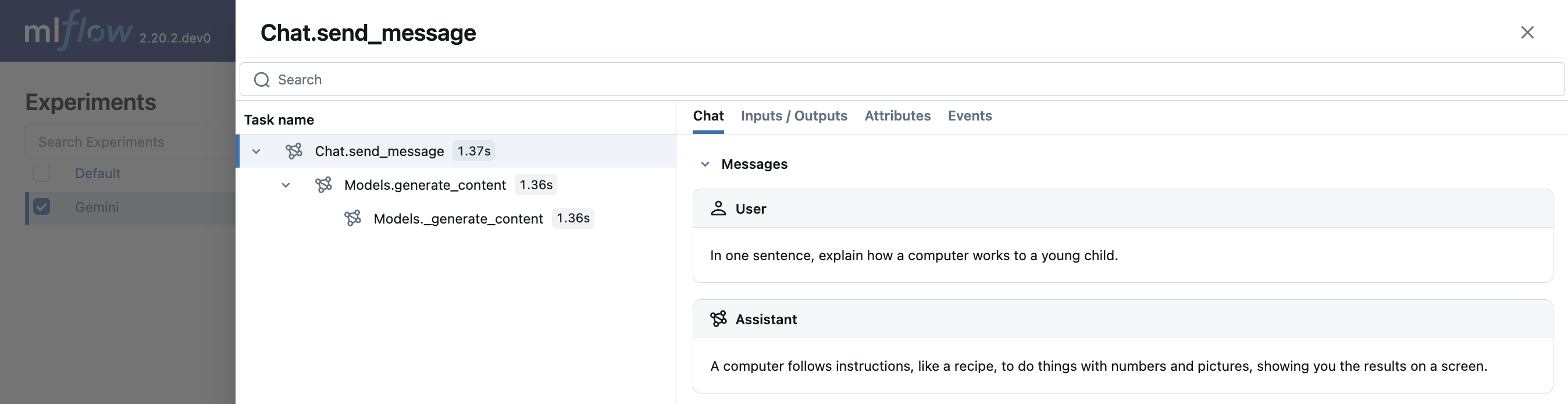
MLflow 支持跟踪与 Gemini 的多轮次对话:
import mlflow

mlflow.gemini.autolog()

chat = client.chats.create(model='gemini-1.5-flash')
response = chat.send_message("In one sentence, explain how a computer works to a young child.")
print(response.text)
response = chat.send_message("Okay, how about a more detailed explanation to a high schooler?")
print(response.text)
嵌入
Gemini SDK 的 MLflow 追踪功能支持嵌入 API:
result = client.models.embed_content(model="text-embedding-004", contents="Hello world")
禁用自动跟踪
可以通过调用mlflow.gemini.autolog(disable=True)或mlflow.autolog(disable=True)来全局禁用 Gemini 的自动跟踪。