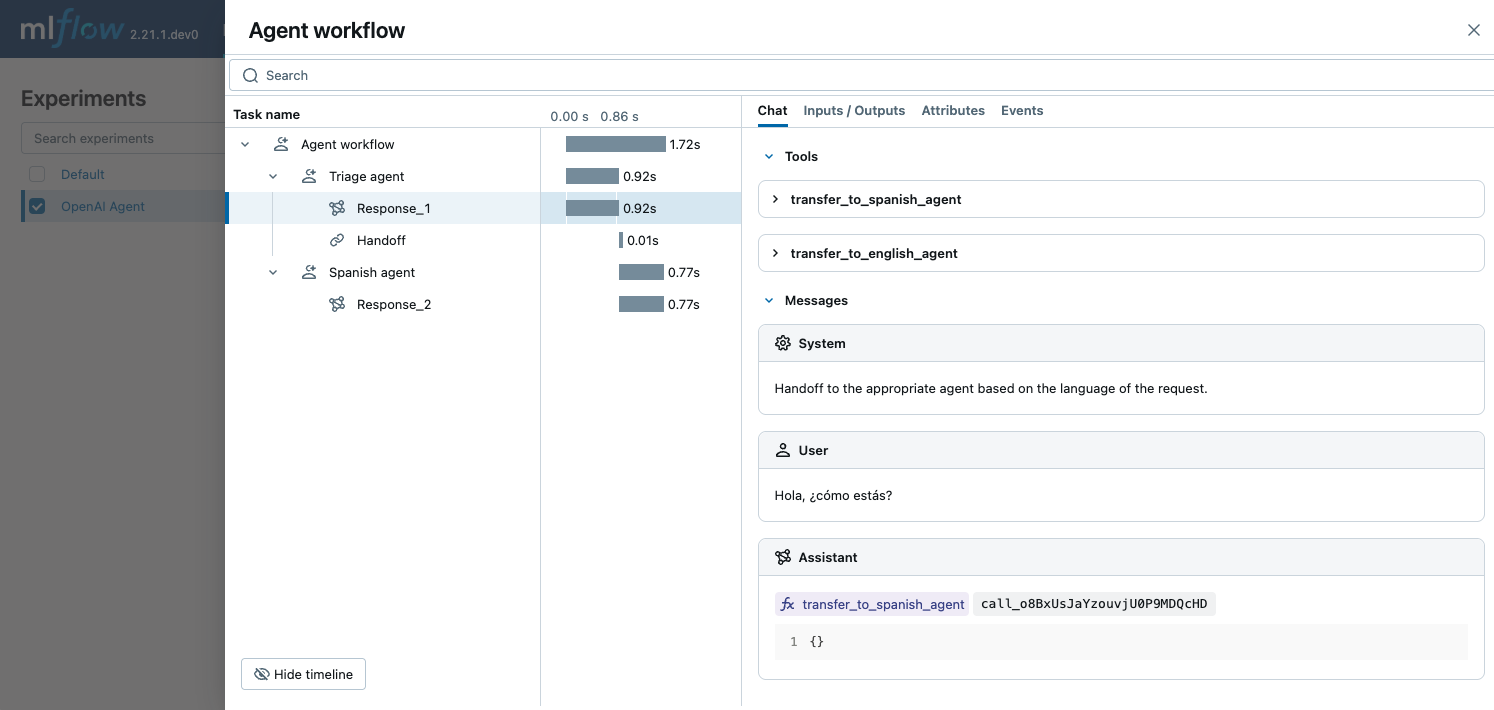
MLflow 跟踪 为 OpenAI 代理 SDK 提供自动跟踪功能,这是 OpenAI 开发的多代理框架。 通过调用 mlflow.openai.autolog 函数为 OpenAI 启用自动追踪功能,MLflow 将捕获跟踪并将其记录到当前活动的 MLflow 实验中。
import mlflow

mlflow.openai.autolog()
注释
在无服务器计算群集上,不会自动启用 genAI 跟踪框架的自动记录。 必须通过为要跟踪的特定集成调用适当的 mlflow.<library>.autolog() 函数来显式启用自动记录。
先决条件
若要将 MLflow 跟踪与 OpenAI 代理 SDK 配合使用,需要安装 MLflow、OpenAI SDK 和 openai-agents 库。
开发
对于开发环境,请安装带有“Databricks Extras”的完整 MLflow 包,openai以及openai-agents:
pip install --upgrade "mlflow[databricks]>=3.1" openai openai-agents
完整 mlflow[databricks] 包包括用于 Databricks 的本地开发和试验的所有功能。
生产
对于生产部署,请安装mlflow-tracing、openai和openai-agents。
pip install --upgrade mlflow-tracing openai openai-agents
包 mlflow-tracing 已针对生产用途进行优化。
注释
强烈建议使用 MLflow 3 以获得最佳的 OpenAI代理跟踪体验。
在运行示例之前,需要配置环境:
对于不使用 Databricks 笔记本的用户:设置 Databricks 环境变量:
export DATABRICKS_HOST="https://your-workspace.cloud.databricks.com"
export DATABRICKS_TOKEN="your-personal-access-token"
对于 Databricks 笔记本中的用户:这些凭据会自动为您设置。
API 密钥:确保已配置 OpenAI API 密钥。 对于生产环境,请使用 AI Gateway 或 Databricks 密钥,而不要使用硬编码的值,以安全地管理 API 密钥。
export OPENAI_API_KEY="your-openai-api-key"
基本示例
以下示例演示如何将 OpenAI 代理 SDK 与 MLflow 跟踪配合使用,以便进行简单的多语言聊天代理。 这三个代理协作确定输入的语言,并将其移交给讲语言的相应子代理。 MLflow 捕获代理彼此交互的方式,并调用 OpenAI API。
import mlflow
import asyncio
from agents import Agent, Runner
import os

# Ensure your OPENAI_API_KEY is set in your environment
# os.environ["OPENAI_API_KEY"] = "your-openai-api-key" # Uncomment and set if not globally configured

# Enable auto tracing for OpenAI Agents SDK
mlflow.openai.autolog() # This covers agents if using openai module for LLM calls
# If agents have their own autolog, e.g., mlflow.agents.autolog(), prefer that.

# Set up MLflow tracking to Databricks
mlflow.set_tracking_uri("databricks")
mlflow.set_experiment("/Shared/openai-agent-demo")

# Define a simple multi-agent workflow
spanish_agent = Agent(
    name="Spanish agent",
    instructions="You only speak Spanish.",
)

english_agent = Agent(
    name="English agent",
    instructions="You only speak English",
)

triage_agent = Agent(
    name="Triage agent",
    instructions="Handoff to the appropriate agent based on the language of the request.",
    handoffs=[spanish_agent, english_agent],
)

async def main():
    result = await Runner.run(triage_agent, input="Hola, ¿cómo estás?")
    print(result.final_output)

# If you are running this code in a Jupyter notebook, replace this with `await main()`.
if __name__ == "__main__":
    asyncio.run(main())
函数调用
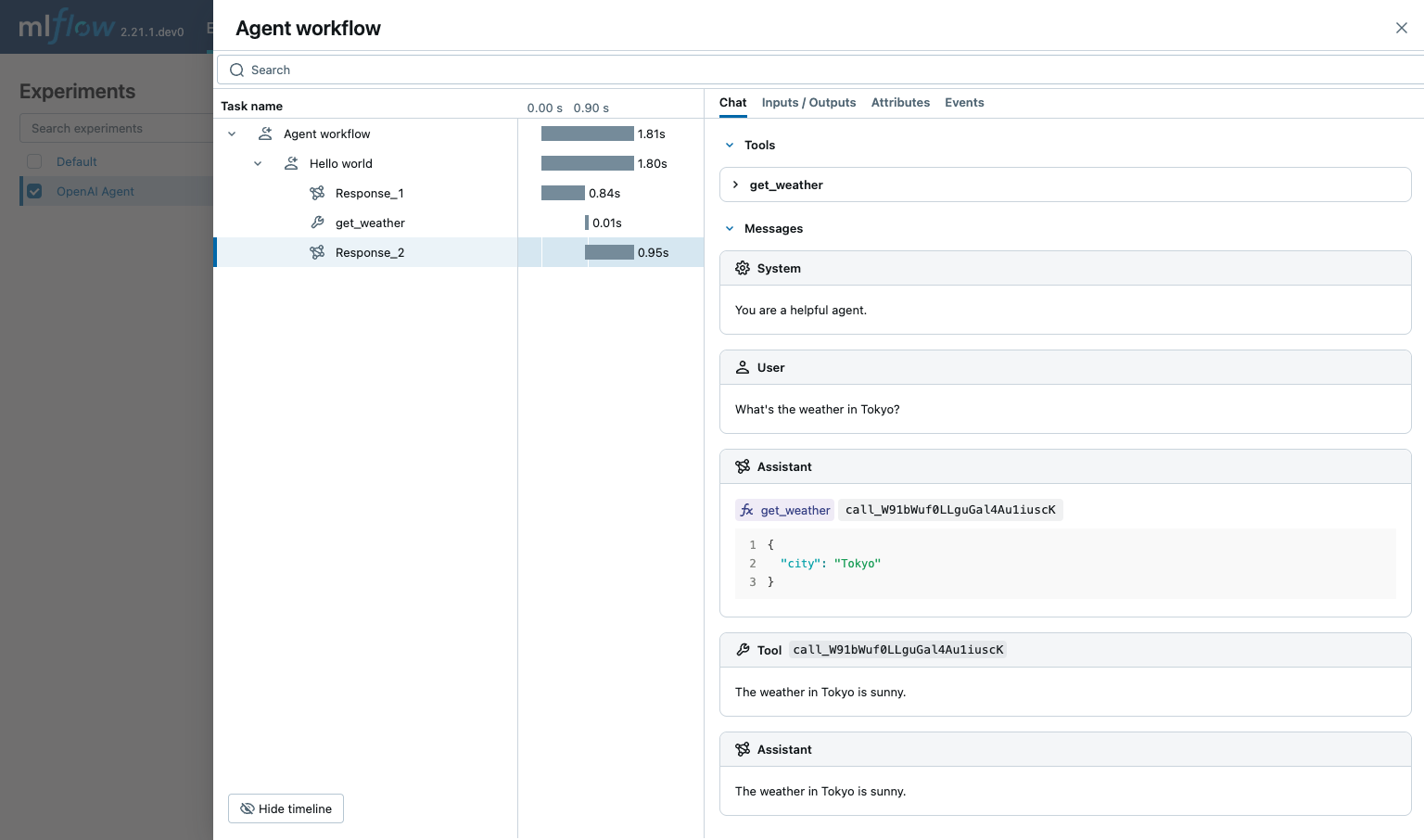
OpenAI 代理 SDK 支持定义代理可以调用的函数。 MLflow 会捕获函数调用,并显示代理可用的函数,这些函数包括被调用的函数以及函数调用的输入和输出。
import asyncio
from agents import Agent, Runner, function_tool
import mlflow
import os

# Ensure your OPENAI_API_KEY is set in your environment
# os.environ["OPENAI_API_KEY"] = "your-openai-api-key" # Uncomment and set if not globally configured

# Enable auto tracing for OpenAI Agents SDK
mlflow.openai.autolog() # Assuming underlying LLM calls are via OpenAI

# Set up MLflow tracking to Databricks if not already configured
# mlflow.set_tracking_uri("databricks")
# mlflow.set_experiment("/Shared/openai-agent-function-calling-demo")

@function_tool
def get_weather(city: str) -> str:
    return f"The weather in {city} is sunny."

agent = Agent(
    name="Hello world",
    instructions="You are a helpful agent.",
    tools=[get_weather],
)

async def main():
    result = await Runner.run(agent, input="What's the weather in Tokyo?")
    print(result.final_output)
    # The weather in Tokyo is sunny.

# If you are running this code in a Jupyter notebook, replace this with `await main()`.
if __name__ == "__main__":
    asyncio.run(main())
警告
对于生产环境,请使用 AI Gateway 或 Databricks 密钥,而不要使用硬编码的值,以安全地管理 API 密钥。
护栏
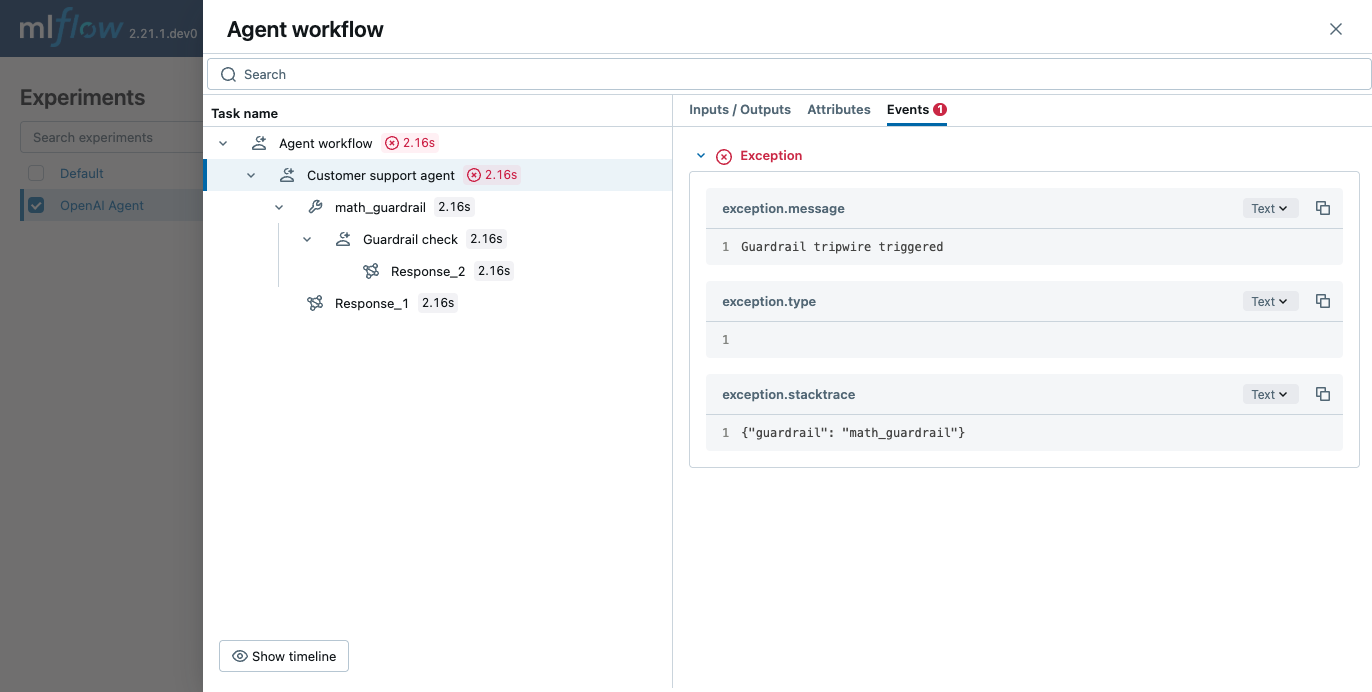
OpenAI 代理 SDK 支持定义可用于检查代理输入和输出的防护栏。 MLflow 会捕获护栏检查,并显示该检查的理由以及护栏是否被触发。
from pydantic import BaseModel
from agents import (
    Agent,
    GuardrailFunctionOutput,
    InputGuardrailTripwireTriggered,
    RunContextWrapper,
    Runner,
    TResponseInputItem,
    input_guardrail,
)
import mlflow
import os

# Ensure your OPENAI_API_KEY is set in your environment
# os.environ["OPENAI_API_KEY"] = "your-openai-api-key" # Uncomment and set if not globally configured

# Enable auto tracing for OpenAI Agents SDK
mlflow.openai.autolog() # Assuming underlying LLM calls are via OpenAI

# Set up MLflow tracking to Databricks if not already configured
# mlflow.set_tracking_uri("databricks")
# mlflow.set_experiment("/Shared/openai-agent-guardrails-demo")

class MathHomeworkOutput(BaseModel):
    is_math_homework: bool
    reasoning: str

guardrail_agent = Agent(
    name="Guardrail check",
    instructions="Check if the user is asking you to do their math homework.",
    output_type=MathHomeworkOutput,
)

@input_guardrail
async def math_guardrail(
    ctx: RunContextWrapper[None], agent: Agent, input
) -> GuardrailFunctionOutput:
    result = await Runner.run(guardrail_agent, input, context=ctx.context)

    return GuardrailFunctionOutput(
        output_info=result.final_output,
        tripwire_triggered=result.final_output.is_math_homework,
    )

agent = Agent(
    name="Customer support agent",
    instructions="You are a customer support agent. You help customers with their questions.",
    input_guardrails=[math_guardrail],
)

async def main():
    # This should trip the guardrail
    try:
        await Runner.run(agent, "Hello, can you help me solve for x: 2x + 3 = 11?")
        print("Guardrail didn't trip - this is unexpected")

    except InputGuardrailTripwireTriggered:
        print("Math homework guardrail tripped")

# If you are running this code in a Jupyter notebook, replace this with `await main()`.
if __name__ == "__main__":
    asyncio.run(main())
禁用自动跟踪
可以通过调用 mlflow.openai.autolog(disable=True) 或 mlflow.autolog(disable=True) 来全局禁用 OpenAI 代理 SDK 的自动跟踪。