开始使用 Azure PowerShell 实现 Azure DDoS IP 保护。 在本快速入门中,你将使用 PowerShell 启用 DDoS IP 保护并将其链接到公共 IP 地址。
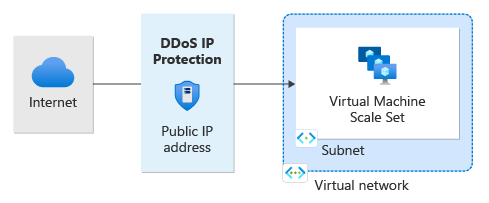
先决条件
- 具有活动订阅的 Azure 帐户。 创建试用版订阅。
- 本地安装的 Azure PowerShell 或 Azure 本地 Shell
- 如果选择在本地安装和使用 PowerShell,则本文需要 Azure PowerShell 模块 9.0.0 或更高版本。 运行
Get-Module -ListAvailable Az查找已安装的版本。 如果需要进行升级,请参阅 Install Azure PowerShell module(安装 Azure PowerShell 模块)。 如果在本地运行 PowerShell,则还需运行Connect-AzAccount -Environment AzureChinaCloud以创建与 Azure 的连接。
注意
建议使用 Azure Az PowerShell 模块与 Azure 交互。 若要开始,请参阅安装 Azure PowerShell。 若要了解如何迁移到 Az PowerShell 模块,请参阅 将 Azure PowerShell 从 AzureRM 迁移到 Az。
为公共 IP 地址启用 DDoS IP 保护
创建新的公共 IP 地址或现有公共 IP 地址时,可以启用 DDoS IP 保护。 选择方案的选项卡。
在本示例中,我们将公共 IP 地址命名为 myStandardPublicIP:
#Creates the resource group
New-AzResourceGroup -Name MyResourceGroup -Location chinaeast2

#Creates the IP address and enables DDoS IP Protection
New-AzPublicIpAddress -Name myStandardPublicIP -ResourceGroupName MyResourceGroup -Sku Standard -Location "China East 2 " -AllocationMethod Static -DdosProtectionMode Enabled
注意
DDoS IP 保护仅在公共 IP 标准 SKU 上启用。
验证并测试
检查公共 IP 地址的详细信息,并验证是否已启用 DDoS IP 保护。
#Gets the public IP address
$publicIp = Get-AzPublicIpAddress -Name myStandardPublicIP -ResourceGroupName MyResourceGroup

#Checks the status of the public IP address
$protectionMode = $publicIp.DdosSettings.ProtectionMode

#Returns the status of the public IP address
$protectionMode
为公共 IP 地址禁用 DDoS IP 保护
$publicIp = Get-AzPublicIpAddress -Name myStandardPublicIP -ResourceGroupName MyResourceGroup

$publicIp.DdosSettings.ProtectionMode = 'Disabled'

Set-AzPublicIpAddress -PublicIpAddress $publicIp
注意
将 DDoS IP 保护从“已启用”更改为“已禁用”时,公共 IP 资源的遥测将不再活动。
清理资源
可保留资源以供下一教程使用。 如果你不再需要它们,删除 MyResourceGroup 资源组。 当你删除资源组时,也会删除公网IP地址和组内所有其他资源。
Remove-AzResourceGroup -Name MyResourceGroup
后续步骤
在本快速入门中,你已创建:
- 资源组
- 公共 IP 地址
你已使用 Azure PowerShell 启用 DDoS IP 防护。 想了解如何查看和配置受保护公共IP的遥测数据,请继续阅读教程。