本快速入门介绍如何使用 Bicep 创建以 Web 应用作为源的 Azure Front Door。
Note
对于 Web 工作负载,强烈建议使用 Azure DDoS 防护和 Web 应用程序防护墙来抵御新兴的 DDoS 攻击。 另一种选择是将 Azure Front Door 与 Web 应用程序防火墙一起使用。 Azure Front Door 提供针对网络级别 DDoS 攻击 的平台级保护 。 有关详细信息,请参阅 Azure 服务的安全基线。
Bicep 是一种特定于域的语言 (DSL),使用声明性语法来部署 Azure 资源。 它提供简明的语法、可靠的类型安全性以及对代码重用的支持。 Bicep 会针对你的 Azure 基础结构即代码解决方案提供最佳创作体验。
Prerequisites
- 有效的 Azure 订阅。 如果没有试用版,请创建 试用版 。
- 网站或 Web 应用程序的 IP 地址或 FQDN。
查阅 Bicep 文件
本快速入门中使用的 Bicep 文件来自 Azure 快速入门模板。
在本快速入门中,你将创建 Azure Front Door 配置文件和 Azure 应用服务,并配置应用服务以验证流量是否来自 Azure Front Door 源。
@description('The location into which regionally scoped resources should be deployed. Note that Front Door is a global resource.')
param location string = resourceGroup().location

@description('The name of the App Service application to create. This must be globally unique.')
param appName string = 'myapp-${uniqueString(resourceGroup().id)}'

@description('The name of the SKU to use when creating the App Service plan.')
param appServicePlanSkuName string = 'S1'

@description('The number of worker instances of your App Service plan that should be provisioned.')
param appServicePlanCapacity int = 1

@description('The name of the Front Door endpoint to create. This must be globally unique.')
param frontDoorEndpointName string = 'afd-${uniqueString(resourceGroup().id)}'

@description('The name of the SKU to use when creating the Front Door profile.')
@allowed([
  'Standard_AzureFrontDoor'
  'Premium_AzureFrontDoor'
])
param frontDoorSkuName string = 'Standard_AzureFrontDoor'

var appServicePlanName = 'AppServicePlan'

var frontDoorProfileName = 'MyFrontDoor'
var frontDoorOriginGroupName = 'MyOriginGroup'
var frontDoorOriginName = 'MyAppServiceOrigin'
var frontDoorRouteName = 'MyRoute'

resource frontDoorProfile 'Microsoft.Cdn/profiles@2021-06-01' = {
  name: frontDoorProfileName
  location: 'global'
  sku: {
    name: frontDoorSkuName
  }
}

resource appServicePlan 'Microsoft.Web/serverFarms@2020-06-01' = {
  name: appServicePlanName
  location: location
  sku: {
    name: appServicePlanSkuName
    capacity: appServicePlanCapacity
  }
  kind: 'app'
}

resource app 'Microsoft.Web/sites@2020-06-01' = {
  name: appName
  location: location
  kind: 'app'
  identity: {
    type: 'SystemAssigned'
  }
  properties: {
    serverFarmId: appServicePlan.id
    httpsOnly: true
    siteConfig: {
      detailedErrorLoggingEnabled: true
      httpLoggingEnabled: true
      requestTracingEnabled: true
      ftpsState: 'Disabled'
      minTlsVersion: '1.2'
      ipSecurityRestrictions: [
        {
          tag: 'ServiceTag'
          ipAddress: 'AzureFrontDoor.Backend'
          action: 'Allow'
          priority: 100
          headers: {
            'x-azure-fdid': [
              frontDoorProfile.properties.frontDoorId
            ]
          }
          name: 'Allow traffic from Front Door'
        }
      ]
    }
  }
}

resource frontDoorEndpoint 'Microsoft.Cdn/profiles/afdEndpoints@2021-06-01' = {
  name: frontDoorEndpointName
  parent: frontDoorProfile
  location: 'global'
  properties: {
    enabledState: 'Enabled'
  }
}

resource frontDoorOriginGroup 'Microsoft.Cdn/profiles/originGroups@2021-06-01' = {
  name: frontDoorOriginGroupName
  parent: frontDoorProfile
  properties: {
    loadBalancingSettings: {
      sampleSize: 4
      successfulSamplesRequired: 3
    }
    healthProbeSettings: {
      probePath: '/'
      probeRequestType: 'HEAD'
      probeProtocol: 'Http'
      probeIntervalInSeconds: 100
    }
  }
}

resource frontDoorOrigin 'Microsoft.Cdn/profiles/originGroups/origins@2021-06-01' = {
  name: frontDoorOriginName
  parent: frontDoorOriginGroup
  properties: {
    hostName: app.properties.defaultHostName
    httpPort: 80
    httpsPort: 443
    originHostHeader: app.properties.defaultHostName
    priority: 1
    weight: 1000
  }
}

resource frontDoorRoute 'Microsoft.Cdn/profiles/afdEndpoints/routes@2021-06-01' = {
  name: frontDoorRouteName
  parent: frontDoorEndpoint
  dependsOn: [
    frontDoorOrigin // This explicit dependency is required to ensure that the origin group is not empty when the route is created.
  ]
  properties: {
    originGroup: {
      id: frontDoorOriginGroup.id
    }
    supportedProtocols: [
      'Http'
      'Https'
    ]
    patternsToMatch: [
      '/*'
    ]
    forwardingProtocol: 'HttpsOnly'
    linkToDefaultDomain: 'Enabled'
    httpsRedirect: 'Enabled'
  }
}

output appServiceHostName string = app.properties.defaultHostName
output frontDoorEndpointHostName string = frontDoorEndpoint.properties.hostName
Bicep 文件定义了多个 Azure 资源:
- Microsoft.Cdn/profiles - Azure Front Door 标准/高级配置
- Microsoft.Web/serverfarms - 用于托管 Web 应用的应用服务计划
- Microsoft.Web/sites - Front Door 的 Web 应用源服务请求
部署 Bicep 文件
将 Bicep 文件保存为本地计算机上的 main.bicep 。
使用 Azure CLI 或 Azure PowerShell 来部署该 Bicep 文件。
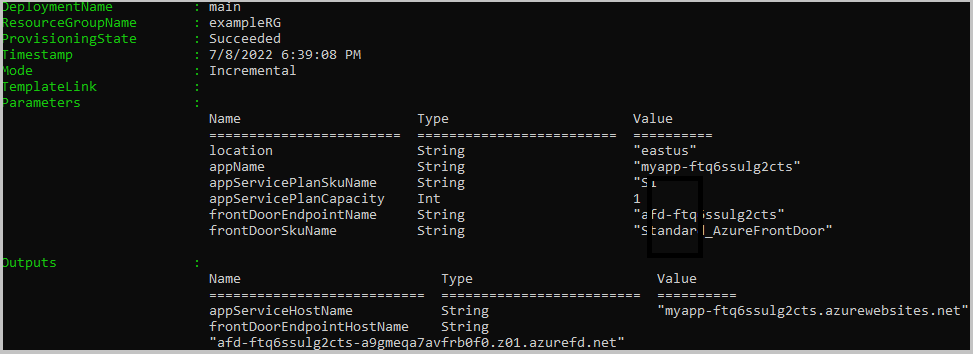
az group create --name exampleRG --location chinaeast2 az deployment group create --resource-group exampleRG --template-file main.bicep部署完成后,你应该会看到如下所示的输出:
验证部署
使用 Azure CLI 或 Azure PowerShell 列出在资源组中部署的资源。
az resource list --resource-group exampleRG
你还可以使用 Azure 门户验证该部署。
登录到 Azure 门户。
从左窗格中选择 资源组 。
选择在上一部分创建的资源组。
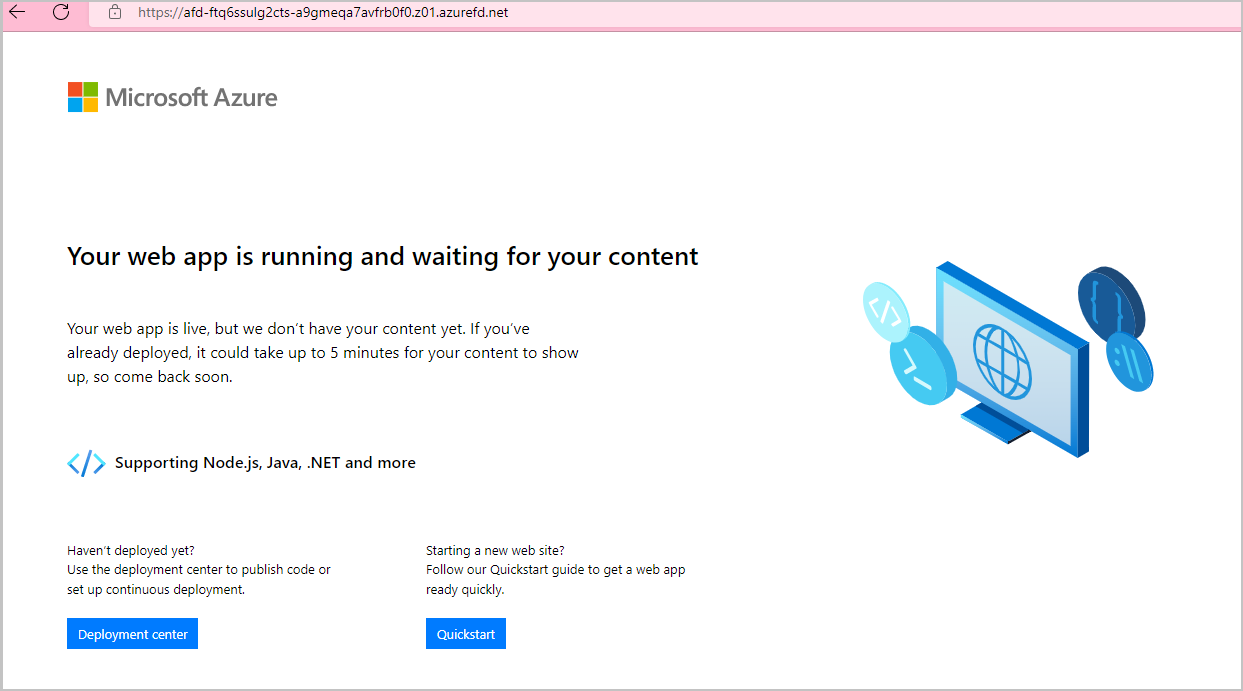
选择创建的 Front Door。 你将看到终结点主机名。 复制该主机名并将其粘贴到浏览器的地址栏中。 按 Enter,系统会将请求路由到 Web 应用。
清理资源
如果不再需要 Front Door 服务和资源组,请使用 Azure 门户、Azure CLI 或 Azure PowerShell 将其删除。 会删除 Front Door 和所有相关资源。
az group delete --name exampleRG