适用于: ✔️ Front Door 标准版 ✔️ Front Door 高级版
本快速入门介绍了如何使用 Azure 资源管理器 (ARM) 模板创建 Azure Front Door,并以一个 Azure Web 应用作为源。
Azure 资源管理器模板是一个 JavaScript 对象表示法(JSON)文件,用于定义项目的基础结构和配置。 模板使用声明性语法。 你可以在不编写用于创建部署的编程命令序列的情况下,描述预期部署。
如果你满足前置条件并且熟悉 Azure 资源管理器 模板,请选择“部署到 Azure” 按钮,在 Azure 门户中打开该模板。

Prerequisites
- 一份 Azure 订阅。 如果没有试用版,请创建 试用版 。
- 网站或网页应用的IP地址或完全限定域名(FQDN)。
查看模板
本快速入门使用了 Azure Quickstart Templates 中的一个模板。
在这个快速入门中,你需要创建一个 Azure Front Door 标准/高级版,一个应用服务,并配置应用服务以验证流量是否通过 Azure Front Door 源。
{
  "$schema": "https://schema.management.azure.com/schemas/2019-04-01/deploymentTemplate.json#",
  "contentVersion": "1.0.0.0",
  "metadata": {
    "_generator": {
      "name": "bicep",
      "version": "0.5.6.12127",
      "templateHash": "1359495056007144414"
    }
  },
  "parameters": {
    "location": {
      "type": "string",
      "defaultValue": "[resourceGroup().location]",
      "metadata": {
        "description": "The location into which regionally scoped resources should be deployed. Note that Front Door is a global resource."
      }
    },
    "appName": {
      "type": "string",
      "defaultValue": "[format('myapp-{0}', uniqueString(resourceGroup().id))]",
      "metadata": {
        "description": "The name of the App Service application to create. This must be globally unique."
      }
    },
    "appServicePlanSkuName": {
      "type": "string",
      "defaultValue": "S1",
      "metadata": {
        "description": "The name of the SKU to use when creating the App Service plan."
      }
    },
    "appServicePlanCapacity": {
      "type": "int",
      "defaultValue": 1,
      "metadata": {
        "description": "The number of worker instances of your App Service plan that should be provisioned."
      }
    },
    "frontDoorEndpointName": {
      "type": "string",
      "defaultValue": "[format('afd-{0}', uniqueString(resourceGroup().id))]",
      "metadata": {
        "description": "The name of the Front Door endpoint to create. This must be globally unique."
      }
    },
    "frontDoorSkuName": {
      "type": "string",
      "defaultValue": "Standard_AzureFrontDoor",
      "allowedValues": [
        "Standard_AzureFrontDoor",
        "Premium_AzureFrontDoor"
      ],
      "metadata": {
        "description": "The name of the SKU to use when creating the Front Door profile."
      }
    }
  },
  "variables": {
    "appServicePlanName": "AppServicePlan",
    "frontDoorProfileName": "MyFrontDoor",
    "frontDoorOriginGroupName": "MyOriginGroup",
    "frontDoorOriginName": "MyAppServiceOrigin",
    "frontDoorRouteName": "MyRoute"
  },
  "resources": [
    {
      "type": "Microsoft.Cdn/profiles",
      "apiVersion": "2021-06-01",
      "name": "[variables('frontDoorProfileName')]",
      "location": "global",
      "sku": {
        "name": "[parameters('frontDoorSkuName')]"
      }
    },
    {
      "type": "Microsoft.Web/serverfarms",
      "apiVersion": "2020-06-01",
      "name": "[variables('appServicePlanName')]",
      "location": "[parameters('location')]",
      "sku": {
        "name": "[parameters('appServicePlanSkuName')]",
        "capacity": "[parameters('appServicePlanCapacity')]"
      },
      "kind": "app"
    },
    {
      "type": "Microsoft.Web/sites",
      "apiVersion": "2020-06-01",
      "name": "[parameters('appName')]",
      "location": "[parameters('location')]",
      "kind": "app",
      "identity": {
        "type": "SystemAssigned"
      },
      "properties": {
        "serverFarmId": "[resourceId('Microsoft.Web/serverfarms', variables('appServicePlanName'))]",
        "httpsOnly": true,
        "siteConfig": {
          "detailedErrorLoggingEnabled": true,
          "httpLoggingEnabled": true,
          "requestTracingEnabled": true,
          "ftpsState": "Disabled",
          "minTlsVersion": "1.2",
          "ipSecurityRestrictions": [
            {
              "tag": "ServiceTag",
              "ipAddress": "AzureFrontDoor.Backend",
              "action": "Allow",
              "priority": 100,
              "headers": {
                "x-azure-fdid": [
                  "[reference(resourceId('Microsoft.Cdn/profiles', variables('frontDoorProfileName'))).frontDoorId]"
                ]
              },
              "name": "Allow traffic from Front Door"
            }
          ]
        }
      },
      "dependsOn": [
        "[resourceId('Microsoft.Web/serverfarms', variables('appServicePlanName'))]",
        "[resourceId('Microsoft.Cdn/profiles', variables('frontDoorProfileName'))]"
      ]
    },
    {
      "type": "Microsoft.Cdn/profiles/afdEndpoints",
      "apiVersion": "2021-06-01",
      "name": "[format('{0}/{1}', variables('frontDoorProfileName'), parameters('frontDoorEndpointName'))]",
      "location": "global",
      "properties": {
        "enabledState": "Enabled"
      },
      "dependsOn": [
        "[resourceId('Microsoft.Cdn/profiles', variables('frontDoorProfileName'))]"
      ]
    },
    {
      "type": "Microsoft.Cdn/profiles/originGroups",
      "apiVersion": "2021-06-01",
      "name": "[format('{0}/{1}', variables('frontDoorProfileName'), variables('frontDoorOriginGroupName'))]",
      "properties": {
        "loadBalancingSettings": {
          "sampleSize": 4,
          "successfulSamplesRequired": 3
        },
        "healthProbeSettings": {
          "probePath": "/",
          "probeRequestType": "HEAD",
          "probeProtocol": "Http",
          "probeIntervalInSeconds": 100
        }
      },
      "dependsOn": [
        "[resourceId('Microsoft.Cdn/profiles', variables('frontDoorProfileName'))]"
      ]
    },
    {
      "type": "Microsoft.Cdn/profiles/originGroups/origins",
      "apiVersion": "2021-06-01",
      "name": "[format('{0}/{1}/{2}', variables('frontDoorProfileName'), variables('frontDoorOriginGroupName'), variables('frontDoorOriginName'))]",
      "properties": {
        "hostName": "[reference(resourceId('Microsoft.Web/sites', parameters('appName'))).defaultHostName]",
        "httpPort": 80,
        "httpsPort": 443,
        "originHostHeader": "[reference(resourceId('Microsoft.Web/sites', parameters('appName'))).defaultHostName]",
        "priority": 1,
        "weight": 1000
      },
      "dependsOn": [
        "[resourceId('Microsoft.Web/sites', parameters('appName'))]",
        "[resourceId('Microsoft.Cdn/profiles/originGroups', variables('frontDoorProfileName'), variables('frontDoorOriginGroupName'))]"
      ]
    },
    {
      "type": "Microsoft.Cdn/profiles/afdEndpoints/routes",
      "apiVersion": "2021-06-01",
      "name": "[format('{0}/{1}/{2}', variables('frontDoorProfileName'), parameters('frontDoorEndpointName'), variables('frontDoorRouteName'))]",
      "properties": {
        "originGroup": {
          "id": "[resourceId('Microsoft.Cdn/profiles/originGroups', variables('frontDoorProfileName'), variables('frontDoorOriginGroupName'))]"
        },
        "supportedProtocols": [
          "Http",
          "Https"
        ],
        "patternsToMatch": [
          "/*"
        ],
        "forwardingProtocol": "HttpsOnly",
        "linkToDefaultDomain": "Enabled",
        "httpsRedirect": "Enabled"
      },
      "dependsOn": [
        "[resourceId('Microsoft.Cdn/profiles/afdEndpoints', variables('frontDoorProfileName'), parameters('frontDoorEndpointName'))]",
        "[resourceId('Microsoft.Cdn/profiles/originGroups/origins', variables('frontDoorProfileName'), variables('frontDoorOriginGroupName'), variables('frontDoorOriginName'))]",
        "[resourceId('Microsoft.Cdn/profiles/originGroups', variables('frontDoorProfileName'), variables('frontDoorOriginGroupName'))]"
      ]
    }
  ],
  "outputs": {
    "appServiceHostName": {
      "type": "string",
      "value": "[reference(resourceId('Microsoft.Web/sites', parameters('appName'))).defaultHostName]"
    },
    "frontDoorEndpointHostName": {
      "type": "string",
      "value": "[reference(resourceId('Microsoft.Cdn/profiles/afdEndpoints', variables('frontDoorProfileName'), parameters('frontDoorEndpointName'))).hostName]"
    }
  }
}
该模板定义了多个 Azure 资源:
- Microsoft.Web/serverfarms (用于托管 Web 应用的应用服务计划)
- Microsoft.Web/sites (Azure Front Door 的 Web 应用源服务请求)
部署模板
打开 Azure Cli。
Note
要部署 Azure Front Door Premium,而非 Standard,请将参数值
sku替换为Premium_AzureFrontDoor。 要了解详细比较,请查看 Azure Front Door 层级比较。$projectName = Read-Host -Prompt "Enter a project name that is used for generating resource names" $location = Read-Host -Prompt "Enter the location (i.e. chinanorth3)" $templateUri = "https://raw.githubusercontent.com/Azure/azure-quickstart-templates/master/quickstarts/microsoft.cdn/front-door-standard-premium-app-service-public/azuredeploy.json" $resourceGroupName = "${projectName}rg" New-AzResourceGroup -Name $resourceGroupName -Location "$location" New-AzResourceGroupDeployment -ResourceGroupName $resourceGroupName -TemplateUri $templateUri -frontDoorSkuName Standard_AzureFrontDoor Read-Host -Prompt "Press [ENTER] to continue ..."等到控制台中显示提示。
选择上一个代码块中的 “复制” 以复制 PowerShell 脚本。
右键单击 shell 控制台窗格,然后选择“ 粘贴”。
输入相应的值。
模板部署可创建将 Web 应用用作源的 Azure Front Door。
资源组名称是追加 了 rg 的项目名称。
Note
frontDoorName 必须是模板成功部署的全局唯一名称。 如果部署失败,请从步骤 1 重新开始。
部署模板需要几分钟时间。 完成后,输出类似于:
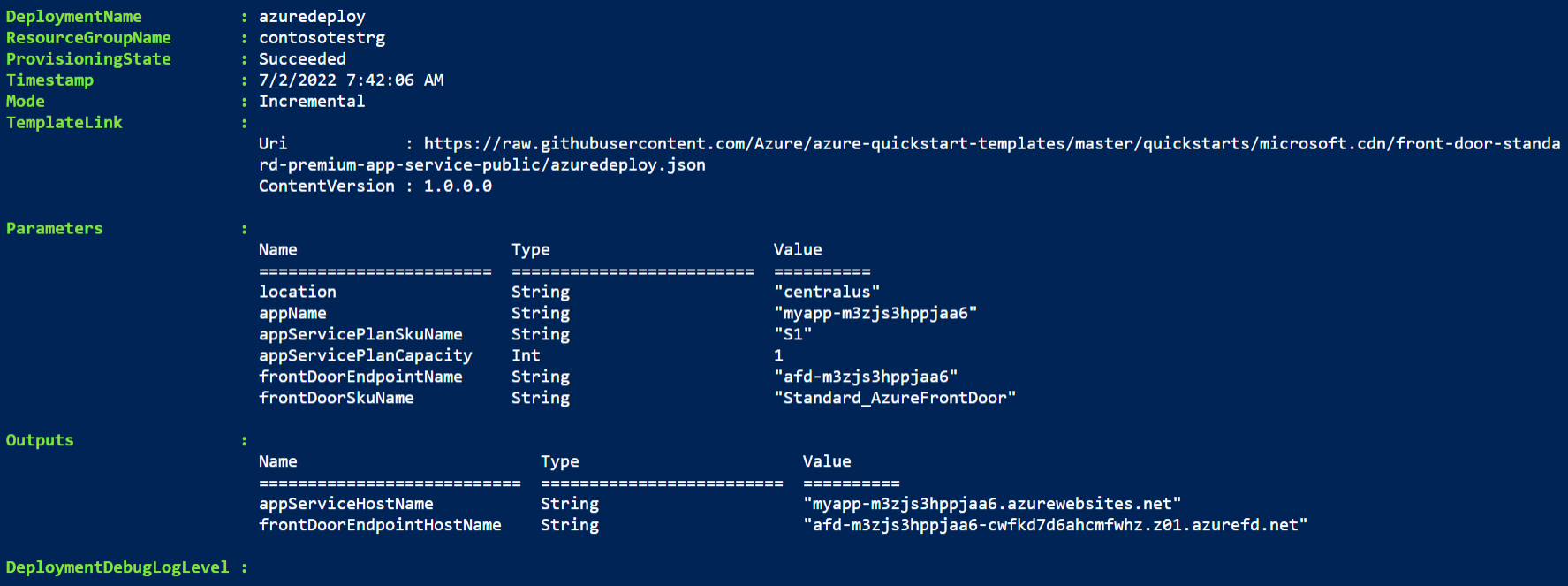
使用 Azure PowerShell 部署模板。 除了 Azure PowerShell,还可以使用 Azure 门户、Azure CLI 和 REST API。 若要了解其他部署方法,请参阅 “部署模板”。
验证部署
登录到 Azure 门户。
从左窗格中选择 资源组 。
选择你在上一部分中创建的资源组。 项目名称为默认资源组名称,并附加rg。
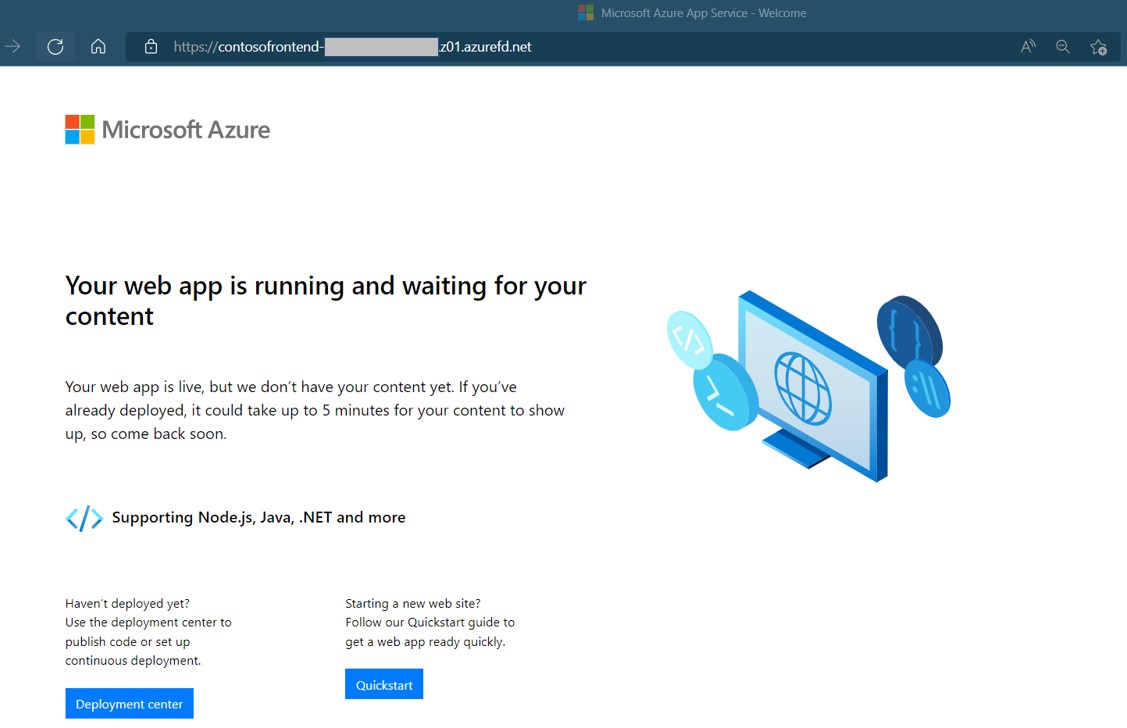
选择你之前创建的 Azure Front Door 以查看端点主机名。 复制该主机名并将其粘贴到浏览器的地址栏中。 按下回车键,你的请求会自动路由到网页应用。
清理资源
如果不再需要 Azure Front Door 服务,请删除资源组。 此操作会移除 Azure Front Door 及所有相关资源。
若要删除资源组,请调用 Remove-AzResourceGroup cmdlet:
Remove-AzResourceGroup -Name <your resource group name>