Azure Front Door 规则引擎允许用户通过配置匹配条件和操作对,在 Front Door 边缘轻松自定义处理和路由逻辑。
You can define various rule actions based on combination of 19 supported match conditions from incoming requests. 这些规则允许你:
动态管理缓存策略
将请求转发到不同的源或版本
修改请求或响应标头,以通过标头隐藏敏感信息或传递重要信息。 例如,实现安全标头以防止基于浏览器的漏洞,例如:
- HTTP 严格传输安全 (HSTS)
- X-XSS-protection
- Content-security-policy
- X-frame-options
- 跨域资源共享 (CORS) 场景的 Access-Control-Allow-Origin 标头。
基于安全性的属性也可以用 Cookie 来定义。
重写 URL 路径或将请求重定向到新目标
使用正则表达式和服务器变量启用复杂方案:从传入的请求或响应中捕获动态值,并将其与静态字符串或其他变量组合在一起。
本文介绍 Azure Front Door 规则引擎支持的常见用例,并提供详细的配置示例来满足各种业务和技术要求。
方案 1:使用查询字符串、URL 路径段或传入主机名捕获进行重定向
管理重定向对于搜索引擎优化(SEO)、用户体验和网站正常运行至关重要。 Azure Front Door 的规则引擎和服务器变量使你能够基于各种参数有效地管理批处理重定向。
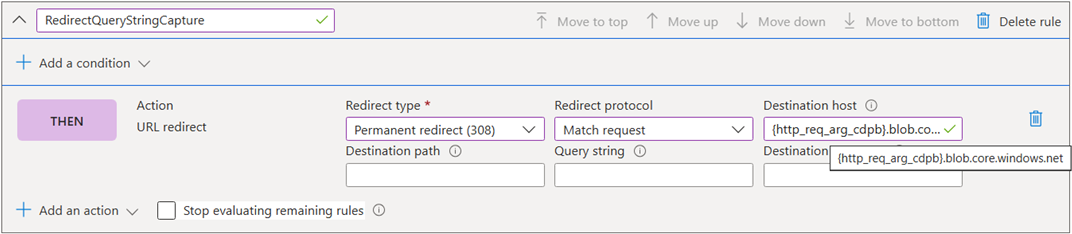
基于查询字符串参数的重定向: 可以通过以格式 {http_req_arg_<key>}捕获特定查询字符串键的值,使用传入 URL 的查询字段来重定向请求。
For example, extract the value of cdpb query key from an incoming URL: https://example.mydomain.com/testcontainer/123.zip?sig=fffff&cdpb=teststorageaccount and use it to configure the Destination host into outgoing URL: https://teststorageaccount.blob.core.chinacloudapi.cn/testcontainer/123.zip?sig=fffff&cdpb=teststorageaccount.
此方法支持动态重定向,而无需为每个 cdpb 值创建单独的规则,从而显著减少所需的规则数。
{
    "type": "Microsoft.Cdn/profiles/rulesets/rules",
    "apiVersion": "2025-04-15",
    "name": "[concat(parameters('profiles_rulesengineblog_name'), '/RulesBlogScenarios/RedirectQueryStringCapture')]",
    "dependsOn": [
        "[resourceId('Microsoft.Cdn/profiles/rulesets', parameters('profiles_rulesengineblog_name'), 'RulesBlogScenarios')]",
        "[resourceId('Microsoft.Cdn/profiles', parameters('profiles_rulesengineblog_name'))]"
    ],
    "properties": {
        "order": 100,
        "conditions": [],
        "actions": [
            {
                "name": "UrlRedirect",
                "parameters": {
                    "typeName": "DeliveryRuleUrlRedirectActionParameters",
                    "redirectType": "PermanentRedirect",
                    "destinationProtocol": "MatchRequest",
                    "customHostname": "{http_req_arg_cdpb}.blob.core.chinacloudapi.cn"
                }
            }
        ],
        "matchProcessingBehavior": "Continue"
    }
}
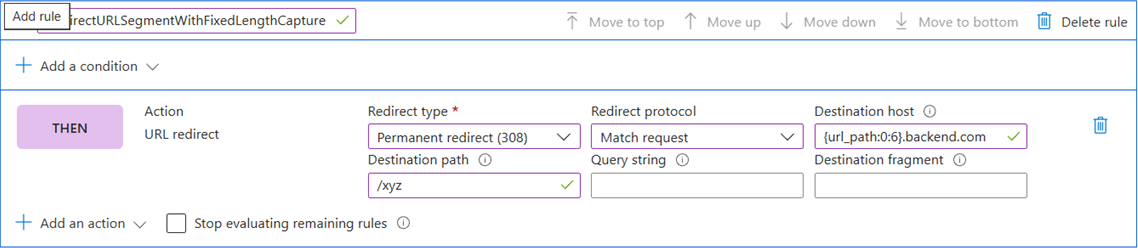
基于固定长度 URL 路径段的重定向: 可以通过使用 {variable:offset:length} 捕获 URL 段,根据固定长度的 URL 路径段将请求重定向到不同的源。 有关详细信息,请参阅 服务器变量格式。
例如,假设租户 ID 嵌入 URL 段,且始终为六个字符长,例如: https://api.contoso.com/{tenantId}/xyz 若要从 URL 中提取 {tenantId},并决定正确的重定向以 tenantId.backend.com/xyz 格式使用。
此方法无需为每个租户 ID 创建单独的规则,从而能够使用更少的规则处理动态路由。
{
    "type": "Microsoft.Cdn/profiles/rulesets/rules",
    "apiVersion": "2025-04-15",
    "name": "[concat(parameters('profiles_rulesengineblog_name'), '/RulesBlogScenarios/RedirectURLSegmentCapture')]",
    "dependsOn": [
        "[resourceId('Microsoft.Cdn/profiles/rulesets', parameters('profiles_rulesengineblog_name'), 'RulesBlogScenarios')]",
        "[resourceId('Microsoft.Cdn/profiles', parameters('profiles_rulesengineblog_name'))]"
    ],
    "properties": {
        "order": 101,
        "conditions": [],
        "actions": [
            {
                "name": "UrlRedirect",
                "parameters": {
                    "typeName": "DeliveryRuleUrlRedirectActionParameters",
                    "redirectType": "PermanentRedirect",
                    "destinationProtocol": "MatchRequest",
                    "customPath": "/xyz",
                    "customHostname": "{url_path:0:6}.backend.com"
                }
            }
        ],
        "matchProcessingBehavior": "Continue"
    }
}
基于动态长度 URL 路径段的重定向: 当 URL 路径段具有动态长度时,可以使用 {url_path:seg#} 提取它。 有关详细信息,请参阅 服务器变量格式。
例如,如果租户 ID 或位置嵌入到 URL 段中,例如:https://api.contoso.com/{tenantId}/xyz,则可以从 URL 中提取{tenantId},并使用重定向目标主机中的服务器变量tenantId.backend.com/xyz的格式{url_path:seg0}.backend.com确定正确的重定向。
此方法避免为每个租户 ID 创建单独的规则,从而实现更高效的配置。
{
    "type": "Microsoft.Cdn/profiles/rulesets/rules",
    "apiVersion": "2025-04-15",
    "name": "[concat(parameters('profiles_rulesengineblog_name'), '/RulesBlogScenarios/RedirectURLSegmentCapture')]",
    "dependsOn": [
        "[resourceId('Microsoft.Cdn/profiles/rulesets', parameters('profiles_rulesengineblog_name'), 'RulesBlogScenarios')]",
        "[resourceId('Microsoft.Cdn/profiles', parameters('profiles_rulesengineblog_name'))]"
    ],
    "properties": {
        "order": 101,
        "conditions": [],
        "actions": [
            {
                "name": "UrlRedirect",
                "parameters": {
                    "typeName": "DeliveryRuleUrlRedirectActionParameters",
                    "redirectType": "PermanentRedirect",
                    "destinationProtocol": "MatchRequest",
                    "customPath": "/xyz",
                    "customHostname": "{url_path:seg0}.backend.com"
                }
            }
        ],
        "matchProcessingBehavior": "Continue"
    }
}
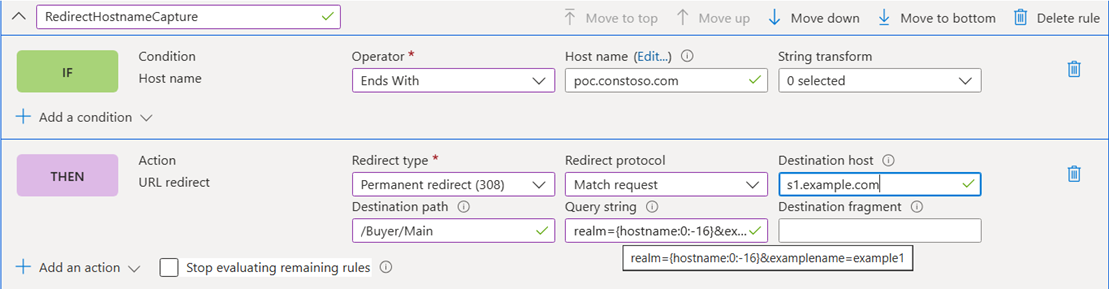
基于传入主机名的一部分重定向: 可以通过提取传入主机名的一部分将请求重定向到不同的源。
例如,可以从 tenantName 捕获 https://[tenantName].poc.contoso.com/GB,以 s1.example.com/Buyer/Main?realm=[tenantName]&examplename=example1 格式使用服务器变量中的偏移量和长度将请求重定向到 {hostname:0:-16}。 有关详细信息,请参阅 服务器变量格式。
{
    "type": "Microsoft.Cdn/profiles/rulesets/rules",
    "apiVersion": "2025-04-15",
    "name": "[concat(parameters('profiles_rulesengineblog_name'), '/RulesBlogScenarios/RedirectHostnameCapture')]",
    "dependsOn": [
        "[resourceId('Microsoft.Cdn/profiles/rulesets', parameters('profiles_rulesengineblog_name'), 'RulesBlogScenarios')]",
        "[resourceId('Microsoft.Cdn/profiles', parameters('profiles_rulesengineblog_name'))]"
    ],
    "properties": {
        "order": 102,
        "conditions": [
            {
                "name": "HostName",
                "parameters": {
                    "typeName": "DeliveryRuleHostNameConditionParameters",
                    "operator": "EndsWith",
                    "negateCondition": false,
                    "matchValues": [
                        "poc.contoso.com"
                    ],
                    "transforms": []
                }
            }
        ],
        "actions": [
            {
                "name": "UrlRedirect",
                "parameters": {
                    "typeName": "DeliveryRuleUrlRedirectActionParameters",
                    "redirectType": "PermanentRedirect",
                    "destinationProtocol": "MatchRequest",
                    "customQueryString": "realm={hostname:0:-16}&examplename=example1",
                    "customPath": "/Buyer/Main",
                    "customHostname": "s1.example.com"
                }
            }
        ],
        "matchProcessingBehavior": "Continue"
    }
}
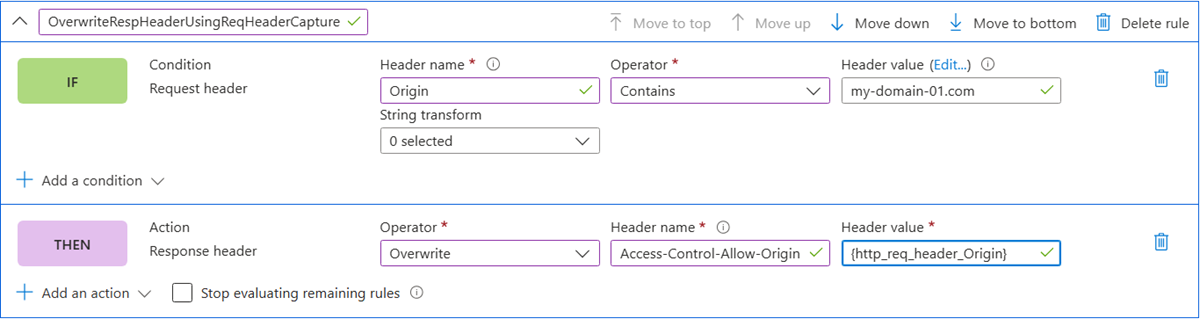
在某些情况下,可能需要根据请求标头值填充或修改响应标头。
例如,可以根据需要添加 CORS 标头,以便在同一 CDN 域的多个源上为脚本提供服务,并且响应中必须在 Access-Control-Allow-Origin 标头中包含与请求源标头相同的 FQDN,而不是使用允许所有域的通配符 (*) 来增强安全性。 可以使用 {http_req_header_Origin} 服务器变量来设置响应标头,从而实现。
{
    "type": "Microsoft.Cdn/profiles/rulesets/rules",
    "apiVersion": "2025-04-15",
    "name": "[concat(parameters('profiles_rulesengineblog_name'), '/RulesBlogScenarios/OverwriteRespHeaderUsingReqHeaderCapture')]",
    "dependsOn": [
        "[resourceId('Microsoft.Cdn/profiles/rulesets', parameters('profiles_rulesengineblog_name'), 'RulesBlogScenarios')]",
        "[resourceId('Microsoft.Cdn/profiles', parameters('profiles_rulesengineblog_name'))]"
    ],
    "properties": {
        "order": 103,
        "conditions": [
            {
                "name": "RequestHeader",
                "parameters": {
                    "typeName": "DeliveryRuleRequestHeaderConditionParameters",
                    "operator": "Contains",
                    "selector": "Origin",
                    "negateCondition": false,
                    "matchValues": [
                        "my-domain-01.com"
                    ],
                    "transforms": []
                }
            }
        ],
        "actions": [
            {
                "name": "ModifyResponseHeader",
                "parameters": {
                    "typeName": "DeliveryRuleHeaderActionParameters",
                    "headerAction": "Overwrite",
                    "headerName": "Access-Control-Allow-Origin",
                    "value": "{http_req_header_Origin}"
                }
            }
        ],
        "matchProcessingBehavior": "Continue"
    }
}
方案 3:将响应标头重命名为品牌特定的标头
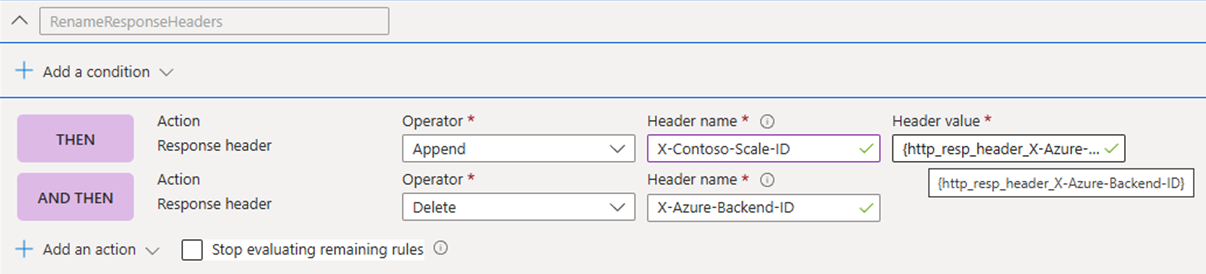
可以通过添加新的自定义响应标头并删除原始响应标头来重命名云提供商生成的响应标头。
例如,可以将响应标头 X-Azure-Backend-ID 替换为品牌特定的标头 X-Contoso-Scale-ID。
{
    "type": "Microsoft.Cdn/profiles/rulesets/rules",
    "apiVersion": "2025-04-15",
    "name": "[concat(parameters('profiles_rulesengineblog_name'), '/RulesBlogScenarios/RenameResponseHeaders')]",
    "dependsOn": [
        "[resourceId('Microsoft.Cdn/profiles/rulesets', parameters('profiles_rulesengineblog_name'), 'RulesBlogScenarios')]",
        "[resourceId('Microsoft.Cdn/profiles', parameters('profiles_rulesengineblog_name'))]"
    ],
    "properties": {
        "order": 104,
        "conditions": [],
        "actions": [
            {
                "name": "ModifyResponseHeader",
                "parameters": {
                    "typeName": "DeliveryRuleHeaderActionParameters",
                    "headerAction": "Append",
                    "headerName": "X-Contoso-Scale-ID",
                    "value": "{http_resp_header_X-Azure-Backend-ID}"
                }
            },
            {
                "name": "ModifyResponseHeader",
                "parameters": {
                    "typeName": "DeliveryRuleHeaderActionParameters",
                    "headerAction": "Delete",
                    "headerName": "X-Azure-Backend-ID"
                }
            }
        ],
        "matchProcessingBehavior": "Continue"
    }
}
方案 4:A/B 测试(试验)
将传入流量拆分为两个源组可用于 A/B 测试、滚动部署或负载均衡,而无需复杂的后端逻辑。
例如,可以根据客户端端口号拆分传入流量。 A rule can match client ports that end in 1, 3, 5, 7, or 9 and forward those requests to an experiment-origin-group. 所有其他流量会继续按路由设置访问默认源组。 前面的正则表达式只是一个示例。 You can explore and test your own expressions using tools like regex101.
Note
由于客户端端口是随机的,因此此方法通常会导致大约 50/50 流量拆分。 但是,由于连接重用或源端口重写等因素,客户端与 Front Door 之间存在任何代理或负载均衡器可能会影响此假设。 使用日志或指标来验证环境中的实际行为。

{
    "type": "Microsoft.Cdn/profiles/rulesets/rules",
    "apiVersion": "2025-04-15",
    "name": "[concat(parameters('profiles_rulesengineblog_name'), '/RulesBlogScenarios/ABExperimentation')]",
    "dependsOn": [
        "[resourceId('Microsoft.Cdn/profiles/rulesets', parameters('profiles_rulesengineblog_name'), 'RulesBlogScenarios')]",
        "[resourceId('Microsoft.Cdn/profiles', parameters('profiles_rulesengineblog_name'))]",
        "[resourceId('Microsoft.Cdn/profiles/origingroups', parameters('profiles_rulesengineblog_name'), 'experiment-origin-group')]"
    ],
    "properties": {
        "order": 105,
        "conditions": [
            {
                "name": "ClientPort",
                "parameters": {
                    "typeName": "DeliveryRuleClientPortConditionParameters",
                    "operator": "RegEx",
                    "negateCondition": false,
                    "matchValues": [
                        "^.*[13579]$"
                    ],
                    "transforms": []
                }
            }
        ],
        "actions": [
            {
                "name": "RouteConfigurationOverride",
                "parameters": {
                    "typeName": "DeliveryRuleRouteConfigurationOverrideActionParameters",
                    "originGroupOverride": {
                        "originGroup": {
                            "id": "[resourceId('Microsoft.Cdn/profiles/origingroups', parameters('profiles_rulesengineblog_name'), 'experiment-origin-group')]"
                        },
                        "forwardingProtocol": "MatchRequest"
                    }
                }
            }
        ],
        "matchProcessingBehavior": "Continue"
    }
}
方案 5:使用 URL 路径修改重定向并保留功能
在某些情况下,可能需要添加新段或删除某些段,同时保留 URL 路径的其余部分。
例如,如果要重定向 https://domain.com/seg0/seg1/seg2/seg3 到 https://example.com/seg0/insert/seg2/seg3。 在此方案中,将 URL 路径中的 {seg1} 替换为 /insert/,同时保留 URL 路径的其余部分。 Azure Front Door 通过组合从服务器变量(URL 段)提取的值和组合静态字符串段 /insert/来实现所需的重定向。 You can use Int32.Max (2147483647) for URL segment’s length field to keep all segments from seg2 to segn. 有关详细信息,请参阅 服务器变量格式。
Note
对于 URL 重写操作,可以通过输入源模式为 /、目标为 /{url_path:seg0}/insert/{url_path:seg2:2147483647} 来完成类似的配置,以实现重定向操作,如下面的门户示例所示。
{
    "type": "Microsoft.Cdn/profiles/rulesets/rules",
    "apiVersion": "2025-04-15",
    "name": "[concat(parameters('profiles_rulesengineblog_name'), '/RulesBlogScenarios/redirectWithSegCap01')]",
    "dependsOn": [
        "[resourceId('Microsoft.Cdn/profiles/rulesets', parameters('profiles_rulesengineblog_name'), 'RulesBlogScenarios')]",
        "[resourceId('Microsoft.Cdn/profiles', parameters('profiles_rulesengineblog_name'))]"
    ],
    "properties": {
        "order": 106,
        "conditions": [],
        "actions": [
            {
                "name": "UrlRedirect",
                "parameters": {
                    "typeName": "DeliveryRuleUrlRedirectActionParameters",
                    "redirectType": "Found",
                    "destinationProtocol": "Https",
                    "customPath": "/{url_path:seg0}/insert/{url_path:seg2:2147483647}"
                }
            }
        ],
        "matchProcessingBehavior": "Continue"
    }
}
方案 6:通过删除 URL 路径的固定部分进行重定向
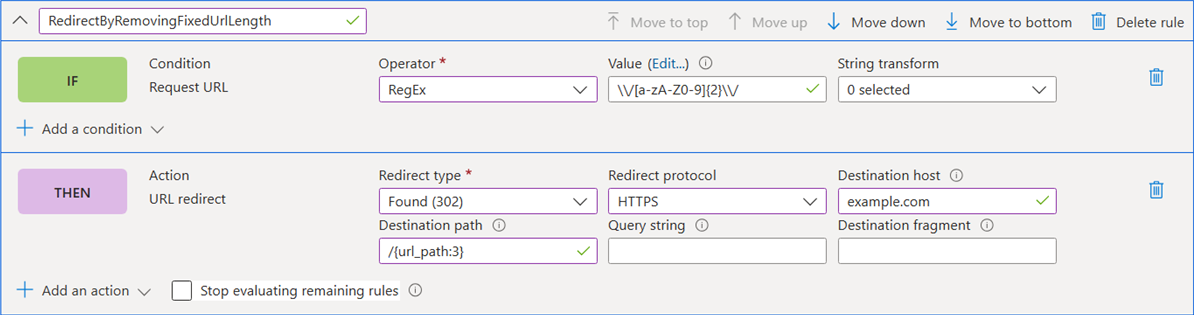
可以从 URL 路径(例如国家/地区代码(cn)或区域设置(zh-cn)中删除已知大小的固定段,同时保留 URL 路径的其余部分。
例如,如果要重定向 https://domain.com/us/seg1/seg2/seg3/ 到 https://example.com/seg1/seg2/seg3/,则需要删除国家/地区代码 /us/ 并保留 URL 路径的其余部分不变。
为实现此目的,请使用 {variable:offset} ,它包括从特定偏移量开始到变量末尾的服务器变量。 有关详细信息,请参阅 服务器变量格式。
Note
对于 URL 重写操作,可以通过输入源模式为 /、目标为 /“{url_path:3} 来完成类似的配置,以实现重定向操作,如下面的门户示例所示。
{
    "type": "Microsoft.Cdn/profiles/rulesets/rules",
    "apiVersion": "2025-04-15",
    "name": "[concat(parameters('profiles_rulesengineblog_name'), '/RulesBlogScenarios/RedirectByRemovingFixedUrlLength')]",
    "dependsOn": [
        "[resourceId('Microsoft.Cdn/profiles/rulesets', parameters('profiles_rulesengineblog_name'), 'RulesBlogScenarios')]",
        "[resourceId('Microsoft.Cdn/profiles', parameters('profiles_rulesengineblog_name'))]"
    ],
    "properties": {
        "order": 107,
        "conditions": [
            {
                "name": "RequestUri",
                "parameters": {
                    "typeName": "DeliveryRuleRequestUriConditionParameters",
                    "operator": "RegEx",
                    "negateCondition": false,
                    "matchValues": [
                        "\\/[a-zA-Z0-9]{2}\\/"
                    ],
                    "transforms": []
                }
            }
        ],
        "actions": [
            {
                "name": "UrlRedirect",
                "parameters": {
                    "typeName": "DeliveryRuleUrlRedirectActionParameters",
                    "redirectType": "Found",
                    "destinationProtocol": "Https",
                    "customPath": "/{url_path:3}"
                    "customHostname": "example.com"
                }
            }
        ],
        "matchProcessingBehavior": "Continue"
    }
}
方案 7:通过删除一个或多个 URL 路径段来重写 URL
可以从 URL 路径中删除一个或多个段,例如国家/地区代码(cn)或区域设置(zh-cn),同时保留 URL 路径的其余部分。
例如,如果要重写 https://domain.com/us/seg1/seg2/seg3/ 为 https://origin.com/seg2/seg3/,则需要同时删除国家/地区代码和附加段 /us/seg1/ ,同时保持 URL 路径的其余部分不变。
为此,请使用 {url_path:seg#:length} 服务器变量格式捕获从特定段编号开始的特定 URL 段。 在此示例中,用于 {url_path:seg2:2147483647} 捕获从 seg2 头到尾的所有段。 值 2147483647 (Int32.Max) 可确保包括所有剩余段。 有关详细信息,请参阅 服务器变量格式。
{
    "type": "Microsoft.Cdn/profiles/rulesets/rules",
    "apiVersion": "2025-04-15",
    "name": "[concat(parameters('profiles_rulesengineblog_name'), '/RulesBlogScenarios/URLRewriteRemovingOneorMoreSegments')]",
    "dependsOn": [
        "[resourceId('Microsoft.Cdn/profiles/rulesets', parameters('profiles_rulesengineblog_name'), 'RulesBlogScenarios')]",
        "[resourceId('Microsoft.Cdn/profiles', parameters('profiles_rulesengineblog_name'))]"
    ],
    "properties": {
        "order": 108,
        "conditions": [],
        "actions": [
            {
                "name": "UrlRewrite",
                "parameters": {
                    "typeName": "DeliveryRuleUrlRewriteActionParameters",
                    "sourcePattern": "/",
                    "destination": "/{url_path:seg2:2147483647}",
                    "preserveUnmatchedPath": false
                }
            }
        ],
        "matchProcessingBehavior": "Continue"
    }
}
Note
When using server variables like {url_path} in the Destination field, the Preserve unmatched path setting becomes less relevant because server variables give you explicit control over which parts of the URL path to include.
场景 8:使用正则表达式减少规则条件数以避免触及限制
在规则条件中使用正则表达式可以显著减少所需的规则数,这有助于避免规则限制,这些限制可能成为需要为数百个客户端设置条件或操作的客户的阻碍因素。
例如,如果客户想要使用特定的 ID 模式标识其客户端,以允许访问 Azure Front Door 后面的资源,则客户端发送标头,如下所示 x-client-id: SN1234-ABCD56。 此标头遵循特定格式: x-client-id: <SN + 4 digits + - + 4 uppercase letters + 2 digits>。
可以使用单个正则表达式模式 ^SN[0-9]{4}-[A-Z]{4}[0-9]{2}$ 来匹配一个规则中的所有有效客户端 ID,例如, SN1234-ABCD56、 SN0001-ZYXW99、 SN2025-QWER12、 SN9876-MNOP34、 SN3141-TEST42等,而不是为每个可能的客户端 ID 创建单个规则。此方法允许使用单个规则配置处理数百个不同的客户端 ID。

{
    "type": "Microsoft.Cdn/profiles/rulesets/rules",
    "apiVersion": "2025-04-15",
    "name": "[concat(parameters('profiles_rulesengineblog_name'), '/RulesBlogScenarios/UseRegexTogroupConditions')]",
    "dependsOn": [
        "[resourceId('Microsoft.Cdn/profiles/rulesets', parameters('profiles_rulesengineblog_name'), 'RulesBlogScenarios')]",
        "[resourceId('Microsoft.Cdn/profiles', parameters('profiles_rulesengineblog_name'))]",
        "[resourceId('Microsoft.Cdn/profiles/origingroups', parameters('profiles_rulesengineblog_name'), 'default-origin-group')]"
    ],
    "properties": {
        "order": 109,
        "conditions": [
            {
                "name": "RequestHeader",
                "parameters": {
                    "typeName": "DeliveryRuleRequestHeaderConditionParameters",
                    "operator": "RegEx",
                    "selector": "x-client-id",
                    "negateCondition": false,
                    "matchValues": [
                        "^SN[0-9]{4}-[A-Z]{4}[0-9]{2}$"
                    ],
                    "transforms": []
                }
            }
        ],
        "actions": [
            {
                "name": "RouteConfigurationOverride",
                "parameters": {
                    "typeName": "DeliveryRuleRouteConfigurationOverrideActionParameters",
                    "originGroupOverride": {
                        "originGroup": {
                            "id": "[resourceId('Microsoft.Cdn/profiles/origingroups', parameters('profiles_rulesengineblog_name'), 'default-origin-group')]"
                        },
                        "forwardingProtocol": "MatchRequest"
                    }
                }
            }
        ],
        "matchProcessingBehavior": "Continue"
    }
}
Note
You can use regex101 to test and validate your regex patterns before implementing them in Azure Front Door.
可以使用响应头中的值作为服务器变量来使动作字段动态化。 当源服务器发出引用其自己的域名的重定向时,这非常有用。
The Problem: Origin servers like Azure App Service commonly issue redirect URLs that reference their own domain name (for example, contoso.chinacloudsites.cn). 如果这些 URL 未修改,则下一个请求将绕过 Azure Front Door,这会中断用户的导航体验。
The Solution: Capture the origin's Location header and rewrite just the host portion so it always reflects the hostname that the client originally used.
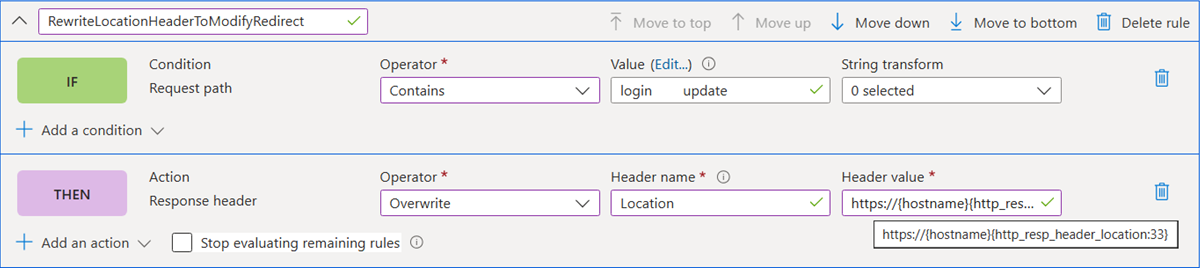
例如,如果前端客户端发送到 Azure Front Door 的主机头为 contoso.com,而源为 contoso.chinacloudsites.cn,当源发出类似 Location: https://contoso.chinacloudsites.cn/login/ 的绝对重定向 URL 时,你可以将位置头修改回使用原始主机名 Location: https://contoso.com/login/
这是使用服务器变量格式实现的:其中: https://{hostname}{http_resp_header_location:33}
-
{hostname} 表示原始客户端主机名 (contoso.com)
-
{http_resp_header_location:33} 从偏移量 33(即 /login/ 部分)开始捕获 Location 标头的内容
{
    "type": "Microsoft.Cdn/profiles/rulesets/rules",
    "apiVersion": "2025-04-15",
    "name": "[concat(parameters('profiles_rulesengineblog_name'), '/RulesBlogScenarios/RewriteLocationHeaderToModifyRedirect')]",
    "dependsOn": [
        "[resourceId('Microsoft.Cdn/profiles/rulesets', parameters('profiles_rulesengineblog_name'), 'RulesBlogScenarios')]",
        "[resourceId('Microsoft.Cdn/profiles', parameters('profiles_rulesengineblog_name'))]"
    ],
    "properties": {
        "order": 110,
        "conditions": [
            {
                "name": "UrlPath",
                "parameters": {
                    "typeName": "DeliveryRuleUrlPathMatchConditionParameters",
                    "operator": "Contains",
                    "negateCondition": false,
                    "matchValues": [
                        "login",
                        "update"
                    ],
                    "transforms": []
                }
            }
        ],
        "actions": [
            {
                "name": "ModifyResponseHeader",
                "parameters": {
                    "typeName": "DeliveryRuleHeaderActionParameters",
                    "headerAction": "Overwrite",
                    "headerName": "Location",
                    "value": " https://{hostname}{http_resp_header_location:33}"
                }
            }
        ],
        "matchProcessingBehavior": "Continue"
    }
}
Note
当规则条件基于请求参数或无条件调用时,可以使用此规则。
为了进行一致的偏移计算,源组中的所有源服务器应具有相同长度的域名,例如,所有 33 个字符(例如 https://contoso.chinacloudsites.cn)。 理想情况下,应该只有一个源服务器,但如果多个源的名称具有相同的长度,则可以接受这些源。
可以应用相同的服务器变量捕获技术来提取和重用不同规则作中的请求查询字符串参数。
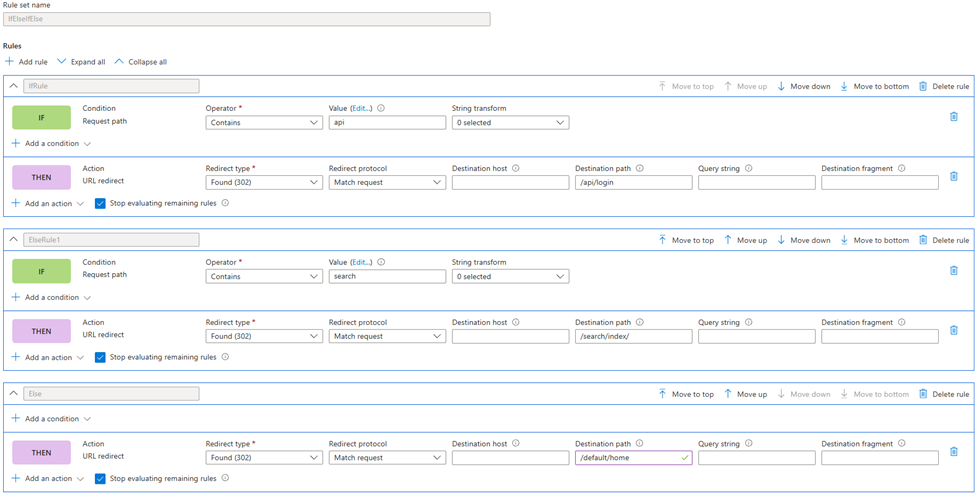
场景 10:If-elseif-else 规则
Azure Front Door 规则引擎本身不支持使用“if-elseif-else”结构的传统条件逻辑。 默认情况下,所有规则都独立评估为“如果条件1,则执行操作1”、“如果条件2,则执行操作2”等。 同时满足多个条件时,将执行多个相应的操作。
但是,可以使用 “停止评估剩余规则 ”功能来模拟“if-elseif-else”逻辑,以创建类似于以下内容的条件分支:
- 如果满足 condition1,则执行 action1 并停止
- 否则如果满足 condition2(但不满足 condition1),则执行 action2 并停止
- 如果满足 condition3(但 condition1 和 condition2 未满足),则执行 action3 并停止
- 否则,执行默认操作
工作原理: 当通常同时满足多个条件时,只有第一个匹配规则才会执行,因为规则评估在第一次匹配后停止。 这有效地模拟了传统的条件分支。
Configuration steps:
- 创建新的规则集(例如,“IfElseifElseRuleset”)
- 按优先级顺序创建规则,首先满足最具体的条件
- 对于每个规则,请检查 “停止评估剩余规则 ”选项
Important
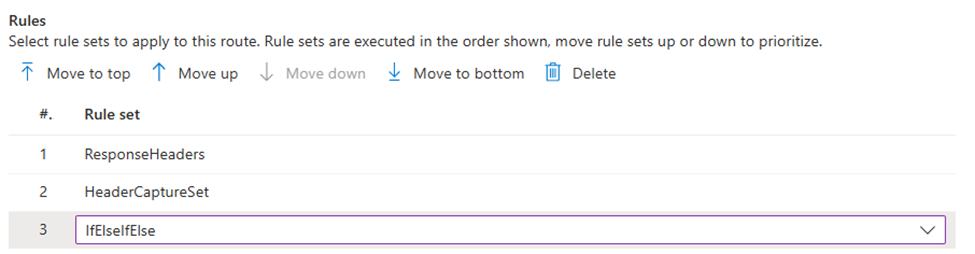
The if-elseif-else paradigm only works if the ruleset is attached as the final ruleset for that route.
方案 11:使用 URL 重定向从传入 URL 中删除查询字符串
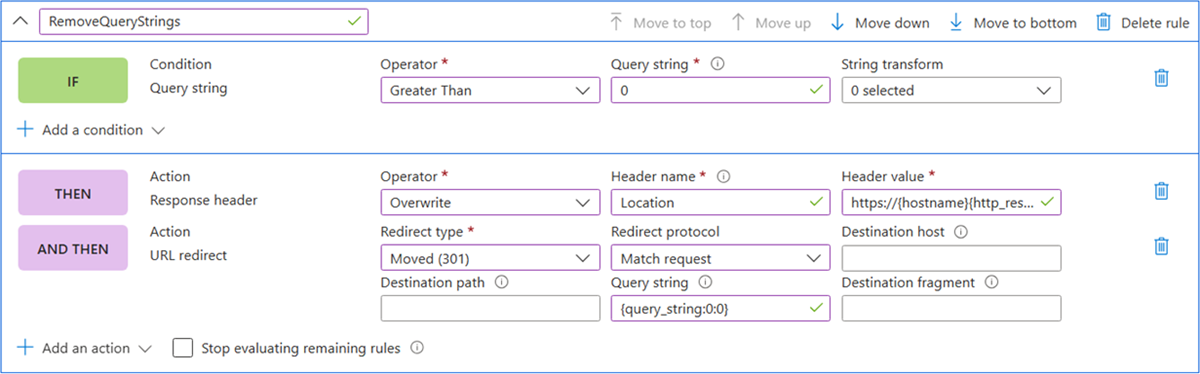
您可以通过实施 3xx URL 重定向来删除传入 URL 中的查询字符串,该重定向会引导用户回到 Azure Front Door 终结点,此时查询字符串将被移除。
Note
用户将在此操作中注意到请求 URL 的更改。
以下示例演示如何从传入 URL 中删除整个查询字符串。 如果需要去除其中的一部分,可以根据需要调整偏移量/长度。 有关详细信息,请参阅 服务器变量格式。
{
    "type": "Microsoft.Cdn/profiles/rulesets/rules",
    "apiVersion": "2025-04-15",
    "name": "[concat(parameters('profiles_rulesengineblog_name'), '/RulesBlogScenarios/RemoveQueryStrings')]",
    "dependsOn": [
        "[resourceId('Microsoft.Cdn/profiles/rulesets', parameters('profiles_rulesengineblog_name'), 'RulesBlogScenarios')]",
        "[resourceId('Microsoft.Cdn/profiles', parameters('profiles_rulesengineblog_name'))]"
    ],
    "properties": {
        "order": 111,
        "conditions": [
            {
                "name": "QueryString",
                "parameters": {
                    "typeName": "DeliveryRuleQueryStringConditionParameters",
                    "operator": "GreaterThan",
                    "negateCondition": false,
                    "matchValues": [
                        "0"
                    ],
                    "transforms": []
                }
            }
        ],
        "actions": [
            {
                "name": "UrlRedirect",
                "parameters": {
                    "typeName": "DeliveryRuleUrlRedirectActionParameters",
                    "redirectType": "Moved",
                    "destinationProtocol": "MatchRequest",
                    "customQueryString": "{query_string:0:0}"
                }
            }
        ],
        "matchProcessingBehavior": "Continue"
    }
}
方案 12:在查询字符串中追加 SAS 令牌,以便 Azure Front Door 能够验证到 Azure 存储服务
可以通过将存储容器的访问权限从公共更改为专用,并使用共享访问签名(SAS)从 Azure Front Door 授予对 Azure 存储资源的受限访问权限,从而保护存储帐户中的文件,而无需公开帐户密钥。
SAS 令牌注入的工作原理: 捕获传入的 URL 路径,并使用重定向或重写规则将 SAS 令牌追加到查询字符串。 由于 URL 重写仅适用于路径,所以需要修改查询字符串时,请使用重定向规则。
例如,如果要将 SAS 令牌追加到传入 URL: https://www.contoso.com/dccp/grammars/0.1.0-59/en-US/grammars/IVR/ssn0100_CollectTIN_QA_dtmf.grxml?version=1.0_1719342835399,重写 URL 将为: https://www.contoso.com/grammars/0.1.0-59/en-US/grammars/IVR/ssn0100_CollectTIN_QA_dtmf.grxml?version=1.0_1719342835399&<SASTOKEN>
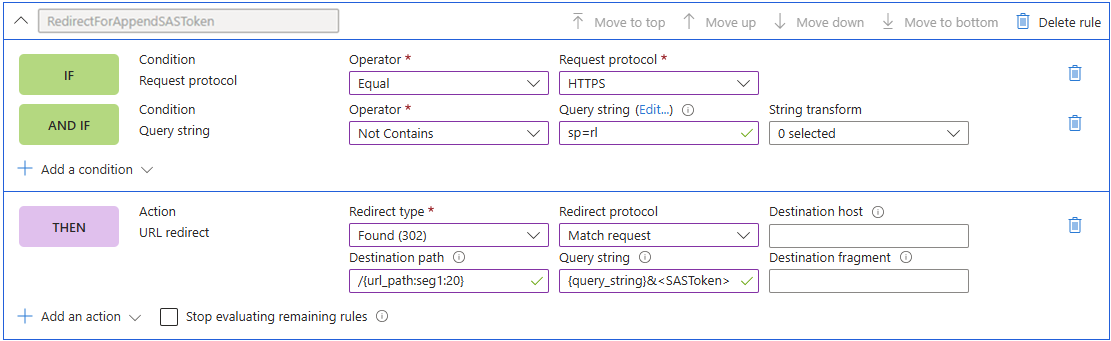
在此示例中,传入的 URL 已具有查询参数,并且你希望在通过配置 URL 重定向 /{url_path:seg1:20}?{query_string}&<SASToken>来追加 SAS 令牌时保留现有查询字符串。
规则配置将把所有不包含 SAS 令牌的 HTTPS 请求重定向(这是通过查询字符串中没有 sp=rl 来识别的)。
{
	"type": "Microsoft.Cdn/profiles/rulesets/rules",
	"apiVersion": "2025-04-15",
	"name": "[concat(parameters('profiles_rulesengineblog_name'), '/RulesBlogScenarios/RedirectForAppendSASToken')]",
	"dependsOn": [
	"[resourceId('Microsoft.Cdn/profiles/rulesets', parameters('profiles_rulesengineblog_name'), 'RulesBlogScenarios')]",
	"[resourceId('Microsoft.Cdn/profiles', parameters('profiles_rulesengineblog_name'))]"
	],
    "properties": {
        "order": 100,
        "conditions": [
            {
                "name": "RequestScheme",
                "parameters": {
                    "typeName": "DeliveryRuleRequestSchemeConditionParameters",
                    "matchValues": [
                        "HTTPS"
                    ],
                    "operator": "Equal",
                    "negateCondition": false,
                    "transforms": []
                }
            },
            {
                "name": "QueryString",
                "parameters": {
                    "typeName": "DeliveryRuleQueryStringConditionParameters",
                    "operator": "Contains",
                    "negateCondition": true,
                    "matchValues": [
                        "sp=rl"
                    ],
                    "transforms": []
                }
            }
        ],
        "actions": [
            {
                "name": "UrlRedirect",
                "parameters": {
                    "typeName": "DeliveryRuleUrlRedirectActionParameters",
                    "redirectType": "Found",
                    "destinationProtocol": "MatchRequest",
                    "customQueryString": "{ {query_string}&<replace with your SAS token>",
                    "customPath": "/{url_path:seg1:20}"
                }
            }
        ],
        "matchProcessingBehavior": "Continue"
	}
}
可以使用 Azure Front Door 规则引擎添加有助于防止基于浏览器的漏洞的安全标头,例如 HTTP Strict-Transport-Security(HSTS)、X-XSS-Protection、Content-Security-Policy 和 X-Frame-Options。
For example, you can add a Content-Security-Policy header to all incoming requests that match the path defined in the route associated with your rules engine configuration. 在此配置中,用作 script-src 'self' https://apiphany.portal.azure-api.cn 标头值,以仅允许受信任的站点 https://apiphany.portal.azure-api.cn 中的脚本在应用程序上运行。 有关详细信息,请参阅 使用规则引擎添加安全标头。
{
    "type": "Microsoft.Cdn/profiles/rulesets/rules",
    "apiVersion": "2025-04-15",
    "name": "[concat(parameters('profiles_rulesengineblog_name'), '/RulesBlogScenarios/ContentSecurityPolicyExample')]",
    "dependsOn": [
    "[resourceId('Microsoft.Cdn/profiles/rulesets', parameters('profiles_rulesengineblog_name'), 'RulesBlogScenarios')]",
    "[resourceId('Microsoft.Cdn/profiles', parameters('profiles_rulesengineblog_name'))]"
    ],
    "properties": {
        "order": 100,
        "conditions": [],
        "actions": [
            {
                "name": "ModifyResponseHeader",
                "parameters": {
                    "typeName": "DeliveryRuleHeaderActionParameters",
                    "headerAction": "Append",
                    "headerName": "Content-Security-Policy",
                    "value": "script-src 'self' https://apiphany.portal.azure-api.cn"
                }
            }
        ],
        "matchProcessingBehavior": "Continue"
    }
}
Related content