适用于: ✔️车队经理 ✔️中心群集的车队经理
适用于 Azure Kubernetes Fleet Manager 的跨群集网络提供托管的 Cilium 多群集,用于跨多个群集扩展 Cilium 的基于 eBPF 的网络和可观测性。
Fleet Manager 支持创建多个跨群集网络配置文件,每个配置文件最多支持 255 个成员群集。 配置文件中的集群会加入一个托管式联邦网络,从而能够访问全局服务,并通过 Hubble 实现服务发现和可观测性。
平台工程师标记应参与单个跨群集网络的成员群集,并在定义网络配置文件时在选择器中指定标签。 为了便于批量管理成员关系并避免意外中断,只有在授权用户明确请求时,才会更新跨集群网络。
本文介绍如何配置跨群集网络配置文件、添加成员群集以及如何公开全局服务。
Important
Azure Kubernetes 舰队管理器预览功能可以通过自助服务方式选择性启用。 预览版按“现状”和“视供应情况”提供,它们不包括在服务级别协议和有限保证范围内。 客户支持部门会尽力为 Azure Kubernetes 舰队管理器预览功能提供部分支持。 因此,这些功能并不适合用于生产。
先决条件和限制
- 跨群集网络最多可以有 255 个成员群集。
- 机队管理器成员群集随时只能参与单个跨群集网络。
- 群集必须运行 Kubernetes v1.32 或更高版本,并且已启用 Cilium 的高级容器网络服务(ACNS)。
- 群集必须连接到 单个平面网络 (虚拟网络或多个对等网络)。
- 目前暂不支持通过隧道实现的覆盖网络。
- 无法同时部署自管理的 Cilium 多群集。
- ACNS 设置 Cilium 版本和已启用的功能,这些功能是只读的,用户无法修改。
在您开始之前
如果您没有 Azure 试用订阅,请在开始之前创建 试用订阅。
安装 Cilium CLI ,以便在后续步骤中验证跨群集网络。
配置你的环境
如果当前未使用 Fleet Manager 并想要尝试跨群集网络,请按照本部分中的步骤操作。
如果已配置环境,可以跳到 创建跨群集网络。
设置以下环境变量:
export CLUSTER_RESOURCE_GROUP=<cluster-resource-group>
export FLEET_RESOURCE_GROUP=<fleet-resource-group>
export RESOURCE_LOCATION=<azure-region-name>
export FLEET=<fleet-name>
export MEMBER_CLUSTER_1=aks-member-1
export MEMBER_CLUSTER_2=aks-member-2
export NETWORK_NAME=<network-name>
export NETWORK_PROFILE_NAME=fccnp-demo-01
export CC_NETWORK_NAME=demo-01
创建网络和子网
创建新的Azure 虚拟网络。
az network vnet create \
    --resource-group ${CLUSTER_RESOURCE_GROUP} \
    --location ${RESOURCE_LOCATION} \
    --name ${NETWORK_NAME} \
    --address-prefixes 10.0.0.0/8 \
    --output none
然后创建四个子网,可用于连接两个群集。
# Subnets for cluster 1

SUBNET_ID_1=$(az network vnet subnet create \
    --resource-group ${CLUSTER_RESOURCE_GROUP} \
    --vnet-name ${NETWORK_NAME} \
    --name ${NETWORK_NAME}-01 \
    --address-prefixes 10.240.0.0/16 \
    --output tsv \
    --query id)

SUBNET_ID_2=$(az network vnet subnet create \
    --resource-group ${CLUSTER_RESOURCE_GROUP} \
    --vnet-name ${NETWORK_NAME} \
    --name ${NETWORK_NAME}-02 \
    --address-prefixes 10.241.0.0/16 \
    --output tsv \
    --query id)

# Subnets for cluster 2

SUBNET_ID_3=$(az network vnet subnet create \
    --resource-group ${CLUSTER_RESOURCE_GROUP} \
    --vnet-name ${NETWORK_NAME} \
    --name ${NETWORK_NAME}-03 \
    --address-prefixes 10.242.0.0/16 \
    --output tsv \
    --query id)

SUBNET_ID_4=$(az network vnet subnet create \
    --resource-group ${CLUSTER_RESOURCE_GROUP} \
    --vnet-name ${NETWORK_NAME} \
    --name ${NETWORK_NAME}-04 \
    --address-prefixes 10.243.0.0/16 \
    --output tsv \
    --query id)
创建 AKS 群集
使用平面网络(例如在上一部分中创建的群集)创建两个已启用 ACNS 的 AKS 群集。
对于第一个群集,请选择相应的子网。
    CLUSTER_ID_1=$(az aks create \
        --name ${MEMBER_CLUSTER_1} \
        --resource-group ${CLUSTER_RESOURCE_GROUP} \
        --location ${RESOURCE_LOCATION} \
        --node-count 1 \
        --vnet-subnet-id ${SUBNET_ID_1} \
        --pod-subnet-id ${SUBNET_ID_2} \
        --network-plugin azure \
        --network-dataplane cilium \
        --enable-acns \
        --generate-ssh-keys \
        --output tsv \
        --query id)
使用第二个群集的剩余子网,如下所示。
CLUSTER_ID_2=$(az aks create \
    --name ${MEMBER_CLUSTER_2} \
    --resource-group ${CLUSTER_RESOURCE_GROUP} \
    --location ${RESOURCE_LOCATION} \
    --node-count 1 \
    --vnet-subnet-id ${SUBNET_ID_3} \
    --pod-subnet-id ${SUBNET_ID_4} \
    --network-plugin azure \
    --network-dataplane cilium \
    --enable-acns \
    --generate-ssh-keys \
    --output tsv \
    --query id)
创建机群管理器并加入群集
在本指南中,你将创建新的机队经理。 你不需要中心集群。
az fleet create \
    --name ${FLEET} \
    --resource-group ${FLEET_RESOURCE_GROUP} \
    --location ${RESOURCE_LOCATION}
接下来,添加您的两个集群。 请确保添加可用于选择群集以加入跨群集网络的标签。
az fleet member create \
    --fleet-name ${FLEET} \
    --resource-group ${FLEET_RESOURCE_GROUP} \
    --name mbr-${MEMBER_CLUSTER_1} \
    --member-cluster-id ${CLUSTER_ID_1} \
    --labels "network=${CC_NETWORK_NAME}"
对第二个群集重复此步骤。
az fleet member create \
    --fleet-name ${FLEET} \
    --resource-group ${FLEET_RESOURCE_GROUP} \
    --name mbr-${MEMBER_CLUSTER_2} \
    --member-cluster-id ${CLUSTER_ID_2} \
    --labels "network=${CC_NETWORK_NAME}"
可以遵循现有的快速入门:使用 Azure 门户创建 Azure Kubernetes Fleet Manager 并加入成员群集。
请确保添加一个标签,例如 network=demo01 可用于选择群集以加入跨群集网络。
创建跨群集网络
Fleet Manager 支持多个跨群集网络,每个网络配置在跨群集网络配置文件中定义。
让我们使用预配的 AKS 群集设置新的跨群集网络。
使用
az fleet clustermeshprofile create命令创建跨群集网络配置文件。az fleet clustermeshprofile create \ --fleet-name ${FLEET} \ --resource-group ${FLEET_RESOURCE_GROUP} \ --name ${NETWORK_PROFILE_NAME} \ --member-selector "network=${CC_NETWORK_NAME}"配置文件定义了用于选择要加入网络的成员集群的标签,但在您应用该配置文件之前,它不会将任何配置应用到集群。
使用带有
az fleet clustermeshprofile apply参数的what-if命令,验证哪些群集包含在跨群集网络中。az fleet clustermeshprofile apply \ --what-if \ --fleet-name ${FLEET} \ --resource-group ${FLEET_RESOURCE_GROUP} \ --name ${NETWORK_PROFILE_NAME} \ --output table在创建新的跨集群网络时,两个集群均具有
Add操作。Action ClusterResourceId ETag MeshMembershipState Name -------- ---------------------------------- ---------- --------------------- ---------------- Add /subscription/…/…/mbr-aks-member-1 "fd009cd9" - mbr-aks-member-1 Add /subscription/…/…/mbr-aks-member-2 "a400f86e" - mbr-aks-member-2通过使用不带
az fleet clustermeshprofile apply参数的what-if命令应用跨集群网络更改来创建网络。az fleet clustermeshprofile apply \ --fleet-name ${FLEET} \ --resource-group ${FLEET_RESOURCE_GROUP} \ --name ${NETWORK_PROFILE_NAME}跨群集网络创建从在所选成员群集上配置的 Cilium 组件开始。 创建过程是异步的,总持续时间取决于要加入的群集数。
按如下所示监视整个跨群集网络预配的状态。
az fleet clustermeshprofile show \
    --fleet-name ${FLEET} \
    --resource-group ${FLEET_RESOURCE_GROUP} \
    --name ${NETWORK_PROFILE_NAME} \
    --query "properties.status.state" \
    -o tsv
输出应如下所示。
Result
--------
Applying
应用操作将运行到完成状态,并且无法中断。 运行时,可以监视每个成员的网络状态。
az fleet clustermeshprofile list-members \
    --fleet-name ${FLEET} \
    --resource-group ${FLEET_RESOURCE_GROUP} \
    --name ${NETWORK_PROFILE_NAME} \
    --query "[].{name: name, state: meshProperties.status.state}" \
    -o table
输出应如下所示。
Name              State
----------------  ----------
mbr-aks-member-1  Connecting
mbr-aks-member-2  Connecting
在Azure门户中,转到 Azure Kubernetes Fleet Manager。
在服务菜单中的 “设置”下,选择 “跨群集网络>+ 创建”。
输入跨集群网络配置文件的名称。
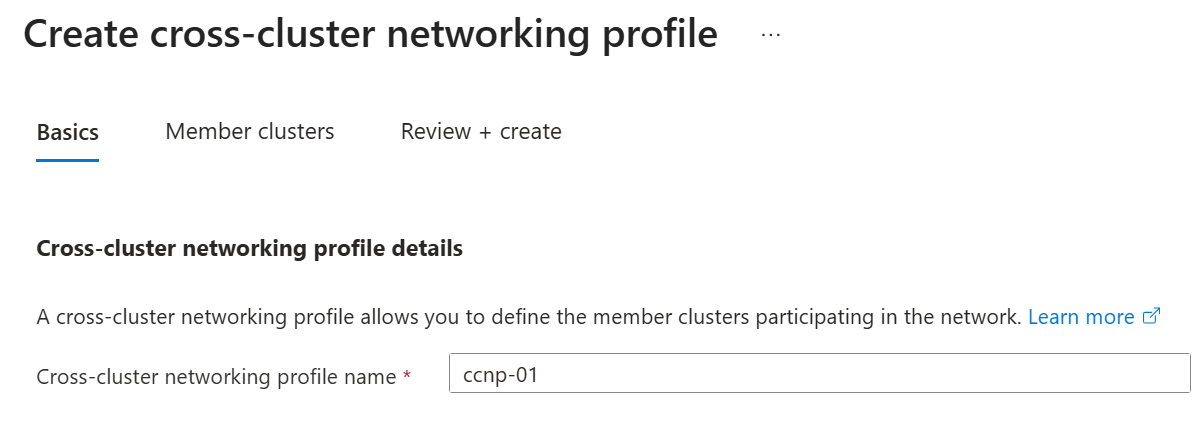
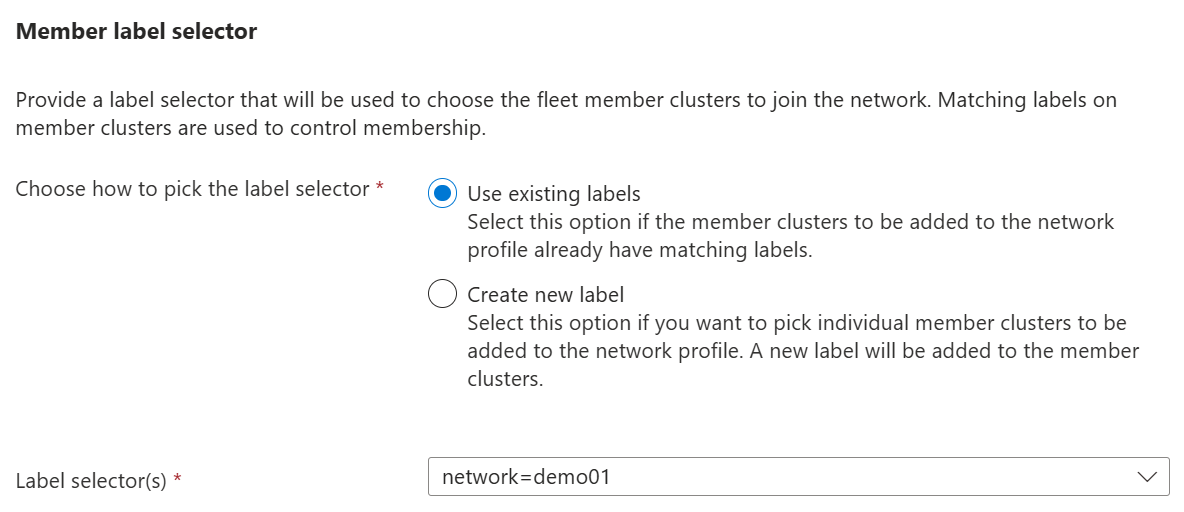
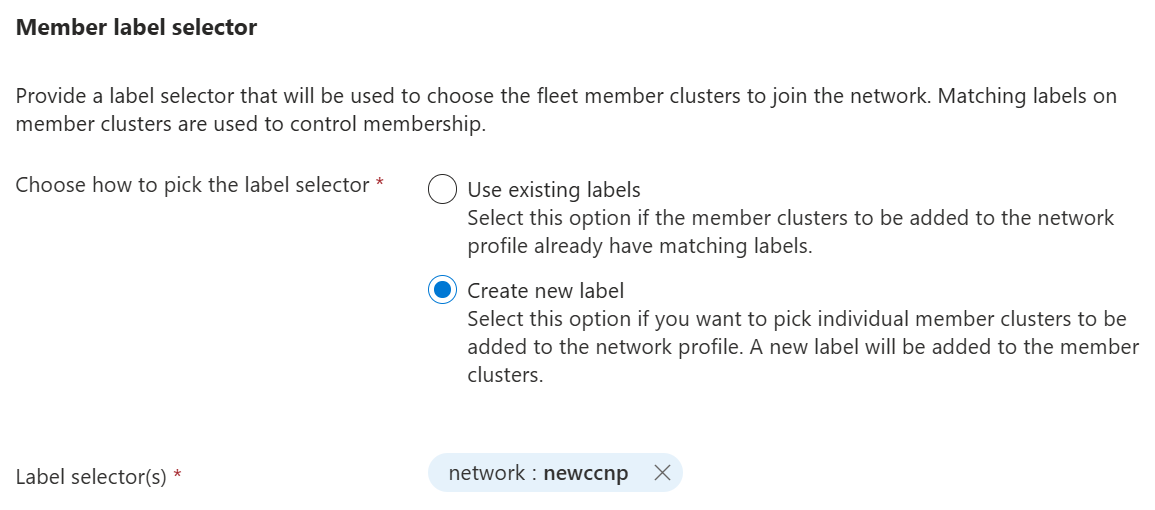
为 成员标签选择器选择下列选项之一,然后选择“ 下一步”。
- 选择如何选取标签选择器:使用现有成员群集标签。 从 “标签选择器” 下拉列表中选择一个或多个现有标签。
- 创建新标签:定义应用于你选择的成员群集的新标签。 通过选择 “+ 创建新标签 ”并完成表单来创建标签。
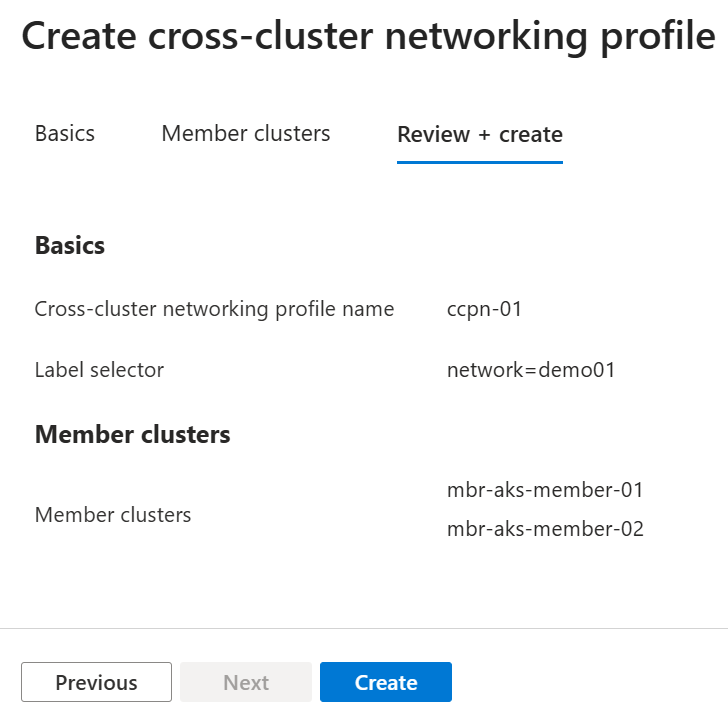
验证哪些群集将包含在跨群集网络中。 选择 “下一步 ”或“ 审阅”。
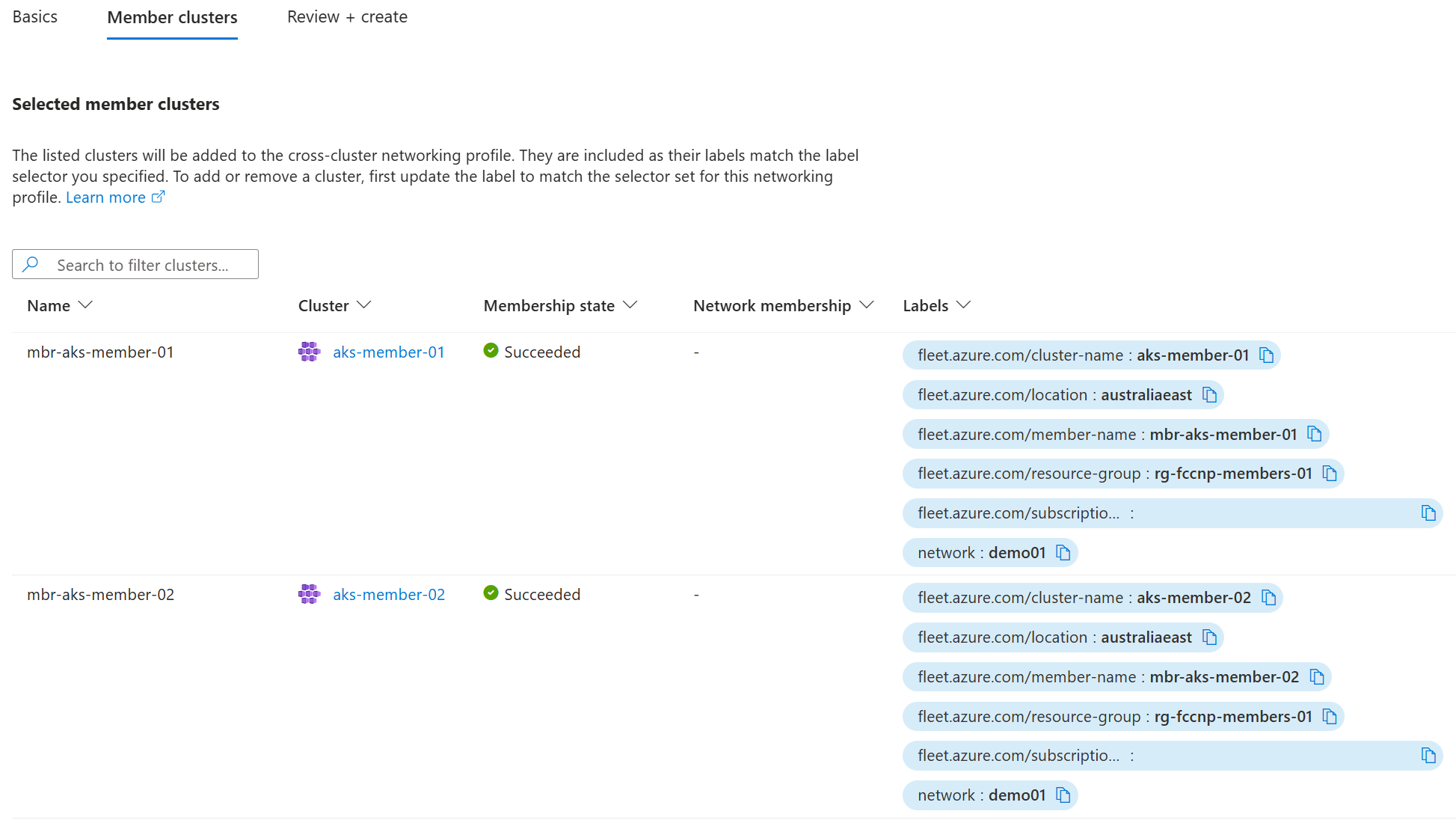
如果缺少任何群集,请确保标记它们以匹配跨群集网络配置文件的标签选择器。
查看建议的跨群集网络,然后选择“ 创建 ”以启动创建过程。
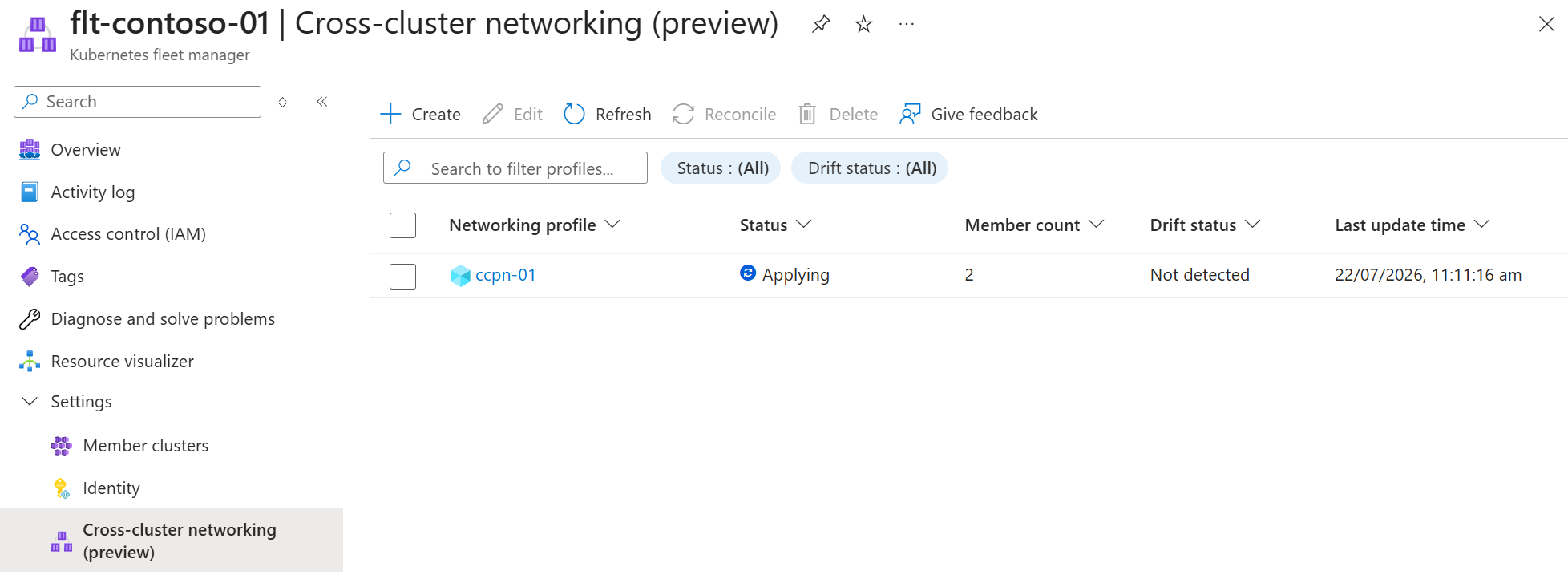
会显示跨集群网络列表,其中新网络的状态为 正在应用。
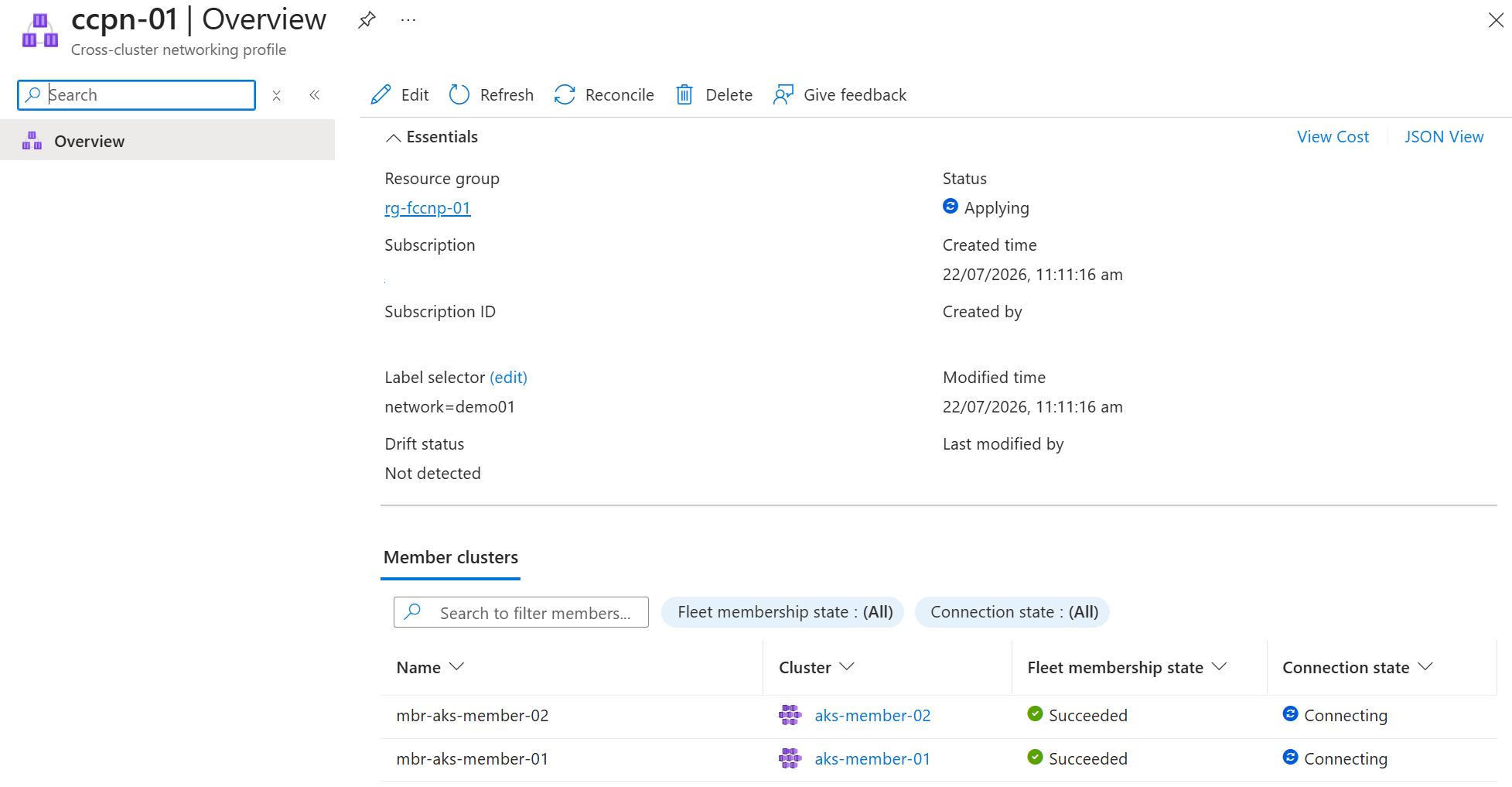
打开跨群集网络配置文件以查看每个成员群集的详细信息。
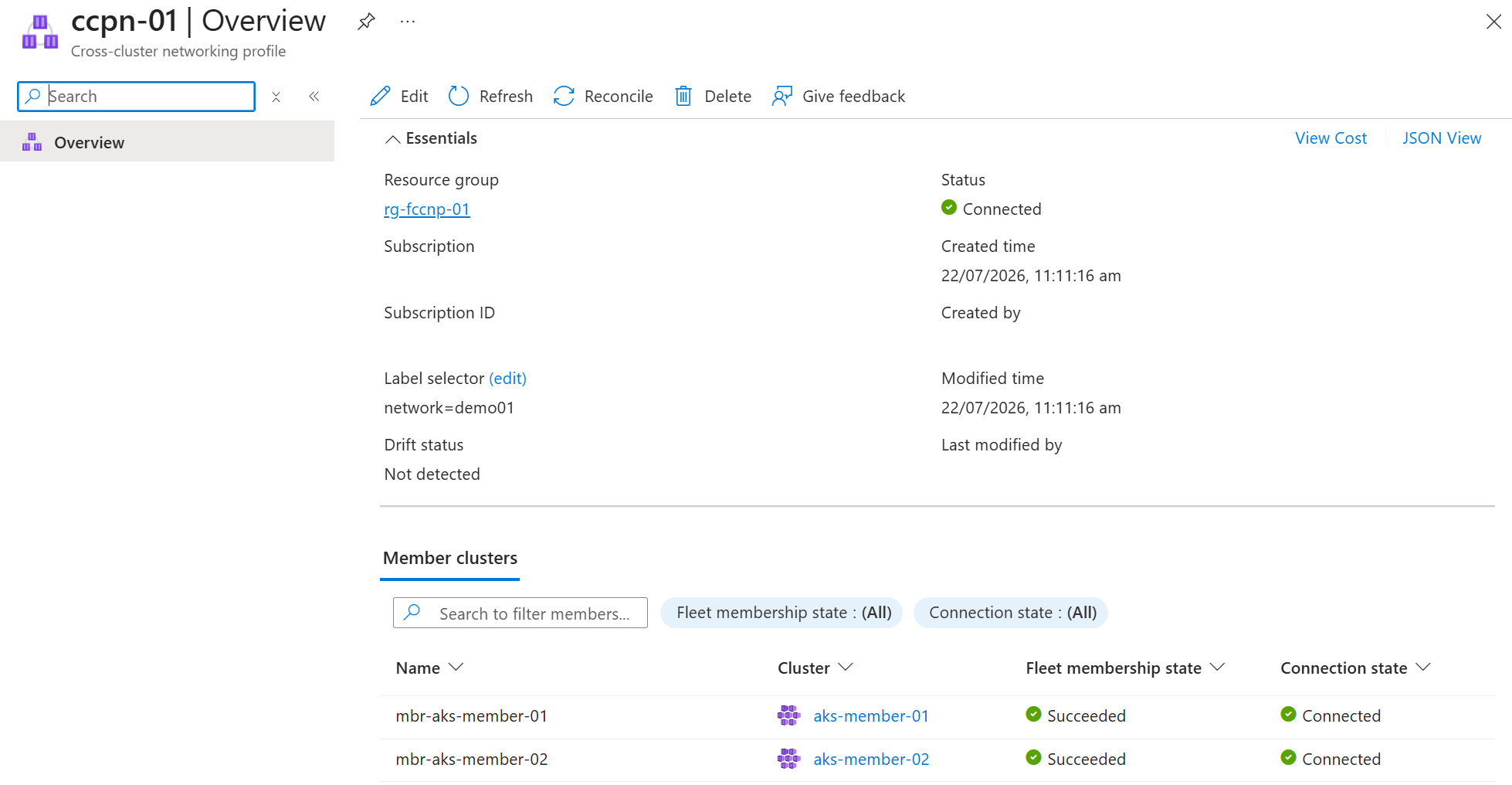
创建跨群集网络时,网络和成员都显示为“已连接”。
注释
群集连接尝试会在 15 分钟后超时。 此超时后,连接状态显示为 Failed。 有关确定原因和解决的提示,请参阅 “故障排除”部分 。
确认跨群集网络连接
当成员群集状态显示为 Connected时,会建立跨群集网络。
通过使用
az aks get-credentials获取两个成员集群的 Kubernetes 访问凭据,并适当地设置context。az aks get-credentials \ --resource-group ${CLUSTER_RESOURCE_GROUP} \ --name ${MEMBER_CLUSTER_1} \ --context cluster1az aks get-credentials \ --resource-group ${CLUSTER_RESOURCE_GROUP} \ --name ${MEMBER_CLUSTER_2} \ --context cluster2使用 Cilium CLI 状态命令查看所有成员群集是否已连接:
cilium clustermesh status --context cluster1✅ Service "clustermesh-apiserver" of type "LoadBalancer" found ✅ Cluster access information is available: - 10.240.0.5:2379 ✅ Deployment clustermesh-apiserver is ready ℹ️ KVStoreMesh is enabled ✅ All 1 nodes are connected to all clusters [min:1 / avg:1.0 / max:1] ✅ All 1 KVStoreMesh replicas are connected to all clusters [min:1 / avg:1.0 / max:1] 🔌 Cluster Connections: - mbr-aks-member-021: 1/1 configured, 1/1 connected - KVStoreMesh: 1/1 configured, 1/1 connected注释
在将 Cilium 群集 ID 注册到网络时,Fleet Manager 跨群集网络会将 Cilium 群集 ID 追加到 Fleet Manager 成员群集名称。 此注册会在
Cluster Connections中为该对等节点添加一个编号。 例如,对等项显示为<fleet-member-name>,后面跟着一个数字,例如mbr-aks-member-22。
设置和测试全局服务
创建跨群集网络后,按照 官方 Cilium 多群集示例 或使用下一步所示的步骤测试负载均衡。 本文中的步骤提供了有关使用 AKS 群集和机群管理器的额外指导。
注释
Fleet Manager 的跨集群网络将 Cilium 的 clustermesh-default-global-namespace 设置为 false,这与 Cilium 的默认值不同。 您必须在命名空间上将注解设置为 true,才能将其用于跨集群服务共享。
创建
mbr-aks-member-1专用命名空间并对其进行批注,以便其内的服务有资格跨跨群集网络共享。 然后使用Deployment清单应用Service和cluster1.yaml资源。kubectl --context=cluster1 create namespace rebel-base-demo kubectl --context=cluster1 annotate namespace rebel-base-demo clustermesh.cilium.io/global="true" --overwrite kubectl --context=cluster1 -n rebel-base-demo apply -f https://raw.githubusercontent.com/cilium/cilium/refs/heads/main/examples/kubernetes/clustermesh/cluster1.yaml kubectl --context=cluster1 -n rebel-base-demo apply -f https://raw.githubusercontent.com/cilium/cilium/refs/heads/main/examples/kubernetes/clustermesh/global-service-example.yaml注释
示例 Cilium 清单使用公共注册表中的容器映像(
docker.io和quay.io)。 如果你的环境使用Azure Policy或类似的允许控制来限制容器映像源,则示例部署可能会生成策略警告或被阻止。 在这种情况下,请将镜像复制到您的策略允许使用的注册表中,并相应地更新清单文件。在
mbr-aks-member-2上应用对应项,但这次使用cluster2.yaml清单。kubectl --context=cluster2 create namespace rebel-base-demo kubectl --context=cluster2 annotate namespace rebel-base-demo clustermesh.cilium.io/global="true" --overwrite kubectl --context=cluster2 -n rebel-base-demo apply -f https://raw.githubusercontent.com/cilium/cilium/refs/heads/main/examples/kubernetes/clustermesh/cluster2.yaml kubectl --context=cluster2 -n rebel-base-demo apply -f https://raw.githubusercontent.com/cilium/cilium/refs/heads/main/examples/kubernetes/clustermesh/global-service-example.yaml在每个群集上多次运行以下命令。 观察服务群集更改,演示请求由多个群集提供服务,尽管只调用一个服务。
kubectl --context=cluster1 -n rebel-base-demo exec -ti deployment/x-wing -- curl rebel-base{"Galaxy": "Alderaan", "Cluster": "Cluster-1"} {"Galaxy": "Alderaan", "Cluster": "Cluster-1"} {"Galaxy": "Alderaan", "Cluster": "Cluster-2"}将
clustermesh.cilium.io/global(群集 1)上的rebel-base-demo命名空间的mbr-aks-member-1注解设置为"false",以便该命名空间中的服务不再通过来自群集 1 的跨群集网络进行共享。kubectl --context=cluster1 annotate namespace rebel-base-demo clustermesh.cilium.io/global="false" --overwrite注释
更改命名空间级别的
clustermesh.cilium.io/global注解后,需要对该命名空间中的每个 Service 进行重新调和,才能使新配置生效(例如使用kubectl --context=cluster1 -n rebel-base-demo apply -f <service-manifest>.yaml)。 相比之下,每个服务service.cilium.io/global注释在几秒钟内对两个群集生效。让我们验证
mbr-aks-member-1(群集 1)可以访问rebel-base群集 1 上的服务,并且mbr-aks-member-2(群集 2)无法。kubectl --context=cluster1 -n rebel-base-demo exec -ti deployment/x-wing -- curl rebel-base在集群 1 上,我们只能看到本地响应,因为 Namespace 不再是全局的,而且远程端点未被导入。
{"Galaxy": "Alderaan", "Cluster": "Cluster-1"}
{"Galaxy": "Alderaan", "Cluster": "Cluster-1"}
{"Galaxy": "Alderaan", "Cluster": "Cluster-1"}
在群集 2 上重复该命令。
kubectl --context=cluster2 -n rebel-base-demo exec -ti deployment/x-wing -- curl rebel-base在群集 2 上,我们只看到本地响应,因为群集 1 上的服务不再共享。
{"Galaxy": "Alderaan", "Cluster": "Cluster-2"}
{"Galaxy": "Alderaan", "Cluster": "Cluster-2"}
{"Galaxy": "Alderaan", "Cluster": "Cluster-2"}
更新跨群集网络
从跨群集网络添加或删除群集的过程遵循此过程。
修改要添加或删除的群集上的标签。
az fleet member update \
    --fleet-name ${FLEET} \
    --resource-group ${FLEET_RESOURCE_GROUP} \
    --name mbr-${MEMBER_CLUSTER_1} \
    --labels "network=none"
使用
az fleet clustermeshprofile apply参数,通过what-if命令查看跨群集网络更改。az fleet clustermeshprofile apply \ --what-if \ --fleet-name ${FLEET} \ --resource-group ${FLEET_RESOURCE_GROUP} \ --name ${NETWORK_PROFILE_NAME} \ --output tableaks-member-1群集在您删除它时会显示Remove操作。Action ClusterResourceId ETag MeshMembershipState Name -------- ---------------------------------- ---------- --------------------- ---------------- Remove /subscription/…/…/mbr-aks-member-1 "fd009cd9" - mbr-aks-member-1 - /subscription/…/…/mbr-aks-member-2 "a400f86e" - mbr-aks-member-2查看更改是可选的,但建议使用,尤其是对于较大的跨群集网络,其中任何更改可能需要一些时间才能完成。
对更改感到满意后,通过运行相同的命令(省略
what-if参数)应用于网络。az fleet clustermeshprofile apply \ --fleet-name ${FLEET} \ --resource-group ${FLEET_RESOURCE_GROUP} \ --name ${NETWORK_PROFILE_NAME} \ --output table
从服务菜单的“设置”下,选择“成员群集”。
使用 成员群集 列表修改要从跨群集网络添加或删除的群集上的标签。
在服务菜单中的 “设置”下,选择 “跨群集网络”。 跨群集网络偏移状态显示
Detected。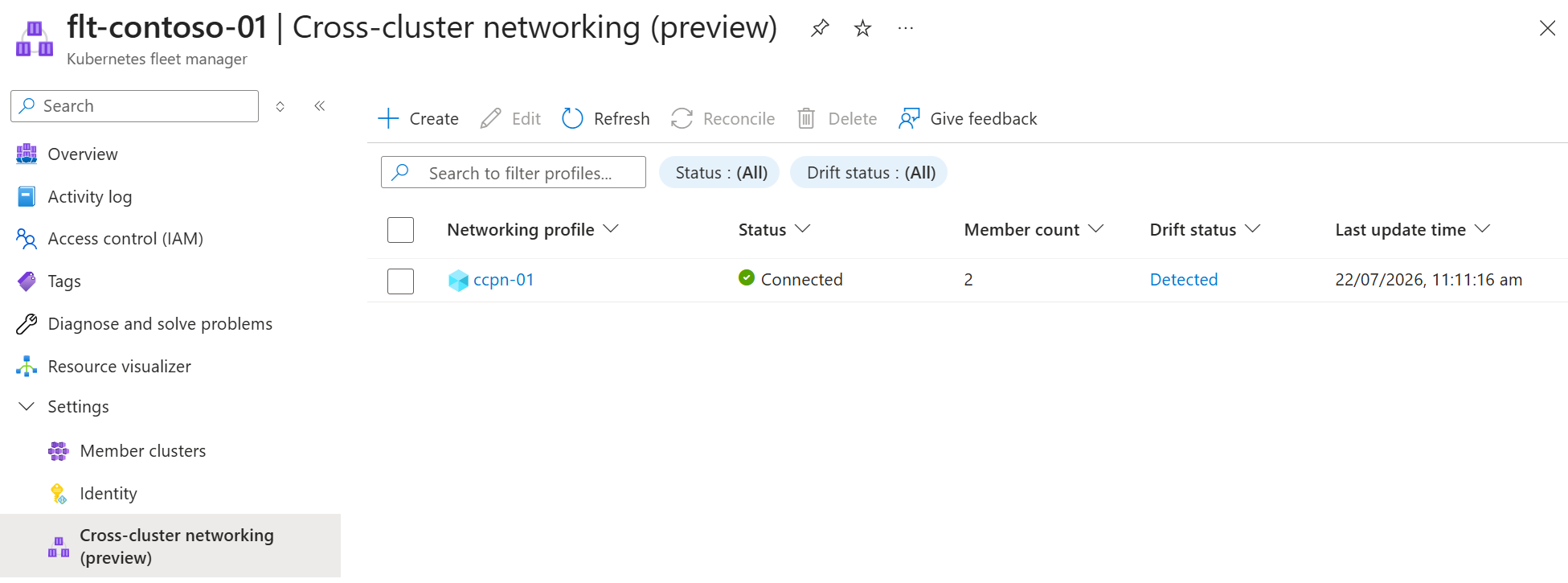
选择会打开
Detected对话框的 偏差状态。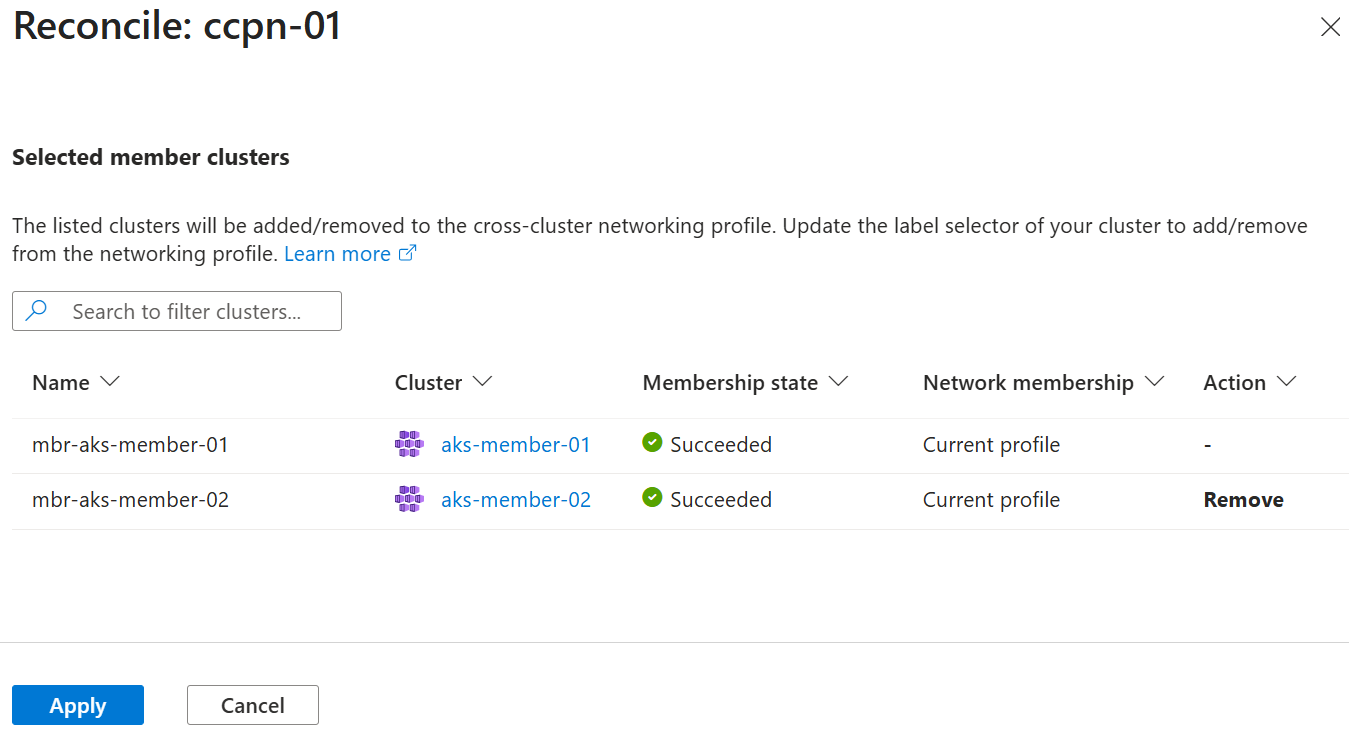
查看建议的更改,选择 “应用” 继续操作。
删除跨群集网络
若要删除跨群集网络,请先通过删除跨群集网络配置文件中使用的标签,从跨群集网络中删除成员。
Important
为了防止意外中断,当它仍包含成员群集时,无法删除跨群集网络。 此外,不能从机群管理器中删除加入跨群集网络的成员群集。
将跨群集网络配置文件的成员选择器更改为没有成员群集的值,然后应用更改,以便所有成员都与跨群集网络断开连接。
az fleet clustermeshprofile create \
    --fleet-name ${FLEET} \
    --resource-group ${FLEET_RESOURCE_GROUP} \
    --name ${NETWORK_PROFILE_NAME} \
    --member-selector "network=none"

az fleet clustermeshprofile apply \
    --fleet-name ${FLEET} \
    --resource-group ${FLEET_RESOURCE_GROUP} \
    --name ${NETWORK_PROFILE_NAME}
继续之前,确认配置文件显示没有任何成员。
az fleet clustermeshprofile list-members \ --fleet-name ${FLEET} \ --resource-group ${FLEET_RESOURCE_GROUP} \ --name ${NETWORK_PROFILE_NAME}[]删除跨集群网络配置文件。
az fleet clustermeshprofile delete \
    --fleet-name ${FLEET} \
    --resource-group ${FLEET_RESOURCE_GROUP} \
    --name ${NETWORK_PROFILE_NAME} \
    --yes
从 Fleet 资源中删除成员群集(或使用
az fleet delete完全删除 Fleet 资源),并在不再需要时删除 AKS 群集和资源组。
在Azure门户中,转到 Azure Kubernetes Fleet Manager。
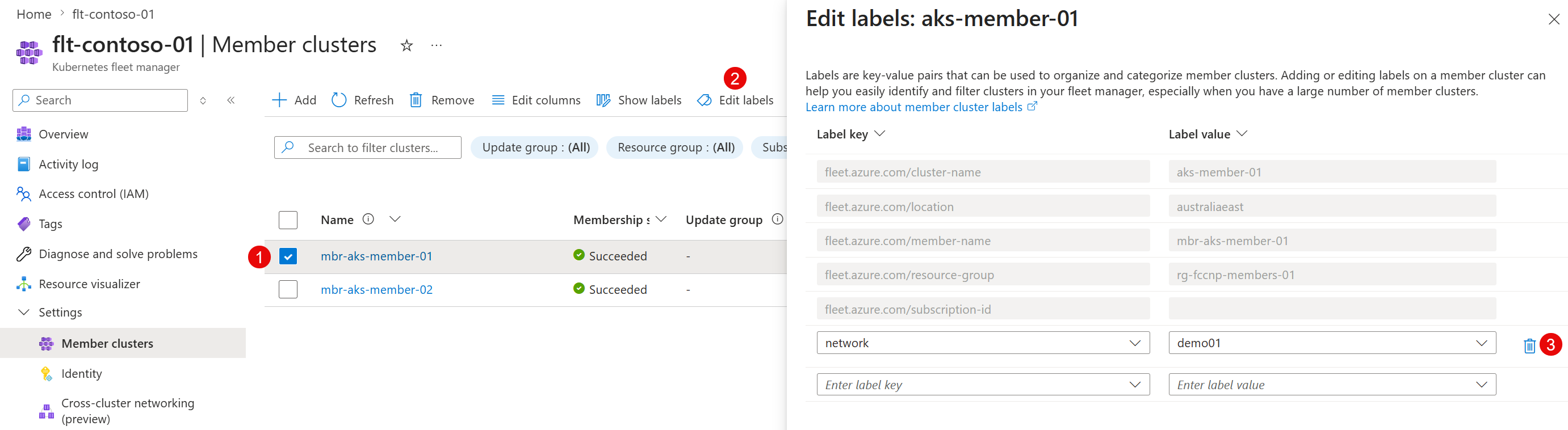
从服务菜单的“设置”下,选择“成员群集”。
在列表中选择所需的群集,然后选择 “编辑标签”。
在 “编辑标签 ”对话框中,删除用于跨群集网络的标签,然后选择 “应用”。 对每个群集重复此操作。
在服务菜单中的 “设置”下,选择 “跨群集网络”。
在列表中选择所需的跨群集网络配置文件,然后选择“ 协调”。
在 “协调 ”对话框中,查看成员群集列表,并检查所有群集是否都将其 删除 为操作。 选择应用。
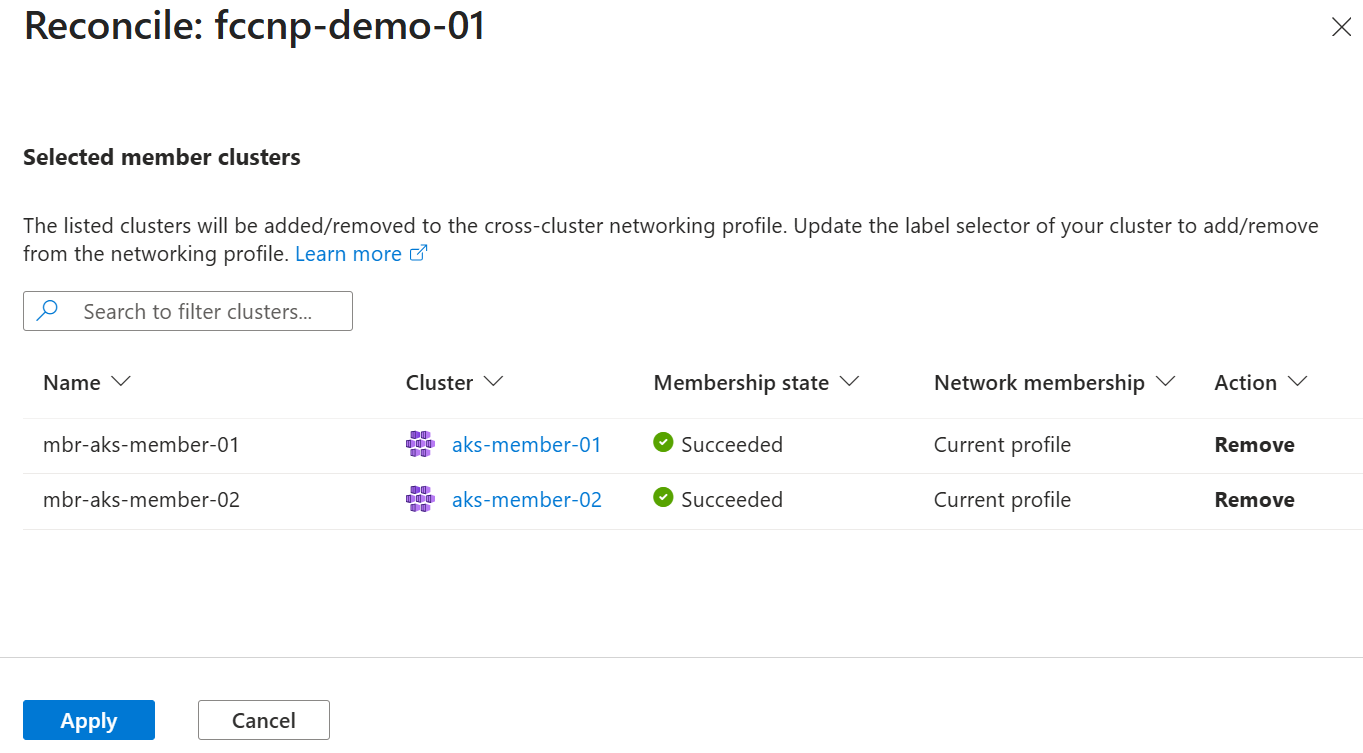
跨群集网络配置文件状态更改为 “应用”。 对帐完成后,网络会显示“ 未连接”状态。
选择网络配置文件,然后选择“ 删除”。
在 “删除跨群集网络配置文件 ”对话框中,验证配置文件是否正确,然后选择“ 删除”。
Troubleshooting
当成员无法连接时, clustermesh-apiserver 群集上的 LoadBalancer 服务没有外部 IP。
检查每个受影响成员集群上的 clustermesh-apiserver 服务:
kubectl --context=cluster1 -n kube-system get svc clustermesh-apiserver
如果 EXTERNAL-IP 显示为 <pending>,则该服务未分配内部负载均衡器 IP。
NAME                    TYPE           CLUSTER-IP     EXTERNAL-IP   PORT(S)          AGE
clustermesh-apiserver   LoadBalancer   10.0.221.162   <pending>     2379:31640/TCP   31s
检查服务事件以确定根本原因:
kubectl --context=cluster1 -n kube-system describe svc clustermesh-apiserver
常见原因是 AuthorizationFailed (HTTP 403)错误,指示 AKS 群集标识无权管理群集连接到的子网。
Events:
  Type     Reason                  Age   From                Message
  ----     ------                  ----  ----                -------
  Normal   EnsuringLoadBalancer    6s    service-controller  Ensuring load balancer
  Warning  SyncLoadBalancerFailed  6s    service-controller  Error syncing load balancer: failed to ensure load balancer: ...
                                                             RESPONSE 403: 403 Forbidden
                                                             ERROR CODE: AuthorizationFailed
                                                             {
                                                               "error": {
                                                                 "code": "AuthorizationFailed",
                                                                 "message": "The client '...' with object id '...' does not have authorization to perform action 'Microsoft.Network/virtualNetworks/subnets/read' over scope '/subscriptions/.../virtualNetworks/<vnet>/subnets/<subnet>' or the scope is invalid..."
                                                               }
                                                             }
如果没有此权限,AKS 负载均衡器控制器无法向 clustermesh-apiserver 服务分配内部 IP,并且跨群集网络无法完成连接。
创建群集时,AKS 群集标识通常会在虚拟网络或子网上接收 网络参与者 角色分配,但在某些配置中,不会创建此分配。 为每个受影响的成员群集手动授予 AKS 群集标识虚拟网络上的 网络参与者 角色,然后使用命令强制对群集 az aks update 进行协调,使新角色生效。
AKS_IDENTITY=$(az aks show --resource-group ${CLUSTER_RESOURCE_GROUP} --name ${MEMBER_CLUSTER_1} --query "identity.principalId" -o tsv)
VNET_ID=$(az network vnet show --resource-group ${CLUSTER_RESOURCE_GROUP} --name ${NETWORK_NAME} --query id -o tsv)

az role assignment create \
    --assignee-object-id ${AKS_IDENTITY} \
    --assignee-principal-type ServicePrincipal \
    --role "Network Contributor" \
    --scope ${VNET_ID}

az aks update --resource-group ${CLUSTER_RESOURCE_GROUP} --name ${MEMBER_CLUSTER_1}
使用角色分配更新群集后,请再次运行 az fleet clustermeshprofile apply 。
注释
在预览版中,即使成员集群显示为 Failed,跨集群网络配置文件的状态也可能继续显示为 Connected。